i5 processor

Gbsnplr

New member
Member
Local time
8:59 PM
Messages
71
Can someone tell me what a i5 processor should run temp wise? I just built a stock system with the stock cooling fan. The temp seems to be in the 58 - 60c range at idle.
 

My Computer

OS
Windows 7 x64
CPU
i7 950
Motherboard
Gigabyte X58A-UD3R
Memory
6 gig
Graphics Card(s)
ATI 6870
Sound Card
On Board
Monitor(s) Displays
Gateway 24"
Screen Resolution
1920x1200
Yeah, that's too high. Not dangerous, but high.

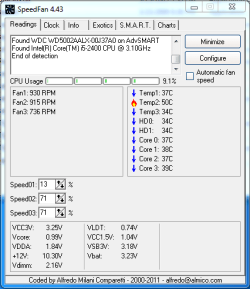
I run at around 40 in a warm room at idle. A typical temp is more like mid 30s in a low to mid 70s Fahrenheit room.

Check what is going on with your fans and heatsink.
 

My Computer

Computer type
PC/Desktop
Computer Manufacturer/Model Number
Ignatz Special; 4 speed manual gearbox; factory air conditioning; one of one
OS
Windows 7 Home Premium SP1, 64-bit
CPU
Intel Skylake i5-6600K, not overclocked
Motherboard
AsRock Z170M Extreme 4, micro ATX
Memory
8 GB HyperX DDR4-2666 (2 x 4 GB)
Graphics Card(s)
none; graphics are integrated on CPU
Sound Card
onboard: Realtek ALC1150; external: USB Behringer UF0-202
Monitor(s) Displays
Dell S2340M 23 inch IPS
Screen Resolution
1600 x 900
Hard Drives
System: Crucial MX100 series SSD, 128 GB;
Data: Samsung Spinpoint 103SJ, 1 TB;
Backup: WD Caviar Green WD30EZRX-00D8PB0, 3 TB
PSU
Rosewill SilentNight 500 watt fanless, semi-modular
Case
Antec Solo II
Cooling
Noctua NH-U12S; Noctua F12 intake, Noctua S12A exhaust
Keyboard
Microsoft 200 6JH-00001 USB
Mouse
Dell or Microsoft optical wired; USB
Antivirus
Microsoft Security Essentials and Malwarebytes Premium
Browser
Pale Moon
Other Info
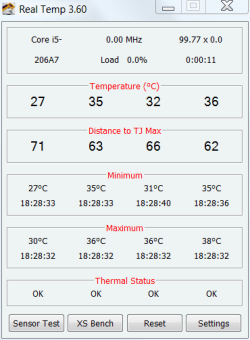
All fans PWM; speeds at idle: CPU circa 500 rpm; intake circa 600 rpm; exhaust circa 600 rpm; CPU temps 27 idle and 47 C load in a warm room (27 C/81 F) when running Intel Extreme Tuning Utility stress test.
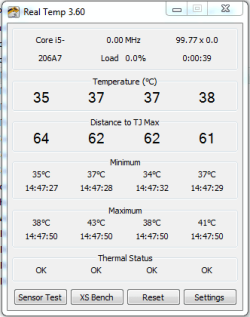
The room where my computer sits is currently at 84 degrees Fahrenheit / 29 degrees celsius with 46% humidity. Here are the temps for my i5-2400 CPU. As you can see, even in a relatively warm room my temps are at acceptable levels.

Capture.PNG Capture2.PNG

I'm using a Zalman CNPS9900 at a low RPM.
The Intel stock coolers will normally run at higher temps than the aftermarket coolers.
 
Last edited:

My Computer

Computer type
PC/Desktop
Computer Manufacturer/Model Number
Custom Build
OS
Windows 7 Home Premium 64 bit
CPU
Intel Core i7-4790
Motherboard
GA-Z87X-D3H
Memory
G.SKILL 8GB (2 x 4GB) DDR3 F3-10666CL9D-8GBNT
Graphics Card(s)
AMD Radeon R7 250
Sound Card
Realtek ALC892
Monitor(s) Displays
Samsung UN32EH5000, Dell 1703FPT
Screen Resolution
1920 x 1080, 1280 x 1024
Hard Drives
WD5003AZEX
WD10EZEX
Samsung HD103SJ
Samsung 128 GB 840 PRO
PSU
SeaSonic M12II SS-500GM
Case
Fractal Design Define R4
Cooling
Zalman CNPS9900ALED
Keyboard
Logitech K800
Mouse
Logitech M705
Internet Speed
16 Mbps
Antivirus
Avast
Browser
Firefox
Other Info
Bose Companion 2 Multimedia Speakers
Mine is in a rather warm room and runs about 36°C at idle. I'm using a Corsair H50.

temp.PNG
 

My Computers

System One System Two

  • Computer type
    PC/Desktop
    Computer Manufacturer/Model Number
    ALWAYS UNDER CONSTRUCTION
    OS
    Windows 11 Pro
    CPU
    Ryzen 9 5900X
    Motherboard
    Asus X570 Crosshair Viii Hero
    Memory
    32GB G Skill DDR4-3600
    Graphics Card(s)
    EVGA RTX 3080 FTW 3 Ultra
    Sound Card
    On Board/Sennheiser PC37X Headset
    Monitor(s) Displays
    3 X Asus 27"
    Screen Resolution
    2560x1440
    Hard Drives
    2 X 1 TB NVME drives
    PSU
    EVGA 850
    Case
    Phanteks Eclipse P400A
    Cooling
    EVGA 280 AIO
    Keyboard
    Logitech G510s/ Logitech G13
    Mouse
    Logitech G502
    Internet Speed
    24/1
    Antivirus
    ESET/MBAM Pro/SAS Pro
    Browser
    Chrome/ Firefox/ Edge
  • Computer type
    Laptop
    System Manufacturer/Model Number
    Dell 16 Plus
    OS
    Windows 11 Pro
    CPU
    Intel Ultra 9 288V
    Memory
    32 GB LPDDR5X 8533
    Monitor(s) Displays
    16" Mini-LED HDR600 Touch 90 Hz
    Screen Resolution
    2560X1600
    Hard Drives
    1 TB NVME
Can someone tell me what a i5 processor should run temp wise? I just built a stock system with the stock cooling fan. The temp seems to be in the 58 - 60c range at idle.

Sandybridge i5 or previous generation?

For previous, Tcase is 72c, so it is not dangerously high, but if it is that high at idle, it will probably approach that under load. A good idle should be around 40c or less.

The Sandybridge should run cooler.
 

My Computer

Computer type
PC/Desktop
Computer Manufacturer/Model Number
Home built (GeneO industries)/Model 4
OS
Windows 10 Pro. EFI boot partition, full EFI boot
CPU
i7 4770k 4.4GHz (44-44-43-43 turbo) @ 1.248V
Motherboard
ASUS Maximus VI Hero
Memory
16GB (8GBx2) @2200 MHz G.skill Sniper 10-11-10-30-1, 1.6V
Graphics Card(s)
MSI GTX 970 Gaming 4G
Sound Card
Onboard SupremeFX Audio
Monitor(s) Displays
NEC Spectraview 2490WUXi-SV
Screen Resolution
1920 x 1200
Hard Drives
Samsung 850 Pro 256GB (OS), Samsung 2x 128GB 840 Pro SSD in RAID0, 3x WD Blue 6Gb/s 1TB RAID0, WD 2TB Black external USB 3.0, 2TB WD20EARS Green external USB 3.0, 2x 500GB Seagate and 1 750 GB external USB, 1x 350GB external USB3
PSU
Seasonic X-850 (2012 KM3 model)
Case
Fractal Design Define R4
Cooling
NH-D14, NF-F12, NF-A15; NF-P14, NF-P12,NF-A14, S12A PWM
Keyboard
Cooler Master Storm Quickfire Rapid - Brown
Mouse
Logitech G602
Internet Speed
126.4 Mb/s down, 24.3 Mb/s up
Other Info
USB 3.0 x8 , SATA III x8, eSATA, USB 2.0 x6. Samsung DVD R/W drive.

WEI: CPU 7.8, Memory 7.9, Graphics 7.9, Disk 7.9
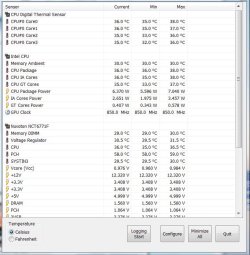
Here's an i7-2600 at basically idle. Just a few IE tabs open and the radio going (WMC). This is with the stock cooler.
 

Attachments

  • Sensors.JPG
    Sensors.JPG
    82.4 KB · Views: 38

My Computer

Computer type
PC/Desktop
Computer Manufacturer/Model Number
Built 2/11/2011
OS
Windows 7 Pro-x64
CPU
i7-2600 3.4GHz - 3.8GHz Turbo
Motherboard
Intel DH67BL-B3
Memory
8Gb - 2x4GB, Muskin 991770 PC3-1333
Graphics Card(s)
Integrated Intel HD 2000
Sound Card
Integrated Intel 10.1 HD, RealTek ALC892
Monitor(s) Displays
Asus LCD VH222H, Haier HL24XSL2a
Screen Resolution
1920x1080, 1920x1080
Hard Drives
Crucial SSD C300-128Gb,
Western Digital WD5002AALX - 500Gb,
Western Digital WD7501AALS - 750Gb
PSU
Seasonic 650W 80+ Gold Modular
Case
Rosewill Defender
Cooling
Stock CPU, Four 120mm case fans, PCH fan added
Keyboard
Logitech EX100 Y-RBH94 Wireless
Mouse
Logitech EX100 M-RCE95 Wireless
Internet Speed
3.0/1.5 Mbs
Antivirus
Microsoft Security Essentials
Browser
Microsoft Internet Explorer 11
Other Info
Antec Veris Premier-Multimedia IR Station,
Cyber Accoustics-3602 Speakers,
AFT XM-5U Card Reader,
Hauppauge TV-HVR-2250,
Sony LX300 USB Turntable
For previous, Tcase is 72c, so it is not dangerously high, but if it is that high at idle, it will probably approach that under load. A good idle should be around 40c or less.
GeneO, you do realize that Tcase temp and core temps are 2 different measurements, right? Us mere mortals don't have the tools, sensors and software to actually measure the Tcase temps. Tcase is measured at the geometric center on the topside of the processor integrated heat spreader. Therefore, you can run core temps well in excess of 72c and stll have Tcase temps within a safe range. Unfortunately, there isn't a direct correlation to core temps and Tcase temps to just translate what your numbers would be. But I've got one of these 72c Tcase Intel chips and you can run the cores upwards of 85-90C and still won't shut themselves down from overheating. For a rough ballpark, your core temp can usually run 15-20C higher than Tcase max.
 

My Computer

Computer Manufacturer/Model Number
Self-Built in July 2009
OS
Windows 7 Ultimate x64
CPU
Intel Q9550 2.83Ghz OC'd to 3.40Ghz
Motherboard
Gigabyte GA-EP45-UD3R rev. 1.1, F12 BIOS
Memory
8GB G.Skill PI DDR2-800, 4-4-4-12 timings
Graphics Card(s)
EVGA 1280MB Nvidia GeForce GTX570
Sound Card
Realtek ALC899A 8 channel onboard audio
Monitor(s) Displays
23" Acer x233H
Screen Resolution
1920x1080
Hard Drives
Intel X25-M 80GB Gen 2 SSD
Western Digital 1TB Caviar Black, 32MB cache. WD1001FALS
PSU
Corsair 620HX modular
Case
Antec P182
Cooling
stock
Keyboard
ABS M1 Mechanical
Mouse
Logitech G9 Laser Mouse
Internet Speed
15/2 cable modem
Other Info
Windows and Linux enthusiast. Logitech G35 Headset.
For previous, Tcase is 72c, so it is not dangerously high, but if it is that high at idle, it will probably approach that under load. A good idle should be around 40c or less.
GeneO, you do realize that Tcase temp and core temps are 2 different measurements, right? Us mere mortals don't have the tools, sensors and software to actually measure the Tcase temps. Tcase is measured at the geometric center on the topside of the processor integrated heat spreader. Therefore, you can run core temps well in excess of 72c and stll have Tcase temps within a safe range. Unfortunately, there isn't a direct correlation to core temps and Tcase temps to just translate what your numbers would be. But I've got one of these 72c Tcase Intel chips and you can run the cores upwards of 85-90C and still won't shut themselves down from overheating. For a rough ballpark, your core temp can usually run 15-20C higher than Tcase max.

Yes, I realize that. The core temp can be higher but Tcase is a good target to shoot for keeping the load temp under for 24x7 IMO.

You may be able to run them that high without shutting down, but you will reduce the lifetime of the processor due to electromigration, which has an exponential dependence on the temperature.
 

My Computer

Computer type
PC/Desktop
Computer Manufacturer/Model Number
Home built (GeneO industries)/Model 4
OS
Windows 10 Pro. EFI boot partition, full EFI boot
CPU
i7 4770k 4.4GHz (44-44-43-43 turbo) @ 1.248V
Motherboard
ASUS Maximus VI Hero
Memory
16GB (8GBx2) @2200 MHz G.skill Sniper 10-11-10-30-1, 1.6V
Graphics Card(s)
MSI GTX 970 Gaming 4G
Sound Card
Onboard SupremeFX Audio
Monitor(s) Displays
NEC Spectraview 2490WUXi-SV
Screen Resolution
1920 x 1200
Hard Drives
Samsung 850 Pro 256GB (OS), Samsung 2x 128GB 840 Pro SSD in RAID0, 3x WD Blue 6Gb/s 1TB RAID0, WD 2TB Black external USB 3.0, 2TB WD20EARS Green external USB 3.0, 2x 500GB Seagate and 1 750 GB external USB, 1x 350GB external USB3
PSU
Seasonic X-850 (2012 KM3 model)
Case
Fractal Design Define R4
Cooling
NH-D14, NF-F12, NF-A15; NF-P14, NF-P12,NF-A14, S12A PWM
Keyboard
Cooler Master Storm Quickfire Rapid - Brown
Mouse
Logitech G602
Internet Speed
126.4 Mb/s down, 24.3 Mb/s up
Other Info
USB 3.0 x8 , SATA III x8, eSATA, USB 2.0 x6. Samsung DVD R/W drive.

WEI: CPU 7.8, Memory 7.9, Graphics 7.9, Disk 7.9
Yes, I realize that. The core temp can be higher but Tcase is a good target to shoot for keeping the load temp under for 24x7 IMO.
I agree, if you can stay under the tCase you are better off. But it's always good for people to realize that you can near the tcase temps on a full load box without being in the danger zone.

You may be able to run them that high without shutting down, but you will reduce the lifetime of the processor due to electromigration, which has an exponential dependence on the temperature.
I often wonder what the real world time difference is. For example, would it take a processor that might last 8 years and shorten it to 3 years...or would it be more like a CPU that would have lasted 72 months only makes it 71 months?

I personally believe that enthusiasts obsess way too much over temperatures. A small few might have a true heat problem, but the vast majority are probably perfectly safe for the entire useful life of their rig without a dozen case fans, the perfect thermal paste and the most sophisticated CPU cooler which can be purchased.

 

My Computer

Computer Manufacturer/Model Number
Self-Built in July 2009
OS
Windows 7 Ultimate x64
CPU
Intel Q9550 2.83Ghz OC'd to 3.40Ghz
Motherboard
Gigabyte GA-EP45-UD3R rev. 1.1, F12 BIOS
Memory
8GB G.Skill PI DDR2-800, 4-4-4-12 timings
Graphics Card(s)
EVGA 1280MB Nvidia GeForce GTX570
Sound Card
Realtek ALC899A 8 channel onboard audio
Monitor(s) Displays
23" Acer x233H
Screen Resolution
1920x1080
Hard Drives
Intel X25-M 80GB Gen 2 SSD
Western Digital 1TB Caviar Black, 32MB cache. WD1001FALS
PSU
Corsair 620HX modular
Case
Antec P182
Cooling
stock
Keyboard
ABS M1 Mechanical
Mouse
Logitech G9 Laser Mouse
Internet Speed
15/2 cable modem
Other Info
Windows and Linux enthusiast. Logitech G35 Headset.
Yes, I realize that. The core temp can be higher but Tcase is a good target to shoot for keeping the load temp under for 24x7 IMO.
I agree, if you can stay under the tCase you are better off. But it's always good for people to realize that you can near the tcase temps on a full load box without being in the danger zone.

You may be able to run them that high without shutting down, but you will reduce the lifetime of the processor due to electromigration, which has an exponential dependence on the temperature.
I often wonder what the real world time difference is. For example, would it take a processor that might last 8 years and shorten it to 3 years...or would it be more like a CPU that would have lasted 72 months only makes it 71 months?

I personally believe that enthusiasts obsess way too much over temperatures. A small few might have a true heat problem, but the vast majority are probably perfectly safe for the entire useful life of their rig without a dozen case fans, the perfect thermal paste and the most sophisticated CPU cooler which can be purchased.

Well like I said it depends on the temperature exponentially, so it can destroy the traces on your chip if you run it too high too long. How long I don't know, but that is why processor manufacturers have temperature and voltage limits. It doesn't take much effort or money to keep your processor core voltages under Tcase if you are not extremely overclocking.

For enthusiasts who turn over their systems every year or couple of years, I guess there is probably not much concern.

Intel's recall of the Sandybridge chipset was due to electromigration of the SATA components. True, design issue, but nonetheless, as components shrink, electormigration concerns grow.
 

My Computer

Computer type
PC/Desktop
Computer Manufacturer/Model Number
Home built (GeneO industries)/Model 4
OS
Windows 10 Pro. EFI boot partition, full EFI boot
CPU
i7 4770k 4.4GHz (44-44-43-43 turbo) @ 1.248V
Motherboard
ASUS Maximus VI Hero
Memory
16GB (8GBx2) @2200 MHz G.skill Sniper 10-11-10-30-1, 1.6V
Graphics Card(s)
MSI GTX 970 Gaming 4G
Sound Card
Onboard SupremeFX Audio
Monitor(s) Displays
NEC Spectraview 2490WUXi-SV
Screen Resolution
1920 x 1200
Hard Drives
Samsung 850 Pro 256GB (OS), Samsung 2x 128GB 840 Pro SSD in RAID0, 3x WD Blue 6Gb/s 1TB RAID0, WD 2TB Black external USB 3.0, 2TB WD20EARS Green external USB 3.0, 2x 500GB Seagate and 1 750 GB external USB, 1x 350GB external USB3
PSU
Seasonic X-850 (2012 KM3 model)
Case
Fractal Design Define R4
Cooling
NH-D14, NF-F12, NF-A15; NF-P14, NF-P12,NF-A14, S12A PWM
Keyboard
Cooler Master Storm Quickfire Rapid - Brown
Mouse
Logitech G602
Internet Speed
126.4 Mb/s down, 24.3 Mb/s up
Other Info
USB 3.0 x8 , SATA III x8, eSATA, USB 2.0 x6. Samsung DVD R/W drive.

WEI: CPU 7.8, Memory 7.9, Graphics 7.9, Disk 7.9
Back
Top