i7-3770 with 8GB of RAM is lagging

vic3685

New member
Local time
12:58 AM
Messages
3
This computer is about 1 year old, and I thought it should be pretty potent, but lately it's lagging.

It's an i7, I have 8GB of RAM, a WD blue caviar 1TB hard drive and an AMD Radeon 7800 series graphic card.

I'm attaching the diagnostics from the SF Diagnostics tool.

A few things I've noticed:
- Memory is always at 60%-80%. Chrome being the main consumer.
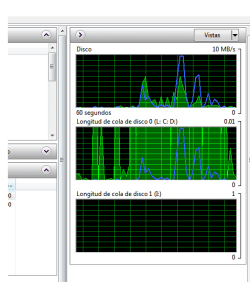
- The hard drive has weird spikes in the Resource Monitor. In the following example, it was all nice and low until I decided to close a Notepad file (5 lines, didn't even save!). The numbers in the hard drive graphs bother me a little... is it normal to have a max number of 0.01 in the queue graph, and of 10MB in the disk graph? (graphs attached)

Could you help me out? Is it just a RAM problem? If I can, I'd like to avoid buying another 8GB, unless it's the absolute certain cause of the issue.

(As a sidenote: I am a web developer. I normally have Sublime Text, Prepros, Sourcetree and one Adobe program open, apart from Chrome, to test everything out and look for language documentation. It did not use to be a problem)
 

Attachments
My Computer My Computer

At a glance

Windows 7 Ultimate x64i7 3770 @3.40Ghz8GBAMD Radeon 7800 series
Computer type
PC/Desktop
Computer Manufacturer/Model Number
custom build
OS
Windows 7 Ultimate x64
CPU
i7 3770 @3.40Ghz
Motherboard
ASUS P8 B75-M LX
Memory
8GB
Graphics Card(s)
AMD Radeon 7800 series
Monitor(s) Displays
Samsung SyncMaster 932NW
Screen Resolution
1440x900
Hard Drives
WDC WD10EZEX-07ZF5A0 ATA Device - 1TB (for OS)
WD My Passport 1TB (for data)
PSU
600W
Case
OVERCASE AX-513
Antivirus
Avast
Browser
Chrome mostly
We surly will try to help.

Need your system specs filled in completely.
Motherboard and power supply for starters.

A picture like these would be helpful.

Resource Monitor.PNGs

Resource Monitor Ram.PNG
 

My Computer My Computer

At a glance

Windows 10 Pro. 64/ version 1709 Windows 7 Pr...Intel i7-6800K @ 4.3Corsair Platinum 16 gig @2400EVGA GTX 1070 OC
Computer type
PC/Desktop
Computer Manufacturer/Model Number
Home made Desktop
OS
Windows 10 Pro. 64/ version 1709 Windows 7 Pro/64
CPU
Intel i7-6800K @ 4.3
Motherboard
ASUS X-99 Deluxe II
Memory
Corsair Platinum 16 gig @2400
Graphics Card(s)
EVGA GTX 1070 OC
Monitor(s) Displays
Asus 27" LED LCD/VE278Q
Screen Resolution
1920-1080 or 1280-720 HDMI
Hard Drives
INTEL SSD 730-240 Gb Sata 3.0/
PSU
EVGA Platium 1200W
Case
Phanteks Luxe Tempered Glass 8 fans/ one radiator
Cooling
XSPC/ Water Cooled CPU
Keyboard
Das 4 Professional
Mouse
Logitech M705/MX Anywhere 2-S
Internet Speed
100 mbits
Antivirus
Microsoft Security Essentials/ Malwarebytes Premium 3.0/ SAS
Browser
I.E. 11 default/Firefox/ ISP Time Warner Cable/Spectrum
Other Info
LG BluRay Burner/
Sound system-KLipsch-THX/
Icy Dock ssd Hot Swap bays.
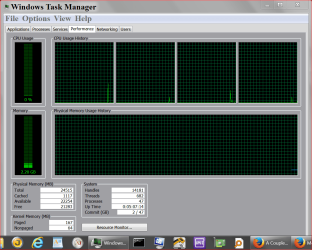
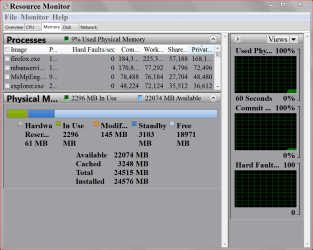
I added some of the specs, and I'm adding the resource and memory screenshots. Right now the computer is working without any lags, but hopefully it gives some insight anyway.
ResMon-RAM.PNG

TaskMgr-Performance.PNG
 

My Computer My Computer

At a glance

Windows 7 Ultimate x64i7 3770 @3.40Ghz8GBAMD Radeon 7800 series
Computer type
PC/Desktop
Computer Manufacturer/Model Number
custom build
OS
Windows 7 Ultimate x64
CPU
i7 3770 @3.40Ghz
Motherboard
ASUS P8 B75-M LX
Memory
8GB
Graphics Card(s)
AMD Radeon 7800 series
Monitor(s) Displays
Samsung SyncMaster 932NW
Screen Resolution
1440x900
Hard Drives
WDC WD10EZEX-07ZF5A0 ATA Device - 1TB (for OS)
WD My Passport 1TB (for data)
PSU
600W
Case
OVERCASE AX-513
Antivirus
Avast
Browser
Chrome mostly
What do you have running that is using 4.74 gb of ram?

You have a whopping 118 processes running which is about twice as much as most.

More pictures please.

System Configure/Startup. Post the complete list.
 

My Computer My Computer

At a glance

Windows 10 Pro. 64/ version 1709 Windows 7 Pr...Intel i7-6800K @ 4.3Corsair Platinum 16 gig @2400EVGA GTX 1070 OC
Computer type
PC/Desktop
Computer Manufacturer/Model Number
Home made Desktop
OS
Windows 10 Pro. 64/ version 1709 Windows 7 Pro/64
CPU
Intel i7-6800K @ 4.3
Motherboard
ASUS X-99 Deluxe II
Memory
Corsair Platinum 16 gig @2400
Graphics Card(s)
EVGA GTX 1070 OC
Monitor(s) Displays
Asus 27" LED LCD/VE278Q
Screen Resolution
1920-1080 or 1280-720 HDMI
Hard Drives
INTEL SSD 730-240 Gb Sata 3.0/
PSU
EVGA Platium 1200W
Case
Phanteks Luxe Tempered Glass 8 fans/ one radiator
Cooling
XSPC/ Water Cooled CPU
Keyboard
Das 4 Professional
Mouse
Logitech M705/MX Anywhere 2-S
Internet Speed
100 mbits
Antivirus
Microsoft Security Essentials/ Malwarebytes Premium 3.0/ SAS
Browser
I.E. 11 default/Firefox/ ISP Time Warner Cable/Spectrum
Other Info
LG BluRay Burner/
Sound system-KLipsch-THX/
Icy Dock ssd Hot Swap bays.
Twice as many as most sounds bad :(

Here's the info you requested:
Running processes
processes1.PNG

processes2.PNG


Chrome, Explorer and Spotify are half of those processes.

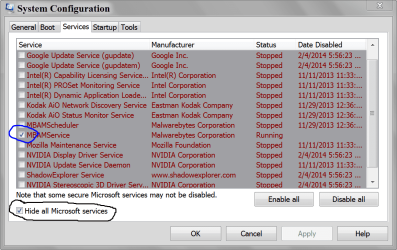
MSconfig startup:
startup1.PNG

startup2.PNG

startupDisabled.PNG


The disabled processes are newly disabled, I haven't actually restarted the computer yet.
 

My Computer My Computer

At a glance

Windows 7 Ultimate x64i7 3770 @3.40Ghz8GBAMD Radeon 7800 series
Computer type
PC/Desktop
Computer Manufacturer/Model Number
custom build
OS
Windows 7 Ultimate x64
CPU
i7 3770 @3.40Ghz
Motherboard
ASUS P8 B75-M LX
Memory
8GB
Graphics Card(s)
AMD Radeon 7800 series
Monitor(s) Displays
Samsung SyncMaster 932NW
Screen Resolution
1440x900
Hard Drives
WDC WD10EZEX-07ZF5A0 ATA Device - 1TB (for OS)
WD My Passport 1TB (for data)
PSU
600W
Case
OVERCASE AX-513
Antivirus
Avast
Browser
Chrome mostly
This is what I'm looking for. I need to see the complete displays like below.
Because I don't read your language it would help me understand.

MSCONFIG STARTUP.PNG

MSCONFIG SERVICES.PNG

You have a ton of things running.
You have a mass amount of Google Chrome and a uTorrant running.

I suggest you read this tutorial by Brink and play close attentions to #8 & 9.

http://www.sevenforums.com/tutorials/11728-optimize-windows-7-a.html
 

My Computer My Computer

At a glance

Windows 10 Pro. 64/ version 1709 Windows 7 Pr...Intel i7-6800K @ 4.3Corsair Platinum 16 gig @2400EVGA GTX 1070 OC
Computer type
PC/Desktop
Computer Manufacturer/Model Number
Home made Desktop
OS
Windows 10 Pro. 64/ version 1709 Windows 7 Pro/64
CPU
Intel i7-6800K @ 4.3
Motherboard
ASUS X-99 Deluxe II
Memory
Corsair Platinum 16 gig @2400
Graphics Card(s)
EVGA GTX 1070 OC
Monitor(s) Displays
Asus 27" LED LCD/VE278Q
Screen Resolution
1920-1080 or 1280-720 HDMI
Hard Drives
INTEL SSD 730-240 Gb Sata 3.0/
PSU
EVGA Platium 1200W
Case
Phanteks Luxe Tempered Glass 8 fans/ one radiator
Cooling
XSPC/ Water Cooled CPU
Keyboard
Das 4 Professional
Mouse
Logitech M705/MX Anywhere 2-S
Internet Speed
100 mbits
Antivirus
Microsoft Security Essentials/ Malwarebytes Premium 3.0/ SAS
Browser
I.E. 11 default/Firefox/ ISP Time Warner Cable/Spectrum
Other Info
LG BluRay Burner/
Sound system-KLipsch-THX/
Icy Dock ssd Hot Swap bays.
Back
Top