I7 overclock help

Alle22

New member
Local time
5:51 PM
Messages
2
hi i have just overclocked to 4GHz with 1.35625 volts question is whether it is too large for a D0 or is it normal? i have even tried 1.3875 and without bsod.Qpi: one is now at 2.8 ghz you should increase or decrease the QPI: one for better stability? Have max temp 75 degrees sounds like a lot? I tried over 4GHZ but then it comes bsod. Thanking for the reply:)

img0001dn.jpg

img0002or.jpg

img0003ps.jpg

img0004gw.jpg
 
Last edited by a moderator:

My Computer

OS
Windows 7 Ultimate x64
CPU
i7 920 D0
Motherboard
Gigabyte GA-X58-UD3R REV: 1,6
Memory
Corsair XMS3 DDR3 1333MHz 6GB CL9
Graphics Card(s)
Asus 480
Monitor(s) Displays
Dell dell 2209WA
Hard Drives
SSD Corsair Force 60GB + 1tb Seagate + 400gb samsung
PSU
Corsair 620hx
Case
Raven rv02
Cooling
Corsair H50
hi i have just overclocked to 4GHz with 1.35625 volts question is whether it is too large for a D0 or is it normal?

It depends on the individual chip. Some only need vcore in the 1.1-1.2v range to hit 4.0ghz. Others, like yours (and mine BTW) need a higher voltage to hit the same clocks.

So no, it's not too large for a D0 and yes it's pretty normal.


should increase or decrease the QPI: one for better stability?

Increase.

Blue screens when overclocking are often the result of incorrect RAM settings as much as they are voltage related.


Have max temp 75 degrees sounds like a lot?


Not when stress testing.
 

My Computer

Computer type
PC/Desktop
Computer Manufacturer/Model Number
Systems by SmartEyeball
OS
8 Pro x64
CPU
i7 3770K 4.6GHz
Motherboard
ASUS P8Z77 WS
Memory
16GB G.Skill Trident X 2666mhz
Graphics Card(s)
x2 EVGA 780 Ti Superclocked SLI
Sound Card
SB X-FI Surround 5.1 PRO USB / ATH-AD900 Headphones
Monitor(s) Displays
x3 Dell U2410 / 58" Samsung
Screen Resolution
5760*1200/ 1920*1200
Hard Drives
2x Intel 520 240GB (RAID 0) * 2x WD Caviar Blacks 2TB (RAID 0) * 2TB WD Caviar Black * Sony Optirac DVD
PSU
Silverstone Strider Evolution 1200W
Case
Thermaltake Level 10 GT Snow Edition
Cooling
Noctua NH-D14
Keyboard
Topre Realforce // Ducky Shine MX Black // Filco Ninja TKL
Mouse
Thermaltake Theron (Highly Recommended) + Razer Imperator
Antivirus
MSE
Browser
IE, FF, WaterFox
Other Info
GT Extreme V2 Sim Racing Cockpit + 40" LCD and K/B Mouse stand ▼
Fanatec CSR Elite Wheel + Clubsport V1 Pedals + CSR shifter/7G-H ▼Saitek X52 Pro ▼ TrackIR 5 Pro
Buttkicker v2 Seat Rumbler with Dedicated 5.1 and Sub Woofer attached to frame ▼
=
Bloody Big Grin
First off if you're going to try to overclock to 4gig you need to get off the "Auto" everything and start "manually" setting voltage values. That's what "true" overclocking is. Since you're going for 4gig you are "truely" overclocking the processor!!! Here's a few tips.....

- DRAM voltage should not be set to "Auto" it should be manually set to 1.640.
- 1.3875 is too high a voltage for the chip
- QPI/Vtt needs to be manually set to at least 1.2500, most will say 1.315

There are other things you can do as well but those are starting points. Also do you know what BIOS you have? The screens you show look a little dated. If you look at my system specs you'd see I have a Gigabyte board as well, though different model.

I get the feeling you don't have a full grasp of overclocking - I say that due to the fact that you have a few voltage setting that should be manually set as opposed to being left on Auto.

With that may I suggest a some reading..... 3 Step Guide To Overclock Your Core i3, i5, or i7 – Updated! | Overclockers

I would also suggest you visit TweakTown's GIGABYTE forum - They have excellent advice on overclocking with "Gigabyte" boards ;)

Good luck
 

My Computer

Computer type
PC/Desktop
Computer Manufacturer/Model Number
Custom built by me.
OS
Windows 10 Pro
CPU
Intel Core i7-4770K (3.5Ghz)
Motherboard
Gigabyte G1 Sniper 5 (F10 Bios)
Memory
32 gig Corsair Dominator Platinum (4x8Gig)
Graphics Card(s)
Sapphire Tri-X R9 Fury
Sound Card
Soundblaster ZXR
Monitor(s) Displays
NEC PA242W 24" LCD Monitor
Screen Resolution
1920 x 1200
Hard Drives
Primary - Samsung 850 Pro (512gig), Samsung 840 Pro (256gig), 2TB WD Caviar Black.
PSU
EVGA Supernova 1000 G2
Case
Cooler Master HAF X
Cooling
Corsair H100i with Corsair Air Series SP120 Quiet Fans
Keyboard
Logitech Wireless Wave
Mouse
Logitech Performance MX
Internet Speed
High Speed Cable
Antivirus
Norton Security
Browser
IE11
Other Info
Memory Timings - 1866MHz @ 9-9-9-27-1T @ 1.5 volts
If his memory is speced @ 1.5V at 1066 MHz then he should not set it to 1.640V - there is no reason to increase that. The screen indicates it is being set to a SPD profile, which is OK.

The QPI doesn't need to be as high as 1.25. It may be stable at less - that takes some experimentation, as does the CPU voltage.
 

My Computer

Computer type
PC/Desktop
Computer Manufacturer/Model Number
Home built (GeneO industries)/Model 4
OS
Windows 10 Pro. EFI boot partition, full EFI boot
CPU
i7 4770k 4.4GHz (44-44-43-43 turbo) @ 1.248V
Motherboard
ASUS Maximus VI Hero
Memory
16GB (8GBx2) @2200 MHz G.skill Sniper 10-11-10-30-1, 1.6V
Graphics Card(s)
MSI GTX 970 Gaming 4G
Sound Card
Onboard SupremeFX Audio
Monitor(s) Displays
NEC Spectraview 2490WUXi-SV
Screen Resolution
1920 x 1200
Hard Drives
Samsung 850 Pro 256GB (OS), Samsung 2x 128GB 840 Pro SSD in RAID0, 3x WD Blue 6Gb/s 1TB RAID0, WD 2TB Black external USB 3.0, 2TB WD20EARS Green external USB 3.0, 2x 500GB Seagate and 1 750 GB external USB, 1x 350GB external USB3
PSU
Seasonic X-850 (2012 KM3 model)
Case
Fractal Design Define R4
Cooling
NH-D14, NF-F12, NF-A15; NF-P14, NF-P12,NF-A14, S12A PWM
Keyboard
Cooler Master Storm Quickfire Rapid - Brown
Mouse
Logitech G602
Internet Speed
126.4 Mb/s down, 24.3 Mb/s up
Other Info
USB 3.0 x8 , SATA III x8, eSATA, USB 2.0 x6. Samsung DVD R/W drive.

WEI: CPU 7.8, Memory 7.9, Graphics 7.9, Disk 7.9
Since overclocking is NOT an exact science our opinions may vary, however I do provide valid evidence to what I suggest in the links I post, and personal experience with a Gigabyte motherboard having a 1366 chipset using a core i7-900 series Bloomfield processor (i7-950 in my case). The OP has a similiar system to mine. Also I note you have an i5 system so your requirements are different from ours.

BTW I'm only overclocked to 3.5gig and I have to run my QPI to 1.25 just to be prime95 satable. On and I think I said the QPI needs to be somewhere between 1.250 & 1.315 ;)

Anyway I say again.... If he's going to clock that high (4gig) those voltages need to be manually set and since he's pushing the limits of the processor those volatage need to be that high.

Yes there's always exceptions to the rule, and we should always try lower volts first for temps sake, but if you start getting BSOD blah blah blah 124 codes - your QPI is too low (reading and personal experience).

Also look at any overlocked i7-900 series chip pushing 4gig and you'll see QPI volts around 1.3.

As for his memory I'll conceed his memory Corsair XMS3 DDR3 1333MHz 6GB CL9 only recommends 1.5volts - XMS3 whereas my Corsair memory (TR3X3G1600C8D) - Dominator® recommends 1.65volts! So yeah, his isn't required to be run as high as mine.

However he still needs to get off the auto voltage everything if he's going near 4gig!!!

My two cents.
 

My Computer

Computer type
PC/Desktop
Computer Manufacturer/Model Number
Custom built by me.
OS
Windows 10 Pro
CPU
Intel Core i7-4770K (3.5Ghz)
Motherboard
Gigabyte G1 Sniper 5 (F10 Bios)
Memory
32 gig Corsair Dominator Platinum (4x8Gig)
Graphics Card(s)
Sapphire Tri-X R9 Fury
Sound Card
Soundblaster ZXR
Monitor(s) Displays
NEC PA242W 24" LCD Monitor
Screen Resolution
1920 x 1200
Hard Drives
Primary - Samsung 850 Pro (512gig), Samsung 840 Pro (256gig), 2TB WD Caviar Black.
PSU
EVGA Supernova 1000 G2
Case
Cooler Master HAF X
Cooling
Corsair H100i with Corsair Air Series SP120 Quiet Fans
Keyboard
Logitech Wireless Wave
Mouse
Logitech Performance MX
Internet Speed
High Speed Cable
Antivirus
Norton Security
Browser
IE11
Other Info
Memory Timings - 1866MHz @ 9-9-9-27-1T @ 1.5 volts
However he still needs to get off the auto voltage everything if he's going near 4gig!!!
This.
Hell, I had to pump 1.55 volts through my i5-2500k to hit 5Ghz, but took it back down to 4.5Ghz.
After some playing, I got the system stable at 4.5Ghz with 1.36volts whereas the auto voltage hat it up at 1.45V!

~Lordbob
 

My Computer

Computer Manufacturer/Model Number
Hera
OS
Windows 7 Ultimate x64, Mint 9
CPU
Intel i5-2500k
Motherboard
ASUS P8P67 Pro
Memory
2x 4Gb Corsair VENGEANCE DDR3-1600
Graphics Card(s)
NVidia GeForce N260GTX Twin Frozr
Sound Card
Realtek HD OnBoard Audio
Monitor(s) Displays
ASUS 24" Monitor
Screen Resolution
1920x1080
Hard Drives
G.SKILL Phoenix Series 60GB SATA II MLC Internal Solid State Drive (SSD)
SAMSUNG Spinpoint F3R 1TB 7200 RPM 32MB Cache SATA II
PSU
Cooler Master Real Power Pro 750W
Case
Cooler Master Haf 932
Cooling
Fans
Keyboard
Razer Tarantula
Mouse
Razer Lachesis
Internet Speed
not fast enough
Since overclocking is NOT an exact science our opinions may vary, however I do provide valid evidence to what I suggest in the links I post, and personal experience with a Gigabyte motherboard having a 1366 chipset using a core i7-900 series Bloomfield processor (i7-950 in my case). The OP has a similiar system to mine. Also I note you have an i5 system so your requirements are different from ours.

BTW I'm only overclocked to 3.5gig and I have to run my QPI to 1.25 just to be prime95 satable. On and I think I said the QPI needs to be somewhere between 1.250 & 1.315 ;)

Anyway I say again.... If he's going to clock that high (4gig) those voltages need to be manually set and since he's pushing the limits of the processor those volatage need to be that high.

Yes there's always exceptions to the rule, and we should always try lower volts first for temps sake, but if you start getting BSOD blah blah blah 124 codes - your QPI is too low (reading and personal experience).

Also look at any overlocked i7-900 series chip pushing 4gig and you'll see QPI volts around 1.3.

As for his memory I'll conceed his memory Corsair XMS3 DDR3 1333MHz 6GB CL9 only recommends 1.5volts - XMS3 whereas my Corsair memory (TR3X3G1600C8D) - Dominator® recommends 1.65volts! So yeah, his isn't required to be run as high as mine.

However he still needs to get off the auto voltage everything if he's going near 4gig!!!

My two cents.

The memory voltage requirements are *not* different. There is n reason to increase it as you suggested since the memory isn't being overclocked. The MB is setting the memory voltage to that in the SPD, which comes directly from the memory and hence the manufacturer.

Yes, auto on everything isn't the way at that clock. And processor amongst the same model vary quite a bit. For my i5, I didn't have to change my qpi/vtt until I get past 3.94 GHz, and even then very little. My point is there is a knee there, and isn't best just to set everything high, then work down, but rather to pick a reasonable overclock, tune it, then slowly work up, adjusting one thing at a time, depending on the failure mode.
 

My Computer

Computer type
PC/Desktop
Computer Manufacturer/Model Number
Home built (GeneO industries)/Model 4
OS
Windows 10 Pro. EFI boot partition, full EFI boot
CPU
i7 4770k 4.4GHz (44-44-43-43 turbo) @ 1.248V
Motherboard
ASUS Maximus VI Hero
Memory
16GB (8GBx2) @2200 MHz G.skill Sniper 10-11-10-30-1, 1.6V
Graphics Card(s)
MSI GTX 970 Gaming 4G
Sound Card
Onboard SupremeFX Audio
Monitor(s) Displays
NEC Spectraview 2490WUXi-SV
Screen Resolution
1920 x 1200
Hard Drives
Samsung 850 Pro 256GB (OS), Samsung 2x 128GB 840 Pro SSD in RAID0, 3x WD Blue 6Gb/s 1TB RAID0, WD 2TB Black external USB 3.0, 2TB WD20EARS Green external USB 3.0, 2x 500GB Seagate and 1 750 GB external USB, 1x 350GB external USB3
PSU
Seasonic X-850 (2012 KM3 model)
Case
Fractal Design Define R4
Cooling
NH-D14, NF-F12, NF-A15; NF-P14, NF-P12,NF-A14, S12A PWM
Keyboard
Cooler Master Storm Quickfire Rapid - Brown
Mouse
Logitech G602
Internet Speed
126.4 Mb/s down, 24.3 Mb/s up
Other Info
USB 3.0 x8 , SATA III x8, eSATA, USB 2.0 x6. Samsung DVD R/W drive.

WEI: CPU 7.8, Memory 7.9, Graphics 7.9, Disk 7.9
Since overclocking is NOT an exact science our opinions may vary, however I do provide valid evidence to what I suggest in the links I post, and personal experience with a Gigabyte motherboard having a 1366 chipset using a core i7-900 series Bloomfield processor (i7-950 in my case). The OP has a similiar system to mine. Also I note you have an i5 system so your requirements are different from ours.

BTW I'm only overclocked to 3.5gig and I have to run my QPI to 1.25 just to be prime95 satable. On and I think I said the QPI needs to be somewhere between 1.250 & 1.315 ;)

Anyway I say again.... If he's going to clock that high (4gig) those voltages need to be manually set and since he's pushing the limits of the processor those volatage need to be that high.

Yes there's always exceptions to the rule, and we should always try lower volts first for temps sake, but if you start getting BSOD blah blah blah 124 codes - your QPI is too low (reading and personal experience).

Also look at any overlocked i7-900 series chip pushing 4gig and you'll see QPI volts around 1.3.

As for his memory I'll conceed his memory Corsair XMS3 DDR3 1333MHz 6GB CL9 only recommends 1.5volts - XMS3 whereas my Corsair memory (TR3X3G1600C8D) - Dominator® recommends 1.65volts! So yeah, his isn't required to be run as high as mine.

However he still needs to get off the auto voltage everything if he's going near 4gig!!!

My two cents.

The memory voltage requirements are *not* different. There is n reason to increase it as you suggested since the memory isn't being overclocked. The MB is setting the memory voltage to that in the SPD, which comes directly from the memory and hence the manufacturer.

Yes, auto on everything isn't the way at that clock. And processor amongst the same model vary quite a bit. For my i5, I didn't have to change my qpi/vtt until I get past 3.94 GHz, and even then very little. My point is there is a knee there, and isn't best just to set everything high, then work down, but rather to pick a reasonable overclock, tune it, then slowly work up, adjusting one thing at a time, depending on the failure mode.
Both of these are valid ways to overclock...

~Lordbob
 

My Computer

Computer Manufacturer/Model Number
Hera
OS
Windows 7 Ultimate x64, Mint 9
CPU
Intel i5-2500k
Motherboard
ASUS P8P67 Pro
Memory
2x 4Gb Corsair VENGEANCE DDR3-1600
Graphics Card(s)
NVidia GeForce N260GTX Twin Frozr
Sound Card
Realtek HD OnBoard Audio
Monitor(s) Displays
ASUS 24" Monitor
Screen Resolution
1920x1080
Hard Drives
G.SKILL Phoenix Series 60GB SATA II MLC Internal Solid State Drive (SSD)
SAMSUNG Spinpoint F3R 1TB 7200 RPM 32MB Cache SATA II
PSU
Cooler Master Real Power Pro 750W
Case
Cooler Master Haf 932
Cooling
Fans
Keyboard
Razer Tarantula
Mouse
Razer Lachesis
Internet Speed
not fast enough
The memory voltage requirements are *not* different. There is n reason to increase it as you suggested since the memory isn't being overclocked.

Actually there IS a reason to pump the memory voltages if

1- the memory manufacturer requires it - mine does.
2- you run it past it's rated speed - depends on your overclock.

Corsair guarantees that my memory will run at a rated guaranteed speed of 1600MHz for normal usage with 1.65volts, not 1.5volts!

Now.... does my memory have to be run at 1.65volts..... no..... it can be run at 1.5 volts..... but that it won't run at 1600MHZ!!!! Which is what my memory's rated speed is ;)

Bottom line some performance memory does have higher voltage requirements. Look at the specs on them. I didn't just make this up.

Does the OP have performance memory....no. Did I conceed this fact... yes.

And I'll say again, an i5 system is diffrent from an i7-900 series system - triple channel vs dual channel memory for one.

Thanks.
 

My Computer

Computer type
PC/Desktop
Computer Manufacturer/Model Number
Custom built by me.
OS
Windows 10 Pro
CPU
Intel Core i7-4770K (3.5Ghz)
Motherboard
Gigabyte G1 Sniper 5 (F10 Bios)
Memory
32 gig Corsair Dominator Platinum (4x8Gig)
Graphics Card(s)
Sapphire Tri-X R9 Fury
Sound Card
Soundblaster ZXR
Monitor(s) Displays
NEC PA242W 24" LCD Monitor
Screen Resolution
1920 x 1200
Hard Drives
Primary - Samsung 850 Pro (512gig), Samsung 840 Pro (256gig), 2TB WD Caviar Black.
PSU
EVGA Supernova 1000 G2
Case
Cooler Master HAF X
Cooling
Corsair H100i with Corsair Air Series SP120 Quiet Fans
Keyboard
Logitech Wireless Wave
Mouse
Logitech Performance MX
Internet Speed
High Speed Cable
Antivirus
Norton Security
Browser
IE11
Other Info
Memory Timings - 1866MHz @ 9-9-9-27-1T @ 1.5 volts
The memory voltage requirements are *not* different. There is n reason to increase it as you suggested since the memory isn't being overclocked.

Actually there IS a reason to pump the memory voltages if

1- the memory manufacturer requires it - mine does.
2- you run it past it's rated speed - depends on your overclock.

Corsair guarantees that my memory will run at a rated guaranteed speed of 1600MHz for normal usage with 1.65volts, not 1.5volts!

Now.... does my memory have to be run at 1.65volts..... no..... it can be run at 1.5 volts..... but that it won't run at 1600MHZ!!!! Which is what my memory's rated speed is ;)

Bottom line some performance memory does have higher voltage requirements. Look at the specs on them. I didn't just make this up.

Does the OP have performance memory....no. Did I conceed this fact... yes.

And I'll say again, an i5 system is diffrent from an i7-900 series system - triple channel vs dual channel memory for one.

Thanks.

I am sorry if I repeated about the memory. but wasn't talking about your memory and I didn't say there aren't situations where you would want to increase the memory voltage. I specifically said there was no reason for the OP to increase his memory voltage as suggested since it was running at its rated voltage based on the memory's SPD information.

Sure i5 is different than i7, but from what I have seen that is a pretty high qpi for that voltage, Not that I have much experience doing this, but the approach that works for me has been to go as high as I stably can only increasing Vcore, then incremental clock steps upward beyond that. That way you can get a better handle of what voltage you need to increase (based on the type of BSOD for instance). If you start out with all high, then it becomes more tedious lowering thE voltages to just what you nee as there are more than one interdependent voltages to vary.

cHEERS
 

My Computer

Computer type
PC/Desktop
Computer Manufacturer/Model Number
Home built (GeneO industries)/Model 4
OS
Windows 10 Pro. EFI boot partition, full EFI boot
CPU
i7 4770k 4.4GHz (44-44-43-43 turbo) @ 1.248V
Motherboard
ASUS Maximus VI Hero
Memory
16GB (8GBx2) @2200 MHz G.skill Sniper 10-11-10-30-1, 1.6V
Graphics Card(s)
MSI GTX 970 Gaming 4G
Sound Card
Onboard SupremeFX Audio
Monitor(s) Displays
NEC Spectraview 2490WUXi-SV
Screen Resolution
1920 x 1200
Hard Drives
Samsung 850 Pro 256GB (OS), Samsung 2x 128GB 840 Pro SSD in RAID0, 3x WD Blue 6Gb/s 1TB RAID0, WD 2TB Black external USB 3.0, 2TB WD20EARS Green external USB 3.0, 2x 500GB Seagate and 1 750 GB external USB, 1x 350GB external USB3
PSU
Seasonic X-850 (2012 KM3 model)
Case
Fractal Design Define R4
Cooling
NH-D14, NF-F12, NF-A15; NF-P14, NF-P12,NF-A14, S12A PWM
Keyboard
Cooler Master Storm Quickfire Rapid - Brown
Mouse
Logitech G602
Internet Speed
126.4 Mb/s down, 24.3 Mb/s up
Other Info
USB 3.0 x8 , SATA III x8, eSATA, USB 2.0 x6. Samsung DVD R/W drive.

WEI: CPU 7.8, Memory 7.9, Graphics 7.9, Disk 7.9
Sure i5 is different than i7, but from what I have seen that is a pretty high qpi for that voltage, Not that I have much experience doing this, but the approach that works for me has been to go as high as I stably can only increasing Vcore, then incremental clock steps upward beyond that. That way you can get a better handle of what voltage you need to increase (based on the type of BSOD for instance). If you start out with all high, then it becomes more tedious lowering thE voltages to just what you nee as there are more than one interdependent voltages to vary.

cHEERS

I'll agree to that point.

BTW the apporach I've taken is to run as low as I can with QPI/Vtt and V-Core voltage at a givin clock speed, than increase as needed for stability. Trying to find that temperature sweetspot vs stability :)

Peace :cool:
 

My Computer

Computer type
PC/Desktop
Computer Manufacturer/Model Number
Custom built by me.
OS
Windows 10 Pro
CPU
Intel Core i7-4770K (3.5Ghz)
Motherboard
Gigabyte G1 Sniper 5 (F10 Bios)
Memory
32 gig Corsair Dominator Platinum (4x8Gig)
Graphics Card(s)
Sapphire Tri-X R9 Fury
Sound Card
Soundblaster ZXR
Monitor(s) Displays
NEC PA242W 24" LCD Monitor
Screen Resolution
1920 x 1200
Hard Drives
Primary - Samsung 850 Pro (512gig), Samsung 840 Pro (256gig), 2TB WD Caviar Black.
PSU
EVGA Supernova 1000 G2
Case
Cooler Master HAF X
Cooling
Corsair H100i with Corsair Air Series SP120 Quiet Fans
Keyboard
Logitech Wireless Wave
Mouse
Logitech Performance MX
Internet Speed
High Speed Cable
Antivirus
Norton Security
Browser
IE11
Other Info
Memory Timings - 1866MHz @ 9-9-9-27-1T @ 1.5 volts
this is the Template from one of the Guys over at Tweaktown/Gigabyte wazza300

Good Quick guide if that is what you are after.

http://i31.tinypic.com/rs6gwn.jpg <=3.8ghz + 4.2ghz overclock template

also has the BSOD codes at the Top, so you know what to do when you see one of them. there is another good guide here.

Core i7 Overclocking Guide For Beginners

just for the sake of it.. im running a i7 D0. on a Gigabyte UD5
1.212v Vcore
QPI 1.275 since i have 12GB ;/
Ram @ 1.5v
28hrs Prime Stable.
4.2GHz HT + Turbo max temp 72c on a H50.. good enuff for me. Room temp in 23c

just takes time. and Remember to Run Prime95 or OCCT or 20 runs of Linux/IBT and watch those temps. id say a good spot would be 75c Max on the hottest core. anything over you should change the airflow or get a Better CPU Cooler, something i can't fit in my case. The NH D14 ;/

+1 on the start Low go high technique :)


What the guys here have said so far should give you a good idea on what you should do.

good luck.
 

My Computer

Computer Manufacturer/Model Number
Goonie Build 8 2010
OS
Windows 7 64bit Ultimate SP1, VMware Windows 7 64bit Ultimate SP1
CPU
Intel Core i7 920 @ 3.8 or 4.2 when i need it
Motherboard
Gigabyte GA-X58-UD5
Memory
Corsair XMS3 12GB DDR3 1600 1.5v
Graphics Card(s)
MSI GeForce GTX 560Ti OC Twin FrozR II
Sound Card
7.1 HD
Monitor(s) Displays
2x BenQ 24 LED 1080p + LG 50PK590 1080p
Screen Resolution
3840 x 1080p
Hard Drives
Intel X25-M 80GB OS/
Intel X25-M 160GB
Data Robotics Drobo V2 8TB
PSU
Corsair AX 750W ATX Modular
Case
Antec Fusion Remote Max
Cooling
Noctua NH D14
Keyboard
Logitech
Mouse
Logitech
Internet Speed
15Mbs Down 1.3Mbs Up
Other Info
Hauppauge HD PVR/
Pioneer 1017-k - 7.1 THX/
Xbox 360 250 Slim
SkyHD/LG 50PK590 TV
Wazza is pretty good. I got a few tips from him as well as Lsdmasap. Lots of good info there (TweakTown's GIGABYTE forum). If you have a Gigabyte board that's the place to go.

Thanks DaGoon

On a side note, I'm not much on water cooling but I just may reconsider purchasing an H50/H70. Though I love my CPU cooler, it doesn't really handle high overclocks well. It's good for med range OC's, but going near 4gig the temps get a little too high.

I'm currently running at 3.5 with my i7-950 and avarage 74c with prime95 load.
 

My Computer

Computer type
PC/Desktop
Computer Manufacturer/Model Number
Custom built by me.
OS
Windows 10 Pro
CPU
Intel Core i7-4770K (3.5Ghz)
Motherboard
Gigabyte G1 Sniper 5 (F10 Bios)
Memory
32 gig Corsair Dominator Platinum (4x8Gig)
Graphics Card(s)
Sapphire Tri-X R9 Fury
Sound Card
Soundblaster ZXR
Monitor(s) Displays
NEC PA242W 24" LCD Monitor
Screen Resolution
1920 x 1200
Hard Drives
Primary - Samsung 850 Pro (512gig), Samsung 840 Pro (256gig), 2TB WD Caviar Black.
PSU
EVGA Supernova 1000 G2
Case
Cooler Master HAF X
Cooling
Corsair H100i with Corsair Air Series SP120 Quiet Fans
Keyboard
Logitech Wireless Wave
Mouse
Logitech Performance MX
Internet Speed
High Speed Cable
Antivirus
Norton Security
Browser
IE11
Other Info
Memory Timings - 1866MHz @ 9-9-9-27-1T @ 1.5 volts
thanks guys for helping :) i will try to do some manuel setting instead for auto next week, why next week? cus i have holiday :D then I say what I did to overclock.
 

My Computer

OS
Windows 7 Ultimate x64
CPU
i7 920 D0
Motherboard
Gigabyte GA-X58-UD3R REV: 1,6
Memory
Corsair XMS3 DDR3 1333MHz 6GB CL9
Graphics Card(s)
Asus 480
Monitor(s) Displays
Dell dell 2209WA
Hard Drives
SSD Corsair Force 60GB + 1tb Seagate + 400gb samsung
PSU
Corsair 620hx
Case
Raven rv02
Cooling
Corsair H50
Wazza is pretty good. I got a few tips from him as well as Lsdmasap. Lots of good info there (TweakTown's GIGABYTE forum). If you have a Gigabyte board that's the place to go.

Thanks DaGoon

On a side note, I'm not much on water cooling but I just may reconsider purchasing an H50/H70. Though I love my CPU cooler, it doesn't really handle high overclocks well. It's good for med range OC's, but going near 4gig the temps get a little too high.

I'm currently running at 3.5 with my i7-950 and avarage 74c with prime95 load.


just going to throw this in the mix, since you are thinking about the Corsair H50, H70 or the new H60.

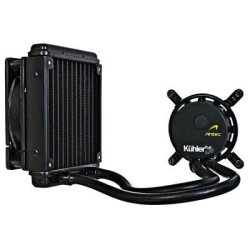
Antec Kúhler H2O 620 CPU Watercooler (Socket Intel LGA 775 / 1155 / 1156 / 1366 / AMD AM2 / AM3 / AM2+ / AM3+) []


Review is here for it. and it beat both the H50/70.. it is also alot Cheaper than both.

Antec Kühler H2O 620 Liquid Cooling System | Antec,Kühler,H2O,620,Benchmarks,Performance,CPU Coolers,Reviews,Liquid Cooler,Liquid Cooling System,David Ramsey,Antec Kühler H2O 620 Liquid Cooling System Benchmark Performance CPU Cooler Review by David
 

Attachments

  • HS-005-AN_400.jpg
    HS-005-AN_400.jpg
    15.5 KB · Views: 4

My Computer

Computer Manufacturer/Model Number
Goonie Build 8 2010
OS
Windows 7 64bit Ultimate SP1, VMware Windows 7 64bit Ultimate SP1
CPU
Intel Core i7 920 @ 3.8 or 4.2 when i need it
Motherboard
Gigabyte GA-X58-UD5
Memory
Corsair XMS3 12GB DDR3 1600 1.5v
Graphics Card(s)
MSI GeForce GTX 560Ti OC Twin FrozR II
Sound Card
7.1 HD
Monitor(s) Displays
2x BenQ 24 LED 1080p + LG 50PK590 1080p
Screen Resolution
3840 x 1080p
Hard Drives
Intel X25-M 80GB OS/
Intel X25-M 160GB
Data Robotics Drobo V2 8TB
PSU
Corsair AX 750W ATX Modular
Case
Antec Fusion Remote Max
Cooling
Noctua NH D14
Keyboard
Logitech
Mouse
Logitech
Internet Speed
15Mbs Down 1.3Mbs Up
Other Info
Hauppauge HD PVR/
Pioneer 1017-k - 7.1 THX/
Xbox 360 250 Slim
SkyHD/LG 50PK590 TV
Yeah..... I said I "might" reconsider but..... and I worry about noise with regards to a push pull setup. Right now my system is really really quiet with the setup I currently have so.....

The other thing is if I did go with something like that, I'd have to go with the established guys as I'm kind of untrusting with having water in my system anyway. Hate to try some new guy who says "sorry, we'll get it right on the next revision" :eek:

And before I get beat up..... I've used Antec cases for years until moving to my current Cooler Master HAF X case. I've also used and still use their power supplies - see system specs ;)

Thanks for the suggestions though.
 

My Computer

Computer type
PC/Desktop
Computer Manufacturer/Model Number
Custom built by me.
OS
Windows 10 Pro
CPU
Intel Core i7-4770K (3.5Ghz)
Motherboard
Gigabyte G1 Sniper 5 (F10 Bios)
Memory
32 gig Corsair Dominator Platinum (4x8Gig)
Graphics Card(s)
Sapphire Tri-X R9 Fury
Sound Card
Soundblaster ZXR
Monitor(s) Displays
NEC PA242W 24" LCD Monitor
Screen Resolution
1920 x 1200
Hard Drives
Primary - Samsung 850 Pro (512gig), Samsung 840 Pro (256gig), 2TB WD Caviar Black.
PSU
EVGA Supernova 1000 G2
Case
Cooler Master HAF X
Cooling
Corsair H100i with Corsair Air Series SP120 Quiet Fans
Keyboard
Logitech Wireless Wave
Mouse
Logitech Performance MX
Internet Speed
High Speed Cable
Antivirus
Norton Security
Browser
IE11
Other Info
Memory Timings - 1866MHz @ 9-9-9-27-1T @ 1.5 volts
Yeah..... I said I "might" reconsider but..... and I worry about noise with regards to a push pull setup. Right now my system is really really quiet with the setup I currently have so.....

The other thing is if I did go with something like that, I'd have to go with the established guys as I'm kind of untrusting with having water in my system anyway. Hate to try some new guy who says "sorry, we'll get it right on the next revision" :eek:

And before I get beat up..... I've used Antec cases for years until moving to my current Cooler Master HAF X case. I've also used and still use their power supplies - see system specs ;)

Thanks for the suggestions though.

I have Noctua NF D 12 fans in push pull on my H70 and they are quiet as...cheers
 

My Computer

Computer Manufacturer/Model Number
home built
OS
Windows 7 Professional 64 bit
CPU
930 i7 quad O/C 4ghz
Motherboard
Asus P6X58D premium
Memory
G Skill 3x2gb O/C to 1603mhz 1T timing
Graphics Card(s)
EVGA 570
Sound Card
creative titanium
Monitor(s) Displays
samsung s23a950d..120hz 3D
Screen Resolution
1920x1080
Hard Drives
Western Digital 3X150 Velocoraptors in Raid 5
PSU
Antec Quattro 1000 watt
Case
Xigmatek Elysium
Cooling
Custom Loop..Kryos block.360rad..BP comp fittings etc
Keyboard
Razor arcosa
Mouse
Razer Diamondback
Internet Speed
Wireless so w/e I get at the time
Hi Guys I ve a TOSHIBA Qosmio X770,BIOS v1.70,Intel(R) Core(TM) i7-2670QM CPU @ 2.20GHz,Type DDR3
Size 8192 MByte(RAM),NVIDIA GeForce GTX560M (1.5GB, GDDR5) & im new to OC'ing...please cud someone help me 1st how to OC & 2nd to increase OC'ing safely, many thanx n advance :)
 

My Computer

Computer Manufacturer/Model Number
TOSHIBA Qosmio X770-11C
OS
Windows 7 Ultimate SP1 x64
CPU
Intel Core i7-2670QM CPU @ 2.20GHz
Motherboard
BIOS v1.70
Memory
DDR3 Size 8192 MByte (RAM)
Graphics Card(s)
NVIDIA GeForce GTX 560M (1.5GB, GDDR5)
Hard Drives
SSD 500GB + HDD 500GB @ 7200rpm (1TB)
Internet Speed
2 MG Broardband
Hi Guys I ve a TOSHIBA Qosmio X770,BIOS v1.70,Intel(R) Core(TM) i7-2670QM CPU @ 2.20GHz,Type DDR3
Size 8192 MByte(RAM),NVIDIA GeForce GTX560M (1.5GB, GDDR5) & im new to OC'ing...please cud someone help me 1st how to OC & 2nd to increase OC'ing safely, many thanx n advance :)

That's not going to happen if it is a Laptop sorry :zip:
 

My Computer

Computer type
PC/Desktop
Computer Manufacturer/Model Number
CoreI7-6700K MrFingerIII Special Builds
OS
Windows 10 Home Premium 64bit sp1
CPU
Intel I7-6700K @ 4.6 Ghz 1.344 volts everyday OC
Motherboard
Asrock Fatality K6 Z170 Socket 1151
Memory
32GB G-Skill TridentZ 3200mhz 16-18-18-38 DDR4
Graphics Card(s)
Sli Gigabyte Windforce GTX 980 G1
Sound Card
AC97 Creative Rage Tactic 3D Headphones Bluetooth
Monitor(s) Displays
27" Asus ROG Swift PG278Q G-Sync 48" Vizio Smart HD TV
Screen Resolution
2560x1440p 27"- 48" Currently Gaming at 2560x1440p Res 2K
Hard Drives
250GB Samsung Evo840SSD Seagate baracuda 500 GB WD Mybook 500Gb 1TB Seagate Barracuda
PSU
HX1050w Corsair Silver 80plus certified crosfire/sli
Case
Enthod Pro Full Tower
Cooling
Corsair H110i GT 280 mm High Performance WaterBlock
Keyboard
Logitech wireless keyboard
Mouse
Logitech wireless mouse
Internet Speed
Cox Cable 100+ mb
Antivirus
WebRoot Spysweeper with Antivirus
Browser
IE-10, Chrome, Opera
Other Info
My Other Rig is a AMD FX8320E @4.6Ghz 16GB Ballistic Sport Ram
Mobo Asrock Fatality 990FX 120GB OCZ SSD 1TB Seagate Barracuda Corsair H75 Cooling PSU Corsair CX750
GPU GTX Gigabyte 970G1
Ok Thanx for Reply my friend :) So its only Desktops Then?? Guess so...NEVERMIND, Thanx again.
 

My Computer

Computer Manufacturer/Model Number
TOSHIBA Qosmio X770-11C
OS
Windows 7 Ultimate SP1 x64
CPU
Intel Core i7-2670QM CPU @ 2.20GHz
Motherboard
BIOS v1.70
Memory
DDR3 Size 8192 MByte (RAM)
Graphics Card(s)
NVIDIA GeForce GTX 560M (1.5GB, GDDR5)
Hard Drives
SSD 500GB + HDD 500GB @ 7200rpm (1TB)
Internet Speed
2 MG Broardband
Back
Top