
I'm struggling to substitute IBeam cursor (which appears in Notepad; MS Word and Adobe Acrobat and is too skinny for my taste),(I'm not referring to blinking insertion point) My unsuccessful steps, following this tutorial (http://www.sevenforums.com/tutorials/2402-mouse-pointers-change.html) from Swan are: 1..Place desired IBeam cursor in: C:\Windows\Cursors.- I presume that there is no need to Unblock the file, because the unblock button is missing. 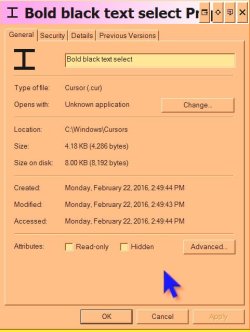 2..Open Registry Editor and In the right pane of Cursors, right click on IBeam
 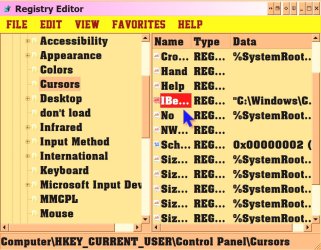 and type in the full path to the location of my .cur file within quotes, and click on OK.
 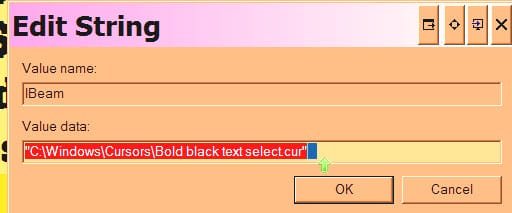 3..Save the new theme. 4..Restart or Log off. 5..Control Panel>Mouse>Pointers- the following error massage appears:
  So i desperately need YOUR help to make IBeam cursor bigger, colourful, and more visible.
2..Open Registry Editor and In the right pane of Cursors, right click on IBeam and type in the full path to the location of my .cur file within quotes, and click on OK. 3..Save the new theme. 4..Restart or Log off. 5..Control Panel>Mouse>Pointers- the following error massage appears: So i desperately need YOUR help to make IBeam cursor bigger, colourful, and more visible.My Computer
- Computer type
- PC/Desktop
- Computer Manufacturer/Model Number
- custom build
- OS
- Windows 7 Ultimate x64
- CPU
- Xeon
- Motherboard
- gigabyte
- Memory
- 8gb
- Graphics Card(s)
- ati
- Hard Drives
- raid
- Antivirus
- AVG
- Browser
- Opera