IBM Lenovo is giving me fits on re-installing O/S

Chaim613

New member
Local time
5:28 AM
Messages
50
Hi,
In trying to re-install W-7 Pro from a Microsoft install disk, I formatted the System partition and need to provide a driver to the install procedure. I've run into a problem: I downloaded the Western Digital driver to a thumb-drive but when I tell the W-7 installation procedure to find the driver on the thumb drive, and "DriverRestore.exe" from Western Digital appears on the file directory, I select the file, and press "Open", the installation procedure responds with "The specified location doesn't contain any information about your hardware"
But I'm sure that file is for the correct Hard Drive.
What to do?
This is a great Forum,
Thank you
 

My Computer My Computer

At a glance

Windows 7 Pro 64 bit
OS
Windows 7 Pro 64 bit

My Computer My Computer

At a glance

Windows 10 Pro X64Intel Quad Core i7-4770 @ 3.4Ghz16.0GB PC3-12800 DDR3 SDRAM 1600 MHzIntel Integrated HD Graphics
Computer type
PC/Desktop
Computer Manufacturer/Model Number
Lenovo IdeaCenter 450
OS
Windows 10 Pro X64
CPU
Intel Quad Core i7-4770 @ 3.4Ghz
Memory
16.0GB PC3-12800 DDR3 SDRAM 1600 MHz
Graphics Card(s)
Intel Integrated HD Graphics
Sound Card
Realtek HD Audio
Monitor(s) Displays
HP 22" LCD
Screen Resolution
1680 x 1050
Hard Drives
250GB Samsung EVO SATA-3 SSD
2TB Seagate ST2000DM001 SATA-2
1.5TB Seagate ST3150041AS SATA
Keyboard
Dell USB
Mouse
Lenovo USB
Internet Speed
Cable via Road Runner 3MB Upload, 30MB Download
Antivirus
Windows Defender, MBAM Pro, MBAE
Browser
Seamonkey
Other Info
UEFI/GPT
PLDS DVD-RW DH16AERSH
The machine was bought used with W-7 Pro
I successfully re-installed the O/S with the microsoft W-7 Pro Installation Disk I am now using, only I didn't previously format the system partition, back in March and the machine was a lot faster as a result of formatting the logical partition during installation of the O/S.
I've downloaded the W-7 64 bit .ISO file and the installation procedure doesn't recognize the file, saying there is no "signed" .ISO file on the media. I think I need the IBM Lenovo Restore Disk. Thank you very much for responding. I've tried everyone's advice and I'll report back whether the Restore Disk worked.
 

My Computer My Computer

At a glance

Windows 7 Pro 64 bit
OS
Windows 7 Pro 64 bit

My Computer My Computer

At a glance

Windows 10 Pro X64Intel Quad Core i7-4770 @ 3.4Ghz16.0GB PC3-12800 DDR3 SDRAM 1600 MHzIntel Integrated HD Graphics
Computer type
PC/Desktop
Computer Manufacturer/Model Number
Lenovo IdeaCenter 450
OS
Windows 10 Pro X64
CPU
Intel Quad Core i7-4770 @ 3.4Ghz
Memory
16.0GB PC3-12800 DDR3 SDRAM 1600 MHz
Graphics Card(s)
Intel Integrated HD Graphics
Sound Card
Realtek HD Audio
Monitor(s) Displays
HP 22" LCD
Screen Resolution
1680 x 1050
Hard Drives
250GB Samsung EVO SATA-3 SSD
2TB Seagate ST2000DM001 SATA-2
1.5TB Seagate ST3150041AS SATA
Keyboard
Dell USB
Mouse
Lenovo USB
Internet Speed
Cable via Road Runner 3MB Upload, 30MB Download
Antivirus
Windows Defender, MBAM Pro, MBAE
Browser
Seamonkey
Other Info
UEFI/GPT
PLDS DVD-RW DH16AERSH
"Lenovo giving me fits" recap

I downloaded a Digital River .iso, and it worked (almost). Now I need to keep the W-7 Pro install disk in the drive, or when I restart, I get the msg.: "No Operating System".
What is the fix to that? I tried re-installing...same msg!
Thank you for getting me this far. :)
 

My Computer My Computer

At a glance

Windows 7 Pro 64 bit
OS
Windows 7 Pro 64 bit
I downloaded the Western Digital driver to a thumb-drive but when I tell the W-7 installation procedure to find the driver on the thumb drive, and "DriverRestore.exe" from Western Digital appears on the file directory, I select the file, and press "Open", the installation procedure responds with "The specified location doesn't contain any information about your hardware"
An ".exe" is not what a driver folder looks like. This .EXE file might be a self-expanding installation file from WD, and if so it probably will produce folder/sub-folder structure which down lower somewhere there will be the expected .INF file for the device.

What is the WD device you need drivers for?? What exactly is the web location you obtained this WD driver installer file from?

You don't point to this .EXE file when telling the W7 installer to find the drivers here. You must point to what probably is the expansion of that probably self-expanding .EXE. In fact that .EXE might be the expansion/installation complete so just run it. Or, you can try manually expanding it with WinRAR or WinZIP, and then see what gets expanded and verify that there is an .INF file down in some sub-folder.

It is the INF file in a folder/sub-folder structure that you point Windows to when installing a driver (and the Windows driver installer will drill down and find it as long as you check "look in sub-folders" option). Not an .EXE. But frequently the manufacturer will provide an "all-in-one" self-expanding installer file, which then runs the SETUP.EXE from the expansion to actually do the driver install. But it is the .INF file which is the "driver" which is what Windows will be looking for if you ask Windows to install the driver from the expanded folder/sub-folder structure.

The message "The specified location doesn't contain any information about your hardware" is what Windows returns if it can't find the proper .INF file for the hardware ID of the hardware it's trying to install a driver for. Obviously your .EXE is not an .INF file, nor is it a folder/sub-folder structure in which an .INF can be found. You need to expand the .EXE (probably) which will likely reveal a \BIN or \DRIVERS folder in which the needed .INF will then be visible for Windows to find and use.

Or... RUN that .EXE from WD, and it will probably do it all for you.
 

My Computer My Computer

At a glance

Windows 7 Pro x64 (1), Win7 Pro X64 (2)i5-3350p 3.1Ghz/6MB-cache (1); E8400 3.0Ghz/6...8GB PC3-12800 DDR3 (1); 4GB PC3-10600 DDR3 (2)ATI HD7750 (1), (see TV cards); ATI R7 250 (2)
Computer type
PC/Desktop
Computer Manufacturer/Model Number
Home-built, two systems (1) and (2)
OS
Windows 7 Pro x64 (1), Win7 Pro X64 (2)
CPU
i5-3350p 3.1Ghz/6MB-cache (1); E8400 3.0Ghz/6MB-cache (2)
Motherboard
ASUS P8Z77-V Pro (1); ASUS P5Q3 (2)
Memory
8GB PC3-12800 DDR3 (1); 4GB PC3-10600 DDR3 (2)
Graphics Card(s)
ATI HD7750 (1), (see TV cards); ATI R7 250 (2)
Sound Card
Realtek ALC892 HD Audio (1); Realtek ALC1200 HD Audio (2)
Monitor(s) Displays
Eizo HD2441W LCD, Eizo S2433W (1); Eizo 24" S2433W (2)
Screen Resolution
1920x1200, 1920x1200 (1); 1920x1200 (2)
Hard Drives
(1) 1TB SATA-II (7200RPM), 2x2TB SATA-III (7200RPM), 250GB SATA-III (10000RPM) for OS; 2x2TB external USB 3.0

(2) 320GB SATA-II (7200RPM), 750GB SATA-II (7200RPM), 150GB SATA-II (10000RPM) for OS; 2TB external USB 3.0
PSU
Nesteq ECS-6001 600W (1); Nesteq ECS-5001 500W (2)
Case
Acousti-Case 360 (1) and (2)
Cooling
Noctua NH-U12P SE2 for CPU, 2x120mm case fans (1) and (2)
Keyboard
IBM PS/2 (1) and (2)
Mouse
Logitech MX Revolution wireless (1); Microsoft wired (2)
Internet Speed
100mbps down / 10mbps up
Antivirus
Microsoft Security Essentials; Malwarebyte Anti-Malware Pro
Browser
Firefox
Other Info
Ceton InfiniTV 4-tuner cablecard-enabled TV card as well as Hauppauge HVR-2250 OTA/ATSC 2-tuner TV card in (1), running under Win7 WMC
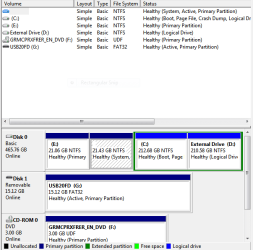
I guess it's "start from scratch". Is there a good tutorial on "How to partition a drive for re-installing the O/S"? I installed the O/S on the logical partition because it was working, and I was frustrated (I know that's not a very good, perhaps poor, reason)
 

Attachments

  • Disk Management Aug 19 2014.PNG
    Disk Management Aug 19 2014.PNG
    14.9 KB · Views: 10

My Computer My Computer

At a glance

Windows 7 Pro 64 bit
OS
Windows 7 Pro 64 bit
If you follow the steps for a http://www.sevenforums.com/tutorials/219487-clean-reinstall-factory-oem-windows-7-a.html#post1839164 it covers all of this and much more.

You will get and keep a perfect install to the exact extent you stick with the tools and methods in that tutorial which had helped over a million users without a single complaint.

I always delete all partitions during the booted install, create and format new as desired then install Win7 to the first partition which is in the fastest part of the HD.
 
Back
Top