icc color profile

aliciatapp

New member
Local time
1:58 AM
Messages
15
I received a new color profile for my pc windows 7.. saved it to my desktop.. right clicked and clicked on install
nothing happened- it didn't install
in options I unblocked it.

What do I do.. Hope its simple.. I am very dumb when it comes to this.

Thanks, Alicia
 

My Computer

OS
windows 7
Where did you get the profile?

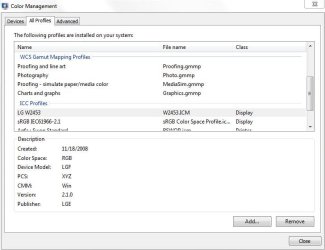
Hit start, and in the search box type : COLOR
The 1st result should be Color management.

Look in the All Profiles tab and see if it isn't listed there.
 

Attachments

  • Capture.JPG
    Capture.JPG
    44.9 KB · Views: 149

My Computer

Computer Manufacturer/Model Number
Custom (Self Build)
OS
Windows 7 Home Premium 64bit
CPU
Intel Core i7 2700k
Motherboard
eVGA P67 SLI
Memory
8GB Mushkin Redline Ridgebacks @1866
Graphics Card(s)
EVGA GTX570 SC
Sound Card
XiFi Titanium HD
Monitor(s) Displays
LG W2453V
Screen Resolution
1920x1080
Hard Drives
Intel 320 80GB -- Intel X25-V 40GB --WD Black 1TB x2 -- WD Blue 640GB
PSU
Seasonic x750
Case
Corsair 600T SE White
Cooling
eVGA Superclocked CPU Cooler
Keyboard
Saitek Cyborg
Antivirus
Kaspersky
Browser
IE
Other Info
LG BD/DVD
no its not there.. Its a special profile for dye sublimation
 

My Computer

OS
windows 7
In that same window in the Devices Tab, as in the snip above,

You should be able to click "add" and add the cusom profile to your list.
 

My Computer

Computer Manufacturer/Model Number
Custom (Self Build)
OS
Windows 7 Home Premium 64bit
CPU
Intel Core i7 2700k
Motherboard
eVGA P67 SLI
Memory
8GB Mushkin Redline Ridgebacks @1866
Graphics Card(s)
EVGA GTX570 SC
Sound Card
XiFi Titanium HD
Monitor(s) Displays
LG W2453V
Screen Resolution
1920x1080
Hard Drives
Intel 320 80GB -- Intel X25-V 40GB --WD Black 1TB x2 -- WD Blue 640GB
PSU
Seasonic x750
Case
Corsair 600T SE White
Cooling
eVGA Superclocked CPU Cooler
Keyboard
Saitek Cyborg
Antivirus
Kaspersky
Browser
IE
Other Info
LG BD/DVD
I deleted the old profile which became invalid yesterday -- all of a sudden this happened . its been printing great.

restarted went to devices add- the new profile .. but it reverts to the old profile which is invalid.

My icc profile tech person said that it probably is a windows 7 issue.. what should i do ..

Frantic
 

My Computer

OS
windows 7
1. Copy the new color profile to windows/system32/spool/drivers/color folder
2. In control panel, open 'color management' and select the device you want the profile to be associated with.
3. click 'Add'. if you do not see the new profile in the pop-up, click browse and navigate to windows/system32/spool/drivers/color and then select the profile. Select, then click the 'Add' button.

4. make the new profile default, and that's it......hopefully.

I presume this is a printer profile? If you are printing via photoshop, color management can be applied via the application, which is my own preferred way. However, I don't want to spoil your workflow.

hope the above helps

John
 

My Computer

OS
Windows 7 (64bit)
CPU
Intel i7 930
Motherboard
AsusP6X58D-E
Memory
12 gig
Graphics Card(s)
Radion HD 5770
Sound Card
On board
Monitor(s) Displays
Iiyama 24in HD Widescreen
Hard Drives
2 X 1Tb Western Digital Caviar Black
PSU
800 w
Have you copied the new profile to the Color folder as per johndh post above? ^ ^
If you are running 64 bit have you also copied it to the
C:\Windows\SysWOW64\spool\drivers\color folder as well?
Remembering
(on the way) to delete/move the old profile where it "won't be looked for" if they're not named the same. I'd also do a PC wide search for the old profiles name. Some programs (Adobe springs to mind) also have the colour profile in their own folders.
 

My Computer

OS
Windows 7 x64
Yes, I did and everything is fine now.. Thanks for all your help
Alicia
 

My Computer

OS
windows 7
Hello, I am having a somewhat similar problem...I am able to follow the exact instructions in Windows color management, but what I can't do is find the Spool folder in the System32 folder or sysWOW64 folder (I have a 64 bit system). I am able to find my profile by using the add feature, but not sure...is it working? Or is pasting the ICC in the folder the last step? Thank you in advance for any help.
 

My Computer

OS
Windows 7 Home 64
Back
Top