
Solved iCloud error notification

oklatom

New member
Local time
7:49 PM
Messages
4
Location
Emond, Oklahoma
I couldn't find it if this was covered elsewhere. I hope I have the right place to post this. Mods, please delete this if it's in the wrong place, etc.


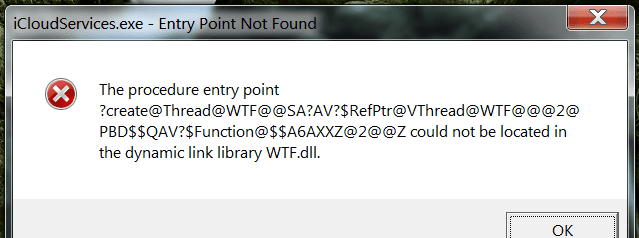
icloudservices.exe - entry point not found


This shows up in a white box every time I reboot, and it has since the April system updates. icloud still works, but this is irritating, and I don't know if there are other errors caused by it. I would sincerely appreciate any help. Thanks in advance.
 

Attachments
  • iCloud Error 2018-06-14_032748.png
    iCloud Error 2018-06-14_032748.png
    16.8 KB · Views: 14
Last edited:

My Computer

Computer type
PC/Desktop
Computer Manufacturer/Model Number
HP h8-1287c Pavilion
OS
Windows 7 Home Premium x64
CPU
Intel Core i7-3770 CPU @ 3.40 GHz Ivy Bridge 22nm Technology
Motherboard
PEGATRON CORPORATION 2AD5
Memory
12 GB Memory
Graphics Card(s)
ATI AMD Radeon HD 7400 Series (MSI) 1024MB
Sound Card
IDT High Definition Audio CODEC
Monitor(s) Displays
VX2450 SERIES (1920x1080@60Hz)
Screen Resolution
1920 x 1080
Hard Drives
Hitachi HDS723020BLA6452SCSI Disk 1863.01 GB
Keyboard
Microsoft Wirless Comfort Keyboard 5000
Mouse
Microsoft Wireless Mouse 5000
Antivirus
Avast Internet Security
Browser
Firefox Quantum
Hi oklatom,

I did a quick Google search and found that other people were having the same problem in Windows 7!
From what they said it appears to be to do with iTunes! Have you got iTunes installed?

There also appears to be a solution here: Solved: Error Messages on start up

I hope this helps!
 

My Computer

Computer type
Laptop
Computer Manufacturer/Model Number
Fujitsu LIFEBOOK
OS
Win 7 HP SP1 64-bit Vista HB SP2 32-bit Linux Mint 18.3
CPU
Intel(R) Pentium(R) CPU P6200 @ 2.13GHz
Motherboard
FUJITSU FJNBB06
Memory
4.00 GB
Graphics Card(s)
Intel(R) Graphics Media Accelerator HD
Sound Card
[1] Realtek High Definition Audio [2] Intel(R) Display Audio
Screen Resolution
1366 x 768 x 32 bits (4294967296 colors) @ 59 Hz
Hard Drives
TOSHIBA MK5076GSX
Antivirus
AVG FREE
Hi oklatom,

I did a quick Google search and found that other people were having the same problem in Windows 7!
From what they said it appears to be to do with iTunes! Have you got iTunes installed?

There also appears to be a solution here: Solved: Error Messages on start up

I hope this helps!


Thanks. Unfortunately, this didn't do it. I do have iTunes, and it is up to date. Thanks again.
 

My Computer

Computer type
PC/Desktop
Computer Manufacturer/Model Number
HP h8-1287c Pavilion
OS
Windows 7 Home Premium x64
CPU
Intel Core i7-3770 CPU @ 3.40 GHz Ivy Bridge 22nm Technology
Motherboard
PEGATRON CORPORATION 2AD5
Memory
12 GB Memory
Graphics Card(s)
ATI AMD Radeon HD 7400 Series (MSI) 1024MB
Sound Card
IDT High Definition Audio CODEC
Monitor(s) Displays
VX2450 SERIES (1920x1080@60Hz)
Screen Resolution
1920 x 1080
Hard Drives
Hitachi HDS723020BLA6452SCSI Disk 1863.01 GB
Keyboard
Microsoft Wirless Comfort Keyboard 5000
Mouse
Microsoft Wireless Mouse 5000
Antivirus
Avast Internet Security
Browser
Firefox Quantum
Evidently your computer is trying to connect to iCloud whenever you boot up. To stop this from happening, run MSCONFIG, go to the Startup tab, and if you see anything related to iCloud (perhaps iTunes, some internet group you have joined, or maybe a friend or family member invited you to join a photo sharing group), disable it from the startup list.

Now go to the Services tab. Check the box which says "Hide all Microsoft services". Now if you see anything that appears to be related to iCloud, put a check by it. Then click Disable, then Apply.

Now reboot and see if the message shows up again. It probably won't; but if it does, you'll need to delete more startup items and non-Microsoft service, to see if doing so fixes the error.

When the error goes away, whatever you just disabled is a likely candidate for causing the problem. Either leave it disabled, or reinstall it to try to fix the error.
 

My Computer

Computer type
PC/Desktop
Computer Manufacturer/Model Number
Dell
OS
Linux Mint 18.2 xfce 64-bit (VMWare host) / Windows 8.1 Pro 32-bit (VMWare guest)
CPU
Haswell
Memory
4 GB
Monitor(s) Displays
Acer 23"
Screen Resolution
1920 x 1080
Hard Drives
Two hard drives, 1TB each: One for Linux, one for my data.
Keyboard
IBM Model M
Antivirus
Sophos (Linux), Trend Micro (Windows)
Browser
Firefox, Opera
Other Info
I use Samba to share my data drive with the other computers at my house and with my guest session in VMWare Workstation Player.
Evidently your computer is trying to connect to iCloud whenever you boot up. To stop this from happening, run MSCONFIG, go to the Startup tab, and if you see anything related to iCloud (perhaps iTunes, some internet group you have joined, or maybe a friend or family member invited you to join a photo sharing group), disable it from the startup list.

Now go to the Services tab. Check the box which says "Hide all Microsoft services". Now if you see anything that appears to be related to iCloud, put a check by it. Then click Disable, then Apply.

Now reboot and see if the message shows up again. It probably won't; but if it does, you'll need to delete more startup items and non-Microsoft service, to see if doing so fixes the error.

When the error goes away, whatever you just disabled is a likely candidate for causing the problem. Either leave it disabled, or reinstall it to try to fix the error.


I used a startup manager and did as you suggested. I disabled anything to do with icloud and itunes, and that did it. Thank you sincerely for your help.
 

My Computer

Computer type
PC/Desktop
Computer Manufacturer/Model Number
HP h8-1287c Pavilion
OS
Windows 7 Home Premium x64
CPU
Intel Core i7-3770 CPU @ 3.40 GHz Ivy Bridge 22nm Technology
Motherboard
PEGATRON CORPORATION 2AD5
Memory
12 GB Memory
Graphics Card(s)
ATI AMD Radeon HD 7400 Series (MSI) 1024MB
Sound Card
IDT High Definition Audio CODEC
Monitor(s) Displays
VX2450 SERIES (1920x1080@60Hz)
Screen Resolution
1920 x 1080
Hard Drives
Hitachi HDS723020BLA6452SCSI Disk 1863.01 GB
Keyboard
Microsoft Wirless Comfort Keyboard 5000
Mouse
Microsoft Wireless Mouse 5000
Antivirus
Avast Internet Security
Browser
Firefox Quantum
I am glad you got it sorted oklatom :D. Nice catch by the way mrjimphelps :thumbsup:.
 

My Computer

Computer type
Laptop
Computer Manufacturer/Model Number
Fujitsu LIFEBOOK
OS
Win 7 HP SP1 64-bit Vista HB SP2 32-bit Linux Mint 18.3
CPU
Intel(R) Pentium(R) CPU P6200 @ 2.13GHz
Motherboard
FUJITSU FJNBB06
Memory
4.00 GB
Graphics Card(s)
Intel(R) Graphics Media Accelerator HD
Sound Card
[1] Realtek High Definition Audio [2] Intel(R) Display Audio
Screen Resolution
1366 x 768 x 32 bits (4294967296 colors) @ 59 Hz
Hard Drives
TOSHIBA MK5076GSX
Antivirus
AVG FREE
I used a startup manager and did as you suggested. I disabled anything to do with icloud and itunes, and that did it. Thank you sincerely for your help.

Glad you got it fixed.:thumbsup:
 

My Computer

Computer type
PC/Desktop
Computer Manufacturer/Model Number
Dell
OS
Linux Mint 18.2 xfce 64-bit (VMWare host) / Windows 8.1 Pro 32-bit (VMWare guest)
CPU
Haswell
Memory
4 GB
Monitor(s) Displays
Acer 23"
Screen Resolution
1920 x 1080
Hard Drives
Two hard drives, 1TB each: One for Linux, one for my data.
Keyboard
IBM Model M
Antivirus
Sophos (Linux), Trend Micro (Windows)
Browser
Firefox, Opera
Other Info
I use Samba to share my data drive with the other computers at my house and with my guest session in VMWare Workstation Player.
Back
Top