
icon bug

eliagustaffer

New member
Local time
2:03 PM
Messages
3
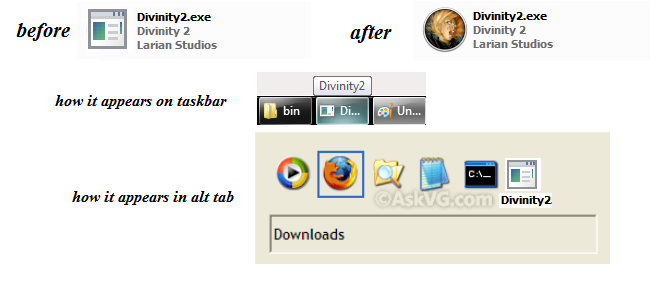
I got this game Divinity 2 Developer's Cut on Steam today but it has the generic exe icon file from Windows (Some other games also have broken icons for no reason). I used resource hacker and this is the result as posted in the image below. Basically it did import the desired icon but the game still displays the default one both in taskbar and also while alt+tabbing. I've tried multiple ways to fix this with no result (including deleting the iconcache.db)


iconbug.png
 

My Computer

Computer type
PC/Desktop
OS
Windows 7 Ultimate x64
Do you know where the correct icon is located on your system?

If so, right click on the shortcut on the taskbar and select Properties. In the Shortcut tab, click on Change Icon. Browse to the the icon and select it.
 

My Computer

Computer type
Laptop
Computer Manufacturer/Model Number
Dell M6500 Precision Work Station
OS
Windows 7 Pro SP1 64 bit
Memory
8 GB
Screen Resolution
1920x
Internet Speed
30 Mbps
Antivirus
Norton Security
Browser
IE 11
Do you know where the correct icon is located on your system?

If so, right click on the shortcut on the taskbar and select Properties. In the Shortcut tab, click on Change Icon. Browse to the the icon and select it.


already tried that, it works if i pin it but once i start the game it switches back to the generic icon
z.png


After some googling i found this information. So basically some files have have all icons set properly but others do not. You can have 1 icon showing on taskbar, another on the alt tab window, another on the title bar or in explorer window. I have yet to find a program that can change the icon on the title bar or on the explorer windows (can only change the basic icon the one that shows on the file)

Windows uses an application's icon in four different places:
  1. Explorer windows
  2. The Alt-Tab window
  3. On the Taskbar
  4. In the TitleBar of the application (if it has a control box).
 

My Computer

Computer type
PC/Desktop
OS
Windows 7 Ultimate x64

My Computer

Computer type
Laptop
Computer Manufacturer/Model Number
Dell M6500 Precision Work Station
OS
Windows 7 Pro SP1 64 bit
Memory
8 GB
Screen Resolution
1920x
Internet Speed
30 Mbps
Antivirus
Norton Security
Browser
IE 11


already did that also cleared the icon cache as well
found a temporary fix to this, program called "Title Bar Changer Studio" but it's freeware and expires in 30 days and I also have to keep it running. the icon on the taskbar and in alt tab window are not the same as the explorer or the title bar icon so even if it displays proper there (which it does), in some cases it won't display proper as i said. title bar changer studio seems to know where it's stored and changes it but it would be nice if it could inject it directly in the exe file and save it... who knows maybe one day there will be a program that can do that
 

My Computer

Computer type
PC/Desktop
OS
Windows 7 Ultimate x64
Have you run SFC /Scannow just to see if there might be a screwed up .dll?
 

My Computer

Computer type
Laptop
Computer Manufacturer/Model Number
Dell M6500 Precision Work Station
OS
Windows 7 Pro SP1 64 bit
Memory
8 GB
Screen Resolution
1920x
Internet Speed
30 Mbps
Antivirus
Norton Security
Browser
IE 11
Back
Top
