
Icon Cache - Rebuild

How to Rebuild the Icon Cache in Windows

   Information
If one or more of your icons are not displaying correctly, or that your icon cache is corrupted, then you might consider rebuilding the icon cache to reset and reload the icon images into the icon cache in Vista, Windows 7, and Windows 8.

   Note
This will not help with any of the following icon issues:
  • A shortcut's icon that is not displayed properly due to the source of the shortcut being moved or deleted. You may need to recreate a new shortcut directly from the source (ex: program's exe) file to replace it instead.
  • All icons for a specific file extension display the wrong icon. This may be due to setting the wrong association for what program to open the file extension instead. You can restore the default file extension's associations to fix this icon instead.


OPTION ONE

Automatically Rebuild the Icon Cache


1. Click/tap on the download button below to download the file below.
Rebuild_Icon_Cache.bat

Download


2. Save the file to your desktop, and run it.

3. Click/tap on Run when prompted.

4. Follow the instructions in the command prompt to rebuild the Icon Cache. (see screenshot below)
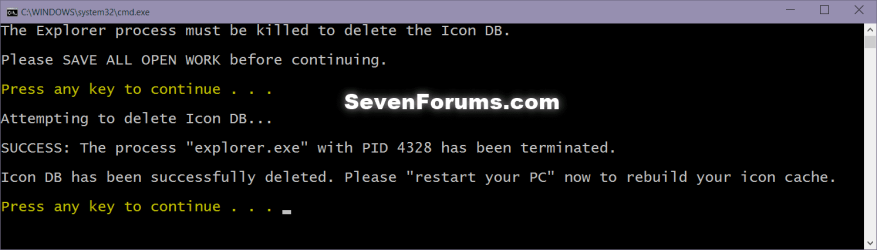
Icon_cache_command.png
5. Restart your computer to generate a new IconCache.db file.

6. If the icons are still not displaying properly, then download and merge the ICO option in this tutorial for Windows 7 or Windows 8 to restore the default associations of .ico (icon) files.


OPTION TWO

To Manually Rebuild the Icon Cache using the Command Prompt


1. Close and save anything that you are working on. This command will kill explorer and restart the computer when completed.

2. Open a command prompt in Windows 7 or Windows 8.

3. In the command prompt, Copy and paste each command line below exactly as is one at a time and press enter after each command.
:warn:WARNING: The last command will restart the computer, so be sure to close and save anything that you are working on first.
  • ie4uinit.exe -ClearIconCache
  • taskkill /IM explorer.exe /F
  • DEL "%localappdata%\IconCache.db" /A
  • DEL "%localappdata%\Microsoft\Windows\Explorer\iconcache*" /A
  • shutdown /r /f /t 00
4. The IconCache.db file has now been rebuilt.

5. If the icons are still not displaying properly, then download and merge the ICO option in this tutorial for Windows 7 or Windows 8 to restore the default associations of .ico (icon) files.

That's it,
Shawn


Attachments

Last edited:
You're most welcome Khronikos, and welcome to Seven Forums. :)
 

My Computer

Computer type
PC/Desktop
Computer Manufacturer/Model Number
Self built custom
OS
64-bit Windows 11 Pro for Workstations
CPU
Intel i7-8700K OC'd to 5 GHz
Motherboard
ASUS ROG Maximus XI Formula Z390
Memory
64 GB (4x16GB) G.SKILL TridentZ RGB DDR4 3600 MHz
Graphics Card(s)
ASUS ROG-STRIX-GTX1080TI-O11G-GAMING
Sound Card
Integrated
Monitor(s) Displays
2 x Samsung Odyssey G7 27"
Screen Resolution
2560x1440
Hard Drives
1TB Samsung 990 PRO M.2,
4TB Samsung 990 PRO PRO M.2,
TerraMaster F8 SSD Plus NAS
PSU
Seasonic Prime Titanium 850W
Case
Thermaltake Core P3
Cooling
Corsair Hydro H115i
Keyboard
Logitech wireless K800
Mouse
Logitech MX Master 4
Internet Speed
2 Gb/s Download and 100 Mb/s Upload
Antivirus
Malwarebyte Anti-Malware Premium
Browser
Google Chrome
Other Info
Logitech Z625 speaker system,
Logitech BRIO 4K Pro webcam,
HP Color LaserJet Pro MFP M477fdn,
APC SMART-UPS RT 1000 XL - SURT1000XLI,
Galaxy S23 Plus phone
Another new problem fixed!

Thanks Shawn.

Don't know if CCleaner caused it or not. I've unticked Thumbnail Cache and Taskbar Jump Lists just in case (not that I understand what they do anyway) :D
 
Last edited:

My Computer

Computer Manufacturer/Model Number
HP Pavillion dv7-6011TX
OS
Windows 7 Home Premium 64bit SP1
CPU
i7
Memory
8GB
Hard Drives
1TB
Internet Speed
ADSL2+
You're most welcome Perth.

The "Thumbnail Cache" option in CCleaner will clear the cache that holds the images for the thumbnails of files and folders in Windows Explorer. When cleared it will force Windows Explorer to reload these images back into the cache to refresh and update them in case of corruption or wrong images displayed.

The Taskbar Jump Lists" option in CCleaner will clear the items that you see when you right click on a pinned icon on the taskbar.
 

My Computer

Computer type
PC/Desktop
Computer Manufacturer/Model Number
Self built custom
OS
64-bit Windows 11 Pro for Workstations
CPU
Intel i7-8700K OC'd to 5 GHz
Motherboard
ASUS ROG Maximus XI Formula Z390
Memory
64 GB (4x16GB) G.SKILL TridentZ RGB DDR4 3600 MHz
Graphics Card(s)
ASUS ROG-STRIX-GTX1080TI-O11G-GAMING
Sound Card
Integrated
Monitor(s) Displays
2 x Samsung Odyssey G7 27"
Screen Resolution
2560x1440
Hard Drives
1TB Samsung 990 PRO M.2,
4TB Samsung 990 PRO PRO M.2,
TerraMaster F8 SSD Plus NAS
PSU
Seasonic Prime Titanium 850W
Case
Thermaltake Core P3
Cooling
Corsair Hydro H115i
Keyboard
Logitech wireless K800
Mouse
Logitech MX Master 4
Internet Speed
2 Gb/s Download and 100 Mb/s Upload
Antivirus
Malwarebyte Anti-Malware Premium
Browser
Google Chrome
Other Info
Logitech Z625 speaker system,
Logitech BRIO 4K Pro webcam,
HP Color LaserJet Pro MFP M477fdn,
APC SMART-UPS RT 1000 XL - SURT1000XLI,
Galaxy S23 Plus phone
The "Taskbar Jump Lists" option in CCleaner will clear the items that you see when you right click on a pinned icon on the taskbar.

Thanks for the clarification of those options Shawn. I sort of understood what they did from the Help file but wasn't sure.

The icons that lost their "picture" were pinned items on the taskbar. But the icons were also corrupted in the exe files they were pointing to.

I'll tick them again and see if it happens again. Suspect it was just a glitch. At least now I know how to get them back.
 
Last edited:

My Computer

Computer Manufacturer/Model Number
HP Pavillion dv7-6011TX
OS
Windows 7 Home Premium 64bit SP1
CPU
i7
Memory
8GB
Hard Drives
1TB
Internet Speed
ADSL2+
You're welcome. :)
 

My Computer

Computer type
PC/Desktop
Computer Manufacturer/Model Number
Self built custom
OS
64-bit Windows 11 Pro for Workstations
CPU
Intel i7-8700K OC'd to 5 GHz
Motherboard
ASUS ROG Maximus XI Formula Z390
Memory
64 GB (4x16GB) G.SKILL TridentZ RGB DDR4 3600 MHz
Graphics Card(s)
ASUS ROG-STRIX-GTX1080TI-O11G-GAMING
Sound Card
Integrated
Monitor(s) Displays
2 x Samsung Odyssey G7 27"
Screen Resolution
2560x1440
Hard Drives
1TB Samsung 990 PRO M.2,
4TB Samsung 990 PRO PRO M.2,
TerraMaster F8 SSD Plus NAS
PSU
Seasonic Prime Titanium 850W
Case
Thermaltake Core P3
Cooling
Corsair Hydro H115i
Keyboard
Logitech wireless K800
Mouse
Logitech MX Master 4
Internet Speed
2 Gb/s Download and 100 Mb/s Upload
Antivirus
Malwarebyte Anti-Malware Premium
Browser
Google Chrome
Other Info
Logitech Z625 speaker system,
Logitech BRIO 4K Pro webcam,
HP Color LaserJet Pro MFP M477fdn,
APC SMART-UPS RT 1000 XL - SURT1000XLI,
Galaxy S23 Plus phone
You're most welcome Perth.

The "Thumbnail Cache" option in CCleaner will clear the cache that holds the images for the thumbnails of files and folders in Windows Explorer. When cleared it will force Windows Explorer to reload these images back into the cache to refresh and update them in case of corruption or wrong images displayed.

The Taskbar Jump Lists" option in CCleaner will clear the items that you see when you right click on a pinned icon on the taskbar.

Great information, makes it really easy!
 

My Computer

Computer type
PC/Desktop
Computer Manufacturer/Model Number
Custom Build
OS
Windows 7 x64 Ultimate
CPU
Intel 4770k
Motherboard
Asus Maximus VI Formula
Memory
Corsair Vengance DDR3 (2x8) 16GB
Graphics Card(s)
Zotac 580 GTX (nVidia)
Sound Card
Onboard
Monitor(s) Displays
Samsung XL2370
Screen Resolution
1920x1080p
Hard Drives
1 SSD Corsair Neutron
1 WD Blue
1 Seagate
PSU
Thermaltake 1000W
Case
NZXT Phantom 530
Cooling
4 case coolers, Zalman 9900MAX CPU and GPU stock cooler
Keyboard
Microsoft X4 Sidewinder
Mouse
G700 wireless Logitech
Internet Speed
10mb/s
Antivirus
Kaspersky PURE 3
Browser
Firefox and Thor
Other Info
DVD-ROM Sony Opticarc OEM
Thanks! This worked perfectly! About half of my icons suddenly "turned generic" and this corrected everything.
 

My Computer

OS
Windows 7 Professional 64bit
You're welcome RMK, and welcome to Seven Forums. :)
 

My Computer

Computer type
PC/Desktop
Computer Manufacturer/Model Number
Self built custom
OS
64-bit Windows 11 Pro for Workstations
CPU
Intel i7-8700K OC'd to 5 GHz
Motherboard
ASUS ROG Maximus XI Formula Z390
Memory
64 GB (4x16GB) G.SKILL TridentZ RGB DDR4 3600 MHz
Graphics Card(s)
ASUS ROG-STRIX-GTX1080TI-O11G-GAMING
Sound Card
Integrated
Monitor(s) Displays
2 x Samsung Odyssey G7 27"
Screen Resolution
2560x1440
Hard Drives
1TB Samsung 990 PRO M.2,
4TB Samsung 990 PRO PRO M.2,
TerraMaster F8 SSD Plus NAS
PSU
Seasonic Prime Titanium 850W
Case
Thermaltake Core P3
Cooling
Corsair Hydro H115i
Keyboard
Logitech wireless K800
Mouse
Logitech MX Master 4
Internet Speed
2 Gb/s Download and 100 Mb/s Upload
Antivirus
Malwarebyte Anti-Malware Premium
Browser
Google Chrome
Other Info
Logitech Z625 speaker system,
Logitech BRIO 4K Pro webcam,
HP Color LaserJet Pro MFP M477fdn,
APC SMART-UPS RT 1000 XL - SURT1000XLI,
Galaxy S23 Plus phone
Fellow Texan

Any other news? I have tried rebuilding the icon cache, replacing the shell32.dll, disk cleanup, ccleaner. The icons effected are the Office 2007, office communicator and Adobe. If I look in appwiz.cpl I see a bunch of programs with missing icons, 7-zip, Adobe reader X, .... .and so on and so on. I believe it happened during the latest itunes update I installed yesterday. I tried a restore point but it didn't go far enough back.

Side Note: When it first happened I tried to do a change install on MS office to get the icons to rebuild and it will flash open but never really open the uninstaller. And if I create shortcuts to the actual exe's those are fine.

THIS IS DRIVING ME BONKERS :sick: and I don't want to re-image my machine because I'm on a work machine....
 

My Computer

OS
Windows 7 Prof. 32bit
Hello fellow Texan Milas, and welcome to Seven Forums.

You might see if doing another install of the affected program's (ex: Office) again to do a "repair" install option (if available) to see if that may be able to repair the icons.

If not, then about the only other easier thing to do is to create new shortcuts directly from the exe file for any of the affected programs. :(

Hope this helps,
Shawn
 

My Computer

Computer type
PC/Desktop
Computer Manufacturer/Model Number
Self built custom
OS
64-bit Windows 11 Pro for Workstations
CPU
Intel i7-8700K OC'd to 5 GHz
Motherboard
ASUS ROG Maximus XI Formula Z390
Memory
64 GB (4x16GB) G.SKILL TridentZ RGB DDR4 3600 MHz
Graphics Card(s)
ASUS ROG-STRIX-GTX1080TI-O11G-GAMING
Sound Card
Integrated
Monitor(s) Displays
2 x Samsung Odyssey G7 27"
Screen Resolution
2560x1440
Hard Drives
1TB Samsung 990 PRO M.2,
4TB Samsung 990 PRO PRO M.2,
TerraMaster F8 SSD Plus NAS
PSU
Seasonic Prime Titanium 850W
Case
Thermaltake Core P3
Cooling
Corsair Hydro H115i
Keyboard
Logitech wireless K800
Mouse
Logitech MX Master 4
Internet Speed
2 Gb/s Download and 100 Mb/s Upload
Antivirus
Malwarebyte Anti-Malware Premium
Browser
Google Chrome
Other Info
Logitech Z625 speaker system,
Logitech BRIO 4K Pro webcam,
HP Color LaserJet Pro MFP M477fdn,
APC SMART-UPS RT 1000 XL - SURT1000XLI,
Galaxy S23 Plus phone
Ya, I had put the band-aid on it yesterday with direct shortcuts and pinned them but I'm one to keep attacking the problem until it is really fixed. I could re-install those programs but there are way too many, better to just re-image in that case. It has to be something with the windows reg itself because it affected so many icons all at once.

More Clues: The icons were showing the old XP default icon before doing the disk cleanup. Now they show a combination of the blank page icon and the newer Windows 7 default icon with the green in it.

:huh:
 

My Computer

OS
Windows 7 Prof. 32bit
My guess is that it may have been some issue with iTunes that may have caused it. The best fix is to create new shortcuts directly from the exe files IMO.
 

My Computer

Computer type
PC/Desktop
Computer Manufacturer/Model Number
Self built custom
OS
64-bit Windows 11 Pro for Workstations
CPU
Intel i7-8700K OC'd to 5 GHz
Motherboard
ASUS ROG Maximus XI Formula Z390
Memory
64 GB (4x16GB) G.SKILL TridentZ RGB DDR4 3600 MHz
Graphics Card(s)
ASUS ROG-STRIX-GTX1080TI-O11G-GAMING
Sound Card
Integrated
Monitor(s) Displays
2 x Samsung Odyssey G7 27"
Screen Resolution
2560x1440
Hard Drives
1TB Samsung 990 PRO M.2,
4TB Samsung 990 PRO PRO M.2,
TerraMaster F8 SSD Plus NAS
PSU
Seasonic Prime Titanium 850W
Case
Thermaltake Core P3
Cooling
Corsair Hydro H115i
Keyboard
Logitech wireless K800
Mouse
Logitech MX Master 4
Internet Speed
2 Gb/s Download and 100 Mb/s Upload
Antivirus
Malwarebyte Anti-Malware Premium
Browser
Google Chrome
Other Info
Logitech Z625 speaker system,
Logitech BRIO 4K Pro webcam,
HP Color LaserJet Pro MFP M477fdn,
APC SMART-UPS RT 1000 XL - SURT1000XLI,
Galaxy S23 Plus phone
Another weird thing I just found. After all the work I did today it started to show the icon correctly but only after unpinning from taskbar. If I open outlook or winword the icon is default. But then if I pin it and then unpin it the icon is fixed on the taskbar but not in the jump menu.....
Do you know if icons are pulled from 2 different locations?
 

My Computer

OS
Windows 7 Prof. 32bit
It all depends on the source target that was used to create the shortcut from.

You could reset and clear the jump lists to see if the icon is fixed after it rebuilds itself as you open items.
 

My Computer

Computer type
PC/Desktop
Computer Manufacturer/Model Number
Self built custom
OS
64-bit Windows 11 Pro for Workstations
CPU
Intel i7-8700K OC'd to 5 GHz
Motherboard
ASUS ROG Maximus XI Formula Z390
Memory
64 GB (4x16GB) G.SKILL TridentZ RGB DDR4 3600 MHz
Graphics Card(s)
ASUS ROG-STRIX-GTX1080TI-O11G-GAMING
Sound Card
Integrated
Monitor(s) Displays
2 x Samsung Odyssey G7 27"
Screen Resolution
2560x1440
Hard Drives
1TB Samsung 990 PRO M.2,
4TB Samsung 990 PRO PRO M.2,
TerraMaster F8 SSD Plus NAS
PSU
Seasonic Prime Titanium 850W
Case
Thermaltake Core P3
Cooling
Corsair Hydro H115i
Keyboard
Logitech wireless K800
Mouse
Logitech MX Master 4
Internet Speed
2 Gb/s Download and 100 Mb/s Upload
Antivirus
Malwarebyte Anti-Malware Premium
Browser
Google Chrome
Other Info
Logitech Z625 speaker system,
Logitech BRIO 4K Pro webcam,
HP Color LaserJet Pro MFP M477fdn,
APC SMART-UPS RT 1000 XL - SURT1000XLI,
Galaxy S23 Plus phone
Well the plot thickens. It is somehow related to that bad install of iTunes or maybe some other installer. I cannot uninstall MS Office. It ran though the uninstaller but it never really uninstalled it. I am currently trying to remove it with a special MS uninstaller for this issue. Then I'm gonna try to re-install to see the outcome. I realize that small things that should save down to profile when shutting down, doesn't. Position of icons that I arranged in the extra toolbars I added to the taskbar. I think I might just re-image tomorrow morn..... BLAH!!!
 

My Computer

OS
Windows 7 Prof. 32bit
SOME icon images dissapeared.

I had over 40 icons on my desktop forever. Just the other day I decided to put them all in a folder called programs and leave that on my desktop. Today 75% of the images went to windows default. I tried first the "Rebuild_Icon_Cache.bat" from the first page and right now everything is back to normal. Thank goodness for the forums.
 

My Computer

Computer Manufacturer/Model Number
Sony Laptop Vaio vgn-aw290j / desktop system build EVGA i7
OS
windows 7 pro 64 bit [Both pc's]
CPU
core duo 2.93g / quad core 1366 3.2g
Motherboard
Sony Laptop / EVGA E758-A1
Memory
Sony Laptop 8g / Corsair Dominator 6g
Graphics Card(s)
Nvidea 9600M / Nvidea GTX-580 SLI (2)
Sound Card
sony laptop / Claro Halo OMEGA
Monitor(s) Displays
Sony RGB LED Adobe 18.4" / Samsung 22" 2233RZ 120hz
Hard Drives
**[Laptop]Intel ssd M-25 160gb and 1TB slave drive
**[Desktop]Intel ssd M-25 160gb and 2TB slave drive
PSU
Sony laptop / 1000w Corsair
Case
Sony laptop / Lian Li full tower
Cooling
Sony laptop / Zalman 1366 compatible
Keyboard
Sony Full keyboard / Deck Mechanical
Mouse
Sony Bluetooth / Logitech G500
Internet Speed
Comcast cable 16M
That's great news Analog. Since you leave a bunch of shortcuts on your desktop that may not always be used often, then you might also consider to disable the System Maintenance Troubleshooterto prevent them from being removed automatically if not used in 3 months. :)
 

My Computer

Computer type
PC/Desktop
Computer Manufacturer/Model Number
Self built custom
OS
64-bit Windows 11 Pro for Workstations
CPU
Intel i7-8700K OC'd to 5 GHz
Motherboard
ASUS ROG Maximus XI Formula Z390
Memory
64 GB (4x16GB) G.SKILL TridentZ RGB DDR4 3600 MHz
Graphics Card(s)
ASUS ROG-STRIX-GTX1080TI-O11G-GAMING
Sound Card
Integrated
Monitor(s) Displays
2 x Samsung Odyssey G7 27"
Screen Resolution
2560x1440
Hard Drives
1TB Samsung 990 PRO M.2,
4TB Samsung 990 PRO PRO M.2,
TerraMaster F8 SSD Plus NAS
PSU
Seasonic Prime Titanium 850W
Case
Thermaltake Core P3
Cooling
Corsair Hydro H115i
Keyboard
Logitech wireless K800
Mouse
Logitech MX Master 4
Internet Speed
2 Gb/s Download and 100 Mb/s Upload
Antivirus
Malwarebyte Anti-Malware Premium
Browser
Google Chrome
Other Info
Logitech Z625 speaker system,
Logitech BRIO 4K Pro webcam,
HP Color LaserJet Pro MFP M477fdn,
APC SMART-UPS RT 1000 XL - SURT1000XLI,
Galaxy S23 Plus phone
That's great news Analog. Since you leave a bunch of shortcuts on your desktop that may not always be used often, then you might also consider to disable the System Maintenance Troubleshooterto prevent them from being removed automatically if not used in 3 months. :)

Good tip thanx for that! :)
 

My Computer

Computer Manufacturer/Model Number
Sony Laptop Vaio vgn-aw290j / desktop system build EVGA i7
OS
windows 7 pro 64 bit [Both pc's]
CPU
core duo 2.93g / quad core 1366 3.2g
Motherboard
Sony Laptop / EVGA E758-A1
Memory
Sony Laptop 8g / Corsair Dominator 6g
Graphics Card(s)
Nvidea 9600M / Nvidea GTX-580 SLI (2)
Sound Card
sony laptop / Claro Halo OMEGA
Monitor(s) Displays
Sony RGB LED Adobe 18.4" / Samsung 22" 2233RZ 120hz
Hard Drives
**[Laptop]Intel ssd M-25 160gb and 1TB slave drive
**[Desktop]Intel ssd M-25 160gb and 2TB slave drive
PSU
Sony laptop / 1000w Corsair
Case
Sony laptop / Lian Li full tower
Cooling
Sony laptop / Zalman 1366 compatible
Keyboard
Sony Full keyboard / Deck Mechanical
Mouse
Sony Bluetooth / Logitech G500
Internet Speed
Comcast cable 16M
You're most welcome. :)
 

My Computer

Computer type
PC/Desktop
Computer Manufacturer/Model Number
Self built custom
OS
64-bit Windows 11 Pro for Workstations
CPU
Intel i7-8700K OC'd to 5 GHz
Motherboard
ASUS ROG Maximus XI Formula Z390
Memory
64 GB (4x16GB) G.SKILL TridentZ RGB DDR4 3600 MHz
Graphics Card(s)
ASUS ROG-STRIX-GTX1080TI-O11G-GAMING
Sound Card
Integrated
Monitor(s) Displays
2 x Samsung Odyssey G7 27"
Screen Resolution
2560x1440
Hard Drives
1TB Samsung 990 PRO M.2,
4TB Samsung 990 PRO PRO M.2,
TerraMaster F8 SSD Plus NAS
PSU
Seasonic Prime Titanium 850W
Case
Thermaltake Core P3
Cooling
Corsair Hydro H115i
Keyboard
Logitech wireless K800
Mouse
Logitech MX Master 4
Internet Speed
2 Gb/s Download and 100 Mb/s Upload
Antivirus
Malwarebyte Anti-Malware Premium
Browser
Google Chrome
Other Info
Logitech Z625 speaker system,
Logitech BRIO 4K Pro webcam,
HP Color LaserJet Pro MFP M477fdn,
APC SMART-UPS RT 1000 XL - SURT1000XLI,
Galaxy S23 Plus phone
Another potential fix for this type of issue: I was having similar problems to those listed above - I could see the labels of files and folders on my desktop but none of them had icons of any sort (including no generic icons - all of them were completely empty), as well I could not open the start menu by clicking or using any of the keyboard shortcuts. The IconCache.db rebuild would not work, I could delete the file but it would not re-create itself after multiple restarts, changing colors, resolution, check show all desktop items, etc.

The solution that finally worked for me was opening the registry value HKEY_Local_Machine/Software/Microsoft/Windows/CurrentVersion/Explorer/Shell Icons and deleting the entry labled "29". This immediately* restored my icons and gave me back access to the Start Menu.

*Note: I found this resolution in a Google Search that also said IconCache.db needed to be deleted and that you needed to clear the Thumbnail cache through Disk Cleanup, then restart. I had already done those steps in previous troubleshooting methods.
 

My Computer

OS
7 Ultimate (x64)
CPU
AMD Athlon 64 x2 DCP 6000+
Motherboard
ASUS M2N32-SLI Deluxe
Memory
4gb OCZ Dimm DDR2
Graphics Card(s)
NVIDIA GeForce 8800 GTS
Sound Card
ASUS MCP55 HDA (Integrated, using optical out)
Monitor(s) Displays
32" Westinghouse LCD
Screen Resolution
1360x768
Hard Drives
3x Western Digital Caviar 400gb
1x Western Digital Caviar Green 1.5TB
PSU
Cool Master Real Power Pro 750w
Case
Thermaltake Armor Series VA8003BWS Full Tower Case
Cooling
2x 120mm in/ex, 2x 90mm in/ex, 25cm side fan
Keyboard
Microsoft Wireless Desktop 4000
Mouse
Ditto
Internet Speed
20mbps Charter
Back
Top