Icon Cache - Rebuild

How to Rebuild the Icon Cache in Windows

   Information
If one or more of your icons are not displaying correctly, or that your icon cache is corrupted, then you might consider rebuilding the icon cache to reset and reload the icon images into the icon cache in Vista, Windows 7, and Windows 8.

   Note
This will not help with any of the following icon issues:
  • A shortcut's icon that is not displayed properly due to the source of the shortcut being moved or deleted. You may need to recreate a new shortcut directly from the source (ex: program's exe) file to replace it instead.
  • All icons for a specific file extension display the wrong icon. This may be due to setting the wrong association for what program to open the file extension instead. You can restore the default file extension's associations to fix this icon instead.


OPTION ONE

Automatically Rebuild the Icon Cache


1. Click/tap on the download button below to download the file below.
Rebuild_Icon_Cache.bat

Download


2. Save the file to your desktop, and run it.

3. Click/tap on Run when prompted.

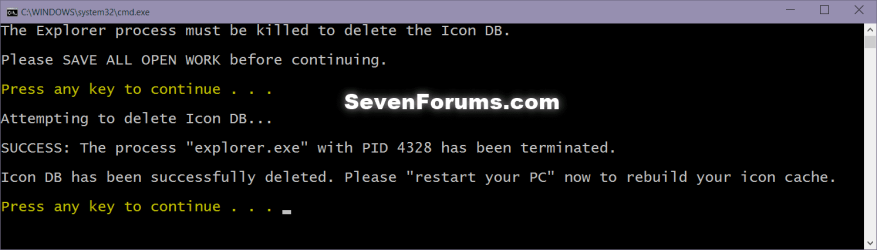
4. Follow the instructions in the command prompt to rebuild the Icon Cache. (see screenshot below)
Icon_cache_command.png
5. Restart your computer to generate a new IconCache.db file.

6. If the icons are still not displaying properly, then download and merge the ICO option in this tutorial for Windows 7 or Windows 8 to restore the default associations of .ico (icon) files.


OPTION TWO

To Manually Rebuild the Icon Cache using the Command Prompt


1. Close and save anything that you are working on. This command will kill explorer and restart the computer when completed.

2. Open a command prompt in Windows 7 or Windows 8.

3. In the command prompt, Copy and paste each command line below exactly as is one at a time and press enter after each command.
:warn:WARNING: The last command will restart the computer, so be sure to close and save anything that you are working on first.
  • ie4uinit.exe -ClearIconCache
  • taskkill /IM explorer.exe /F
  • DEL "%localappdata%\IconCache.db" /A
  • DEL "%localappdata%\Microsoft\Windows\Explorer\iconcache*" /A
  • shutdown /r /f /t 00
4. The IconCache.db file has now been rebuilt.

5. If the icons are still not displaying properly, then download and merge the ICO option in this tutorial for Windows 7 or Windows 8 to restore the default associations of .ico (icon) files.

That's it,
Shawn


Attachments

Last edited:

My Computer My Computer

Computer type
PC/Desktop
Computer Manufacturer/Model Number
Self built custom
OS
64-bit Windows 11 Pro for Workstations
CPU
Intel i7-8700K OC'd to 5 GHz
Motherboard
ASUS ROG Maximus XI Formula Z390
Memory
64 GB (4x16GB) G.SKILL TridentZ RGB DDR4 3600 MHz
Graphics Card(s)
ASUS ROG-STRIX-GTX1080TI-O11G-GAMING
Sound Card
Integrated
Monitor(s) Displays
2 x Samsung Odyssey G7 27"
Screen Resolution
2560x1440
Hard Drives
1TB Samsung 990 PRO M.2,
4TB Samsung 990 PRO PRO M.2,
TerraMaster F8 SSD Plus NAS
PSU
Seasonic Prime Titanium 850W
Case
Thermaltake Core P3
Cooling
Corsair Hydro H115i
Keyboard
Logitech wireless K800
Mouse
Logitech MX Master 4
Internet Speed
2 Gb/s Download and 100 Mb/s Upload
Antivirus
Malwarebyte Anti-Malware Premium
Browser
Google Chrome
Other Info
Logitech Z625 speaker system,
Logitech BRIO 4K Pro webcam,
HP Color LaserJet Pro MFP M477fdn,
APC SMART-UPS RT 1000 XL - SURT1000XLI,
Galaxy S23 Plus phone
In case it found the file i even moved it to a thumb drive and pulled the drive out.
still the same....

found the file - yes it was set at show hidden folders.
i deleted it
emptied recycle bin
as i clicked restart - it appeared again - stubbern little cus isn't it.
same with shut down- appears BEFORE the computer shuts down.
 

My Computer My Computer

OS
7
That's normal. The IconCache.db file will automatically recreate itself. Deleting it just clears and resets the icon cache. Restart as soon as you delete it instead though.
 

My Computer My Computer

Computer type
PC/Desktop
Computer Manufacturer/Model Number
Self built custom
OS
64-bit Windows 11 Pro for Workstations
CPU
Intel i7-8700K OC'd to 5 GHz
Motherboard
ASUS ROG Maximus XI Formula Z390
Memory
64 GB (4x16GB) G.SKILL TridentZ RGB DDR4 3600 MHz
Graphics Card(s)
ASUS ROG-STRIX-GTX1080TI-O11G-GAMING
Sound Card
Integrated
Monitor(s) Displays
2 x Samsung Odyssey G7 27"
Screen Resolution
2560x1440
Hard Drives
1TB Samsung 990 PRO M.2,
4TB Samsung 990 PRO PRO M.2,
TerraMaster F8 SSD Plus NAS
PSU
Seasonic Prime Titanium 850W
Case
Thermaltake Core P3
Cooling
Corsair Hydro H115i
Keyboard
Logitech wireless K800
Mouse
Logitech MX Master 4
Internet Speed
2 Gb/s Download and 100 Mb/s Upload
Antivirus
Malwarebyte Anti-Malware Premium
Browser
Google Chrome
Other Info
Logitech Z625 speaker system,
Logitech BRIO 4K Pro webcam,
HP Color LaserJet Pro MFP M477fdn,
APC SMART-UPS RT 1000 XL - SURT1000XLI,
Galaxy S23 Plus phone
no improvement
icon pics still missing.
and on a MS product! streets and trips 2010
 
Last edited:

My Computer My Computer

OS
7
an email link led to here asking for a screenshot.
no need. it is the standard standin icon a picture with little boxes in it.
for adobe elements 5
reinstalling streets got its icon going.
thanks
 

My Computer My Computer

OS
7
That's great news Anon. I'm happy to hear that you got it sorted. :)
 

My Computer My Computer

Computer type
PC/Desktop
Computer Manufacturer/Model Number
Self built custom
OS
64-bit Windows 11 Pro for Workstations
CPU
Intel i7-8700K OC'd to 5 GHz
Motherboard
ASUS ROG Maximus XI Formula Z390
Memory
64 GB (4x16GB) G.SKILL TridentZ RGB DDR4 3600 MHz
Graphics Card(s)
ASUS ROG-STRIX-GTX1080TI-O11G-GAMING
Sound Card
Integrated
Monitor(s) Displays
2 x Samsung Odyssey G7 27"
Screen Resolution
2560x1440
Hard Drives
1TB Samsung 990 PRO M.2,
4TB Samsung 990 PRO PRO M.2,
TerraMaster F8 SSD Plus NAS
PSU
Seasonic Prime Titanium 850W
Case
Thermaltake Core P3
Cooling
Corsair Hydro H115i
Keyboard
Logitech wireless K800
Mouse
Logitech MX Master 4
Internet Speed
2 Gb/s Download and 100 Mb/s Upload
Antivirus
Malwarebyte Anti-Malware Premium
Browser
Google Chrome
Other Info
Logitech Z625 speaker system,
Logitech BRIO 4K Pro webcam,
HP Color LaserJet Pro MFP M477fdn,
APC SMART-UPS RT 1000 XL - SURT1000XLI,
Galaxy S23 Plus phone
Just curious. What could cause the icons to become corrupted?
Is it a case of power failure / connection failure / fan failure leading to the corruption of the system's registry keys, which then cause the icons to become corrupted?
 

My Computer My Computer

OS
Windows 7 Pro
Hello Ravanx,

It could be a number of things that may cause a icon to become corrupted. Here are some usual causes though:
  • Icon cache itself becomes corrupted causing the icons to not load or load incorrectly.
  • Shortcut loses it's association with it's target file location.
  • The desktop or Windows Explorer window did not refresh properly to show any change that may have been made.
  • If a bad attempt was made to change the icon.
Hope this helps,
Shawn
 

My Computer My Computer

Computer type
PC/Desktop
Computer Manufacturer/Model Number
Self built custom
OS
64-bit Windows 11 Pro for Workstations
CPU
Intel i7-8700K OC'd to 5 GHz
Motherboard
ASUS ROG Maximus XI Formula Z390
Memory
64 GB (4x16GB) G.SKILL TridentZ RGB DDR4 3600 MHz
Graphics Card(s)
ASUS ROG-STRIX-GTX1080TI-O11G-GAMING
Sound Card
Integrated
Monitor(s) Displays
2 x Samsung Odyssey G7 27"
Screen Resolution
2560x1440
Hard Drives
1TB Samsung 990 PRO M.2,
4TB Samsung 990 PRO PRO M.2,
TerraMaster F8 SSD Plus NAS
PSU
Seasonic Prime Titanium 850W
Case
Thermaltake Core P3
Cooling
Corsair Hydro H115i
Keyboard
Logitech wireless K800
Mouse
Logitech MX Master 4
Internet Speed
2 Gb/s Download and 100 Mb/s Upload
Antivirus
Malwarebyte Anti-Malware Premium
Browser
Google Chrome
Other Info
Logitech Z625 speaker system,
Logitech BRIO 4K Pro webcam,
HP Color LaserJet Pro MFP M477fdn,
APC SMART-UPS RT 1000 XL - SURT1000XLI,
Galaxy S23 Plus phone
  • Icon cache itself becomes corrupted causing the icons to not load or load incorrectly.
  • Shortcut loses it's association with it's target file location.
What are the usual causes of the two above scenarios you pointed out??
 

My Computer My Computer

OS
Windows 7 Pro
It could be from a number of things for the icon cache from drive corruption of where the IconCache.db file is located at on the drive, to just simple corruption.

The shortcut could lose it's association if the source file was moved or deleted.
 

My Computer My Computer

Computer type
PC/Desktop
Computer Manufacturer/Model Number
Self built custom
OS
64-bit Windows 11 Pro for Workstations
CPU
Intel i7-8700K OC'd to 5 GHz
Motherboard
ASUS ROG Maximus XI Formula Z390
Memory
64 GB (4x16GB) G.SKILL TridentZ RGB DDR4 3600 MHz
Graphics Card(s)
ASUS ROG-STRIX-GTX1080TI-O11G-GAMING
Sound Card
Integrated
Monitor(s) Displays
2 x Samsung Odyssey G7 27"
Screen Resolution
2560x1440
Hard Drives
1TB Samsung 990 PRO M.2,
4TB Samsung 990 PRO PRO M.2,
TerraMaster F8 SSD Plus NAS
PSU
Seasonic Prime Titanium 850W
Case
Thermaltake Core P3
Cooling
Corsair Hydro H115i
Keyboard
Logitech wireless K800
Mouse
Logitech MX Master 4
Internet Speed
2 Gb/s Download and 100 Mb/s Upload
Antivirus
Malwarebyte Anti-Malware Premium
Browser
Google Chrome
Other Info
Logitech Z625 speaker system,
Logitech BRIO 4K Pro webcam,
HP Color LaserJet Pro MFP M477fdn,
APC SMART-UPS RT 1000 XL - SURT1000XLI,
Galaxy S23 Plus phone
Thanks...

Great Fix!! Thanks :D

You would think that Microsoft would fix this problem?

Kevin
 

My Computer My Computer

Computer Manufacturer/Model Number
HP Pavilion p6140f / Modifications
OS
Windows 7 Ultimate x64-bit SP1
CPU
Intel Core 2 Quad Q9650 3.00GHz
Motherboard
ASUS IPIBL-LB
Memory
8GB PC2-6400 DDR2 Copper Heat Spreaders
Graphics Card(s)
XFX GeForce 9400GT 1GB DDR2 PCI Express 2.0
Sound Card
High Definition Audio
Monitor(s) Displays
Acer 22" x223w, Acer 19" G205H
Screen Resolution
1680 x 1050, 1600 x 900
Hard Drives
128 GB Crucial RealSSD C300 (OS)
750 GB WD Caviar Black 7200RPM Serial ATA HDD
2 TB WD Caviar Green Serial ATA HDD
2 X 1 TB WD Caviar Green Serial ATA HDD
2 X 1.5 TB Seagate FreeAgent USB 2.0 7200RPM
500 GB Seagate FreeAgent USB 2.0 7200RPM
PSU
Sunbeam 650W ATX12V V2.3
Case
HP Case
Keyboard
Microsoft SideWinder X6 Black Keyboard
Mouse
Microsoft SideWinder X8 Black 2.4GHz Wireless 4000
Internet Speed
http://www.speedtest.net/result/951887022.png
You're most welcome Kevin. :)
 

My Computer My Computer

Computer type
PC/Desktop
Computer Manufacturer/Model Number
Self built custom
OS
64-bit Windows 11 Pro for Workstations
CPU
Intel i7-8700K OC'd to 5 GHz
Motherboard
ASUS ROG Maximus XI Formula Z390
Memory
64 GB (4x16GB) G.SKILL TridentZ RGB DDR4 3600 MHz
Graphics Card(s)
ASUS ROG-STRIX-GTX1080TI-O11G-GAMING
Sound Card
Integrated
Monitor(s) Displays
2 x Samsung Odyssey G7 27"
Screen Resolution
2560x1440
Hard Drives
1TB Samsung 990 PRO M.2,
4TB Samsung 990 PRO PRO M.2,
TerraMaster F8 SSD Plus NAS
PSU
Seasonic Prime Titanium 850W
Case
Thermaltake Core P3
Cooling
Corsair Hydro H115i
Keyboard
Logitech wireless K800
Mouse
Logitech MX Master 4
Internet Speed
2 Gb/s Download and 100 Mb/s Upload
Antivirus
Malwarebyte Anti-Malware Premium
Browser
Google Chrome
Other Info
Logitech Z625 speaker system,
Logitech BRIO 4K Pro webcam,
HP Color LaserJet Pro MFP M477fdn,
APC SMART-UPS RT 1000 XL - SURT1000XLI,
Galaxy S23 Plus phone
Help with corrupted application icons on desktop

Hi Brink:

My application icons are not displaying their program icons on my desktop but rather a file folder icon super imposed on the program's icon.

This problem first became apparent when I was away from my computer for a week or so, came back and Microsoft had downloaded several "fixes" that would not all install. I suppose something was corrupted when I had to restart the computer and nothing appeared on the screen except the cursor. As a side note, and possibly the problem why attempts to repair the program (not Win 7) icons hasn't worked is I now have under "User Profiles" in the control panel the following profiles: "Account unknown 6.54 GB", "Default profile 1.54 MB" and "Larry-PC Administrator 2.25 GB."
I don't know where the Account Unknown profile came from but it is mentioned in case it could be the problem. When I boot up I seem to go into the "Larry-PC ADM" profile so..........

I have run SFC Scan.....no problems.
I have followed all the steps above in your responses and nothing works.
I have tried uninstalling some of the Apps and reinstalling them but the icons are still generic folders over the app provided icons.
I have tried the .ico file association download fix....no help.
I have tried changing the size of the icons...no help.
I have tried deleting the IconCache.db file using the batch program. My computer could not execute the line "Taskkill/IM......... but I have deleted the file using another suggestion (killed explorer.exe, deleted, restarted, etc) but it didn't work either.

As I said earlier, the Win 7 program Icons on the desktop, except for the Trash Icon on the main desktop (such as Hearts, Solitaire, etc) are also corrupted and can not be changed using the "change Icon" option under properties. All the icons in the Quick Launch section of my desktop are displaying properly, even the application icons that were moved into this section before my main desktop icons became corrupted and after the corruption.

Any suggestions would be greatly appreciated and eagerly attempted.
 
Last edited:

My Computer My Computer

Computer Manufacturer/Model Number
Alienware Area-51 7500-R4
OS
Windows 7
CPU
D-Core 2 Duo Extreme 2.66GHZ QX6700 8M
Motherboard
EVGA nForce 680I
Memory
8GB DDR2 PC-6400
Graphics Card(s)
2 nVidia dual SLI configured, 280
Sound Card
Creative Augigy 4 w/driver 6.01.1371 w/Dell 5.1 speakers
Monitor(s) Displays
Samsung Syncmaster 24T
Screen Resolution
1900X1200
Hard Drives
2 Seagate 250GB SATA 3G 7200RPM 8MB Cache running Raid 0
1 Seagate 250GB SATA 3G 7200RPM 8MB Cache (Data drive)
Cooling
liquid
Mouse
Logitek

My Computer My Computer

Computer type
PC/Desktop
Computer Manufacturer/Model Number
Self built custom
OS
64-bit Windows 11 Pro for Workstations
CPU
Intel i7-8700K OC'd to 5 GHz
Motherboard
ASUS ROG Maximus XI Formula Z390
Memory
64 GB (4x16GB) G.SKILL TridentZ RGB DDR4 3600 MHz
Graphics Card(s)
ASUS ROG-STRIX-GTX1080TI-O11G-GAMING
Sound Card
Integrated
Monitor(s) Displays
2 x Samsung Odyssey G7 27"
Screen Resolution
2560x1440
Hard Drives
1TB Samsung 990 PRO M.2,
4TB Samsung 990 PRO PRO M.2,
TerraMaster F8 SSD Plus NAS
PSU
Seasonic Prime Titanium 850W
Case
Thermaltake Core P3
Cooling
Corsair Hydro H115i
Keyboard
Logitech wireless K800
Mouse
Logitech MX Master 4
Internet Speed
2 Gb/s Download and 100 Mb/s Upload
Antivirus
Malwarebyte Anti-Malware Premium
Browser
Google Chrome
Other Info
Logitech Z625 speaker system,
Logitech BRIO 4K Pro webcam,
HP Color LaserJet Pro MFP M477fdn,
APC SMART-UPS RT 1000 XL - SURT1000XLI,
Galaxy S23 Plus phone
Missing apps icons on desktop

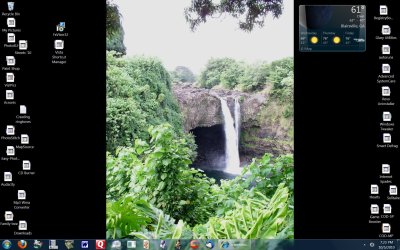
Shawn: I tried the shortcut removal tool...nothing. I am attaching a screenshot.
Thanks
 

Attachments

  • PvtMatter's Desktop.jpg
    PvtMatter's Desktop.jpg
    317.8 KB · Views: 635

My Computer My Computer

Computer Manufacturer/Model Number
Alienware Area-51 7500-R4
OS
Windows 7
CPU
D-Core 2 Duo Extreme 2.66GHZ QX6700 8M
Motherboard
EVGA nForce 680I
Memory
8GB DDR2 PC-6400
Graphics Card(s)
2 nVidia dual SLI configured, 280
Sound Card
Creative Augigy 4 w/driver 6.01.1371 w/Dell 5.1 speakers
Monitor(s) Displays
Samsung Syncmaster 24T
Screen Resolution
1900X1200
Hard Drives
2 Seagate 250GB SATA 3G 7200RPM 8MB Cache running Raid 0
1 Seagate 250GB SATA 3G 7200RPM 8MB Cache (Data drive)
Cooling
liquid
Mouse
Logitek
PvtMatter,

Let's see if doing a system restore using a restore point dated before this happened may be able to undo and fix this for you.

Do the shortcuts still work and open the programs?
 

My Computer My Computer

Computer type
PC/Desktop
Computer Manufacturer/Model Number
Self built custom
OS
64-bit Windows 11 Pro for Workstations
CPU
Intel i7-8700K OC'd to 5 GHz
Motherboard
ASUS ROG Maximus XI Formula Z390
Memory
64 GB (4x16GB) G.SKILL TridentZ RGB DDR4 3600 MHz
Graphics Card(s)
ASUS ROG-STRIX-GTX1080TI-O11G-GAMING
Sound Card
Integrated
Monitor(s) Displays
2 x Samsung Odyssey G7 27"
Screen Resolution
2560x1440
Hard Drives
1TB Samsung 990 PRO M.2,
4TB Samsung 990 PRO PRO M.2,
TerraMaster F8 SSD Plus NAS
PSU
Seasonic Prime Titanium 850W
Case
Thermaltake Core P3
Cooling
Corsair Hydro H115i
Keyboard
Logitech wireless K800
Mouse
Logitech MX Master 4
Internet Speed
2 Gb/s Download and 100 Mb/s Upload
Antivirus
Malwarebyte Anti-Malware Premium
Browser
Google Chrome
Other Info
Logitech Z625 speaker system,
Logitech BRIO 4K Pro webcam,
HP Color LaserJet Pro MFP M477fdn,
APC SMART-UPS RT 1000 XL - SURT1000XLI,
Galaxy S23 Plus phone
Yes, I tried system restore...in fact several of them going back as much as two weeks.....no joy.

All the icons launch the programs. Did I mention I uninstalled some of the apps and reinstalled them only to have the same "file folder" icon show on the desktop?

I downloaded the fix, FXVISOR32 to my desktop and it shows as the correct icon. However when I extracted it (see my screenshot), it appears as all the other icons........a file folder or page. Additionally, if I move any of the icons to the quick launch bar at the bottom of the screen, the proper app icons shows there. When I move it back, it reverts. Also, if I change the size of the icons to 150%, I can see the original, i.e. Firefox, behind the page or folder icon. Next suggestion? I don't want to do a reinstall so................
 

My Computer My Computer

Computer Manufacturer/Model Number
Alienware Area-51 7500-R4
OS
Windows 7
CPU
D-Core 2 Duo Extreme 2.66GHZ QX6700 8M
Motherboard
EVGA nForce 680I
Memory
8GB DDR2 PC-6400
Graphics Card(s)
2 nVidia dual SLI configured, 280
Sound Card
Creative Augigy 4 w/driver 6.01.1371 w/Dell 5.1 speakers
Monitor(s) Displays
Samsung Syncmaster 24T
Screen Resolution
1900X1200
Hard Drives
2 Seagate 250GB SATA 3G 7200RPM 8MB Cache running Raid 0
1 Seagate 250GB SATA 3G 7200RPM 8MB Cache (Data drive)
Cooling
liquid
Mouse
Logitek
As a test, create a new administrator account and see if they display that way in it as well to see if it may be a issue just in your user account or not.
 

My Computer My Computer

Computer type
PC/Desktop
Computer Manufacturer/Model Number
Self built custom
OS
64-bit Windows 11 Pro for Workstations
CPU
Intel i7-8700K OC'd to 5 GHz
Motherboard
ASUS ROG Maximus XI Formula Z390
Memory
64 GB (4x16GB) G.SKILL TridentZ RGB DDR4 3600 MHz
Graphics Card(s)
ASUS ROG-STRIX-GTX1080TI-O11G-GAMING
Sound Card
Integrated
Monitor(s) Displays
2 x Samsung Odyssey G7 27"
Screen Resolution
2560x1440
Hard Drives
1TB Samsung 990 PRO M.2,
4TB Samsung 990 PRO PRO M.2,
TerraMaster F8 SSD Plus NAS
PSU
Seasonic Prime Titanium 850W
Case
Thermaltake Core P3
Cooling
Corsair Hydro H115i
Keyboard
Logitech wireless K800
Mouse
Logitech MX Master 4
Internet Speed
2 Gb/s Download and 100 Mb/s Upload
Antivirus
Malwarebyte Anti-Malware Premium
Browser
Google Chrome
Other Info
Logitech Z625 speaker system,
Logitech BRIO 4K Pro webcam,
HP Color LaserJet Pro MFP M477fdn,
APC SMART-UPS RT 1000 XL - SURT1000XLI,
Galaxy S23 Plus phone
corrupted icons on desktop.

Brink:

Do I delete the other users after I create a new user? I tried just adding another user. Now I can only get in in safe mode. I now have four userw. My other users are Larry-PC\ADM, the original, another user that cropped up recently called "Account unknown". "Default user", can't get into this one...computer says "The Sens service can not connect...please consult your system adm". and the last user I created I can only access in safe mode, Larry-PC\Larry Account. When my computer tries to boot normally, I get a screen with my original login info, Larry-PC\ADM which requests a password. I never assigned one and in the old days, would just hit enter and the computer would boot. Now it will not and states I have enterted an invalid password. I have to keep fiddling around to switch users to the new account I just created (still in safe mode) and the muddled desktop icons are still there just like in the screensho I sent.

So...do I delete all users and just create one new user?
 

My Computer My Computer

Computer Manufacturer/Model Number
Alienware Area-51 7500-R4
OS
Windows 7
CPU
D-Core 2 Duo Extreme 2.66GHZ QX6700 8M
Motherboard
EVGA nForce 680I
Memory
8GB DDR2 PC-6400
Graphics Card(s)
2 nVidia dual SLI configured, 280
Sound Card
Creative Augigy 4 w/driver 6.01.1371 w/Dell 5.1 speakers
Monitor(s) Displays
Samsung Syncmaster 24T
Screen Resolution
1900X1200
Hard Drives
2 Seagate 250GB SATA 3G 7200RPM 8MB Cache running Raid 0
1 Seagate 250GB SATA 3G 7200RPM 8MB Cache (Data drive)
Cooling
liquid
Mouse
Logitek
Back
Top