icon dll files not recognized

EdPell

New member
Local time
3:20 PM
Messages
26
When I recently moved from XP to Win 7, I copied over a few dll files containing icons, but Win 7 doesn't seem to recognize them as such. I tried using an old program I had on the XP, IcoFx, as well as IconsExt, Icons From Files, and IconViewer, but none are effective.

With IconViewer installed, the Icons tab does appear on the Properties sheet for shell32.dll, but not for the other dll files. The other three programs I tried report that there are no icons in the dll file. Everything still looks okay on my XP machine (which I miss).

Any ideas why these dll files are not recognized for what they actually are?

Thanks
EdP
 

My Computer

Computer type
PC/Desktop
Computer Manufacturer/Model Number
Dell
OS
win 7 Home Premium
CPU
3.4GhZ
Motherboard
Dell 0KWVT8
Memory
8GB
Graphics Card(s)
NVIDIA GeForce GT 635
Monitor(s) Displays
Dell 2407
Hard Drives
ST1000DM003
Antivirus
Windows/SAS/MBAM
Browser
Firefox
Welcome to Seven Forums Ed. Specifically what are you trying to do? Replace 7 system files with those from XP? Are you just trying to change certain icons, and if so, which ones? A Guy
 

My Computer

Computer type
PC/Desktop
OS
Windows 10 Home x64
CPU
INTEL Core i5-750 Quad-Core 3.37GHz
Motherboard
ASUS P7P55D
Memory
HyperX Fury Black Series 8GB (2 x 4GB) 1866Mhz
Graphics Card(s)
EVGA GeForce GTX 750 Superclocked 1GB 128-Bit GDDR5
Monitor(s) Displays
LG 32MA68HY 32" IPS
Screen Resolution
1920 x 1080
Hard Drives
Samsung 840 Evo 120GB, SEAGATE 500GB Barracuda® 7200.12, SATA 3 Gb/s, 7200 RPM, 16MB cache
PSU
ANTEC TruePower New TP-550, 80 PLUS, 550W
Case
ANTEC Three Hundred Illusion
Cooling
COOLER MASTER Hyper 212 Plus, 4 x 120mm 1 x 140mm Noctua's
Internet Speed
85 + Mbps
Antivirus
Avast
Browser
Vivaldi
Hi, Guy...
Thanks for responding.

Specifically, all I'm trying to do is replace a shortcut icon with an icon from a DLL file.

I organize my desktop by creating folders containing shortcuts to applications I often use. I like to apply relevant icons to those folders and have become accustomed to what the icons represent.

Some of the icons I use are .ICO files which I've applied to these shortcuts with no problem.

Others are icons embedded in one of several DLL files I have. In XP, if one of these DLL files is selected when changing an icon, the icons in the DLL file are displayed and can be selected just like the icons embedded in SHELL32.DLL.

However, in Win 7 if I select one of my DLL files its icons are not displayed, but this message is: "The file path\fn.DLL contains no icons."

And, as I indicated in my original post, icon extraction programs are unable to find any icons in these files.

EdP
 

My Computer

Computer type
PC/Desktop
Computer Manufacturer/Model Number
Dell
OS
win 7 Home Premium
CPU
3.4GhZ
Motherboard
Dell 0KWVT8
Memory
8GB
Graphics Card(s)
NVIDIA GeForce GT 635
Monitor(s) Displays
Dell 2407
Hard Drives
ST1000DM003
Antivirus
Windows/SAS/MBAM
Browser
Firefox
Were these dll's created using a particular program? Often, although they appear to be regular dlls, windows cannot open them without the original program. These dlls are something you created, or they are from a program not installed in 7, or?

This could also be a permissions issue, either taking ownership, and/or security.

If you like, zip up the dlls and attach it here and we can have a look.

A Guy
 

My Computer

Computer type
PC/Desktop
OS
Windows 10 Home x64
CPU
INTEL Core i5-750 Quad-Core 3.37GHz
Motherboard
ASUS P7P55D
Memory
HyperX Fury Black Series 8GB (2 x 4GB) 1866Mhz
Graphics Card(s)
EVGA GeForce GTX 750 Superclocked 1GB 128-Bit GDDR5
Monitor(s) Displays
LG 32MA68HY 32" IPS
Screen Resolution
1920 x 1080
Hard Drives
Samsung 840 Evo 120GB, SEAGATE 500GB Barracuda® 7200.12, SATA 3 Gb/s, 7200 RPM, 16MB cache
PSU
ANTEC TruePower New TP-550, 80 PLUS, 550W
Case
ANTEC Three Hundred Illusion
Cooling
COOLER MASTER Hyper 212 Plus, 4 x 120mm 1 x 140mm Noctua's
Internet Speed
85 + Mbps
Antivirus
Avast
Browser
Vivaldi
Guy ...

I don't know what program created these dll's - they're files I found back in the 90's and have been using in XP.

I read the instructions on how to attach a file and 7-zipped two of them to upload, but nothing happens when I click on the paper clip.

EdP
 

My Computer

Computer type
PC/Desktop
Computer Manufacturer/Model Number
Dell
OS
win 7 Home Premium
CPU
3.4GhZ
Motherboard
Dell 0KWVT8
Memory
8GB
Graphics Card(s)
NVIDIA GeForce GT 635
Monitor(s) Displays
Dell 2407
Hard Drives
ST1000DM003
Antivirus
Windows/SAS/MBAM
Browser
Firefox
I don't see 7-zip on the list of attachments accepted. It may only accept zips, and they must be less then 8Mb. A Guy
 

My Computer

Computer type
PC/Desktop
OS
Windows 10 Home x64
CPU
INTEL Core i5-750 Quad-Core 3.37GHz
Motherboard
ASUS P7P55D
Memory
HyperX Fury Black Series 8GB (2 x 4GB) 1866Mhz
Graphics Card(s)
EVGA GeForce GTX 750 Superclocked 1GB 128-Bit GDDR5
Monitor(s) Displays
LG 32MA68HY 32" IPS
Screen Resolution
1920 x 1080
Hard Drives
Samsung 840 Evo 120GB, SEAGATE 500GB Barracuda® 7200.12, SATA 3 Gb/s, 7200 RPM, 16MB cache
PSU
ANTEC TruePower New TP-550, 80 PLUS, 550W
Case
ANTEC Three Hundred Illusion
Cooling
COOLER MASTER Hyper 212 Plus, 4 x 120mm 1 x 140mm Noctua's
Internet Speed
85 + Mbps
Antivirus
Avast
Browser
Vivaldi
Thank you for your patience.

Actually, 7Zip can create an archive in zip, 7z, tar, and wim formats. I chose zip.

But I never even got far enough for the forum to know what I wanted to attach because, according to the instructions, clicking the paper clip starts the file upload process which has to happen before specifying where in the post to attach the file.

But I just realized why the paper clip AND the Manage Attachments button were inactive. I have the FireFox NoScript Add-on active and didn't notice that it was barring those options. It's not the first time and it's beginning to get to me.

The file:
View attachment icon-dll.zip

EdP
 

My Computer

Computer type
PC/Desktop
Computer Manufacturer/Model Number
Dell
OS
win 7 Home Premium
CPU
3.4GhZ
Motherboard
Dell 0KWVT8
Memory
8GB
Graphics Card(s)
NVIDIA GeForce GT 635
Monitor(s) Displays
Dell 2407
Hard Drives
ST1000DM003
Antivirus
Windows/SAS/MBAM
Browser
Firefox
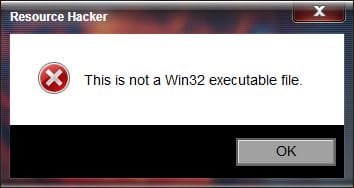
Hmmm, they don't appear to be actual dll files. Resource Hacker reports they are not valid Win32 executable file. Universal extractor reports it is not a valid PE file (Portable Executable). Do you still have the XP PC? If so, I'd try and extract the icons and save them in .ico format. Either these files are corrupt, or were created by a program and given the dll extension, but are not actual dlls.

Win32.jpg

PE.jpg

I'll also post to the Gurus, see if anyone else has any ideas. A Guy
 

My Computer

Computer type
PC/Desktop
OS
Windows 10 Home x64
CPU
INTEL Core i5-750 Quad-Core 3.37GHz
Motherboard
ASUS P7P55D
Memory
HyperX Fury Black Series 8GB (2 x 4GB) 1866Mhz
Graphics Card(s)
EVGA GeForce GTX 750 Superclocked 1GB 128-Bit GDDR5
Monitor(s) Displays
LG 32MA68HY 32" IPS
Screen Resolution
1920 x 1080
Hard Drives
Samsung 840 Evo 120GB, SEAGATE 500GB Barracuda® 7200.12, SATA 3 Gb/s, 7200 RPM, 16MB cache
PSU
ANTEC TruePower New TP-550, 80 PLUS, 550W
Case
ANTEC Three Hundred Illusion
Cooling
COOLER MASTER Hyper 212 Plus, 4 x 120mm 1 x 140mm Noctua's
Internet Speed
85 + Mbps
Antivirus
Avast
Browser
Vivaldi
Can you show an example of the icon of what program it's for? I or someone else may be able to make one that will work in w7.

It may not be compatible with w7.
 

My Computer

Computer type
PC/Desktop
Computer Manufacturer/Model Number
Home Built Desktop By DataTech
OS
Windows 7 Ultimate X64 SP1
CPU
Intel i5-2550K, Differing ~4.4-4.8GHz No built in GPU
Motherboard
ASUS P8Z68-V PRO/GEN3
Memory
16GB G.Skill Sniper 1866MHz @ 2133MHz 2x8GB
Graphics Card(s)
ASUS GTX650TIB-DC2OC-2GD5, (650TI Boost)
Sound Card
Onboard Realtek 5-1
Monitor(s) Displays
Samsung P2570HD
Screen Resolution
1920x1080
Hard Drives
Samsung 840 Pro 256GB SSD for OS, 500GB Seagate Constellation (Enterprise drive) for Data
PSU
Corsair HX650W
Case
Inwin Dragon Rider
Cooling
Hyper 212 EVO w/two Noctua fans, push-pull, @1300 RPM
Keyboard
E-Z Eyes, bright yellow keys with large characters
Mouse
steelseries SENSEI Laser Pro Gaming
Internet Speed
48-51Mbs Mbs down, 11 Mbs up Xfinity Cable
Antivirus
Norton Internet Security 2013
Browser
IE 10, Opera, Pale Moon if needed
Other Info
4 case fans, LG BluRay-RE, ASUS DVD-RW, Mr. Fusion power supply, 1.21 gigawatts.
Very odd.

Using XP SP3, IcoFx extracts the icons from those DLL files, but with a warning message that it's not a 32-bit file, only the 32x32 image will be extracted, and the transparency will be lost.
Using Win 7, IcoFx reports there are no icons in the file.
Curioser and curioser.

Using XP, I was able to extract an icon as an .ico file and the transparency was indeed lost. I invoked IcoFx in Win 7, opened that icon, and drew in the transparency myself. This is what I'll do for other icons I'm hardheaded about having.

FWIW - I'm using the old (free) version 1.6; IcoFx is now at 2.6 and is no longer free.
I think I've wasted enough of your time on this. Others must have much more urgent problems.

Thanks very much for your time, effort, and expertise, Guy. And Britton - thanks for the generous offer.

EdP
 

My Computer

Computer type
PC/Desktop
Computer Manufacturer/Model Number
Dell
OS
win 7 Home Premium
CPU
3.4GhZ
Motherboard
Dell 0KWVT8
Memory
8GB
Graphics Card(s)
NVIDIA GeForce GT 635
Monitor(s) Displays
Dell 2407
Hard Drives
ST1000DM003
Antivirus
Windows/SAS/MBAM
Browser
Firefox
The nice thing with w7 it can use .png images up to 256x256 for icons in a few places.
 

My Computer

Computer type
PC/Desktop
Computer Manufacturer/Model Number
Home Built Desktop By DataTech
OS
Windows 7 Ultimate X64 SP1
CPU
Intel i5-2550K, Differing ~4.4-4.8GHz No built in GPU
Motherboard
ASUS P8Z68-V PRO/GEN3
Memory
16GB G.Skill Sniper 1866MHz @ 2133MHz 2x8GB
Graphics Card(s)
ASUS GTX650TIB-DC2OC-2GD5, (650TI Boost)
Sound Card
Onboard Realtek 5-1
Monitor(s) Displays
Samsung P2570HD
Screen Resolution
1920x1080
Hard Drives
Samsung 840 Pro 256GB SSD for OS, 500GB Seagate Constellation (Enterprise drive) for Data
PSU
Corsair HX650W
Case
Inwin Dragon Rider
Cooling
Hyper 212 EVO w/two Noctua fans, push-pull, @1300 RPM
Keyboard
E-Z Eyes, bright yellow keys with large characters
Mouse
steelseries SENSEI Laser Pro Gaming
Internet Speed
48-51Mbs Mbs down, 11 Mbs up Xfinity Cable
Antivirus
Norton Internet Security 2013
Browser
IE 10, Opera, Pale Moon if needed
Other Info
4 case fans, LG BluRay-RE, ASUS DVD-RW, Mr. Fusion power supply, 1.21 gigawatts.
If you extract some icons you want, post them here and we can see if we can find better versions for you. A Guy
 

My Computer

Computer type
PC/Desktop
OS
Windows 10 Home x64
CPU
INTEL Core i5-750 Quad-Core 3.37GHz
Motherboard
ASUS P7P55D
Memory
HyperX Fury Black Series 8GB (2 x 4GB) 1866Mhz
Graphics Card(s)
EVGA GeForce GTX 750 Superclocked 1GB 128-Bit GDDR5
Monitor(s) Displays
LG 32MA68HY 32" IPS
Screen Resolution
1920 x 1080
Hard Drives
Samsung 840 Evo 120GB, SEAGATE 500GB Barracuda® 7200.12, SATA 3 Gb/s, 7200 RPM, 16MB cache
PSU
ANTEC TruePower New TP-550, 80 PLUS, 550W
Case
ANTEC Three Hundred Illusion
Cooling
COOLER MASTER Hyper 212 Plus, 4 x 120mm 1 x 140mm Noctua's
Internet Speed
85 + Mbps
Antivirus
Avast
Browser
Vivaldi
Back
Top