Icon for folders question

lucasbuck

New member
Member
Local time
11:35 PM
Messages
57
Is there a way to set a folder icon to just use the first image it finds in that folder? I'm a teacher, and have my resources scanned. The cover, first page, second, etc. etc. It would be nice if the icon could just be that first cover image. Rather than a half open folder. Thanks for any info!
 

My Computer

Computer Manufacturer/Model Number
Custom desktop
OS
Windows 7 Professional 64bit
CPU
Intel Core i7 920 @ 2.67GHz
Motherboard
EVGA 141-BL-E757 (Socket 423)
Memory
6.00 GB Triple-Channel DDR3 @ 530MHz
Graphics Card(s)
ATI Radeon HD 5800 Series (XFX Pine Group)
Sound Card
AMD High Definition Audio Device
Hard Drives
932GB Western Digital WDC WD1001FALS-00J7B1 ATA Device (SATA)
2795GB Western Digital WDC WD30EZRX-00MMMB0 ATA Device (SATA)
1863GB Western Digital WDC WD2001FASS-00W2B0 ATA Device (SATA)
1863GB Western Digital WDC WD20EADS-00S2B0 ATA Device (SATA)
Internet Speed
Cable
Disable Thumbnail Preview .

Now, take a pic of the cover using snipping tool, save it as a .png image .

convert the png to icon at http://www.convertico.com/ . Save the icon at any real location where it will stay for a long time without being disturbed .

Right click on the desired folder and select properties . Now go to the customize tab . Click on the "change icon" button .... browse to the location where the icon is saved .... apply > OK .

Hope it helps .


My Computer

Computer type
PC/Desktop
Computer Manufacturer/Model Number
Self Assembled
OS
Microsoft Windows 10 Pro Insider Preview 64-bit
CPU
Intel(R) Core(TM) i3-4130 CPU @ 3.40GHz
Motherboard
Gigabyte Technology Co., Ltd. B85M-D3H
Memory
Corsair Vengence 4GB x2 (8.00GB Dual-Channel DDR3 @ 798MHz)
Graphics Card(s)
2047MB GeForce GTS 450 (ZOTAC International)
Sound Card
Onboard (Realtek High Definition Audio)
Monitor(s) Displays
LG Flatron E2040T
Screen Resolution
1600x900
Hard Drives
Western Digital 1 TB
Seagate 500 GB
PSU
Corsair VS550
Case
Cooler Master K380
Cooling
Cooler Master Seidon 120V Plus
Keyboard
Logitech MK260r
Mouse
Logitech MK260r
Internet Speed
PMPL Broadband
Antivirus
Windows Defender + MBAM
Browser
Firefox
Other Info
Dell Studio 15" Laptop
right click the folder that you want the image showing on ,select properties choose customise tab then select choose file in folder pictures section, then select the picture you want showing , another way is to rename the first picture to folder this will then show in the same manner that you require.
edit:
actually on a closer read of your post you would have to have the first image saved as an ico file then change the folder icon same steps as before ,properties /customise /change icon
a good place to convert an image to an ico file is here.
http://www.convertico.com/
i have done this with my movies folder
e.g
2011-08-17_2114.png
 

My Computer

Computer Manufacturer/Model Number
Hewlett packard/p6512uk
OS
Microsoft Windows 7 Home Premium 64-bit 7600
CPU
IIx4 amd athelon 635 processor
Motherboard
FOXCONN 2AA9
Memory
2x2gb
Graphics Card(s)
ati radeon HD 5450
Sound Card
(1) Realtek High Definition Audio (2) AMD High Definition
Monitor(s) Displays
samsung lcd tv 32"
Screen Resolution
1360x 768
Hard Drives
(1) WDC WD10 01FAES-60Z2A0 SATA Disk Device (2) Maxtor OneTouch USB Device (3) ST310003 33AS USB Device (4) WD My Book 1111 USB Device
PSU
?
Cooling
air!
Keyboard
wireless hp
Mouse
wireless Hp,optical
Internet Speed
1.10mb/s
Antivirus
MSE
Browser
Firefox
That's a nifty trick there! The gf will love this! Is there any downloadable app like that so I will not have to go to the site whenever I will convert? Just asking:)
 

My Computer

Computer type
PC/Desktop
Computer Manufacturer/Model Number
Custom Build
OS
Win7 Ultimate 64bit
CPU
AMD A8 5600K APU
Motherboard
Gigabyte F2A75MD3H
Memory
16gb DDR3
Graphics Card(s)
Radeon 7560
Sound Card
onboard
Monitor(s) Displays
kingston lcd 23inch wide
Hard Drives
WD 500gb (2)
WD 1TB
Antivirus
EAM + Online Armor Premium -- desktop

My Computer

Computer type
PC/Desktop
Computer Manufacturer/Model Number
Self Assembled
OS
Microsoft Windows 10 Pro Insider Preview 64-bit
CPU
Intel(R) Core(TM) i3-4130 CPU @ 3.40GHz
Motherboard
Gigabyte Technology Co., Ltd. B85M-D3H
Memory
Corsair Vengence 4GB x2 (8.00GB Dual-Channel DDR3 @ 798MHz)
Graphics Card(s)
2047MB GeForce GTS 450 (ZOTAC International)
Sound Card
Onboard (Realtek High Definition Audio)
Monitor(s) Displays
LG Flatron E2040T
Screen Resolution
1600x900
Hard Drives
Western Digital 1 TB
Seagate 500 GB
PSU
Corsair VS550
Case
Cooler Master K380
Cooling
Cooler Master Seidon 120V Plus
Keyboard
Logitech MK260r
Mouse
Logitech MK260r
Internet Speed
PMPL Broadband
Antivirus
Windows Defender + MBAM
Browser
Firefox
Other Info
Dell Studio 15" Laptop
That's a nifty trick there! The gf will love this! Is there any downloadable app like that so I will not have to go to the site whenever I will convert? Just asking:)

You could dowload IcoFx from here. IcoFX - The Free Icon Editor. It will convert pictures to icons along with lots of other features.


Arc beat me to it.
 
Last edited:

My Computer

Computer type
Laptop
Computer Manufacturer/Model Number
Hewlett-Packard/G62-107SA Notebook
OS
Microsoft Windows 7 Home Premium 64-bit Service Pack 1
CPU
Intel(R) Core(TM) i3 CPU M 330 @ 2.13GHz
Motherboard
Hewlett-Packard 1425
Memory
8 GB DDR3
Graphics Card(s)
Intel(R) HD Graphics
Sound Card
Realtek High Definition Audio
Monitor(s) Displays
Builtin
Screen Resolution
1366 x 768 x 32 bits (4294967296 colors) @ 60 Hz
Hard Drives
250 GB SATA Hard Disk Drive 7200 rpm
2TB Seagate GoFlex USB 2 Drive
1TB Iomega Prestige USB 2 Drive
1.5TB Iomega Prestige USB 2 Drive (Samsung)
2TB WD MyBook Live NAS.
Mouse
Logitech Anywhere MX
Internet Speed
152 Mbs download 10 Mbs upload
Antivirus
Norton 360
Browser
Chrome
@kado897/Arc,

Thanks for the reply:)

Yeah will do(so I can convert without connection).

I just tried the service ConvertICO.com - Convert .PNG format files to .ICO or .ICO format files to .PNG : Windows Vista compatible icons and it's great! One question, I see that some of the icon takes the shape of the image itself round or angular...how do you do that? I tried to convert a BMW logo to an icon and it still had the "square" around it. Do you have to use Photoshop to cut the rest of what you don't like...or is there something faster?

Just asking;)
 

My Computer

Computer type
PC/Desktop
Computer Manufacturer/Model Number
Custom Build
OS
Win7 Ultimate 64bit
CPU
AMD A8 5600K APU
Motherboard
Gigabyte F2A75MD3H
Memory
16gb DDR3
Graphics Card(s)
Radeon 7560
Sound Card
onboard
Monitor(s) Displays
kingston lcd 23inch wide
Hard Drives
WD 500gb (2)
WD 1TB
Antivirus
EAM + Online Armor Premium -- desktop
Hi Damien,

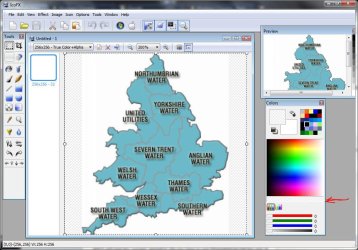
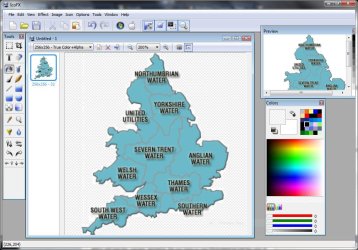
If you have a white background to the image that will show up. What you have to do is turn that into a transparent background. In IcoFx is is quite easy.

1. Select the transparent color.

Capture.JPG

2. Use the Paint Pot tool.

Capture1.JPG

3. Apply to the white areas. It changes everything the same color.

Capture2.JPG

Not sure the checkered transparent BG shows very well.
 

My Computer

Computer type
Laptop
Computer Manufacturer/Model Number
Hewlett-Packard/G62-107SA Notebook
OS
Microsoft Windows 7 Home Premium 64-bit Service Pack 1
CPU
Intel(R) Core(TM) i3 CPU M 330 @ 2.13GHz
Motherboard
Hewlett-Packard 1425
Memory
8 GB DDR3
Graphics Card(s)
Intel(R) HD Graphics
Sound Card
Realtek High Definition Audio
Monitor(s) Displays
Builtin
Screen Resolution
1366 x 768 x 32 bits (4294967296 colors) @ 60 Hz
Hard Drives
250 GB SATA Hard Disk Drive 7200 rpm
2TB Seagate GoFlex USB 2 Drive
1TB Iomega Prestige USB 2 Drive
1.5TB Iomega Prestige USB 2 Drive (Samsung)
2TB WD MyBook Live NAS.
Mouse
Logitech Anywhere MX
Internet Speed
152 Mbs download 10 Mbs upload
Antivirus
Norton 360
Browser
Chrome
Hi Keith

Never used IcoFx so thought I would stop been lazy using the on-line converters and have a pop.When you add the transparency how do you apply to the whole of the white background in one go. I'm finding the paint pot tool is applying it in sections sometimes large but then other times pixel by pixel and with my eyes its impossible to see the chequered transparency so I cant tell where I've been and where I haven't.

Danny
 

My Computer

Computer Manufacturer/Model Number
acer aspire 5935g
OS
Windows 7 Home Premium x64 SP1
CPU
intel(R)core(TM)2 duo CPU T6600 @ 2.20GHz
Motherboard
intel gm45/gm47 revision 07
Memory
3 gb ddr3
Graphics Card(s)
ati radeon hd4570/512mb
Monitor(s) Displays
lop156wh2-tle1 15.3 flat
Screen Resolution
1366x768
Hard Drives
OCZ-Agility3 60gig ssd
320gig external hdd
500gig external hdd
Mouse
Optical
Internet Speed
30Mbps Down/30Mbps Up
Hi Keith

Never used IcoFx so thought I would stop been lazy using the on-line converters and have a pop.When you add the transparency how do you apply to the whole of the white background in one go. I'm finding the paint pot tool is applying it in sections sometimes large but then other times pixel by pixel and with my eyes its impossible to see the chequered transparency so I cant tell where I've been and where I haven't.

Danny

Hi Danny.
The Paint Pot tool will only replace an area of a constant color. If there are small variations it will go on in bits. You may also have to tidy up odd bits using the other tools. I find the line tool with a wide width quite good for that. You can also select areas and press the DEL key to get the same effect.
 

My Computer

Computer type
Laptop
Computer Manufacturer/Model Number
Hewlett-Packard/G62-107SA Notebook
OS
Microsoft Windows 7 Home Premium 64-bit Service Pack 1
CPU
Intel(R) Core(TM) i3 CPU M 330 @ 2.13GHz
Motherboard
Hewlett-Packard 1425
Memory
8 GB DDR3
Graphics Card(s)
Intel(R) HD Graphics
Sound Card
Realtek High Definition Audio
Monitor(s) Displays
Builtin
Screen Resolution
1366 x 768 x 32 bits (4294967296 colors) @ 60 Hz
Hard Drives
250 GB SATA Hard Disk Drive 7200 rpm
2TB Seagate GoFlex USB 2 Drive
1TB Iomega Prestige USB 2 Drive
1.5TB Iomega Prestige USB 2 Drive (Samsung)
2TB WD MyBook Live NAS.
Mouse
Logitech Anywhere MX
Internet Speed
152 Mbs download 10 Mbs upload
Antivirus
Norton 360
Browser
Chrome
Hi Keith

Never used IcoFx so thought I would stop been lazy using the on-line converters and have a pop.When you add the transparency how do you apply to the whole of the white background in one go. I'm finding the paint pot tool is applying it in sections sometimes large but then other times pixel by pixel and with my eyes its impossible to see the chequered transparency so I cant tell where I've been and where I haven't.

Danny

Hi Danny.
The Paint Pot tool will only replace an area of a constant color. If there are small variations it will go on in bits. You may also have to tidy up odd bits using the other tools. I find the line tool with a wide width quite good for that. You can also select areas and press the DEL key to get the same effect.

Ok thanks Keith

That transparency hexing is neigh on impossible to see with a white background.They could have done to make that a bit darker.Its sending my eyes funny:shock:

Danny
 

My Computer

Computer Manufacturer/Model Number
acer aspire 5935g
OS
Windows 7 Home Premium x64 SP1
CPU
intel(R)core(TM)2 duo CPU T6600 @ 2.20GHz
Motherboard
intel gm45/gm47 revision 07
Memory
3 gb ddr3
Graphics Card(s)
ati radeon hd4570/512mb
Monitor(s) Displays
lop156wh2-tle1 15.3 flat
Screen Resolution
1366x768
Hard Drives
OCZ-Agility3 60gig ssd
320gig external hdd
500gig external hdd
Mouse
Optical
Internet Speed
30Mbps Down/30Mbps Up
Hi Keith

Never used IcoFx so thought I would stop been lazy using the on-line converters and have a pop.When you add the transparency how do you apply to the whole of the white background in one go. I'm finding the paint pot tool is applying it in sections sometimes large but then other times pixel by pixel and with my eyes its impossible to see the chequered transparency so I cant tell where I've been and where I haven't.

Danny

Hi Danny.
The Paint Pot tool will only replace an area of a constant color. If there are small variations it will go on in bits. You may also have to tidy up odd bits using the other tools. I find the line tool with a wide width quite good for that. You can also select areas and press the DEL key to get the same effect.

Ok thanks Keith

That transparency hexing is neigh on impossible to see with a white background.They could have done to make that a bit darker.Its sending my eyes funny:shock:

Danny

One way to do it if your eyesight is poor is first to convert it to a dark color using Paint Pot and then doing it with the transparent pattern.
 

My Computer

Computer type
Laptop
Computer Manufacturer/Model Number
Hewlett-Packard/G62-107SA Notebook
OS
Microsoft Windows 7 Home Premium 64-bit Service Pack 1
CPU
Intel(R) Core(TM) i3 CPU M 330 @ 2.13GHz
Motherboard
Hewlett-Packard 1425
Memory
8 GB DDR3
Graphics Card(s)
Intel(R) HD Graphics
Sound Card
Realtek High Definition Audio
Monitor(s) Displays
Builtin
Screen Resolution
1366 x 768 x 32 bits (4294967296 colors) @ 60 Hz
Hard Drives
250 GB SATA Hard Disk Drive 7200 rpm
2TB Seagate GoFlex USB 2 Drive
1TB Iomega Prestige USB 2 Drive
1.5TB Iomega Prestige USB 2 Drive (Samsung)
2TB WD MyBook Live NAS.
Mouse
Logitech Anywhere MX
Internet Speed
152 Mbs download 10 Mbs upload
Antivirus
Norton 360
Browser
Chrome
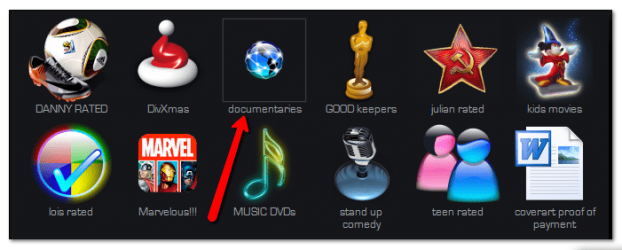
do you mean the square around the documentaries icon in my pic ,
the way to get rid of it is to make the png/jpeg you are about to convert bigger before you convert it.
you can do this in paint ,just resize the image !
2011-08-23_0952.png
 

My Computer

Computer Manufacturer/Model Number
Hewlett packard/p6512uk
OS
Microsoft Windows 7 Home Premium 64-bit 7600
CPU
IIx4 amd athelon 635 processor
Motherboard
FOXCONN 2AA9
Memory
2x2gb
Graphics Card(s)
ati radeon HD 5450
Sound Card
(1) Realtek High Definition Audio (2) AMD High Definition
Monitor(s) Displays
samsung lcd tv 32"
Screen Resolution
1360x 768
Hard Drives
(1) WDC WD10 01FAES-60Z2A0 SATA Disk Device (2) Maxtor OneTouch USB Device (3) ST310003 33AS USB Device (4) WD My Book 1111 USB Device
PSU
?
Cooling
air!
Keyboard
wireless hp
Mouse
wireless Hp,optical
Internet Speed
1.10mb/s
Antivirus
MSE
Browser
Firefox
do you mean the square around the documentaries icon in my pic ,
the way to get rid of it is to make the png/jpeg you are about to convert bigger before you convert it.
you can do this in paint ,just resize the image !
View attachment 171695

Nice one boohbah

Danny
 

My Computer

Computer Manufacturer/Model Number
acer aspire 5935g
OS
Windows 7 Home Premium x64 SP1
CPU
intel(R)core(TM)2 duo CPU T6600 @ 2.20GHz
Motherboard
intel gm45/gm47 revision 07
Memory
3 gb ddr3
Graphics Card(s)
ati radeon hd4570/512mb
Monitor(s) Displays
lop156wh2-tle1 15.3 flat
Screen Resolution
1366x768
Hard Drives
OCZ-Agility3 60gig ssd
320gig external hdd
500gig external hdd
Mouse
Optical
Internet Speed
30Mbps Down/30Mbps Up
no prob, making the background transparent on an icon is easy if you have photoshop,
just use the "magic eraser tool"
2011-08-23_1539.png
click on the white and bingo its gone!
save as png , upload ,convert and enjoy
 

My Computer

Computer Manufacturer/Model Number
Hewlett packard/p6512uk
OS
Microsoft Windows 7 Home Premium 64-bit 7600
CPU
IIx4 amd athelon 635 processor
Motherboard
FOXCONN 2AA9
Memory
2x2gb
Graphics Card(s)
ati radeon HD 5450
Sound Card
(1) Realtek High Definition Audio (2) AMD High Definition
Monitor(s) Displays
samsung lcd tv 32"
Screen Resolution
1360x 768
Hard Drives
(1) WDC WD10 01FAES-60Z2A0 SATA Disk Device (2) Maxtor OneTouch USB Device (3) ST310003 33AS USB Device (4) WD My Book 1111 USB Device
PSU
?
Cooling
air!
Keyboard
wireless hp
Mouse
wireless Hp,optical
Internet Speed
1.10mb/s
Antivirus
MSE
Browser
Firefox
Or a free alternative ...Paint.NET - Download use the magic wand tool on the white background .
 

Attachments

  • Untitled.png
    Untitled.png
    12.1 KB · Views: 0

My Computer

Computer type
PC/Desktop
Computer Manufacturer/Model Number
Self Assembled
OS
Microsoft Windows 10 Pro Insider Preview 64-bit
CPU
Intel(R) Core(TM) i3-4130 CPU @ 3.40GHz
Motherboard
Gigabyte Technology Co., Ltd. B85M-D3H
Memory
Corsair Vengence 4GB x2 (8.00GB Dual-Channel DDR3 @ 798MHz)
Graphics Card(s)
2047MB GeForce GTS 450 (ZOTAC International)
Sound Card
Onboard (Realtek High Definition Audio)
Monitor(s) Displays
LG Flatron E2040T
Screen Resolution
1600x900
Hard Drives
Western Digital 1 TB
Seagate 500 GB
PSU
Corsair VS550
Case
Cooler Master K380
Cooling
Cooler Master Seidon 120V Plus
Keyboard
Logitech MK260r
Mouse
Logitech MK260r
Internet Speed
PMPL Broadband
Antivirus
Windows Defender + MBAM
Browser
Firefox
Other Info
Dell Studio 15" Laptop
Guys,

Great! Wonderful tips here. The gf especially will love this one! Not into graphics really (in engineering) but with this I seem to have found a new idea:) Will be back when I encounter any problems. You guys rock!

damien
 

My Computer

Computer type
PC/Desktop
Computer Manufacturer/Model Number
Custom Build
OS
Win7 Ultimate 64bit
CPU
AMD A8 5600K APU
Motherboard
Gigabyte F2A75MD3H
Memory
16gb DDR3
Graphics Card(s)
Radeon 7560
Sound Card
onboard
Monitor(s) Displays
kingston lcd 23inch wide
Hard Drives
WD 500gb (2)
WD 1TB
Antivirus
EAM + Online Armor Premium -- desktop
no problem, im not into graphics either really, i just learned to make my computer look the way i want by trial and error and the odd request to the gfx team here on 7f. good link arc. :D
 

My Computer

Computer Manufacturer/Model Number
Hewlett packard/p6512uk
OS
Microsoft Windows 7 Home Premium 64-bit 7600
CPU
IIx4 amd athelon 635 processor
Motherboard
FOXCONN 2AA9
Memory
2x2gb
Graphics Card(s)
ati radeon HD 5450
Sound Card
(1) Realtek High Definition Audio (2) AMD High Definition
Monitor(s) Displays
samsung lcd tv 32"
Screen Resolution
1360x 768
Hard Drives
(1) WDC WD10 01FAES-60Z2A0 SATA Disk Device (2) Maxtor OneTouch USB Device (3) ST310003 33AS USB Device (4) WD My Book 1111 USB Device
PSU
?
Cooling
air!
Keyboard
wireless hp
Mouse
wireless Hp,optical
Internet Speed
1.10mb/s
Antivirus
MSE
Browser
Firefox

My Computer

Computer Manufacturer/Model Number
Custom
OS
Windows 7 Ultimate x64
CPU
AMD Phenom II x4 840 Black Edition
Motherboard
Forgot
Memory
8 Gb
Graphics Card(s)
ATI Radeon HD 5570 2 Gb DDR3
Sound Card
AMD High Definition Audio Device
Monitor(s) Displays
Emprex 21 Inch
Screen Resolution
1280 x 720
Hard Drives
Western Digital 1 TB,
Unknown 160 gb and 1 TB Hitachi External Hard Drive
PSU
600w Custom
Case
Custom
Cooling
Multiple Blue LED Fans
Keyboard
Cyborg V.1
Mouse
Fuhlen Multi Button Gaming Mouse
Internet Speed
20 Mb
Other Info
I own other computers, such as my HP Mini 110 and some of my older computers!
Back
Top