
You are using an out of date browser. It may not display this or other websites correctly.
You should upgrade or use an alternative browser.
You should upgrade or use an alternative browser.
Icon help
- Thread starter FPSApex
- Start date
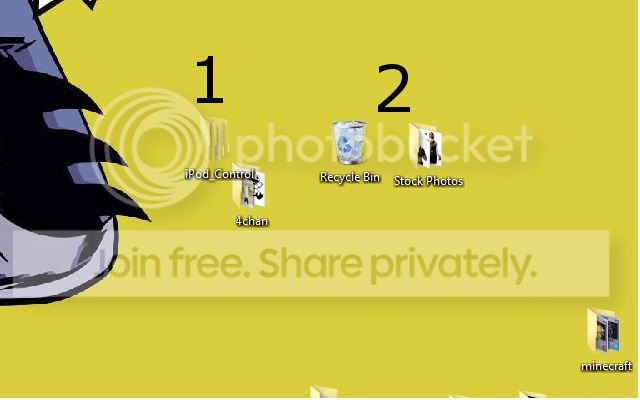


RightClick on desktop, view align to grid or auto arrange..
My Computer
- Computer type
- PC/Desktop
- Computer Manufacturer/Model Number
- Dell XPS 420
- OS
- Windows 10, Home Clean Install
- CPU
- Intel Core2 processsor Q8200(2.33Ghz 1333FSB) Quad Core Tech
- Motherboard
- Dell
- Memory
- 6 gb
- Graphics Card(s)
- ATI Radeon 256MB HD3650
- Sound Card
- Intergrated 7.1 Channel Audio
- Monitor(s) Displays
- Dell SP2009W 20"
- Hard Drives
- 640 GB Serial ATA Hard drive
- Cooling
- Fan
- Keyboard
- Dell USB Keyboard
- Mouse
- Dell Premium Optical USB
- Internet Speed
- DSL 2.85

Hi FPSApex Welcome to Sevenforums Try this: Right click your Desktop, click View>Auto Arrange Icons to make them all line up down the left hand side of the screen.
Alternatively, Right Click>View>ALign Icons to Grid and then they will line up neatly, if you move them.
Alternatively, Right Click>View>ALign Icons to Grid and then they will line up neatly, if you move them.
My Computer
- Computer type
- PC/Desktop
- Computer Manufacturer/Model Number
- Medion Erazer (note to self: insert model number) - with custom additions
- OS
- Windows 10 Pro x64
- CPU
- Intel Core i5 7400 @ 3.00GHz
- Motherboard
- OEM supllied with PC
- Memory
- 8GB 2133Mhz DDR4 (OEM supplied)
- Graphics Card(s)
- Gygabyte Windforce GTX 1050Ti (Factory Overclocked)
- Sound Card
- Realtek
- Monitor(s) Displays
- Acer Al1980 + HKC
- Screen Resolution
- 1360*768(HKC) / 1280*1024(Acer)
- Hard Drives
- 1TB Toshiba
1TB WD Caviar Green
120GB Samsung Evo 840
- PSU
- OEM supplied (no power rating on case)
- Case
- OEM Supplied
- Cooling
- Stock
- Keyboard
- Logitech Wireless
- Mouse
- Logitect Wireless
- Internet Speed
- 40Mb/s Down 10Mb/s Up
- Antivirus
- Defender
- Browser
- Firefox
 Glad we could help
 My Computer
- Computer type
- PC/Desktop
- Computer Manufacturer/Model Number
- Medion Erazer (note to self: insert model number) - with custom additions
- OS
- Windows 10 Pro x64
- CPU
- Intel Core i5 7400 @ 3.00GHz
- Motherboard
- OEM supllied with PC
- Memory
- 8GB 2133Mhz DDR4 (OEM supplied)
- Graphics Card(s)
- Gygabyte Windforce GTX 1050Ti (Factory Overclocked)
- Sound Card
- Realtek
- Monitor(s) Displays
- Acer Al1980 + HKC
- Screen Resolution
- 1360*768(HKC) / 1280*1024(Acer)
- Hard Drives
- 1TB Toshiba
1TB WD Caviar Green
120GB Samsung Evo 840
- PSU
- OEM supplied (no power rating on case)
- Case
- OEM Supplied
- Cooling
- Stock
- Keyboard
- Logitech Wireless
- Mouse
- Logitect Wireless
- Internet Speed
- 40Mb/s Down 10Mb/s Up
- Antivirus
- Defender
- Browser
- Firefox
Come back often and tell your friends about the service at SevenForums
My Computer
- Computer type
- PC/Desktop
- Computer Manufacturer/Model Number
- Dell XPS 420
- OS
- Windows 10, Home Clean Install
- CPU
- Intel Core2 processsor Q8200(2.33Ghz 1333FSB) Quad Core Tech
- Motherboard
- Dell
- Memory
- 6 gb
- Graphics Card(s)
- ATI Radeon 256MB HD3650
- Sound Card
- Intergrated 7.1 Channel Audio
- Monitor(s) Displays
- Dell SP2009W 20"
- Hard Drives
- 640 GB Serial ATA Hard drive
- Cooling
- Fan
- Keyboard
- Dell USB Keyboard
- Mouse
- Dell Premium Optical USB
- Internet Speed
- DSL 2.85