Solved Icon issue with Advanced Uninstaller's "pinned" shortcut

jonnyhotchkiss

New member
Member
VIP
Local time
5:39 AM
Messages
260
hello again Brink!

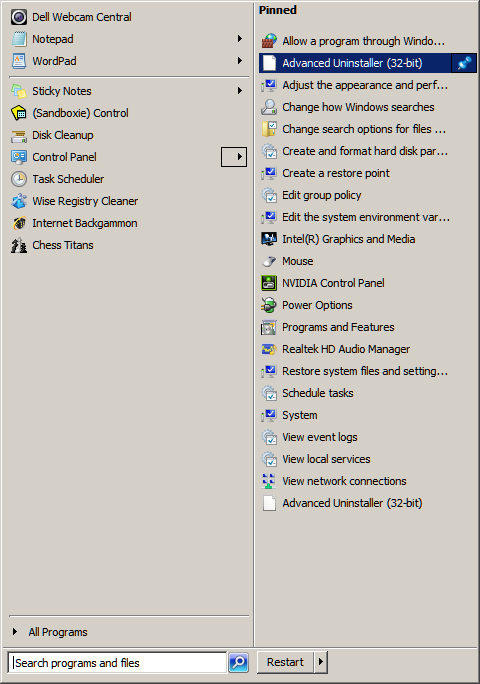
I'm trying to fix an annoyance with Advanced Uninstaller's "pinned" shortcut. It's a pinned control panel shortcut in the start menu
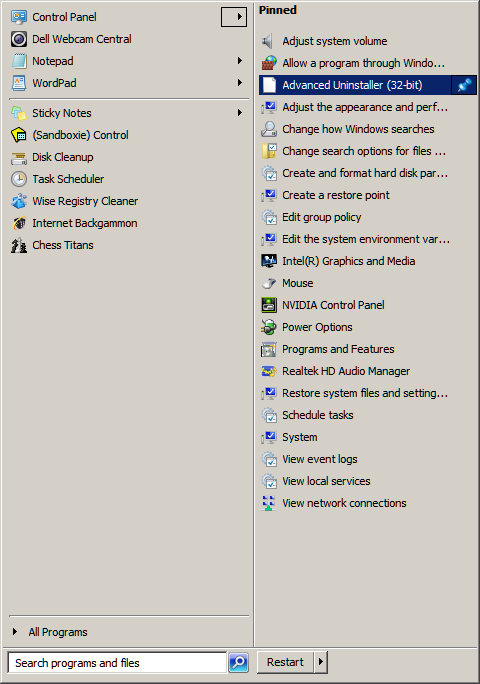

OIzO5gM.png


A) the icon's missing and b) the link can't be unpinned.


I've tried searching this thread and the other linked (fresh out the oven: ) alas no mention of control panel's pinned items.


One interesting thing I read on advanced uninstall FAQ


  • Why "Pin to" is missing on Revo Uninstaller's shortcut and cannot be pinned to Windows 7 taskbar?

    No Pin to option available in Windows 7 taskbar
    No Pin to option is available on the shortcut
    The reason for the problem is that Windows 7 does not allow pinning programs containing "install" keyword in their name. You can solve the problem by making a shortcut on your desktop of Revo Uninstaller and change the shortcut's name to just "Revo" or something else, but the name should not contain "install" as Revo Uninstaller Pro does!
Anyway, do you have any suggestions on where/how I can check for the cause of this "broken shortcut"?


I've glanced at JumpListsView and ShellExView and tried searching the reg....


The icon appears correctly in start menu but not in control panel...
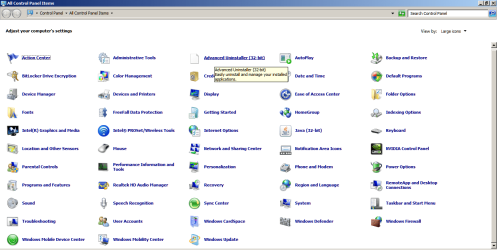
vpX4CIS.png

I think it's a 32-bit app on a 64-bit OS issue... but not sure where to go from here.

Suggestions, as always, most welcome :D
 
Last edited by a moderator:

My Computer My Computer

At a glance

Windows 7 Ultimate 64bit2.28GbNVIDIA
Computer type
Laptop
Computer Manufacturer/Model Number
Dell
OS
Windows 7 Ultimate 64bit
CPU
2.2
Memory
8Gb
Graphics Card(s)
NVIDIA
Screen Resolution
1280/762
Mouse
built in pad || iphone || MS wireless
Internet Speed
100MB
Antivirus
Avast
Browser
Chrome, Chrome portable
Hello Jonny,

Have you already tried to uninstall and reinstall "Advanced Uninstaller" to see if it may repair it?
 

My Computer My Computer

At a glance

64-bit Windows 11 Pro for WorkstationsIntel i7-8700K OC'd to 5 GHz64 GB (4x16GB) G.SKILL TridentZ RGB DDR4 3600...ASUS ROG-STRIX-GTX1080TI-O11G-GAMING
Computer type
PC/Desktop
Computer Manufacturer/Model Number
Self built custom
OS
64-bit Windows 11 Pro for Workstations
CPU
Intel i7-8700K OC'd to 5 GHz
Motherboard
ASUS ROG Maximus XI Formula Z390
Memory
64 GB (4x16GB) G.SKILL TridentZ RGB DDR4 3600 MHz
Graphics Card(s)
ASUS ROG-STRIX-GTX1080TI-O11G-GAMING
Sound Card
Integrated
Monitor(s) Displays
2 x Samsung Odyssey G7 27"
Screen Resolution
2560x1440
Hard Drives
1TB Samsung 990 PRO M.2,
4TB Samsung 990 PRO PRO M.2,
TerraMaster F8 SSD Plus NAS
PSU
Seasonic Prime Titanium 850W
Case
Thermaltake Core P3
Cooling
Corsair Hydro H115i
Keyboard
Logitech wireless K800
Mouse
Logitech MX Master 4
Internet Speed
2 Gb/s Download and 100 Mb/s Upload
Antivirus
Malwarebyte Anti-Malware Premium
Browser
Google Chrome
Other Info
Logitech Z625 speaker system,
Logitech BRIO 4K Pro webcam,
HP Color LaserJet Pro MFP M477fdn,
APC SMART-UPS RT 1000 XL - SURT1000XLI,
Galaxy S23 Plus phone
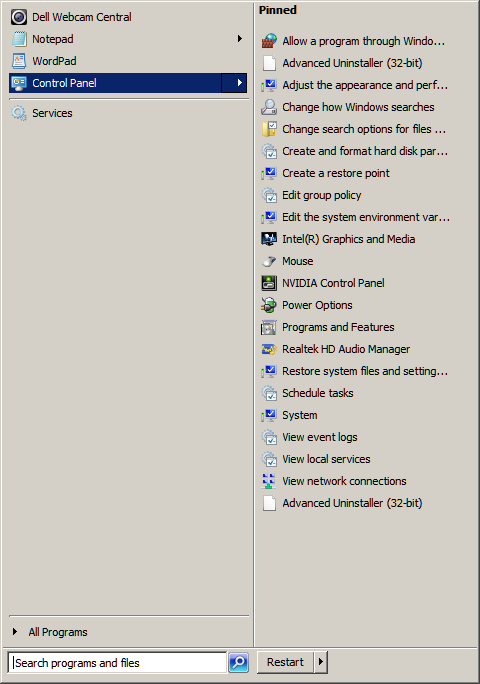
Just tried, reboot and I now have this issue (except the blank icon is named

noFmHiP.png


Perhaps ironically, I've now installed ccleaner on this build, to clean up after another cleaner.

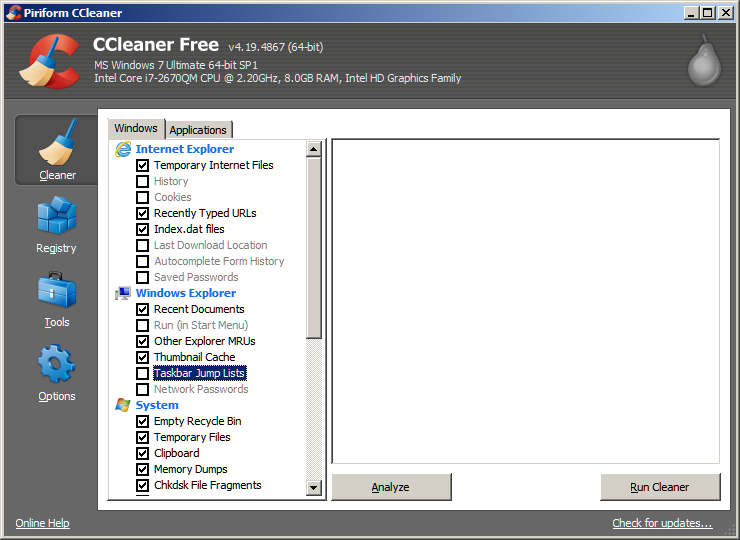
1st swoop with the following options (all advanced, further down and invisible, are set to default - unchecked)
JnAdm6S.png


Will re-attempt after check and reboot, 2nd iteration trashing my jumplists (there was a time when I was precious about such things!)

...
 

My Computer My Computer

At a glance

Windows 7 Ultimate 64bit2.28GbNVIDIA
Computer type
Laptop
Computer Manufacturer/Model Number
Dell
OS
Windows 7 Ultimate 64bit
CPU
2.2
Memory
8Gb
Graphics Card(s)
NVIDIA
Screen Resolution
1280/762
Mouse
built in pad || iphone || MS wireless
Internet Speed
100MB
Antivirus
Avast
Browser
Chrome, Chrome portable
quick reg scan reveals the registry is littered with nearly 600 mentions of advanced uninstaller after uninstalling it. erroneous icon remains.

Java is installed as 32-bit. should I be looking at it's namespace entry, in comparison with Revo's, to try and spot the break?

(this is all a side-note, as I intend to reinstall)

There's also the possibility that, as the ghost-pinned entry is still stuck, despite application uninstall, that it's pertaining to a previous install of the software (I used to have an older version, this is all massive speculation)

Off to wipe jumplists and re-read your article on namespaces
 

My Computer My Computer

At a glance

Windows 7 Ultimate 64bit2.28GbNVIDIA
Computer type
Laptop
Computer Manufacturer/Model Number
Dell
OS
Windows 7 Ultimate 64bit
CPU
2.2
Memory
8Gb
Graphics Card(s)
NVIDIA
Screen Resolution
1280/762
Mouse
built in pad || iphone || MS wireless
Internet Speed
100MB
Antivirus
Avast
Browser
Chrome, Chrome portable
after reading more of your guides and playing closer attention I think I have found the culprit.

Remembering the blank icon issue (where the exact resolution was not known), I think CCleaner's clean jumplists (or equallty the reset items via batch/cmd prompt method) is "the fix".

for me, I found that unchecking (start menu properties) privacy "store and display recently opened programs/items" removed the list... and re-enabling allowed me to rebuild new jumplists. OK, start menu pinned data is gone...

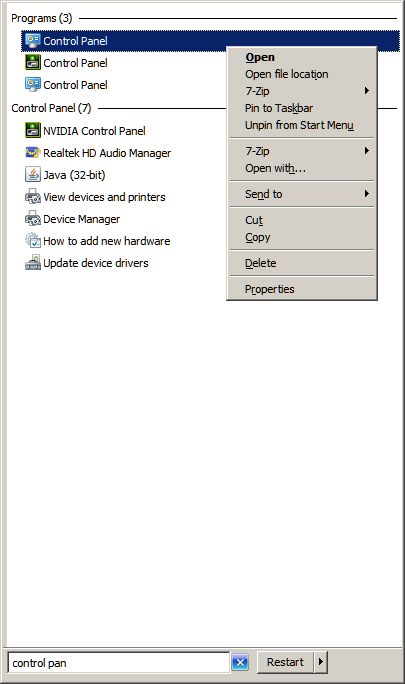
After a frantic search, I think that, to pin the control panel like I like it, you need to pin "control panel"
BnQijFq.png


XtXlEZR.png


Looking at the jumplistsview I see a) a correlation and b) a candidate!!

If8LF9m.png


The application IDs match, and the first entry doesn't conform (re syntax)
8vLrUu0.png


On closer inspection .. there's lots of paths that don't work.

the first - {B4B0CDBC-A610-4CE1-BC70-2BA43091FDEA} - I thought was advanced uninstaller...

the second, full path - ::{26EE0668-A00A-44D7-9371-BEB064C98683}\0\::{6DFD7C5C-2451-11D3-A299-00C04F8EF6AF} - is folder options!

3, ::{26EE0668-A00A-44D7-9371-BEB064C98683}\5\::{BB06C0E4-D293-4F75-8A90-CB05B6477EEE}, is System
4, ::{26EE0668-A00A-44D7-9371-BEB064C98683}\2\::{025A5937-A6BE-4686-A844-36FE4BEC8B6D}, power options...

the next set, including "the master" {ED7BA470-8E54-465E-825C-99712043E01C}, don't work...

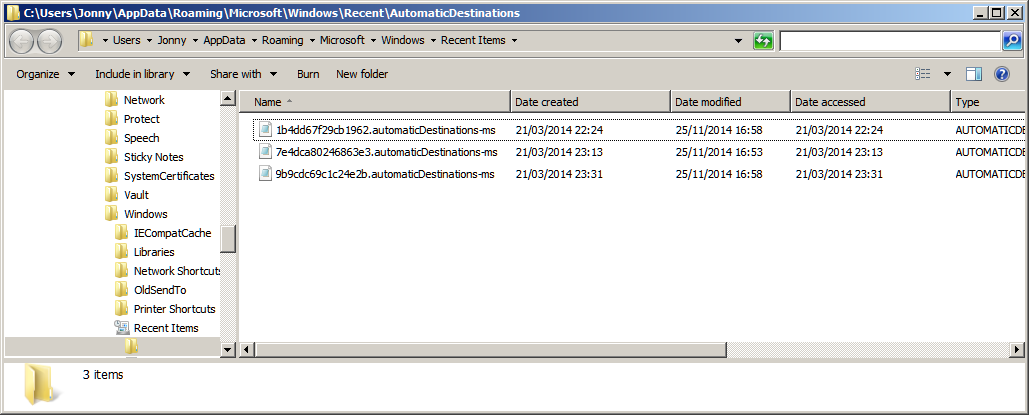
Should I just delete 7e4dca80246863e3.automaticDestinations-ms and start again?
 

My Computer My Computer

At a glance

Windows 7 Ultimate 64bit2.28GbNVIDIA
Computer type
Laptop
Computer Manufacturer/Model Number
Dell
OS
Windows 7 Ultimate 64bit
CPU
2.2
Memory
8Gb
Graphics Card(s)
NVIDIA
Screen Resolution
1280/762
Mouse
built in pad || iphone || MS wireless
Internet Speed
100MB
Antivirus
Avast
Browser
Chrome, Chrome portable
If you find it listed under Namespace in the registry, then deleting it should remove it from the Control Panel.
 

My Computer My Computer

At a glance

64-bit Windows 11 Pro for WorkstationsIntel i7-8700K OC'd to 5 GHz64 GB (4x16GB) G.SKILL TridentZ RGB DDR4 3600...ASUS ROG-STRIX-GTX1080TI-O11G-GAMING
Computer type
PC/Desktop
Computer Manufacturer/Model Number
Self built custom
OS
64-bit Windows 11 Pro for Workstations
CPU
Intel i7-8700K OC'd to 5 GHz
Motherboard
ASUS ROG Maximus XI Formula Z390
Memory
64 GB (4x16GB) G.SKILL TridentZ RGB DDR4 3600 MHz
Graphics Card(s)
ASUS ROG-STRIX-GTX1080TI-O11G-GAMING
Sound Card
Integrated
Monitor(s) Displays
2 x Samsung Odyssey G7 27"
Screen Resolution
2560x1440
Hard Drives
1TB Samsung 990 PRO M.2,
4TB Samsung 990 PRO PRO M.2,
TerraMaster F8 SSD Plus NAS
PSU
Seasonic Prime Titanium 850W
Case
Thermaltake Core P3
Cooling
Corsair Hydro H115i
Keyboard
Logitech wireless K800
Mouse
Logitech MX Master 4
Internet Speed
2 Gb/s Download and 100 Mb/s Upload
Antivirus
Malwarebyte Anti-Malware Premium
Browser
Google Chrome
Other Info
Logitech Z625 speaker system,
Logitech BRIO 4K Pro webcam,
HP Color LaserJet Pro MFP M477fdn,
APC SMART-UPS RT 1000 XL - SURT1000XLI,
Galaxy S23 Plus phone
Call me tempestuous, but I deleted the "control panel" audodestination-ms file 7e4dca80246863e3, and started rebuilding... and got rid of the deadlink.

Time to reinstall the suspect software (I obviously wouldn't if only it wasn't so damn useful!), think I'll make a mental note to not pin it to the start menu!

Mark solved :D
 

My Computer My Computer

At a glance

Windows 7 Ultimate 64bit2.28GbNVIDIA
Computer type
Laptop
Computer Manufacturer/Model Number
Dell
OS
Windows 7 Ultimate 64bit
CPU
2.2
Memory
8Gb
Graphics Card(s)
NVIDIA
Screen Resolution
1280/762
Mouse
built in pad || iphone || MS wireless
Internet Speed
100MB
Antivirus
Avast
Browser
Chrome, Chrome portable
I tried a few text searches of the registry, and found either no entries (I had the .cpl filename, the company revo, the program name of course....) or too much noise (if anything, it's absence from namespace was what struck me).

thank you Brink!!
 

My Computer My Computer

At a glance

Windows 7 Ultimate 64bit2.28GbNVIDIA
Computer type
Laptop
Computer Manufacturer/Model Number
Dell
OS
Windows 7 Ultimate 64bit
CPU
2.2
Memory
8Gb
Graphics Card(s)
NVIDIA
Screen Resolution
1280/762
Mouse
built in pad || iphone || MS wireless
Internet Speed
100MB
Antivirus
Avast
Browser
Chrome, Chrome portable
Great news. You're most welcome. :)
 

My Computer My Computer

At a glance

64-bit Windows 11 Pro for WorkstationsIntel i7-8700K OC'd to 5 GHz64 GB (4x16GB) G.SKILL TridentZ RGB DDR4 3600...ASUS ROG-STRIX-GTX1080TI-O11G-GAMING
Computer type
PC/Desktop
Computer Manufacturer/Model Number
Self built custom
OS
64-bit Windows 11 Pro for Workstations
CPU
Intel i7-8700K OC'd to 5 GHz
Motherboard
ASUS ROG Maximus XI Formula Z390
Memory
64 GB (4x16GB) G.SKILL TridentZ RGB DDR4 3600 MHz
Graphics Card(s)
ASUS ROG-STRIX-GTX1080TI-O11G-GAMING
Sound Card
Integrated
Monitor(s) Displays
2 x Samsung Odyssey G7 27"
Screen Resolution
2560x1440
Hard Drives
1TB Samsung 990 PRO M.2,
4TB Samsung 990 PRO PRO M.2,
TerraMaster F8 SSD Plus NAS
PSU
Seasonic Prime Titanium 850W
Case
Thermaltake Core P3
Cooling
Corsair Hydro H115i
Keyboard
Logitech wireless K800
Mouse
Logitech MX Master 4
Internet Speed
2 Gb/s Download and 100 Mb/s Upload
Antivirus
Malwarebyte Anti-Malware Premium
Browser
Google Chrome
Other Info
Logitech Z625 speaker system,
Logitech BRIO 4K Pro webcam,
HP Color LaserJet Pro MFP M477fdn,
APC SMART-UPS RT 1000 XL - SURT1000XLI,
Galaxy S23 Plus phone
Back
Top