
icon missing in shortcut and exe from xp

senderj

New member
Local time
5:06 PM
Messages
13
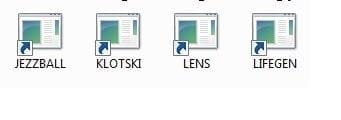
I have dual boot xp and win7. I have a folder containing some exe and another folder with shortcut pointing to the corresponding exe in the first one. In xp, the icons are shown normally in both folders. In win7, only a generic icon is used in both folders. Here is the screen extracts.
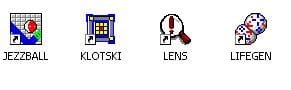
icons in xp.JPG

icons in win7.jpg
I tried the change icon in the properties, but there is no icon displayed in win7. I tried to remove the icon cache as mentioned in other threads here, but couldn't fix the problem. I tried this on both x64 and x32 system, still the same problem. I tried to use icon extractor software and it said no icon found from both exe and shortcut when running in win7.

Appreciate any info/suggestion to fix the problem.
 

My Computer My Computer

At a glance

Windows 7 Ultimate x64 SP1Intel(R) Core(TM) i7-2600K CPU @ 3.40GHzCorsair 8.00 GBIntel(R) HD Graphics 3000
Computer type
PC/Desktop
OS
Windows 7 Ultimate x64 SP1
CPU
Intel(R) Core(TM) i7-2600K CPU @ 3.40GHz
Motherboard
ASRock Z68 Extreme4
Memory
Corsair 8.00 GB
Graphics Card(s)
Intel(R) HD Graphics 3000
Sound Card
Realtek
Monitor(s) Displays
Dell
Screen Resolution
1680 x 1050 x 32 bits
Hard Drives
ST2000DL003-9VT166 ATA Device
Antivirus
AVG
Hello senderj, welcome to Seven Forums!


Have a look at this tutorial at the link below to see if it will help and be sure to post back with any further questions you may have and to keep us informed.

How to Change the Icon of a Shortcut in Windows 7
 

My Computer My Computer

At a glance

W 7 64-bit UltimateIntel Q9550 Yorkfield8GB Dominator 8500C5DATI : XFX 5870
Computer Manufacturer/Model Number
* BFK Customs *
OS
W 7 64-bit Ultimate
CPU
Intel Q9550 Yorkfield
Motherboard
ASUS P5Q Pro
Memory
8GB Dominator 8500C5D
Graphics Card(s)
ATI : XFX 5870
Sound Card
Realtek HD Audio 7-1
Monitor(s) Displays
1x 47" LCD HDMI & 3x 26" LCD HDMI
Screen Resolution
1920x1080P & 1920x1200
Hard Drives
1x 80GB Intel X25-M G2 SSD : 1x 500GB & 1x 640GB WD Caviar Black(s)
PSU
Corsair 620HX
Case
Cooler Master RC-690
Cooling
Tuniq Tower 120, 2x 140mm and 3x 120mm case fans
Keyboard
Microsoft 500
Mouse
Razer Diamondback 3G
Internet Speed
14 Mb/s
Other Info
1x Koutech 3Gb/s SATA HDD Hot Swap Rack
Thanks for the reply. But as I have said, I have already tried to "change icon in the properties". But no icon was found. The problem here is that, in xp, the exe has icon when selecting it in the properties. But in win7, no icon was found when selecting it in the properties. That's what I meant.
 

My Computer My Computer

At a glance

Windows 7 Ultimate x64 SP1Intel(R) Core(TM) i7-2600K CPU @ 3.40GHzCorsair 8.00 GBIntel(R) HD Graphics 3000
Computer type
PC/Desktop
OS
Windows 7 Ultimate x64 SP1
CPU
Intel(R) Core(TM) i7-2600K CPU @ 3.40GHz
Motherboard
ASRock Z68 Extreme4
Memory
Corsair 8.00 GB
Graphics Card(s)
Intel(R) HD Graphics 3000
Sound Card
Realtek
Monitor(s) Displays
Dell
Screen Resolution
1680 x 1050 x 32 bits
Hard Drives
ST2000DL003-9VT166 ATA Device
Antivirus
AVG

My Computer My Computer

At a glance

Vista, Windows7, Mint Mate, Zorin, Windows 8from 1.6GHz Duo to i7
Computer Manufacturer/Model Number
HP, Dell, Gateway, Toshiba - 4 laptops and 2 desktops
OS
Vista, Windows7, Mint Mate, Zorin, Windows 8
CPU
from 1.6GHz Duo to i7
Monitor(s) Displays
2x HP w2207
Hard Drives
5x HDD, 7x SSD, 12x Externals
Keyboard
with trackball - no mices
Mouse
Trackball mice
Internet Speed
DSL 6000
Please read my original post. I've already tried but still the same. My exe is very old. May be the way it store icon is out-dated for win7. It works in xp and previous windows versions, but not in win7. Anybody can confirm this?
 
Last edited:

My Computer My Computer

At a glance

Windows 7 Ultimate x64 SP1Intel(R) Core(TM) i7-2600K CPU @ 3.40GHzCorsair 8.00 GBIntel(R) HD Graphics 3000
Computer type
PC/Desktop
OS
Windows 7 Ultimate x64 SP1
CPU
Intel(R) Core(TM) i7-2600K CPU @ 3.40GHz
Motherboard
ASRock Z68 Extreme4
Memory
Corsair 8.00 GB
Graphics Card(s)
Intel(R) HD Graphics 3000
Sound Card
Realtek
Monitor(s) Displays
Dell
Screen Resolution
1680 x 1050 x 32 bits
Hard Drives
ST2000DL003-9VT166 ATA Device
Antivirus
AVG
Funny, I was having the same exact problem with some of the files you referenced, i.e. jezzball, or other WEP games. Also, Microsoft Arcade games - Asteroids, Battlezone, Tempest, DigDug. The icons embedded in the exe file simply did not show up in Win7, where they had always shown up in XP. After a lot of Googling, I finally wound up downloading a utility supposed to extract icons from exe files. It didn't work, but in doing so, I got the clue to sove the problem. I noticed that the utility readme said that it could only extract from 32 bit programs, and not 16 bit programs. I deduced that these programs are old 16 bit programs, which Win7 cannot extract the icons from.

Fortunately, I have another machine running XP, which recognizes the icons embedded in the 16 bit programs. So, my solution was to open the exe with Irfanview on the XP machine, which extracted the icon. I then saved that as an .ico file for each program. I put these icons on my Win7 PC, then changed icons for the shortcuts through the file properties. Now I am happy :D.

NOTE: Irfanview could not extract the icon when running on the Win7 PC!!

Maybe you could also solve this by running Win7 in XP compatibility mode or other such means which I have not tried.
 
Last edited:

My Computer My Computer

At a glance

Windows 7 Ultimate 32bit
OS
Windows 7 Ultimate 32bit
Hard Drives
OS: 75GB Raptor
Data: 2x 500GB (RAID)
diamondfist,

Thanks for the reply. No wonder the extraction software didn't work on win7. I'll give it a try on XP.
 

My Computer My Computer

At a glance

Windows 7 Ultimate x64 SP1Intel(R) Core(TM) i7-2600K CPU @ 3.40GHzCorsair 8.00 GBIntel(R) HD Graphics 3000
Computer type
PC/Desktop
OS
Windows 7 Ultimate x64 SP1
CPU
Intel(R) Core(TM) i7-2600K CPU @ 3.40GHz
Motherboard
ASRock Z68 Extreme4
Memory
Corsair 8.00 GB
Graphics Card(s)
Intel(R) HD Graphics 3000
Sound Card
Realtek
Monitor(s) Displays
Dell
Screen Resolution
1680 x 1050 x 32 bits
Hard Drives
ST2000DL003-9VT166 ATA Device
Antivirus
AVG
Back
Top