
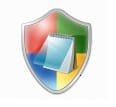
Icon problem, shield

Semidead

New member
Hi. I have a problem with some of my icons. I am unable to change them. They are just a green, blue, yellow and red shield. I'm attaching a picture of the icon. What can I do to make the icons "normal" ?

Thanks.
 

Attachments

  • e123.jpg
    e123.jpg
    17.5 KB · Views: 593

My Computer

Computer Manufacturer/Model Number
Silverstone
OS
Windows 7 Ultimate x64
CPU
Intel Core 2 Duo E8400 3,0 GHz
Motherboard
Asus P5Q Deluxe
Memory
8Gb PC-6400
Graphics Card(s)
XFX Radeon HD 5830
Sound Card
Onboard
Monitor(s) Displays
BenQ G2411HD 24"
Screen Resolution
1920x1080
Hard Drives
2x WD VelociRaptor 150 Gb in RAID 0
PSU
Chieftec Nitro Series 750W
Case
Silverstone FT01 Black
Cooling
Scythe Ninja rev. 2
Keyboard
Ace
Mouse
Logitech mx518
Internet Speed
16000/800
What programs are affected by this?
 

My Computer

Computer Manufacturer/Model Number
HP
OS
Windows 7 Ultimate 64-bit
CPU
Intel(R) Core(TM) i5-540M @ 2.53GHz
Motherboard
Hewlett-Packard 1522
Memory
4GB DDR3 System Memory
Graphics Card(s)
1GB ATI Mobility Radeon HD 5830 Graphics
Monitor(s) Displays
15.6" diagonal Full High Definition LED
Screen Resolution
1920x1080
Hard Drives
500GB 7200RPM SATA Hard Drive
PSU
6 Cell Lithium Ion Polymer Battery
Cooling
NZXT Aluminum Notebook Cooler With 3 120mm Adjustable Fans
Other Info
Envy 15
Do you mean what file types? If so, all file types that are not "normal". Like .srt, .cfg, .l6s, .dat, .dmp files.

Edit: Looks like all these files with the shield icon opens with Windows Shell Common Dll.
 

My Computer

Computer Manufacturer/Model Number
Silverstone
OS
Windows 7 Ultimate x64
CPU
Intel Core 2 Duo E8400 3,0 GHz
Motherboard
Asus P5Q Deluxe
Memory
8Gb PC-6400
Graphics Card(s)
XFX Radeon HD 5830
Sound Card
Onboard
Monitor(s) Displays
BenQ G2411HD 24"
Screen Resolution
1920x1080
Hard Drives
2x WD VelociRaptor 150 Gb in RAID 0
PSU
Chieftec Nitro Series 750W
Case
Silverstone FT01 Black
Cooling
Scythe Ninja rev. 2
Keyboard
Ace
Mouse
Logitech mx518
Internet Speed
16000/800

My Computer

Computer Manufacturer/Model Number
Hewlett Packard Compaq Presario CQ60-305au
OS
Windows Seven Home Premium 32bit SP1
CPU
AMD Athlon QI46 2.1Ghz
Motherboard
Wistron 303c
Memory
2048 Mb DDR2 SD RAM
Graphics Card(s)
NVidea GE GoForce 8200M G/256mb dedicated graphics memory
Sound Card
MCP78S NVidea high definition
Monitor(s) Displays
15.6" High definition Brightview Widescreen
Screen Resolution
1336x768
Hard Drives
Toshiba MK2555GSX ATA

My Computer

Computer Manufacturer/Model Number
Silverstone
OS
Windows 7 Ultimate x64
CPU
Intel Core 2 Duo E8400 3,0 GHz
Motherboard
Asus P5Q Deluxe
Memory
8Gb PC-6400
Graphics Card(s)
XFX Radeon HD 5830
Sound Card
Onboard
Monitor(s) Displays
BenQ G2411HD 24"
Screen Resolution
1920x1080
Hard Drives
2x WD VelociRaptor 150 Gb in RAID 0
PSU
Chieftec Nitro Series 750W
Case
Silverstone FT01 Black
Cooling
Scythe Ninja rev. 2
Keyboard
Ace
Mouse
Logitech mx518
Internet Speed
16000/800
If after running Sfc /scannow the situation is as before, we have only a few options left . First, try a system restore from a previous date , and if it is also not working , probably there is only one way left , that is http://www.sevenforums.com/tutorials/3413-repair-install.html .

Can you remind what you have done just before the change took place ? any update, program installation, disk cleanup or virus check ?
 

My Computer

Computer type
PC/Desktop
Computer Manufacturer/Model Number
Self Assembled
OS
Microsoft Windows 10 Pro Insider Preview 64-bit
CPU
Intel(R) Core(TM) i3-4130 CPU @ 3.40GHz
Motherboard
Gigabyte Technology Co., Ltd. B85M-D3H
Memory
Corsair Vengence 4GB x2 (8.00GB Dual-Channel DDR3 @ 798MHz)
Graphics Card(s)
2047MB GeForce GTS 450 (ZOTAC International)
Sound Card
Onboard (Realtek High Definition Audio)
Monitor(s) Displays
LG Flatron E2040T
Screen Resolution
1600x900
Hard Drives
Western Digital 1 TB
Seagate 500 GB
PSU
Corsair VS550
Case
Cooler Master K380
Cooling
Cooler Master Seidon 120V Plus
Keyboard
Logitech MK260r
Mouse
Logitech MK260r
Internet Speed
PMPL Broadband
Antivirus
Windows Defender + MBAM
Browser
Firefox
Other Info
Dell Studio 15" Laptop
If after running Sfc /scannow the situation is as before, we have only a few options left . First, try a system restore from a previous date , and if it is also not working , probably there is only one way left , that is http://www.sevenforums.com/tutorials/3413-repair-install.html .

Can you remind what you have done just before the change took place ? any update, program installation, disk cleanup or virus check ?
Hmm, I dont have a system restore from when before it happened. But I think I remember when it happened. When I installed a software for changing icons..I can't remember the name, though. Will check into it.
 

My Computer

Computer Manufacturer/Model Number
Silverstone
OS
Windows 7 Ultimate x64
CPU
Intel Core 2 Duo E8400 3,0 GHz
Motherboard
Asus P5Q Deluxe
Memory
8Gb PC-6400
Graphics Card(s)
XFX Radeon HD 5830
Sound Card
Onboard
Monitor(s) Displays
BenQ G2411HD 24"
Screen Resolution
1920x1080
Hard Drives
2x WD VelociRaptor 150 Gb in RAID 0
PSU
Chieftec Nitro Series 750W
Case
Silverstone FT01 Black
Cooling
Scythe Ninja rev. 2
Keyboard
Ace
Mouse
Logitech mx518
Internet Speed
16000/800
So you have changed icons using a third party program . Does the program have any backup mechanism , or any mechanism to apply windows default icons back ?

Probably the icon theme (or icon pack) you are using dont have the appropriate icons for thse files you mentioned .
 

My Computer

Computer type
PC/Desktop
Computer Manufacturer/Model Number
Self Assembled
OS
Microsoft Windows 10 Pro Insider Preview 64-bit
CPU
Intel(R) Core(TM) i3-4130 CPU @ 3.40GHz
Motherboard
Gigabyte Technology Co., Ltd. B85M-D3H
Memory
Corsair Vengence 4GB x2 (8.00GB Dual-Channel DDR3 @ 798MHz)
Graphics Card(s)
2047MB GeForce GTS 450 (ZOTAC International)
Sound Card
Onboard (Realtek High Definition Audio)
Monitor(s) Displays
LG Flatron E2040T
Screen Resolution
1600x900
Hard Drives
Western Digital 1 TB
Seagate 500 GB
PSU
Corsair VS550
Case
Cooler Master K380
Cooling
Cooler Master Seidon 120V Plus
Keyboard
Logitech MK260r
Mouse
Logitech MK260r
Internet Speed
PMPL Broadband
Antivirus
Windows Defender + MBAM
Browser
Firefox
Other Info
Dell Studio 15" Laptop
I fixed the problem by downloading IconPackager and changing the icons from there. Thanks for the assistance!
 

My Computer

Computer Manufacturer/Model Number
Silverstone
OS
Windows 7 Ultimate x64
CPU
Intel Core 2 Duo E8400 3,0 GHz
Motherboard
Asus P5Q Deluxe
Memory
8Gb PC-6400
Graphics Card(s)
XFX Radeon HD 5830
Sound Card
Onboard
Monitor(s) Displays
BenQ G2411HD 24"
Screen Resolution
1920x1080
Hard Drives
2x WD VelociRaptor 150 Gb in RAID 0
PSU
Chieftec Nitro Series 750W
Case
Silverstone FT01 Black
Cooling
Scythe Ninja rev. 2
Keyboard
Ace
Mouse
Logitech mx518
Internet Speed
16000/800
I fixed the problem by downloading IconPackager and changing the icons from there. Thanks for the assistance!
Intelligent :D
Thanks for posting back the solution .
 

My Computer

Computer type
PC/Desktop
Computer Manufacturer/Model Number
Self Assembled
OS
Microsoft Windows 10 Pro Insider Preview 64-bit
CPU
Intel(R) Core(TM) i3-4130 CPU @ 3.40GHz
Motherboard
Gigabyte Technology Co., Ltd. B85M-D3H
Memory
Corsair Vengence 4GB x2 (8.00GB Dual-Channel DDR3 @ 798MHz)
Graphics Card(s)
2047MB GeForce GTS 450 (ZOTAC International)
Sound Card
Onboard (Realtek High Definition Audio)
Monitor(s) Displays
LG Flatron E2040T
Screen Resolution
1600x900
Hard Drives
Western Digital 1 TB
Seagate 500 GB
PSU
Corsair VS550
Case
Cooler Master K380
Cooling
Cooler Master Seidon 120V Plus
Keyboard
Logitech MK260r
Mouse
Logitech MK260r
Internet Speed
PMPL Broadband
Antivirus
Windows Defender + MBAM
Browser
Firefox
Other Info
Dell Studio 15" Laptop
Back
Top