
You are using an out of date browser. It may not display this or other websites correctly.
You should upgrade or use an alternative browser.
You should upgrade or use an alternative browser.
Icon selector...thingy?
- Thread starter Xandrel
- Start date

oobbyy3
New member
I'm interested in this, too.
My Computer
- OS
- Windows 7
- CPU
- Pentiun Dual-Core CPU E5200 @ 2.50 GHz
- Motherboard
- Gigabyte EP31-DS3L
- Memory
- 2.00 GB
- Graphics Card(s)
- NVIDIA GeForce 9600 GT
- Monitor(s) Displays
- Samsung SyncMaster 710N
- Screen Resolution
- 1280x1024
- Keyboard
- Logitech EX 100
- Mouse
- Logitech EX 100

not possible i'd say. 
My Computer
- OS
- window's 7
- CPU
- core 2 quad
- Motherboard
- gigabyte
- Memory
- 2gb corsair
- Graphics Card(s)
- ati hd4850
- Monitor(s) Displays
- lg
- Screen Resolution
- 1600 X 900
- Case
- power logic
- Other Info
- none of the spec above is accurate

dunfiddlin
Banned
not possible i'd say.
That's a tad defeatist! It's obviously possible - it has to get the color value from somewhere. Whether it can be teased out of the labyrinthine coding is another mattter.
My Computer
- OS
- Windows 7
perhaps someone out there can share it with us 
My Computer
- OS
- window's 7
- CPU
- core 2 quad
- Motherboard
- gigabyte
- Memory
- 2gb corsair
- Graphics Card(s)
- ati hd4850
- Monitor(s) Displays
- lg
- Screen Resolution
- 1600 X 900
- Case
- power logic
- Other Info
- none of the spec above is accurate

- Local time
- 6:24 AM
- Messages
- 3,194
Might be possible with Resource Hacker. People use this to make custome explorer.exe's for themes....I dont know where the value would be though....
Resource Hacker
Resource Hacker
My Computer
- Computer type
- Laptop
- Computer Manufacturer/Model Number
- ASUS G60-RBBX05
- OS
- Win7 Home Premium 64x
- CPU
- Intel Core 2 Duo P7450 / 2.13 GHz (2.29 with Extreme Turbo)
- Memory
- 4 GB PC-6400 Hyundai (2X2) at 800Mhz
- Graphics Card(s)
- NVIDIA GeForce GTX 260M 1GB DDR3 VRAM
- Monitor(s) Displays
- 16" LED Backlit
- Screen Resolution
- 1366 x 768 on laptop 1600x1050 max res on 22" external mon
- Hard Drives
- OCZ Agility 3 60GB SSD / 320 GB - Serial ATA-150 - 7200 rpm
- PSU
- 6-cell Lithium ion { lasts 1.5 hours }
- Case
- ASUS G60 Laptop
- Keyboard
- Chicklet type back-lit (white light) keyboard
- Mouse
- Logitech G9 Laser Mouse 3200dpi and 1000 reports per minute
- Internet Speed
- Comcast 8.60mb/s up - 3.11mb/s down
- Antivirus
- MSE
- Browser
- Firefox
- Other Info
- General mid-budget gaming Comp. Low batterylife - High FrameRates - currently overheating problems :(
2nd Rig: Case: Rosewill BLACKHAWK Gaming ATX Mid Tower Computer Case
Mobo: GIGABYTE GA-990FXA-UD3
CPU: AMD FX-6200 Zambezi 3.8GHz (4.1GHz Turbo)
Heatsink: COOLER MASTER V8 CPU Cooler
RAM: Patriot Viper 3 8GB (2 x 4GB) 240-Pin DDR3 SDRAM 1866 (PC3 15000)
GPU: SAPPHIRE Radeon HD 6850 1GB 2
- Local time
- 6:24 AM
- Messages
- 3,194
I would warn though. Back up your system and files before modifying the explorer.exe
My Computer
- Computer type
- Laptop
- Computer Manufacturer/Model Number
- ASUS G60-RBBX05
- OS
- Win7 Home Premium 64x
- CPU
- Intel Core 2 Duo P7450 / 2.13 GHz (2.29 with Extreme Turbo)
- Memory
- 4 GB PC-6400 Hyundai (2X2) at 800Mhz
- Graphics Card(s)
- NVIDIA GeForce GTX 260M 1GB DDR3 VRAM
- Monitor(s) Displays
- 16" LED Backlit
- Screen Resolution
- 1366 x 768 on laptop 1600x1050 max res on 22" external mon
- Hard Drives
- OCZ Agility 3 60GB SSD / 320 GB - Serial ATA-150 - 7200 rpm
- PSU
- 6-cell Lithium ion { lasts 1.5 hours }
- Case
- ASUS G60 Laptop
- Keyboard
- Chicklet type back-lit (white light) keyboard
- Mouse
- Logitech G9 Laser Mouse 3200dpi and 1000 reports per minute
- Internet Speed
- Comcast 8.60mb/s up - 3.11mb/s down
- Antivirus
- MSE
- Browser
- Firefox
- Other Info
- General mid-budget gaming Comp. Low batterylife - High FrameRates - currently overheating problems :(
2nd Rig: Case: Rosewill BLACKHAWK Gaming ATX Mid Tower Computer Case
Mobo: GIGABYTE GA-990FXA-UD3
CPU: AMD FX-6200 Zambezi 3.8GHz (4.1GHz Turbo)
Heatsink: COOLER MASTER V8 CPU Cooler
RAM: Patriot Viper 3 8GB (2 x 4GB) 240-Pin DDR3 SDRAM 1866 (PC3 15000)
GPU: SAPPHIRE Radeon HD 6850 1GB 2
I would warn though. Back up your system and files before modifying the explorer.exe
Or you get black desktop caused by explorer not starting and corrupted
My Computer
- OS
- window's 7
- CPU
- core 2 quad
- Motherboard
- gigabyte
- Memory
- 2gb corsair
- Graphics Card(s)
- ati hd4850
- Monitor(s) Displays
- lg
- Screen Resolution
- 1600 X 900
- Case
- power logic
- Other Info
- none of the spec above is accurate
dunfiddlin
Banned
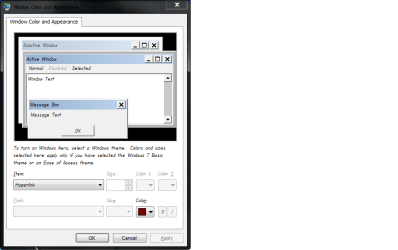
Actually this turns out to be trivially easy though not obvious!
Personalization > Window Color > Advanced Appearance Settings
Selected Items controls colour of 'thingy' border
Hyperlink controls colour of area.
Et voila ...
Next problem ... changing the selected icon background!
Personalization > Window Color > Advanced Appearance Settings
Selected Items controls colour of 'thingy' border
Hyperlink controls colour of area.
Et voila ...
Next problem ... changing the selected icon background!
Attachments

My Computer
- OS
- Windows 7
you actually find it? impressive...wait for the OP to say his word
My Computer
- OS
- window's 7
- CPU
- core 2 quad
- Motherboard
- gigabyte
- Memory
- 2gb corsair
- Graphics Card(s)
- ati hd4850
- Monitor(s) Displays
- lg
- Screen Resolution
- 1600 X 900
- Case
- power logic
- Other Info
- none of the spec above is accurate
oobbyy3
New member
My Computer
- OS
- Windows 7
- CPU
- Pentiun Dual-Core CPU E5200 @ 2.50 GHz
- Motherboard
- Gigabyte EP31-DS3L
- Memory
- 2.00 GB
- Graphics Card(s)
- NVIDIA GeForce 9600 GT
- Monitor(s) Displays
- Samsung SyncMaster 710N
- Screen Resolution
- 1280x1024
- Keyboard
- Logitech EX 100
- Mouse
- Logitech EX 100
dunfiddlin
Banned
Um ... then you only did half of what I wrote. This changes the inside color ...
Attachments
My Computer
- OS
- Windows 7
Actually this turns out to be trivially easy though not obvious!
Personalization > Window Color > Advanced Appearance Settings
Selected Items controls colour of 'thingy' border
Hyperlink controls colour of area.
Et voila ...
Next problem ... changing the selected icon background!
you are awesome =D thank you very much!
My Computer
- OS
- Windows 7 Ultimate