Icon Text Color

MalachiDraven

New member
Local time
3:15 AM
Messages
3
Hi there. I've been customizing my desktop today, and I've found a pretty good theme, and I've been using Windows 7 Style Builder to change some of the colors to fit the rest of my skins. However, I'm having trouble with one tiny font color.

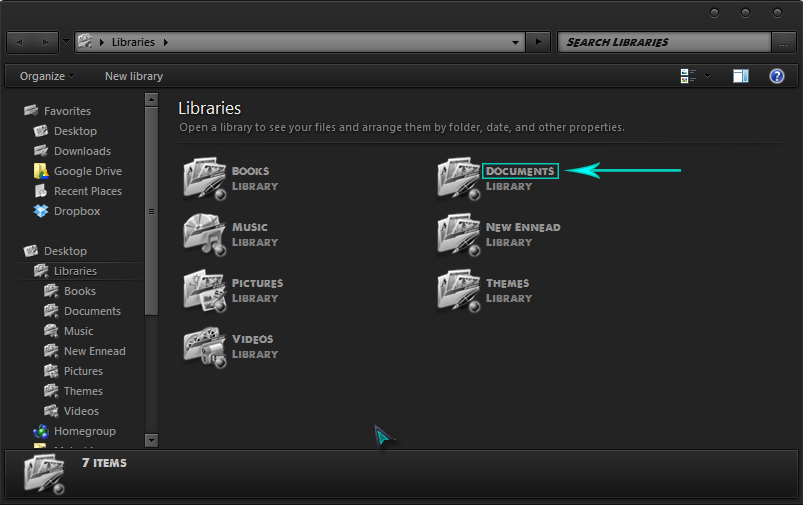
I can't seem to get the Icon Text Color to stay put. I can "Test" it in Style Builder, and it works fine. It shows up as the correct teal color that I want. But then when I save it, and I actually use the visual style...all of a sudden the text is back to the skin's default grey color. How come it won't just stay?

This is the text I'm trying to change:
lKVz2sA.png


The theme I'm using is Placebo.

I don't know if the theme is overwriting my Style Builder settings, or if Windows is being silly :P

Any help is appreciated.
 

My Computer

Computer type
PC/Desktop
OS
Windows 7 Ultimate x64
sounds like it is overwriting it, you would have to change the font color in the theme, you need to either ask the theme maker to alter it or permit you to, or wait for Bongo to come online and he will look at it as that is his speciality
 

My Computer

Computer Manufacturer/Model Number
Hewlett packard/p6512uk
OS
Microsoft Windows 7 Home Premium 64-bit 7600
CPU
IIx4 amd athelon 635 processor
Motherboard
FOXCONN 2AA9
Memory
2x2gb
Graphics Card(s)
ati radeon HD 5450
Sound Card
(1) Realtek High Definition Audio (2) AMD High Definition
Monitor(s) Displays
samsung lcd tv 32"
Screen Resolution
1360x 768
Hard Drives
(1) WDC WD10 01FAES-60Z2A0 SATA Disk Device (2) Maxtor OneTouch USB Device (3) ST310003 33AS USB Device (4) WD My Book 1111 USB Device
PSU
?
Cooling
air!
Keyboard
wireless hp
Mouse
wireless Hp,optical
Internet Speed
1.10mb/s
Antivirus
MSE
Browser
Firefox
Welcome to the Seven Forums

Are you trying to edit the theme while you are using it? If so you cannot do it that way you need to switch to a different theme log off and log on and then edit the theme you want to edit.

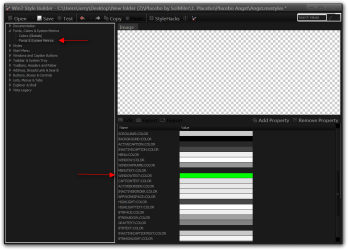
That text color should be changed at Fonts, Colors & System Metrics > Fonts & System Metrics > WINDOWTEXT:COLOR

Jerry
Win7 Style Builder - CUsersJerryDesktopNew folder (2)Placebo by SolMiler1. PlaceboPlacebo AngstA.png
 

My Computer

Computer type
Laptop
Computer Manufacturer/Model Number
Sager NP9170
OS
Win 7 Pro x64 / Win 10 Pro
CPU
Intel(R) Core(TM) i7-3630QM CPU @ 2.40GHz
Motherboard
CLEVO P170EM
Memory
12 GB
Graphics Card(s)
(1) Intel(R) HD Graphics 4000 (2) NVIDIA GeForce GTX 675M
Sound Card
(1) Realtek High Definition Audio (2) Intel(R) Display Aud
Monitor(s) Displays
17.3
Screen Resolution
1920x1080
Hard Drives
(1) Samsung 860 EVO 500GB(OS) (1) Samsung 860 EVO 500GB(Data)
Keyboard
Backlite
Antivirus
MSE, Malwarebytes Pro
Browser
Firefox
Other Info
DESKTOP: Custom-built.
OS: Win 10 Pro x64.
CASE: Rosewill R5.
CPU: Intel I5 4670K CPU @ 3.40GHz.
CPU COOLER: Cool Master Hyper 212 EVO.
MOTHERBOARD: Asus Z87-A.
MEMORY: Kingston HyperX 2x4 GB.
GPU: Nvidia Geforce 650 TI.
PSU: Corsair TX750.
DRIVES: (1) Samsung 840 120 GB SSD (2) Western Digital blue 500 GB 7200 RPM.
Those are the steps I've taken. It works fine when I "Test" it, but as soon as I hit Save and go to use it, it no longer works. The WINDOW:TEXTCOLOR is set to teal, but it's still showing as Grey in the Windows Explorer (and on Desktop Icons). However, the teal IS working in other windows such as Chrome, Notepad, etc. So it's just the Icon Text Color that won't stay.
 

My Computer

Computer type
PC/Desktop
OS
Windows 7 Ultimate x64
Go to C:\Windows\Resources\Themes\Aero\Shell\NormalColor folder and get a copy of shellstyle.dll and replace the 1 in the Placebo theme folder.

Jerry
 

My Computer

Computer type
Laptop
Computer Manufacturer/Model Number
Sager NP9170
OS
Win 7 Pro x64 / Win 10 Pro
CPU
Intel(R) Core(TM) i7-3630QM CPU @ 2.40GHz
Motherboard
CLEVO P170EM
Memory
12 GB
Graphics Card(s)
(1) Intel(R) HD Graphics 4000 (2) NVIDIA GeForce GTX 675M
Sound Card
(1) Realtek High Definition Audio (2) Intel(R) Display Aud
Monitor(s) Displays
17.3
Screen Resolution
1920x1080
Hard Drives
(1) Samsung 860 EVO 500GB(OS) (1) Samsung 860 EVO 500GB(Data)
Keyboard
Backlite
Antivirus
MSE, Malwarebytes Pro
Browser
Firefox
Other Info
DESKTOP: Custom-built.
OS: Win 10 Pro x64.
CASE: Rosewill R5.
CPU: Intel I5 4670K CPU @ 3.40GHz.
CPU COOLER: Cool Master Hyper 212 EVO.
MOTHERBOARD: Asus Z87-A.
MEMORY: Kingston HyperX 2x4 GB.
GPU: Nvidia Geforce 650 TI.
PSU: Corsair TX750.
DRIVES: (1) Samsung 840 120 GB SSD (2) Western Digital blue 500 GB 7200 RPM.
Go to C:\Windows\Resources\Themes\Aero\Shell\NormalColor folder and get a copy of shellstyle.dll and replace the 1 in the Placebo theme folder.

Jerry

That worked perfectly! Thank you very much!!
 

My Computer

Computer type
PC/Desktop
OS
Windows 7 Ultimate x64
You're Welcome
 

My Computer

Computer type
Laptop
Computer Manufacturer/Model Number
Sager NP9170
OS
Win 7 Pro x64 / Win 10 Pro
CPU
Intel(R) Core(TM) i7-3630QM CPU @ 2.40GHz
Motherboard
CLEVO P170EM
Memory
12 GB
Graphics Card(s)
(1) Intel(R) HD Graphics 4000 (2) NVIDIA GeForce GTX 675M
Sound Card
(1) Realtek High Definition Audio (2) Intel(R) Display Aud
Monitor(s) Displays
17.3
Screen Resolution
1920x1080
Hard Drives
(1) Samsung 860 EVO 500GB(OS) (1) Samsung 860 EVO 500GB(Data)
Keyboard
Backlite
Antivirus
MSE, Malwarebytes Pro
Browser
Firefox
Other Info
DESKTOP: Custom-built.
OS: Win 10 Pro x64.
CASE: Rosewill R5.
CPU: Intel I5 4670K CPU @ 3.40GHz.
CPU COOLER: Cool Master Hyper 212 EVO.
MOTHERBOARD: Asus Z87-A.
MEMORY: Kingston HyperX 2x4 GB.
GPU: Nvidia Geforce 650 TI.
PSU: Corsair TX750.
DRIVES: (1) Samsung 840 120 GB SSD (2) Western Digital blue 500 GB 7200 RPM.
Back
Top