Icon View

bumpstrous

New member
Local time
8:03 PM
Messages
3
I hope this is the right section.
Hello I have used Windows XP for years and now I bought a new laptop that came
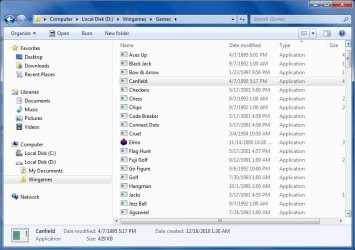
with the latest windows 7. My problem is I have some small games that I ran on windows xp and the game icons were the actual executable files however now that I have copied these games to Windows 7 they all just display a default icon so now I have to open the games for my daughter cause she can't really read as yet but she knewthe games by icon look.
I tried to reduce the value of the Icon in Windows and Appearance to see if it would help but they still have the default icon I dropped the value down to 16 which seem to be the minimum size allowed but this still has not solved the problem.
Is there a way to get the icons as they appeared in windows Xp I thank you for any help.
 

My Computer

Computer Manufacturer/Model Number
Compaq
OS
Windows 7
CPU
Intel Celeron
Memory
2 GB
Graphics Card(s)
Moble Intel 4 Series Express
Sound Card
Conexant Pebble High Defination Smart Audio
Hard Drives
250GB Toshiba SATA
Case
Laptop

My Computer

Computer type
PC/Desktop
Computer Manufacturer/Model Number
Self built custom
OS
64-bit Windows 11 Pro for Workstations
CPU
Intel i7-8700K OC'd to 5 GHz
Motherboard
ASUS ROG Maximus XI Formula Z390
Memory
64 GB (4x16GB) G.SKILL TridentZ RGB DDR4 3600 MHz
Graphics Card(s)
ASUS ROG-STRIX-GTX1080TI-O11G-GAMING
Sound Card
Integrated
Monitor(s) Displays
2 x Samsung Odyssey G7 27"
Screen Resolution
2560x1440
Hard Drives
1TB Samsung 990 PRO M.2,
4TB Samsung 990 PRO PRO M.2,
TerraMaster F8 SSD Plus NAS
PSU
Seasonic Prime Titanium 850W
Case
Thermaltake Core P3
Cooling
Corsair Hydro H115i
Keyboard
Logitech wireless K800
Mouse
Logitech MX Master 4
Internet Speed
2 Gb/s Download and 100 Mb/s Upload
Antivirus
Malwarebyte Anti-Malware Premium
Browser
Google Chrome
Other Info
Logitech Z625 speaker system,
Logitech BRIO 4K Pro webcam,
HP Color LaserJet Pro MFP M477fdn,
APC SMART-UPS RT 1000 XL - SURT1000XLI,
Galaxy S23 Plus phone
Hi there Shawn Thanks for your assistance but not quite what I am trying to achieve. What I need is to have the icons display the related icon picture in windows 7 like it did in windows XP. I have attaxhed two images of vp view and Windows 7 view. note the Game Elmo is the only one that appears in both OP systems as the same icon. In windows xp if I made a shortcut to any of the games there the shortcut also had the same icon but in Windows 7 only the default icon appears regardless of the size I view the icons at.
 

Attachments

  • XP look.JPG
    XP look.JPG
    86.9 KB · Views: 8
  • Windows 7 view.jpg
    Windows 7 view.jpg
    66.8 KB · Views: 8

My Computer

Computer Manufacturer/Model Number
Compaq
OS
Windows 7
CPU
Intel Celeron
Memory
2 GB
Graphics Card(s)
Moble Intel 4 Series Express
Sound Card
Conexant Pebble High Defination Smart Audio
Hard Drives
250GB Toshiba SATA
Case
Laptop
It really depends on what icons they embedded in the file for what is displayed. There has been a change in what type of icon sizes are used since Vista, and some older XP program's icons may just not display in all or none of the different icon view sizes in Vista and Windows 7 like they did in XP. :(

You might see if installing or running the programs in XP compatibility mode may help any.
 

My Computer

Computer type
PC/Desktop
Computer Manufacturer/Model Number
Self built custom
OS
64-bit Windows 11 Pro for Workstations
CPU
Intel i7-8700K OC'd to 5 GHz
Motherboard
ASUS ROG Maximus XI Formula Z390
Memory
64 GB (4x16GB) G.SKILL TridentZ RGB DDR4 3600 MHz
Graphics Card(s)
ASUS ROG-STRIX-GTX1080TI-O11G-GAMING
Sound Card
Integrated
Monitor(s) Displays
2 x Samsung Odyssey G7 27"
Screen Resolution
2560x1440
Hard Drives
1TB Samsung 990 PRO M.2,
4TB Samsung 990 PRO PRO M.2,
TerraMaster F8 SSD Plus NAS
PSU
Seasonic Prime Titanium 850W
Case
Thermaltake Core P3
Cooling
Corsair Hydro H115i
Keyboard
Logitech wireless K800
Mouse
Logitech MX Master 4
Internet Speed
2 Gb/s Download and 100 Mb/s Upload
Antivirus
Malwarebyte Anti-Malware Premium
Browser
Google Chrome
Other Info
Logitech Z625 speaker system,
Logitech BRIO 4K Pro webcam,
HP Color LaserJet Pro MFP M477fdn,
APC SMART-UPS RT 1000 XL - SURT1000XLI,
Galaxy S23 Plus phone
Ok Thank you very much for your help... :cry: guess I'll have to let my daughter bothrt me until she is ready to read and figure out the games herself.. Thanks for your time again..
 

My Computer

Computer Manufacturer/Model Number
Compaq
OS
Windows 7
CPU
Intel Celeron
Memory
2 GB
Graphics Card(s)
Moble Intel 4 Series Express
Sound Card
Conexant Pebble High Defination Smart Audio
Hard Drives
250GB Toshiba SATA
Case
Laptop
You're welcome. Hopefully you will not get bothered to much. :(
 

My Computer

Computer type
PC/Desktop
Computer Manufacturer/Model Number
Self built custom
OS
64-bit Windows 11 Pro for Workstations
CPU
Intel i7-8700K OC'd to 5 GHz
Motherboard
ASUS ROG Maximus XI Formula Z390
Memory
64 GB (4x16GB) G.SKILL TridentZ RGB DDR4 3600 MHz
Graphics Card(s)
ASUS ROG-STRIX-GTX1080TI-O11G-GAMING
Sound Card
Integrated
Monitor(s) Displays
2 x Samsung Odyssey G7 27"
Screen Resolution
2560x1440
Hard Drives
1TB Samsung 990 PRO M.2,
4TB Samsung 990 PRO PRO M.2,
TerraMaster F8 SSD Plus NAS
PSU
Seasonic Prime Titanium 850W
Case
Thermaltake Core P3
Cooling
Corsair Hydro H115i
Keyboard
Logitech wireless K800
Mouse
Logitech MX Master 4
Internet Speed
2 Gb/s Download and 100 Mb/s Upload
Antivirus
Malwarebyte Anti-Malware Premium
Browser
Google Chrome
Other Info
Logitech Z625 speaker system,
Logitech BRIO 4K Pro webcam,
HP Color LaserJet Pro MFP M477fdn,
APC SMART-UPS RT 1000 XL - SURT1000XLI,
Galaxy S23 Plus phone
Back
Top