JavaScript is disabled. For a better experience, please enable JavaScript in your browser before proceeding.
You are using an out of date browser. It may not display this or other websites correctly.
You should upgrade or use an
alternative browser .
Solved Icons are stacking together when moving from folder
So basically whenever I highlight multiple icons in a folder and try to move them anywhere such as my desktop for example they are stacking together instead of staying in place. The file extension, shortcut, non-shortcut is not a factor. Help would be greatly appreciated in trying to change it back.
Non grouped.jpg
198.6 KB
· Views: 8
grouped.jpg
204.1 KB
· Views: 7
Last edited: Dec 7, 2013
Computer type PC/Desktop Computer Manufacturer/Model Number Digital Storm OS Windows 7 Home Premium 64bit CPU Intel Core i3-4330 CPU @ 3.50 GHz Motherboard ASUS H81M Series Memory 8 GB Graphics Card(s) Nvidia GTX 650 Sound Card N/A Monitor(s) Displays Acer 19" AL2216W Screen Resolution 1680x1050 Antivirus Microsoft Security Essentials Browser Chrome
New member
Guru
Gold Member
VIP
That's just the way the items you are moving are represented during the move/copy. They don't stay like that in the new location.
Computer type PC/Desktop Computer Manufacturer/Model Number Lenovo IdeaCenter 450 OS Windows 10 Pro X64 CPU Intel Quad Core i7-4770 @ 3.4Ghz Memory 16.0GB PC3-12800 DDR3 SDRAM 1600 MHz Graphics Card(s) Intel Integrated HD Graphics Sound Card Realtek HD Audio Monitor(s) Displays HP 22" LCD Screen Resolution 1680 x 1050 Hard Drives 250GB Samsung EVO SATA-3 SSD Keyboard Dell USB Mouse Lenovo USB Internet Speed Cable via Road Runner 3MB Upload, 30MB Download Antivirus Windows Defender, MBAM Pro, MBAE Browser Seamonkey Other Info UEFI/GPT
New member
Thread Starter
It almost didn't make sense to me.
Any icons that I move from any folder, group up like they do in screen shot 2, when before they would all move like they do in screen shot 1.....So basically I'm trying to get all my Icons to move like they do in screen shot 1. When i try to move them when they stacked like in screenshot 2 to say my desktop....instead of going where I try to move them they kind of scatter where ever they pls. Hopefully that makes a little more sense.
Computer type PC/Desktop Computer Manufacturer/Model Number Digital Storm OS Windows 7 Home Premium 64bit CPU Intel Core i3-4330 CPU @ 3.50 GHz Motherboard ASUS H81M Series Memory 8 GB Graphics Card(s) Nvidia GTX 650 Sound Card N/A Monitor(s) Displays Acer 19" AL2216W Screen Resolution 1680x1050 Antivirus Microsoft Security Essentials Browser Chrome
Senior Member
Guru
Gold Member
VIP
Are you trying to get the new folder on your desktop or do you just want the icons from an existing folder. Have you tried right clicking on the icon & selecting send to desktop.
Computer type PC/Desktop Computer Manufacturer/Model Number Self built using existing case OS Windows 7 Home Premium 64 bit sp1 CPU Intel i5 3570 3.4Ghz Ivy Bridge SKT 1155 quad core Motherboard Gigabyte Z77-HD3 SKT 1155 2xSata 3, 4x USB 3.0 Memory G-Skill Rip Jaws 16Gb (8x2) DDR3 -1600 PC3 12800 CL 10 red Graphics Card(s) Gigabyte NVIDIA GT610 1Gb DDR3 810/1200 PCI-E 2.0 Silent Sound Card NVIDIA High Definition & Realtech High Definition Audio Monitor(s) Displays 2 x Philips 226V4L 16:9 aspect ratio Screen Resolution 1920 x 1080 HD Hard Drives Samsung 840 Pro 256gb SSD, SATA 3. PSU Corsair VS450 Case Codeng Cooling PSU fan & CPU fan Keyboard Logitech Mouse Logitech Wireless trackball M570 Internet Speed Wireless 3G. 3mg down & 550kb up. Antivirus Bitdefender Internet Security 2020 Browser Opera (Current Version) & Firefox Other Info MS Office 2013 Pro. Davis weather station software. MGE Nova 600 avr UPS.
New member
Thread Starter
I just want to be able to drag and drop multiple icons without them stacking, while being moved....So I know exactly where they will be placed when I move them to a different location.
Computer type PC/Desktop Computer Manufacturer/Model Number Digital Storm OS Windows 7 Home Premium 64bit CPU Intel Core i3-4330 CPU @ 3.50 GHz Motherboard ASUS H81M Series Memory 8 GB Graphics Card(s) Nvidia GTX 650 Sound Card N/A Monitor(s) Displays Acer 19" AL2216W Screen Resolution 1680x1050 Antivirus Microsoft Security Essentials Browser Chrome
New member
Guru
Gold Member
VIP
They wouldn't stay the same location wise anyway. They are normally displayed according to the sort order in effect for the target they are going to.
Computer type PC/Desktop Computer Manufacturer/Model Number Lenovo IdeaCenter 450 OS Windows 10 Pro X64 CPU Intel Quad Core i7-4770 @ 3.4Ghz Memory 16.0GB PC3-12800 DDR3 SDRAM 1600 MHz Graphics Card(s) Intel Integrated HD Graphics Sound Card Realtek HD Audio Monitor(s) Displays HP 22" LCD Screen Resolution 1680 x 1050 Hard Drives 250GB Samsung EVO SATA-3 SSD Keyboard Dell USB Mouse Lenovo USB Internet Speed Cable via Road Runner 3MB Upload, 30MB Download Antivirus Windows Defender, MBAM Pro, MBAE Browser Seamonkey Other Info UEFI/GPT
New member
Thread Starter
If you do that would be amazing!
Computer type PC/Desktop Computer Manufacturer/Model Number Digital Storm OS Windows 7 Home Premium 64bit CPU Intel Core i3-4330 CPU @ 3.50 GHz Motherboard ASUS H81M Series Memory 8 GB Graphics Card(s) Nvidia GTX 650 Sound Card N/A Monitor(s) Displays Acer 19" AL2216W Screen Resolution 1680x1050 Antivirus Microsoft Security Essentials Browser Chrome
Senior Member
Guru
Gold Member
VIP
Would cutting & pasting work, rather than dragging them across. Also you could try copy & paste but this will probably show them as a short cut.
Computer type PC/Desktop Computer Manufacturer/Model Number Self built using existing case OS Windows 7 Home Premium 64 bit sp1 CPU Intel i5 3570 3.4Ghz Ivy Bridge SKT 1155 quad core Motherboard Gigabyte Z77-HD3 SKT 1155 2xSata 3, 4x USB 3.0 Memory G-Skill Rip Jaws 16Gb (8x2) DDR3 -1600 PC3 12800 CL 10 red Graphics Card(s) Gigabyte NVIDIA GT610 1Gb DDR3 810/1200 PCI-E 2.0 Silent Sound Card NVIDIA High Definition & Realtech High Definition Audio Monitor(s) Displays 2 x Philips 226V4L 16:9 aspect ratio Screen Resolution 1920 x 1080 HD Hard Drives Samsung 840 Pro 256gb SSD, SATA 3. PSU Corsair VS450 Case Codeng Cooling PSU fan & CPU fan Keyboard Logitech Mouse Logitech Wireless trackball M570 Internet Speed Wireless 3G. 3mg down & 550kb up. Antivirus Bitdefender Internet Security 2020 Browser Opera (Current Version) & Firefox Other Info MS Office 2013 Pro. Davis weather station software. MGE Nova 600 avr UPS.
New member
Thread Starter
My really OCD self with just have to deal with it.
Thanks for your time, guys I appreciate It.
Computer type PC/Desktop Computer Manufacturer/Model Number Digital Storm OS Windows 7 Home Premium 64bit CPU Intel Core i3-4330 CPU @ 3.50 GHz Motherboard ASUS H81M Series Memory 8 GB Graphics Card(s) Nvidia GTX 650 Sound Card N/A Monitor(s) Displays Acer 19" AL2216W Screen Resolution 1680x1050 Antivirus Microsoft Security Essentials Browser Chrome
Administrator
Staff member
Computer type PC/Desktop Computer Manufacturer/Model Number Self built custom OS 64-bit Windows 11 Pro for Workstations CPU Intel i7-8700K OC'd to 5 GHz Motherboard ASUS ROG Maximus XI Formula Z390 Memory 64 GB (4x16GB) G.SKILL TridentZ RGB DDR4 3600 MHz Graphics Card(s) ASUS ROG-STRIX-GTX1080TI-O11G-GAMING Sound Card Integrated Monitor(s) Displays 2 x Samsung Odyssey G7 27" Screen Resolution 2560x1440 Hard Drives 1TB Samsung 990 PRO M.2, PSU Seasonic Prime Titanium 850W Case Thermaltake Core P3 Cooling Corsair Hydro H115i Keyboard Logitech wireless K800 Mouse Logitech MX Master 4 Internet Speed 2 Gb/s Download and 100 Mb/s Upload Antivirus Malwarebyte Anti-Malware Premium Browser Google Chrome Other Info Logitech Z625 speaker system,

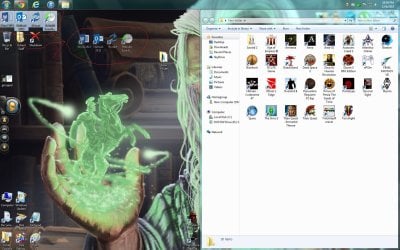
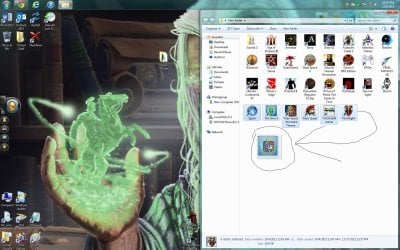

 Any icons that I move from any folder, group up like they do in screen shot 2, when before they would all move like they do in screen shot 1.....So basically I'm trying to get all my Icons to move like they do in screen shot 1. When i try to move them when they stacked like in screenshot 2 to say my desktop....instead of going where I try to move them they kind of scatter where ever they pls. Hopefully that makes a little more sense.
 Thanks for your time, guys I appreciate It.
