
Icons - Change Using Resource Hacker

   Information
A few days ago I faced a question http://www.sevenforums.com/customization/72719-how-do-i-change-icons-using-restorator.html . I provided the suggestion there; latter thought if there is a tutorial, it may help many guys asking the question.
   Note
Tools required :
1. Resource Hacker : Now supports 64 bit system and .png files. Download it from : Download New Updated “Resource Hacker 3.5.2 Beta” with 64-bit and PNG File Support - Tweaking with Vishal

2. IcoFX : A free application that can be used to get a ready reference of the system icons. Download it from IcoFX - The Free Icon Editor - Download


Download and install the above mentioned programs.


Now it starts :

Suppose we are changing the default games icon with this one chinaz5.png

Though almost all of the system is changeable in this process, it is just an example :D

1. Go to C:\Windows\System32\imageres.dll and take a copy if it in a secured place (i.e. take a backup of it)

2. Now Take Ownership of the imageres.dll

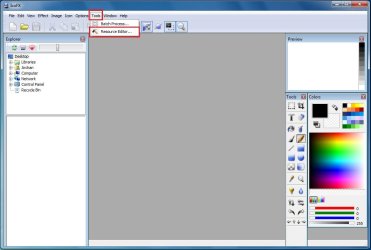
3. Open IcoFX. Click on Tools > Resource Editor.
Pic1.jpg
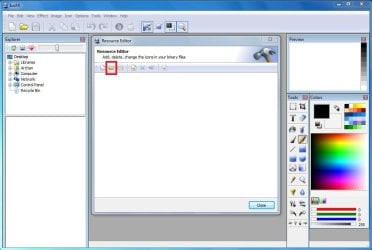
4. In the resource editor window , click on the folder icon. The Open Resources window will appear.
pic2.JPG
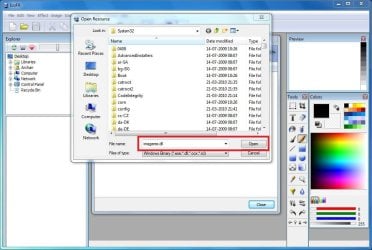
5. In the open resources window, give the filename "imageres.dll" and click open.
pic3.JPG
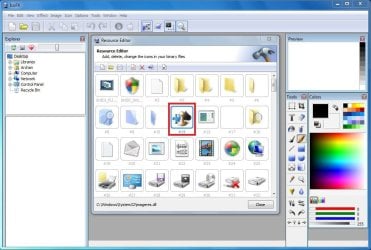
6. So in the resource editor window, The games icon no is #14
pic4.JPG
We are to moderate it using Resource Hacker. Now we may close IcoFX.

7. Open Resource Hacker. Click on File > Open . It will automatically open in System 32.
pic5.jpg
8. In the incoming box, give the file name "imageres.dll" and click "open".
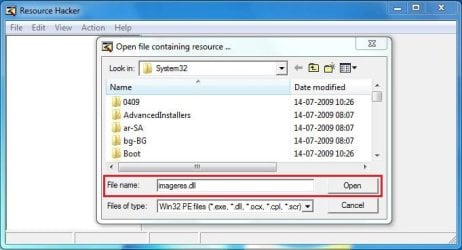
pic6.JPG
9. Now, Click on the "+" sign in front of "Icon Group"
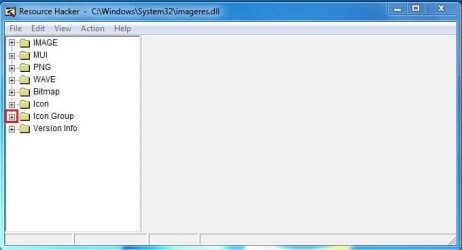
pic7.JPG
10. You will look the Icon group tree expands, and an item "*1033" there. Click on "*1033" and see the games icon revealed in the right side pane of the window.
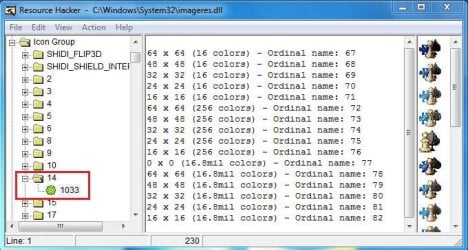
pic8.JPG
11. Now right click on "*1033" and click on "replace resource"
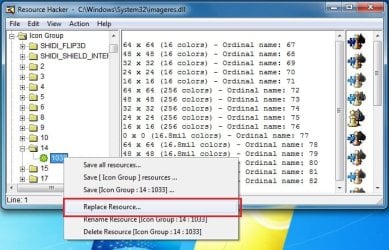
pic9.jpg
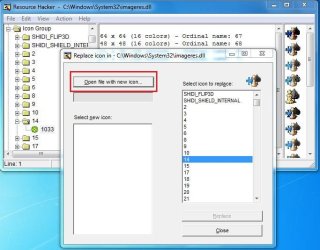
12. In the upcoming box, click on "Open the file with new icon" and browse for it.
pic10.JPG
13. Now, first click on "Select new icon" and then click on "replace"
pic11.JPG
Repeat upto step 13 for the icons you want to change at a time, and when all of your icons are replaced, go to step 14.
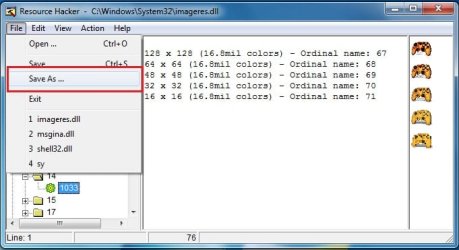
14. We are almost done. We successfully modified the imageres.dll file. Now it is to save it. Cilck on File > Save as, give the filename "imageres,dll". Save it on your desktop.
pic12.jpg
15. Go again to C:\Windows\System32\imageres.dll. Rename it to inageresOLD.dll or something. Now copy the modified imageres.dll in that location. The last thing is to restart ... either you may restart your computer, or you may restart explorer.exe using task manager.

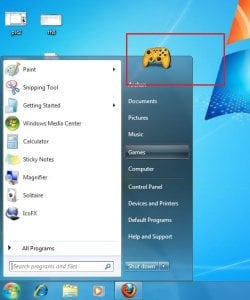
16. After restart, Click on start menu and place your pointer on the games link. you will get it :D
final.jpg
I agree with you that the process is lengthy and labourous :( But it is the free of cost way to change all the system icons.

Enjoy yourself. And again,dont forget to backup your original imageres.dll before starting the process :)


Last edited by a moderator:
Arc

My system is x64 bit
 

My Computer

Computer Manufacturer/Model Number
7600
OS
Windows 7 Home Premium
CPU
Pentium(R) Dual-Core E5300 @ 2.60GHz
Motherboard
ASUS P5KPL-AM/PS
Memory
4GB RAM
Graphics Card(s)
NVIDIA GeForce 9500 GT
Monitor(s) Displays
Benq 22"
Screen Resolution
1920 x 1080
Hard Drives
600GB NTFS HDD WD, 1TB External HDD HP simple save , 1TB External WD HDD, 250GB External WD HDD.
Case
Cooler Master Scout
Keyboard
Razer Lycosa
Mouse
Razer Imperator
Other Info
Windows®. Life without Walls™.

Love Steam
I'm not able to take ownership of the "imageres.dll" according Take Ownership of getting error "access denied". If i don't get the Ownership then nothing can be done. So help me.
 

My Computer

Computer type
Laptop
OS
Windows 7 Ultimate
You may use the zip attached .... unzip and run the takeownership.reg to merge it with registry ; and it will be in your right click context menu now .

Browse to imageres.dll , right click on it , and click on take ownership .
 

Attachments

My Computer

Computer type
PC/Desktop
Computer Manufacturer/Model Number
Self Assembled
OS
Microsoft Windows 10 Pro Insider Preview 64-bit
CPU
Intel(R) Core(TM) i3-4130 CPU @ 3.40GHz
Motherboard
Gigabyte Technology Co., Ltd. B85M-D3H
Memory
Corsair Vengence 4GB x2 (8.00GB Dual-Channel DDR3 @ 798MHz)
Graphics Card(s)
2047MB GeForce GTS 450 (ZOTAC International)
Sound Card
Onboard (Realtek High Definition Audio)
Monitor(s) Displays
LG Flatron E2040T
Screen Resolution
1600x900
Hard Drives
Western Digital 1 TB
Seagate 500 GB
PSU
Corsair VS550
Case
Cooler Master K380
Cooling
Cooler Master Seidon 120V Plus
Keyboard
Logitech MK260r
Mouse
Logitech MK260r
Internet Speed
PMPL Broadband
Antivirus
Windows Defender + MBAM
Browser
Firefox
Other Info
Dell Studio 15" Laptop
I already got that & have TakeOwnership option in the Context Menu but guess what still its not working (i followed every step in your tutorial till 13 & there are no problem till that step). After i click on replace i get an error "Out of Scope Resource". What should i do now or what i'm missing???
View attachment 108558
 
Last edited:

My Computer

Computer type
Laptop
OS
Windows 7 Ultimate
Oh ! Dont be afraid . I dont know why , but it occurs sometimes . You need not to be afraid . Just click on OK, and everything will be as usual .

Feel free to ask for any assistance if needed . I would not be online for next few hours , but returning home I will see it .

From India I guess ?
 

My Computer

Computer type
PC/Desktop
Computer Manufacturer/Model Number
Self Assembled
OS
Microsoft Windows 10 Pro Insider Preview 64-bit
CPU
Intel(R) Core(TM) i3-4130 CPU @ 3.40GHz
Motherboard
Gigabyte Technology Co., Ltd. B85M-D3H
Memory
Corsair Vengence 4GB x2 (8.00GB Dual-Channel DDR3 @ 798MHz)
Graphics Card(s)
2047MB GeForce GTS 450 (ZOTAC International)
Sound Card
Onboard (Realtek High Definition Audio)
Monitor(s) Displays
LG Flatron E2040T
Screen Resolution
1600x900
Hard Drives
Western Digital 1 TB
Seagate 500 GB
PSU
Corsair VS550
Case
Cooler Master K380
Cooling
Cooler Master Seidon 120V Plus
Keyboard
Logitech MK260r
Mouse
Logitech MK260r
Internet Speed
PMPL Broadband
Antivirus
Windows Defender + MBAM
Browser
Firefox
Other Info
Dell Studio 15" Laptop
Sure, another question i got for you: How do i know which all folder to change what'll happen if i change all of them listed under the group??? Is it possible to have different icons for different types of folder acc. to what i store in them??? Some like this:
View attachment 108561
If yes then how to check which number on that list denotes what applications or folder type like eg you showed 'games' folder????

Sorry too many question its just little curious but don't want to mess any thing but also want to give an amazing look to my com... Yes but how did you guessed???? Hmm i guess by looking at my time....

I also wanted to know do i need both IcoFx & Resource Hacker or just any 1????
bcz in the tutorial 1st 6 steps have been explained using IcoFx & remaining with Resource Hacker....was that reason for this failure????
 
Last edited:

My Computer

Computer type
Laptop
OS
Windows 7 Ultimate
I guessed looking at BollywoodMotions tab there ;)

Sorry you cannot apply different icons to different folders as they are live folders . How to change the folder icon ? OK follow this link : http://www.sevenforums.com/943862-post22.html . You are to edit 3,4,5,6 and 162 in order to do it .

Need not to be sorry foe asking a question, I told earlier that you can feel free to ask !!

ISI is a great institute btw . Wish you success in your customization , and in your career, too !!

EDIT : In the first few parts of the tutorial, it is stated how to find out the icon number using IcoFX ;)
 

My Computer

Computer type
PC/Desktop
Computer Manufacturer/Model Number
Self Assembled
OS
Microsoft Windows 10 Pro Insider Preview 64-bit
CPU
Intel(R) Core(TM) i3-4130 CPU @ 3.40GHz
Motherboard
Gigabyte Technology Co., Ltd. B85M-D3H
Memory
Corsair Vengence 4GB x2 (8.00GB Dual-Channel DDR3 @ 798MHz)
Graphics Card(s)
2047MB GeForce GTS 450 (ZOTAC International)
Sound Card
Onboard (Realtek High Definition Audio)
Monitor(s) Displays
LG Flatron E2040T
Screen Resolution
1600x900
Hard Drives
Western Digital 1 TB
Seagate 500 GB
PSU
Corsair VS550
Case
Cooler Master K380
Cooling
Cooler Master Seidon 120V Plus
Keyboard
Logitech MK260r
Mouse
Logitech MK260r
Internet Speed
PMPL Broadband
Antivirus
Windows Defender + MBAM
Browser
Firefox
Other Info
Dell Studio 15" Laptop
Thank you for your wishes...Yeah indeed ISI is a great institute...
Ok so if i got you right i don't need IcoFx just Resource Hacker will do the job. That's great btw i got IcoFx also.
 

My Computer

Computer type
Laptop
OS
Windows 7 Ultimate
Well Arc it seem i still couldn't pulled this off right...
Here if you see on the left windows all icons i customize the old XP style Right click on the folder>Properties> Cutomize>Bottom Change Icon>Browse for the destination icon folder & selected & Apply & Ok. Even after all the steps these remained the same & Program Files & Windows (which i you can't change even in XP style) has also not changed.
View attachment 108578
In the right window you can see it has taken effect but not all the folder icon have changed few are still the same.

Here in the screenshot you can see the old style of thumbnail is showing like the old Windows7 style & it keep showing for sub-folder as well.
View attachment 108580

I don't know what went wrong i changed 3,4,5,6 & 162 as you said & in the same order.
 
Last edited:

My Computer

Computer type
Laptop
OS
Windows 7 Ultimate
Pal you need to replace it with custom live folder icons . If you like there is a few examples : http://www.sevenforums.com/customization/109044-see-through-folder-icon-set.html . But if you want that book icon as folders , you need to turn off thumbnail preview . Follow this tuto link http://www.sevenforums.com/tutorials/11738-thumbnail-previews-enable-disable.html .

With thumbnails on, there is no way to get rid of the situation .

Apply the second link , the thumbs will not be there , but at the same time they will be disabled throughout the windows :( . I dont have any solution of this situation . Shawn Brink may help you more on this event .
 

My Computer

Computer type
PC/Desktop
Computer Manufacturer/Model Number
Self Assembled
OS
Microsoft Windows 10 Pro Insider Preview 64-bit
CPU
Intel(R) Core(TM) i3-4130 CPU @ 3.40GHz
Motherboard
Gigabyte Technology Co., Ltd. B85M-D3H
Memory
Corsair Vengence 4GB x2 (8.00GB Dual-Channel DDR3 @ 798MHz)
Graphics Card(s)
2047MB GeForce GTS 450 (ZOTAC International)
Sound Card
Onboard (Realtek High Definition Audio)
Monitor(s) Displays
LG Flatron E2040T
Screen Resolution
1600x900
Hard Drives
Western Digital 1 TB
Seagate 500 GB
PSU
Corsair VS550
Case
Cooler Master K380
Cooling
Cooler Master Seidon 120V Plus
Keyboard
Logitech MK260r
Mouse
Logitech MK260r
Internet Speed
PMPL Broadband
Antivirus
Windows Defender + MBAM
Browser
Firefox
Other Info
Dell Studio 15" Laptop
Arc the prob is that Thumbnail is turned off & acc. to Thumbnail Previews - Enable or Disable. That's what i was thniking how to get rid of it because i can't turn off something which is already off.

Can't i use any other folder icons as i have Leopard icons that's what i have used over here???
Or does it need to be done through only custom live folder icons?? Ohh i love my old Mac please i don't want to use any other icons set there is no way to get this right???

What is causing some icons to be the same???That's what even more disturbing (i'm Ok with other things).
 

My Computer

Computer type
Laptop
OS
Windows 7 Ultimate

My Computer

Computer type
PC/Desktop
Computer Manufacturer/Model Number
Self Assembled
OS
Microsoft Windows 10 Pro Insider Preview 64-bit
CPU
Intel(R) Core(TM) i3-4130 CPU @ 3.40GHz
Motherboard
Gigabyte Technology Co., Ltd. B85M-D3H
Memory
Corsair Vengence 4GB x2 (8.00GB Dual-Channel DDR3 @ 798MHz)
Graphics Card(s)
2047MB GeForce GTS 450 (ZOTAC International)
Sound Card
Onboard (Realtek High Definition Audio)
Monitor(s) Displays
LG Flatron E2040T
Screen Resolution
1600x900
Hard Drives
Western Digital 1 TB
Seagate 500 GB
PSU
Corsair VS550
Case
Cooler Master K380
Cooling
Cooler Master Seidon 120V Plus
Keyboard
Logitech MK260r
Mouse
Logitech MK260r
Internet Speed
PMPL Broadband
Antivirus
Windows Defender + MBAM
Browser
Firefox
Other Info
Dell Studio 15" Laptop
Sorry Arc i couldn't reply soon but i resolved the problem of thumbnail,all folders not being changed to "book", they were few options that i tried & now everything just fine & every folder in my windows know got the "Mac Book" look...

Btw that "book" folder icon is Mac Leopard Icon.....Thnx anyway for your
 

My Computer

Computer type
Laptop
OS
Windows 7 Ultimate
Sorry Arc i couldn't reply soon but i resolved the problem of thumbnail,all folders not being changed to "book", they were few options that i tried & now everything just fine & every folder in my windows know got the "Mac Book" look...

Btw that "book" folder icon is Mac Leopard Icon.....Thnx anyway for your
That's the dictionary icon :p
 

My Computer

Computer type
PC/Desktop
Computer Manufacturer/Model Number
Self Assembled
OS
Microsoft Windows 10 Pro Insider Preview 64-bit
CPU
Intel(R) Core(TM) i3-4130 CPU @ 3.40GHz
Motherboard
Gigabyte Technology Co., Ltd. B85M-D3H
Memory
Corsair Vengence 4GB x2 (8.00GB Dual-Channel DDR3 @ 798MHz)
Graphics Card(s)
2047MB GeForce GTS 450 (ZOTAC International)
Sound Card
Onboard (Realtek High Definition Audio)
Monitor(s) Displays
LG Flatron E2040T
Screen Resolution
1600x900
Hard Drives
Western Digital 1 TB
Seagate 500 GB
PSU
Corsair VS550
Case
Cooler Master K380
Cooling
Cooler Master Seidon 120V Plus
Keyboard
Logitech MK260r
Mouse
Logitech MK260r
Internet Speed
PMPL Broadband
Antivirus
Windows Defender + MBAM
Browser
Firefox
Other Info
Dell Studio 15" Laptop
How about taking it a little bit farther ...

That was an excellent tutorial. Now I would love to see how one can change the association of the "Games" and "Favorites" folders to those of one's liking, since
right clicking on them doesn't show "Properties" option, thus not allowing to change
the path to them.
 

My Computer

Computer Manufacturer/Model Number
Toshiba Satelite 350
OS
7 Ultimate x86
CPU
Intel Pentium Dual CPU T2390 1.86Ghz 1.87Ghz
Motherboard
Intel PSLD0E-00V00KPL ; chipset model GL960
Memory
DDR2 1.98GB
Graphics Card(s)
Mobile Intel(R) 965 Express Chipset Family
Monitor(s) Displays
Generic PnP
Screen Resolution
1440x900
Hard Drives
Seagate ST9320423AS ATA 313GB
By changing the imageres.dll files, it changed some of the icons, but not all of them. What is going on with it?

As your system is x64 did you make the changes to *both* imageres.dll files?

1st. C:\Windows\System32\imageres.dll

2nd. C:\Windows\SysWOW64\imageres.dll

You should reboot following each occasion you take ownership of system files. I say this because often people have issues when renaming the files straight away.

Before flushing or rebuilding the icon cache try restarting Explorer cleanly by typing "TSKILL EXPLORER" *without the quotes* in the start/search box and hitting return.
 

My Computer

Computer type
PC/Desktop
OS
Windows 7
What if I wanted to change the opera.exe icon for example using ResHacker?

I'm assuming you open Program Files / Opera / opera.exe or wherever it's located.

And find a 1033 file or something.
 

My Computer

Computer Manufacturer/Model Number
iRush Pro
OS
Windows 7 Ultimate x64
CPU
Intel Core i5 2500K Processor
Motherboard
Intel H67 Chipset Motherboard (Micro ATX)
Memory
2x4GB DDR3 1333Mhz Memory
Graphics Card(s)
Novatech Radeon 6770 1GB Graphics Card
Hard Drives
1TB
PSU
Novatech 500W
Case
Novatech ATX Gaming Case
Cooling
-
Keyboard
Novatech Wired Keyboard
Mouse
Novatech Wired Mouse
Internet Speed
VirginMedia 10MB/s
What if I wanted to change the opera.exe icon for example using ResHacker?

I'm assuming you open Program Files / Opera / opera.exe or wherever it's located.

And find a 1033 file or something.
To change the Opera.exe icon, you need not to take all the hazards. You are to use the desktop shortcut for Opera, and change it. Right click on the desktop icon > Properties > Change Icon > Browse (to the location where the substitute icon is stored) > OK > Apply >OK .

It will change the icon of a particular program throughout the system .
 

My Computer

Computer type
PC/Desktop
Computer Manufacturer/Model Number
Self Assembled
OS
Microsoft Windows 10 Pro Insider Preview 64-bit
CPU
Intel(R) Core(TM) i3-4130 CPU @ 3.40GHz
Motherboard
Gigabyte Technology Co., Ltd. B85M-D3H
Memory
Corsair Vengence 4GB x2 (8.00GB Dual-Channel DDR3 @ 798MHz)
Graphics Card(s)
2047MB GeForce GTS 450 (ZOTAC International)
Sound Card
Onboard (Realtek High Definition Audio)
Monitor(s) Displays
LG Flatron E2040T
Screen Resolution
1600x900
Hard Drives
Western Digital 1 TB
Seagate 500 GB
PSU
Corsair VS550
Case
Cooler Master K380
Cooling
Cooler Master Seidon 120V Plus
Keyboard
Logitech MK260r
Mouse
Logitech MK260r
Internet Speed
PMPL Broadband
Antivirus
Windows Defender + MBAM
Browser
Firefox
Other Info
Dell Studio 15" Laptop
What if I wanted to change the opera.exe icon for example using ResHacker?

I'm assuming you open Program Files / Opera / opera.exe or wherever it's located.

And find a 1033 file or something.
To change the Opera.exe icon, you need not to take all the hazards. You are to use the desktop shortcut for Opera, and change it. Right click on the desktop icon > Properties > Change Icon > Browse (to the location where the substitute icon is stored) > OK > Apply >OK .

It will change the icon of a particular program throughout the system .

But after I surf the Web automatically for 30 minutes, the icon comes to a blank icon or the Opera icon.
 

My Computer

Computer Manufacturer/Model Number
iRush Pro
OS
Windows 7 Ultimate x64
CPU
Intel Core i5 2500K Processor
Motherboard
Intel H67 Chipset Motherboard (Micro ATX)
Memory
2x4GB DDR3 1333Mhz Memory
Graphics Card(s)
Novatech Radeon 6770 1GB Graphics Card
Hard Drives
1TB
PSU
Novatech 500W
Case
Novatech ATX Gaming Case
Cooling
-
Keyboard
Novatech Wired Keyboard
Mouse
Novatech Wired Mouse
Internet Speed
VirginMedia 10MB/s
But after I surf the Web automatically for 30 minutes, the icon comes to a blank icon or the Opera icon.
In this case you may change it ....
Capture.JPG

If you do it, please post the result back . I have never changed a third party program,s icon using this method . :sarc:
 

My Computer

Computer type
PC/Desktop
Computer Manufacturer/Model Number
Self Assembled
OS
Microsoft Windows 10 Pro Insider Preview 64-bit
CPU
Intel(R) Core(TM) i3-4130 CPU @ 3.40GHz
Motherboard
Gigabyte Technology Co., Ltd. B85M-D3H
Memory
Corsair Vengence 4GB x2 (8.00GB Dual-Channel DDR3 @ 798MHz)
Graphics Card(s)
2047MB GeForce GTS 450 (ZOTAC International)
Sound Card
Onboard (Realtek High Definition Audio)
Monitor(s) Displays
LG Flatron E2040T
Screen Resolution
1600x900
Hard Drives
Western Digital 1 TB
Seagate 500 GB
PSU
Corsair VS550
Case
Cooler Master K380
Cooling
Cooler Master Seidon 120V Plus
Keyboard
Logitech MK260r
Mouse
Logitech MK260r
Internet Speed
PMPL Broadband
Antivirus
Windows Defender + MBAM
Browser
Firefox
Other Info
Dell Studio 15" Laptop
Back
Top