Icons - Change Using Resource Hacker

   Information
A few days ago I faced a question http://www.sevenforums.com/customization/72719-how-do-i-change-icons-using-restorator.html . I provided the suggestion there; latter thought if there is a tutorial, it may help many guys asking the question.
   Note
Tools required :
1. Resource Hacker : Now supports 64 bit system and .png files. Download it from : Download New Updated “Resource Hacker 3.5.2 Beta” with 64-bit and PNG File Support - Tweaking with Vishal

2. IcoFX : A free application that can be used to get a ready reference of the system icons. Download it from IcoFX - The Free Icon Editor - Download


Download and install the above mentioned programs.


Now it starts :

Suppose we are changing the default games icon with this one chinaz5.png

Though almost all of the system is changeable in this process, it is just an example :D

1. Go to C:\Windows\System32\imageres.dll and take a copy if it in a secured place (i.e. take a backup of it)

2. Now Take Ownership of the imageres.dll

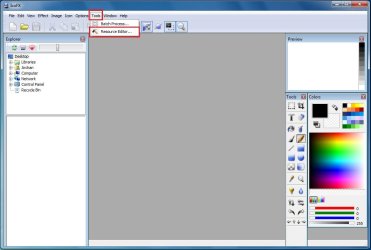
3. Open IcoFX. Click on Tools > Resource Editor.
Pic1.jpg
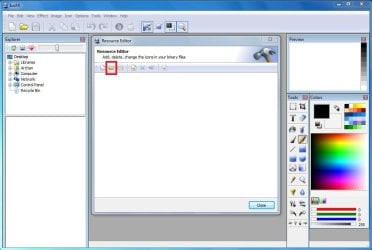
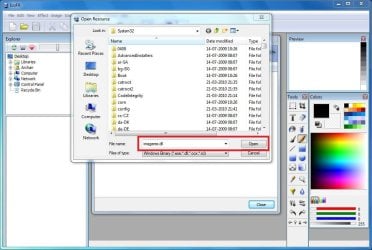
4. In the resource editor window , click on the folder icon. The Open Resources window will appear.
pic2.JPG
5. In the open resources window, give the filename "imageres.dll" and click open.
pic3.JPG
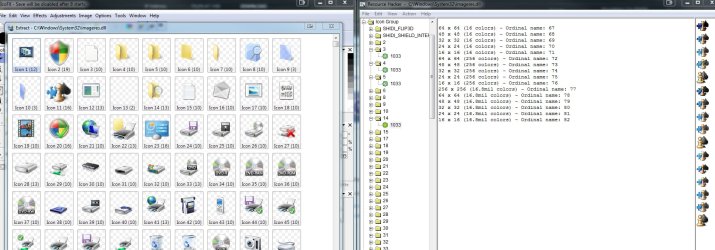
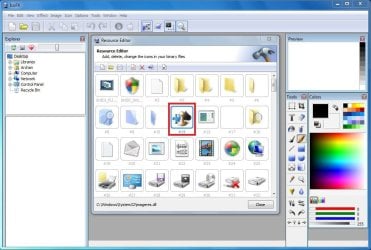
6. So in the resource editor window, The games icon no is #14
pic4.JPG
We are to moderate it using Resource Hacker. Now we may close IcoFX.

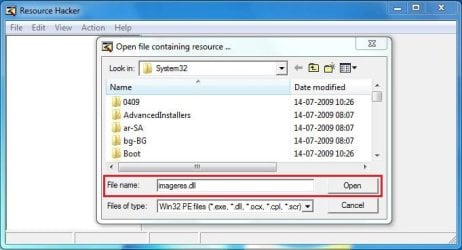
7. Open Resource Hacker. Click on File > Open . It will automatically open in System 32.
pic5.jpg
8. In the incoming box, give the file name "imageres.dll" and click "open".
pic6.JPG
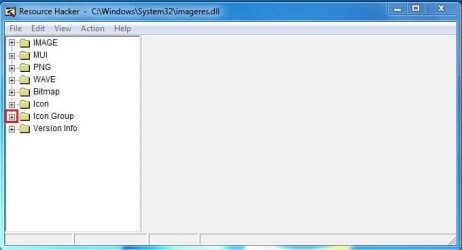
9. Now, Click on the "+" sign in front of "Icon Group"
pic7.JPG
10. You will look the Icon group tree expands, and an item "*1033" there. Click on "*1033" and see the games icon revealed in the right side pane of the window.
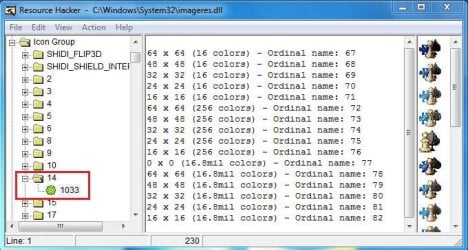
pic8.JPG
11. Now right click on "*1033" and click on "replace resource"
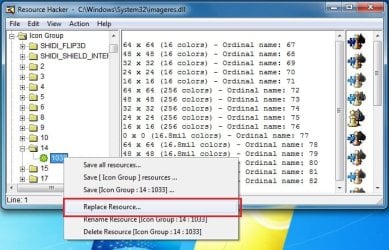
pic9.jpg
12. In the upcoming box, click on "Open the file with new icon" and browse for it.
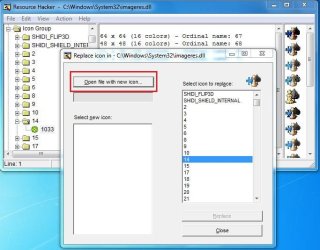
pic10.JPG
13. Now, first click on "Select new icon" and then click on "replace"
pic11.JPG
Repeat upto step 13 for the icons you want to change at a time, and when all of your icons are replaced, go to step 14.
14. We are almost done. We successfully modified the imageres.dll file. Now it is to save it. Cilck on File > Save as, give the filename "imageres,dll". Save it on your desktop.
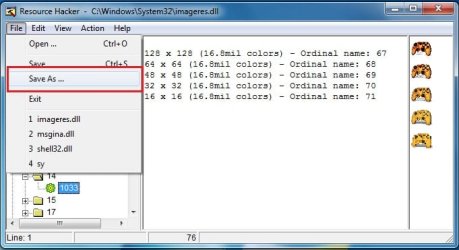
pic12.jpg
15. Go again to C:\Windows\System32\imageres.dll. Rename it to inageresOLD.dll or something. Now copy the modified imageres.dll in that location. The last thing is to restart ... either you may restart your computer, or you may restart explorer.exe using task manager.

16. After restart, Click on start menu and place your pointer on the games link. you will get it :D
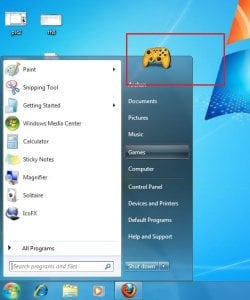
final.jpg
I agree with you that the process is lengthy and labourous :( But it is the free of cost way to change all the system icons.

Enjoy yourself. And again,dont forget to backup your original imageres.dll before starting the process :)


Last edited by a moderator:
But after I surf the Web automatically for 30 minutes, the icon comes to a blank icon or the Opera icon.
You also need to leave the icon you choose in the same folder/location or it will revert to a generic icon if you move it after changing. I keep all of mine in a folder called "Icons" in My Documents.
 

My Computer

Computer type
PC/Desktop
Computer Manufacturer/Model Number
Home Built Desktop By DataTech
OS
Windows 7 Ultimate X64 SP1
CPU
Intel i5-2550K, Differing ~4.4-4.8GHz No built in GPU
Motherboard
ASUS P8Z68-V PRO/GEN3
Memory
16GB G.Skill Sniper 1866MHz @ 2133MHz 2x8GB
Graphics Card(s)
ASUS GTX650TIB-DC2OC-2GD5, (650TI Boost)
Sound Card
Onboard Realtek 5-1
Monitor(s) Displays
Samsung P2570HD
Screen Resolution
1920x1080
Hard Drives
Samsung 840 Pro 256GB SSD for OS, 500GB Seagate Constellation (Enterprise drive) for Data
PSU
Corsair HX650W
Case
Inwin Dragon Rider
Cooling
Hyper 212 EVO w/two Noctua fans, push-pull, @1300 RPM
Keyboard
E-Z Eyes, bright yellow keys with large characters
Mouse
steelseries SENSEI Laser Pro Gaming
Internet Speed
48-51Mbs Mbs down, 11 Mbs up Xfinity Cable
Antivirus
Norton Internet Security 2013
Browser
IE 10, Opera, Pale Moon if needed
Other Info
4 case fans, LG BluRay-RE, ASUS DVD-RW, Mr. Fusion power supply, 1.21 gigawatts.
It didn't work, I changed every one and corrupted Opera, had to reinstall it.

Yes, I have learnt that over past experience :D, can this be on an external drive?
 

My Computer

Computer Manufacturer/Model Number
iRush Pro
OS
Windows 7 Ultimate x64
CPU
Intel Core i5 2500K Processor
Motherboard
Intel H67 Chipset Motherboard (Micro ATX)
Memory
2x4GB DDR3 1333Mhz Memory
Graphics Card(s)
Novatech Radeon 6770 1GB Graphics Card
Hard Drives
1TB
PSU
Novatech 500W
Case
Novatech ATX Gaming Case
Cooling
-
Keyboard
Novatech Wired Keyboard
Mouse
Novatech Wired Mouse
Internet Speed
VirginMedia 10MB/s
Changing icons dont make a program corrupted ... you must have done something wrong there.

BTW, it works for all of us what Britton30 stated above, and flawlessly. At the same time, It shouldn't be in an external drive.
 

My Computer

Computer type
PC/Desktop
Computer Manufacturer/Model Number
Self Assembled
OS
Microsoft Windows 10 Pro Insider Preview 64-bit
CPU
Intel(R) Core(TM) i3-4130 CPU @ 3.40GHz
Motherboard
Gigabyte Technology Co., Ltd. B85M-D3H
Memory
Corsair Vengence 4GB x2 (8.00GB Dual-Channel DDR3 @ 798MHz)
Graphics Card(s)
2047MB GeForce GTS 450 (ZOTAC International)
Sound Card
Onboard (Realtek High Definition Audio)
Monitor(s) Displays
LG Flatron E2040T
Screen Resolution
1600x900
Hard Drives
Western Digital 1 TB
Seagate 500 GB
PSU
Corsair VS550
Case
Cooler Master K380
Cooling
Cooler Master Seidon 120V Plus
Keyboard
Logitech MK260r
Mouse
Logitech MK260r
Internet Speed
PMPL Broadband
Antivirus
Windows Defender + MBAM
Browser
Firefox
Other Info
Dell Studio 15" Laptop
Yeh, I think I changed EVERY icon in 1033 folder as when I changed the one you said it did nothing
 

My Computer

Computer Manufacturer/Model Number
iRush Pro
OS
Windows 7 Ultimate x64
CPU
Intel Core i5 2500K Processor
Motherboard
Intel H67 Chipset Motherboard (Micro ATX)
Memory
2x4GB DDR3 1333Mhz Memory
Graphics Card(s)
Novatech Radeon 6770 1GB Graphics Card
Hard Drives
1TB
PSU
Novatech 500W
Case
Novatech ATX Gaming Case
Cooling
-
Keyboard
Novatech Wired Keyboard
Mouse
Novatech Wired Mouse
Internet Speed
VirginMedia 10MB/s
If you apply a new icon via the customize option from program properties dialog, you could have the icon on an external drive. This would require the drive to be connected constantly. If you were to disconnect it, the generic icons would again take over and you'll have to reapply the custom one(s).

Before you change the imageres.dll, for example, did you http://www.sevenforums.com/tutorials/1911-take-ownership-shortcut.html?ltr=T and rename the original to imageres.dll.OLD? Then reboot to apply your modded .dll file.
 

My Computer

Computer type
PC/Desktop
Computer Manufacturer/Model Number
Home Built Desktop By DataTech
OS
Windows 7 Ultimate X64 SP1
CPU
Intel i5-2550K, Differing ~4.4-4.8GHz No built in GPU
Motherboard
ASUS P8Z68-V PRO/GEN3
Memory
16GB G.Skill Sniper 1866MHz @ 2133MHz 2x8GB
Graphics Card(s)
ASUS GTX650TIB-DC2OC-2GD5, (650TI Boost)
Sound Card
Onboard Realtek 5-1
Monitor(s) Displays
Samsung P2570HD
Screen Resolution
1920x1080
Hard Drives
Samsung 840 Pro 256GB SSD for OS, 500GB Seagate Constellation (Enterprise drive) for Data
PSU
Corsair HX650W
Case
Inwin Dragon Rider
Cooling
Hyper 212 EVO w/two Noctua fans, push-pull, @1300 RPM
Keyboard
E-Z Eyes, bright yellow keys with large characters
Mouse
steelseries SENSEI Laser Pro Gaming
Internet Speed
48-51Mbs Mbs down, 11 Mbs up Xfinity Cable
Antivirus
Norton Internet Security 2013
Browser
IE 10, Opera, Pale Moon if needed
Other Info
4 case fans, LG BluRay-RE, ASUS DVD-RW, Mr. Fusion power supply, 1.21 gigawatts.
I took ownership but didn't rename to old and save the icon in the new imageres, I just saved the modified Opera in the original imageres.
 

My Computer

Computer Manufacturer/Model Number
iRush Pro
OS
Windows 7 Ultimate x64
CPU
Intel Core i5 2500K Processor
Motherboard
Intel H67 Chipset Motherboard (Micro ATX)
Memory
2x4GB DDR3 1333Mhz Memory
Graphics Card(s)
Novatech Radeon 6770 1GB Graphics Card
Hard Drives
1TB
PSU
Novatech 500W
Case
Novatech ATX Gaming Case
Cooling
-
Keyboard
Novatech Wired Keyboard
Mouse
Novatech Wired Mouse
Internet Speed
VirginMedia 10MB/s
OK, I used imageres.dll as an example. To change the Opera icons, you need to open Opera.exe with reshack to change them, following the same take ownership, renaming the original, etc.

What I have done is this:
1.Take ownership of the original.
2.Make a copy of it on the desktop
3.Rename the original (for backup use)
4.Use reshack to mod the copy and compile
5.Move the modded one back to original location
6.Reboot or log off/on

Make sure the one you have just changed has the exact name of the original .dll file.
 

My Computer

Computer type
PC/Desktop
Computer Manufacturer/Model Number
Home Built Desktop By DataTech
OS
Windows 7 Ultimate X64 SP1
CPU
Intel i5-2550K, Differing ~4.4-4.8GHz No built in GPU
Motherboard
ASUS P8Z68-V PRO/GEN3
Memory
16GB G.Skill Sniper 1866MHz @ 2133MHz 2x8GB
Graphics Card(s)
ASUS GTX650TIB-DC2OC-2GD5, (650TI Boost)
Sound Card
Onboard Realtek 5-1
Monitor(s) Displays
Samsung P2570HD
Screen Resolution
1920x1080
Hard Drives
Samsung 840 Pro 256GB SSD for OS, 500GB Seagate Constellation (Enterprise drive) for Data
PSU
Corsair HX650W
Case
Inwin Dragon Rider
Cooling
Hyper 212 EVO w/two Noctua fans, push-pull, @1300 RPM
Keyboard
E-Z Eyes, bright yellow keys with large characters
Mouse
steelseries SENSEI Laser Pro Gaming
Internet Speed
48-51Mbs Mbs down, 11 Mbs up Xfinity Cable
Antivirus
Norton Internet Security 2013
Browser
IE 10, Opera, Pale Moon if needed
Other Info
4 case fans, LG BluRay-RE, ASUS DVD-RW, Mr. Fusion power supply, 1.21 gigawatts.
12. In the upcoming box, click on "Open the file with new icon" and browse for it.

Browse for what !? .ico file !? when i open .ico with Resource Hacker, it says "out of memory".. i want to replace my app icon with this .ico files.. :cry::cry:
 

My Computer

OS
Windows
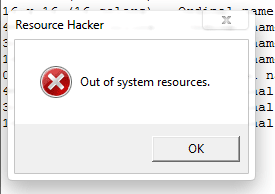
Not out of memory, but out of system resources.

Capture.PNG

Dont worry, press OK and proceed.
 

My Computer

Computer type
PC/Desktop
Computer Manufacturer/Model Number
Self Assembled
OS
Microsoft Windows 10 Pro Insider Preview 64-bit
CPU
Intel(R) Core(TM) i3-4130 CPU @ 3.40GHz
Motherboard
Gigabyte Technology Co., Ltd. B85M-D3H
Memory
Corsair Vengence 4GB x2 (8.00GB Dual-Channel DDR3 @ 798MHz)
Graphics Card(s)
2047MB GeForce GTS 450 (ZOTAC International)
Sound Card
Onboard (Realtek High Definition Audio)
Monitor(s) Displays
LG Flatron E2040T
Screen Resolution
1600x900
Hard Drives
Western Digital 1 TB
Seagate 500 GB
PSU
Corsair VS550
Case
Cooler Master K380
Cooling
Cooler Master Seidon 120V Plus
Keyboard
Logitech MK260r
Mouse
Logitech MK260r
Internet Speed
PMPL Broadband
Antivirus
Windows Defender + MBAM
Browser
Firefox
Other Info
Dell Studio 15" Laptop
Thanks Archie have ben toying with this idea and also making up my own private tuts for the folks I fix for - it really has given me some insight and ideas to toss around.:cool:
 

My Computer

Computer type
PC/Desktop
Computer Manufacturer/Model Number
Own build (new) Desk1 / Asus ROG Win 7 / Desk2 1st build
OS
Desk1 7 Home Prem / Desk2 10 Pro / Main lap Asus ROG 10 Pro 2 laptop Toshiba 7 Pro Asus P2520 7 & 10
CPU
Desk1 i5 3750K / Laptop i7 GTX 860M / Desk2 i5 2500
Motherboard
Desk1 Asus P877-V / Desk2 Gigabyte H67 UD3H / Laptop ?
Memory
Desk1 8GB (1866) / Desk2 16GB (1333) / Laptop 8Gb DDR3
Graphics Card(s)
Desk 1& 2NVidia GTX 650 & Laptops on board Intel
Sound Card
Desk 1 & 2 -XONAR DG Realtek High Def audio Laptop
Monitor(s) Displays
Desk 1 Benq HD 2450 / Desk2 Philips 24" / Laptop 17.5"
Screen Resolution
1920x1080 D1 & D2 & Laptop 1
Hard Drives
Desk1 Samsung 120GB 830 SSD
Asus ROG 256GB 850 Pro SSD
Desk2 Samsung 840 256 SSD
Toshiba 120GB EVO
PSU
Desk 1 Corsair HX 1050/ Laptop ? / Desk 2 Corsair HX 650
Case
Desk 1 Cooler HAF XM ? Toshiba laptop / Desk2 Coolermaster
Cooling
Fans on all Desk1 -2 Desk2 - all Coolermasters 5 Laptop ?
Keyboard
Desk 1 MS Sidewinder X6 Desk 2 MS Sidewinder X 4
Mouse
Desk 1&2 - Gigabyte MS 900 gamer - laptop - Logitec wireless
Internet Speed
ADSL2+
Other Info
One other Desktop (tester) and spare Toshba laptop both with SSD's
Running Kaspersky 2016 ISS on all machines config'd identically
Logitec audio stereo systems on each machine (x3)
Canon MG5250MFC
Router/modem TP-Link running WPA2SK
Thanks Archie have ben toying with this idea and also making up my own private tuts for the folks I fix for - it really has given me some insight and ideas to toss around.:cool:
Nice to know :D Toss around :p
 

My Computer

Computer type
PC/Desktop
Computer Manufacturer/Model Number
Self Assembled
OS
Microsoft Windows 10 Pro Insider Preview 64-bit
CPU
Intel(R) Core(TM) i3-4130 CPU @ 3.40GHz
Motherboard
Gigabyte Technology Co., Ltd. B85M-D3H
Memory
Corsair Vengence 4GB x2 (8.00GB Dual-Channel DDR3 @ 798MHz)
Graphics Card(s)
2047MB GeForce GTS 450 (ZOTAC International)
Sound Card
Onboard (Realtek High Definition Audio)
Monitor(s) Displays
LG Flatron E2040T
Screen Resolution
1600x900
Hard Drives
Western Digital 1 TB
Seagate 500 GB
PSU
Corsair VS550
Case
Cooler Master K380
Cooling
Cooler Master Seidon 120V Plus
Keyboard
Logitech MK260r
Mouse
Logitech MK260r
Internet Speed
PMPL Broadband
Antivirus
Windows Defender + MBAM
Browser
Firefox
Other Info
Dell Studio 15" Laptop
Conflicting icon numbering

This thread has been pretty quiet for a while but I just did a clean install of 7 and wanted to customize a bit and this site has been great.

I started using the tutorial and I have noticed that the number of the icon shown in IcoFx does not match the number in Resource hacker.

For example in IcoFx the Games icon is showing as 11 but in Hacker it is 14.

Did I miss something?

Thanks.
 

Attachments

  • Screen 1.jpg
    Screen 1.jpg
    837.7 KB · Views: 248

My Computer

Computer Manufacturer/Model Number
Custom
OS
Windows 7 Ultimate x64
CPU
i-7 920 2.67 OC'd 3.0
Motherboard
GA-EX58-UD3R
Memory
16gb DDR3
Graphics Card(s)
Radeon HD 6850
Monitor(s) Displays
3 Dell P2210h
Screen Resolution
1920 x 1080
Hard Drives
128 GB ssd, 2 1.5 TB caviar green
Case
Antec 900 v2
Keyboard
MX 3200
I am not sure, see the first post, step 6, it is 14 for me, in both the tools :(
 

My Computer

Computer type
PC/Desktop
Computer Manufacturer/Model Number
Self Assembled
OS
Microsoft Windows 10 Pro Insider Preview 64-bit
CPU
Intel(R) Core(TM) i3-4130 CPU @ 3.40GHz
Motherboard
Gigabyte Technology Co., Ltd. B85M-D3H
Memory
Corsair Vengence 4GB x2 (8.00GB Dual-Channel DDR3 @ 798MHz)
Graphics Card(s)
2047MB GeForce GTS 450 (ZOTAC International)
Sound Card
Onboard (Realtek High Definition Audio)
Monitor(s) Displays
LG Flatron E2040T
Screen Resolution
1600x900
Hard Drives
Western Digital 1 TB
Seagate 500 GB
PSU
Corsair VS550
Case
Cooler Master K380
Cooling
Cooler Master Seidon 120V Plus
Keyboard
Logitech MK260r
Mouse
Logitech MK260r
Internet Speed
PMPL Broadband
Antivirus
Windows Defender + MBAM
Browser
Firefox
Other Info
Dell Studio 15" Laptop
Totally "my bad". I was just opening imageres.dll in IcoFx directly from the tool bar "open folder". Brain lapse on the whole Tools/Icon Resource Editor/imageres.dll.

I got a little ahead of myself in the process.

BTW when I replace an icon should all the sizes appear at once or is that only after I rebuild the cache?
 

My Computer

Computer Manufacturer/Model Number
Custom
OS
Windows 7 Ultimate x64
CPU
i-7 920 2.67 OC'd 3.0
Motherboard
GA-EX58-UD3R
Memory
16gb DDR3
Graphics Card(s)
Radeon HD 6850
Monitor(s) Displays
3 Dell P2210h
Screen Resolution
1920 x 1080
Hard Drives
128 GB ssd, 2 1.5 TB caviar green
Case
Antec 900 v2
Keyboard
MX 3200
You should not replace an icon directly. Change how many do you want, Save the result as imageres.dll in the in the desktop, and replace the imageres file then. Do the same for both System32 and SysWOW64 folders.

Now rebuild icon cache, it should be there.

But before changing/replacing the system files, dont forget to take the backups as suggested.
 

My Computer

Computer type
PC/Desktop
Computer Manufacturer/Model Number
Self Assembled
OS
Microsoft Windows 10 Pro Insider Preview 64-bit
CPU
Intel(R) Core(TM) i3-4130 CPU @ 3.40GHz
Motherboard
Gigabyte Technology Co., Ltd. B85M-D3H
Memory
Corsair Vengence 4GB x2 (8.00GB Dual-Channel DDR3 @ 798MHz)
Graphics Card(s)
2047MB GeForce GTS 450 (ZOTAC International)
Sound Card
Onboard (Realtek High Definition Audio)
Monitor(s) Displays
LG Flatron E2040T
Screen Resolution
1600x900
Hard Drives
Western Digital 1 TB
Seagate 500 GB
PSU
Corsair VS550
Case
Cooler Master K380
Cooling
Cooler Master Seidon 120V Plus
Keyboard
Logitech MK260r
Mouse
Logitech MK260r
Internet Speed
PMPL Broadband
Antivirus
Windows Defender + MBAM
Browser
Firefox
Other Info
Dell Studio 15" Laptop
Thanks for your replies. Good to know you are still watching your OP.:D

I did a test run changing the Games icon, step by step, and everything worked out. However I just tried changing one other (zip folder) and all I got was one image size (256x256), none of the others. Could this be an issue with the .ico I created in Photoshop with the ico plug-in? (The games one which worked I got off Google @ 256x256 icon.)

Thanks again.
 

My Computer

Computer Manufacturer/Model Number
Custom
OS
Windows 7 Ultimate x64
CPU
i-7 920 2.67 OC'd 3.0
Motherboard
GA-EX58-UD3R
Memory
16gb DDR3
Graphics Card(s)
Radeon HD 6850
Monitor(s) Displays
3 Dell P2210h
Screen Resolution
1920 x 1080
Hard Drives
128 GB ssd, 2 1.5 TB caviar green
Case
Antec 900 v2
Keyboard
MX 3200
I have never worked with photoshop's icon plug-in. Icofx does it much better, and with all the possible resolutons, in a single click.

As you have icofx, why dont you try it? :D
 

My Computer

Computer type
PC/Desktop
Computer Manufacturer/Model Number
Self Assembled
OS
Microsoft Windows 10 Pro Insider Preview 64-bit
CPU
Intel(R) Core(TM) i3-4130 CPU @ 3.40GHz
Motherboard
Gigabyte Technology Co., Ltd. B85M-D3H
Memory
Corsair Vengence 4GB x2 (8.00GB Dual-Channel DDR3 @ 798MHz)
Graphics Card(s)
2047MB GeForce GTS 450 (ZOTAC International)
Sound Card
Onboard (Realtek High Definition Audio)
Monitor(s) Displays
LG Flatron E2040T
Screen Resolution
1600x900
Hard Drives
Western Digital 1 TB
Seagate 500 GB
PSU
Corsair VS550
Case
Cooler Master K380
Cooling
Cooler Master Seidon 120V Plus
Keyboard
Logitech MK260r
Mouse
Logitech MK260r
Internet Speed
PMPL Broadband
Antivirus
Windows Defender + MBAM
Browser
Firefox
Other Info
Dell Studio 15" Laptop
Great tutorial! Nice Arc!
I have a question. Will running sfc /scannow replace the modified icon to the default ones?
 

My Computer

Computer Manufacturer/Model Number
Acer Aspire One 722 (AO722)
OS
Windows 7 Home Premium Service Pack 1 32-bit Build 7601
CPU
AMD C-50 Processor 1.0 Ghz
Memory
2 GB DDR3 RAM (1.73 usable in System Properties)
Graphics Card(s)
AMD Radeon HD 6200 series Graphics
Sound Card
High Definition Audio Device
Monitor(s) Displays
Generic PnP Monitor
Screen Resolution
1366 x 768 (recommended)
Hard Drives
320 GB HDD storage
298.09 GB in Disk Management (REAL)
Keyboard
Built-in on my laptop
Mouse
External mouse
Other Info
Installed Windows 7 Service Pack 1 by 9/9/2012
Great tutorial! Nice Arc!
I have a question. Will running sfc /scannow replace the modified icon to the default ones?

Thanks :)

No, sfc will not change those to system default, cause after replacing icons this way, the default icons will no more be there in the system.
 

My Computer

Computer type
PC/Desktop
Computer Manufacturer/Model Number
Self Assembled
OS
Microsoft Windows 10 Pro Insider Preview 64-bit
CPU
Intel(R) Core(TM) i3-4130 CPU @ 3.40GHz
Motherboard
Gigabyte Technology Co., Ltd. B85M-D3H
Memory
Corsair Vengence 4GB x2 (8.00GB Dual-Channel DDR3 @ 798MHz)
Graphics Card(s)
2047MB GeForce GTS 450 (ZOTAC International)
Sound Card
Onboard (Realtek High Definition Audio)
Monitor(s) Displays
LG Flatron E2040T
Screen Resolution
1600x900
Hard Drives
Western Digital 1 TB
Seagate 500 GB
PSU
Corsair VS550
Case
Cooler Master K380
Cooling
Cooler Master Seidon 120V Plus
Keyboard
Logitech MK260r
Mouse
Logitech MK260r
Internet Speed
PMPL Broadband
Antivirus
Windows Defender + MBAM
Browser
Firefox
Other Info
Dell Studio 15" Laptop
12. In the upcoming box, click on "Open the file with new icon" and browse for it.
Browse for what !? .ico file !? when i open .ico with Resource Hacker, it says "out of memory".. i want to replace my app icon with this .ico files.. :cry::cry:
I apologise for being the newbie who brings up the ancient thread, but I'm receiving the "out of memory" popup, too, and it fails to add the new icon. I've taken ownership, and tried adding it with resource hacker several times, to no avail. Help, please?
 

My Computer

OS
Windows 7
Back
Top