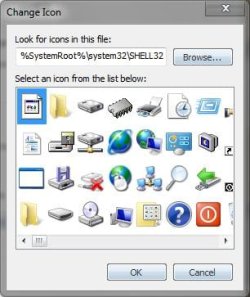
Icons - Change Using Resource Hacker

   Information
A few days ago I faced a question http://www.sevenforums.com/customization/72719-how-do-i-change-icons-using-restorator.html . I provided the suggestion there; latter thought if there is a tutorial, it may help many guys asking the question.
   Note
Tools required :
1. Resource Hacker : Now supports 64 bit system and .png files. Download it from : Download New Updated “Resource Hacker 3.5.2 Beta” with 64-bit and PNG File Support - Tweaking with Vishal

2. IcoFX : A free application that can be used to get a ready reference of the system icons. Download it from IcoFX - The Free Icon Editor - Download


Download and install the above mentioned programs.


Now it starts :

Suppose we are changing the default games icon with this one chinaz5.png

Though almost all of the system is changeable in this process, it is just an example :D

1. Go to C:\Windows\System32\imageres.dll and take a copy if it in a secured place (i.e. take a backup of it)

2. Now Take Ownership of the imageres.dll

3. Open IcoFX. Click on Tools > Resource Editor.
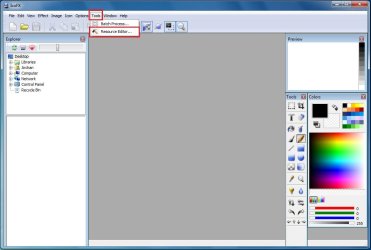
Pic1.jpg
4. In the resource editor window , click on the folder icon. The Open Resources window will appear.
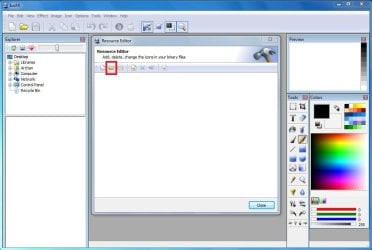
pic2.JPG
5. In the open resources window, give the filename "imageres.dll" and click open.
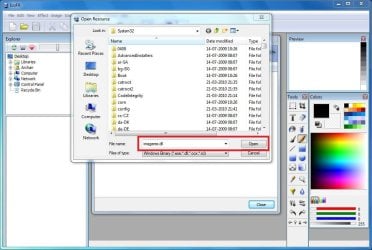
pic3.JPG
6. So in the resource editor window, The games icon no is #14
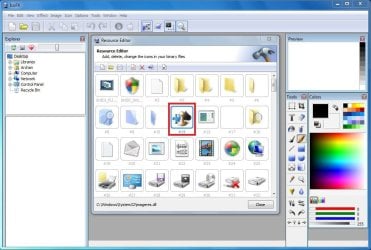
pic4.JPG
We are to moderate it using Resource Hacker. Now we may close IcoFX.

7. Open Resource Hacker. Click on File > Open . It will automatically open in System 32.
pic5.jpg
8. In the incoming box, give the file name "imageres.dll" and click "open".
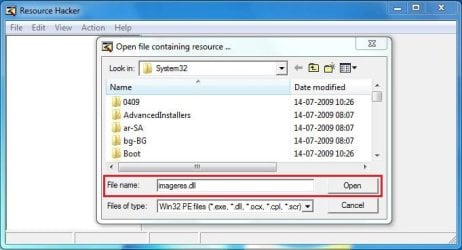
pic6.JPG
9. Now, Click on the "+" sign in front of "Icon Group"
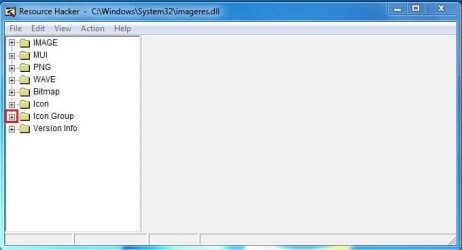
pic7.JPG
10. You will look the Icon group tree expands, and an item "*1033" there. Click on "*1033" and see the games icon revealed in the right side pane of the window.
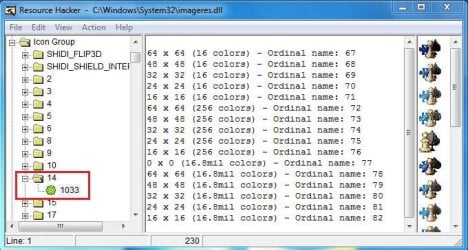
pic8.JPG
11. Now right click on "*1033" and click on "replace resource"
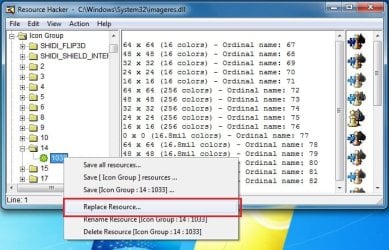
pic9.jpg
12. In the upcoming box, click on "Open the file with new icon" and browse for it.
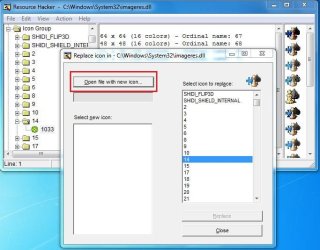
pic10.JPG
13. Now, first click on "Select new icon" and then click on "replace"
pic11.JPG
Repeat upto step 13 for the icons you want to change at a time, and when all of your icons are replaced, go to step 14.
14. We are almost done. We successfully modified the imageres.dll file. Now it is to save it. Cilck on File > Save as, give the filename "imageres,dll". Save it on your desktop.
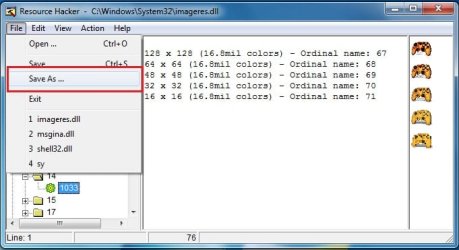
pic12.jpg
15. Go again to C:\Windows\System32\imageres.dll. Rename it to inageresOLD.dll or something. Now copy the modified imageres.dll in that location. The last thing is to restart ... either you may restart your computer, or you may restart explorer.exe using task manager.

16. After restart, Click on start menu and place your pointer on the games link. you will get it :D
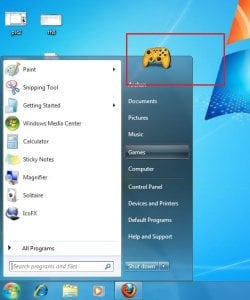
final.jpg
I agree with you that the process is lengthy and labourous :( But it is the free of cost way to change all the system icons.

Enjoy yourself. And again,dont forget to backup your original imageres.dll before starting the process :)


Last edited by a moderator:
Thanks Arc! Nice tuto!!! ;)

Very interesting dll to customize, but what a huge work to do it all!!!
 

My Computer

Computer Manufacturer/Model Number
Home Made 00x
OS
7Home64
CPU
AMD Phenom II x4 965 - 3,4GHz
Motherboard
Gigabyte GA-880GMA-UD2H
Memory
DDR3 1333Mhz, 8Gb (Corsair xms3 : 9, 9, 9, 24)
Graphics Card(s)
GeForce GTX550Ti 1024mb GDDR5 (Gainward)
Sound Card
Creative X-Fi ExtremeGamer
Monitor(s) Displays
Acer 27", led, full hd
Screen Resolution
1920x1080
Hard Drives
G-Skill SSD 80Gb + Kingston SSD 64Gb + WD sata 500Mb + Hitachi sata 1Tb
PSU
CombatPower 750W, 12cm fan
Case
Antec "Three Hundred", 12 + 14 cm fans
Cooling
Noctua NH-U12P (CPU) + 2xNF-B9 (HDD's) + NF-P12 (case side)
Keyboard
Logitech + Saitek "Cyborg Command Unit"
Mouse
Logitech LS1 laser
Internet Speed
4Mb/s
Other Info
6-fan-&-temp controller Scythe Kase Master Pro 5.25
Thanks Arc! Nice tuto!!! ;)

Very interesting dll to customize, but what a huge work to do it all!!!

You are welcome , pal!
Really time consuming ! But you know, it is the only way to get access over all your system icons without reducing your pocket ! Many paid programs are there who either doesnot allow to change all it icons (like tuneup) or doesnot provides flexibility (like stardock iconpackager). But yah... you may mention restorator !

When you provided the 64 bit reshacker link , I planned for it. So again we are mutually thanking each other :D
 

My Computer

Computer type
PC/Desktop
Computer Manufacturer/Model Number
Self Assembled
OS
Microsoft Windows 10 Pro Insider Preview 64-bit
CPU
Intel(R) Core(TM) i3-4130 CPU @ 3.40GHz
Motherboard
Gigabyte Technology Co., Ltd. B85M-D3H
Memory
Corsair Vengence 4GB x2 (8.00GB Dual-Channel DDR3 @ 798MHz)
Graphics Card(s)
2047MB GeForce GTS 450 (ZOTAC International)
Sound Card
Onboard (Realtek High Definition Audio)
Monitor(s) Displays
LG Flatron E2040T
Screen Resolution
1600x900
Hard Drives
Western Digital 1 TB
Seagate 500 GB
PSU
Corsair VS550
Case
Cooler Master K380
Cooling
Cooler Master Seidon 120V Plus
Keyboard
Logitech MK260r
Mouse
Logitech MK260r
Internet Speed
PMPL Broadband
Antivirus
Windows Defender + MBAM
Browser
Firefox
Other Info
Dell Studio 15" Laptop
Nice very tuts!
ThNnx Yew bro ;)
 

My Computer

OS
Windows 7 Ultimate x86
CPU
Intel Dual Core E2200 2.20GHz
Motherboard
Gigabyte
Memory
3GB DDR2
Graphics Card(s)
ATI Radeon HD 2400 Pro 256MB
Sound Card
Realtek HD Audio
Monitor(s) Displays
LG 17'' WIDESCREEN, FLATRON L177WSB
Screen Resolution
1440 x 900 (Recommended)
Hard Drives
160GB SATA WDC WD1600AAJS-00WAA0 /80GB IDE WDC WD800BB-00JHC0
Internet Speed
0KB lol
Nice tutorial; even I can understand it. Thanks.
 

My Computer

Computer Manufacturer/Model Number
Home built
OS
Windows 7 Ultimate 32 bit
CPU
Intel(R) Pentium(R) 4 CPU 3.00GHz
Motherboard
ASUS P4P800-VM Motherboard Chipset: Intel 865G + ICH5
Memory
2.50 GB RAM
Graphics Card(s)
NVIDIA GeForce 7600 GS
Sound Card
SoundMax Integrated Digital Audio (Chip)
Monitor(s) Displays
ViewSonic VX 1962 wm
Screen Resolution
1680 X 1050
Hard Drives
Seagate Barracuda 7200.10 80 GB
ST380215A ATA Device 18.6 GB
Western Digital "My Book" external hard drive 750 GB
Cooling
Fan based
Keyboard
Microsoft Comfort Curve Keyboard 2000 v10 USB
Mouse
Logitec optic USB
Internet Speed
3.01 Mb/s download 0.64 Mb/s upload
Nice very tuts!
ThNnx Yew bro ;)
I am glad that you liked it :)

Nice tutorial; even I can understand it. Thanks.
Hi Carl ! At least I know that there is no enough reason to underrate you in such a manner :D Though its my pleasure that you approved it. It's important to me.
 

My Computer

Computer type
PC/Desktop
Computer Manufacturer/Model Number
Self Assembled
OS
Microsoft Windows 10 Pro Insider Preview 64-bit
CPU
Intel(R) Core(TM) i3-4130 CPU @ 3.40GHz
Motherboard
Gigabyte Technology Co., Ltd. B85M-D3H
Memory
Corsair Vengence 4GB x2 (8.00GB Dual-Channel DDR3 @ 798MHz)
Graphics Card(s)
2047MB GeForce GTS 450 (ZOTAC International)
Sound Card
Onboard (Realtek High Definition Audio)
Monitor(s) Displays
LG Flatron E2040T
Screen Resolution
1600x900
Hard Drives
Western Digital 1 TB
Seagate 500 GB
PSU
Corsair VS550
Case
Cooler Master K380
Cooling
Cooler Master Seidon 120V Plus
Keyboard
Logitech MK260r
Mouse
Logitech MK260r
Internet Speed
PMPL Broadband
Antivirus
Windows Defender + MBAM
Browser
Firefox
Other Info
Dell Studio 15" Laptop

My Computer

Computer type
PC/Desktop
Computer Manufacturer/Model Number
Self Assembled
OS
Microsoft Windows 10 Pro Insider Preview 64-bit
CPU
Intel(R) Core(TM) i3-4130 CPU @ 3.40GHz
Motherboard
Gigabyte Technology Co., Ltd. B85M-D3H
Memory
Corsair Vengence 4GB x2 (8.00GB Dual-Channel DDR3 @ 798MHz)
Graphics Card(s)
2047MB GeForce GTS 450 (ZOTAC International)
Sound Card
Onboard (Realtek High Definition Audio)
Monitor(s) Displays
LG Flatron E2040T
Screen Resolution
1600x900
Hard Drives
Western Digital 1 TB
Seagate 500 GB
PSU
Corsair VS550
Case
Cooler Master K380
Cooling
Cooler Master Seidon 120V Plus
Keyboard
Logitech MK260r
Mouse
Logitech MK260r
Internet Speed
PMPL Broadband
Antivirus
Windows Defender + MBAM
Browser
Firefox
Other Info
Dell Studio 15" Laptop
Thanks for this tutorial. Was exactly what I needed :)
 

My Computer

Computer type
PC/Desktop
Computer Manufacturer/Model Number
Custom Built
OS
Windows 8.1 Pro x64
CPU
Intel Core i7 4790k
Motherboard
MSI Z97S Krait Edition
Memory
8GB Corsair Dominator 1600MHz
Graphics Card(s)
MSI TwinFrozr GeForce GTX770
Sound Card
ASUS Xonar DX/XD 7.1
Monitor(s) Displays
Dell 24" S2409W + Dell 20" E207WFP
Screen Resolution
1920x1080 + 1680x1050
Hard Drives
1x 120GB OCZ Agility 3, 1x 750GB Western Digital Caviar Black, 1x 1TB Western Digital Caviar Blue
PSU
Corsair HX850 modular
Case
Fractal Design Define R4
Cooling
Corsair H60 w/ twin Corsair SP120 fans
Keyboard
Logitech G510S Keyboard
Mouse
Logitech G500S Laser Mouse
Internet Speed
40Mbps
Antivirus
Microsoft Security Essentials
Browser
Google Chrome
Other Info
LG Blu-Ray player
Thanks for this tutorial. Was exactly what I needed :)

Feeling nice that it may fulfill some of your needs. Most welcome for your comment.
 

My Computer

Computer type
PC/Desktop
Computer Manufacturer/Model Number
Self Assembled
OS
Microsoft Windows 10 Pro Insider Preview 64-bit
CPU
Intel(R) Core(TM) i3-4130 CPU @ 3.40GHz
Motherboard
Gigabyte Technology Co., Ltd. B85M-D3H
Memory
Corsair Vengence 4GB x2 (8.00GB Dual-Channel DDR3 @ 798MHz)
Graphics Card(s)
2047MB GeForce GTS 450 (ZOTAC International)
Sound Card
Onboard (Realtek High Definition Audio)
Monitor(s) Displays
LG Flatron E2040T
Screen Resolution
1600x900
Hard Drives
Western Digital 1 TB
Seagate 500 GB
PSU
Corsair VS550
Case
Cooler Master K380
Cooling
Cooler Master Seidon 120V Plus
Keyboard
Logitech MK260r
Mouse
Logitech MK260r
Internet Speed
PMPL Broadband
Antivirus
Windows Defender + MBAM
Browser
Firefox
Other Info
Dell Studio 15" Laptop
im trying to restore the original imageres.dll file but it wont let me. can you help me out?
 

My Computer

Computer Manufacturer/Model Number
The Vampire
OS
Windows 7 Ultimate
CPU
Intel i5 2500k @ 3.30
Motherboard
P8Z68 V-Pro
Memory
G.Skill Ripjaws 1600 2x4 Gb
Graphics Card(s)
BFG GTX 260 MAXCORE 55 OC 896MB GDDR3
Sound Card
Onboard
Monitor(s) Displays
50'' Sony Display Panel
Screen Resolution
1360 x 768
Hard Drives
Seagate 750 GB
WD 160 GB
PSU
OCZ 750 Watts ZT Series Fully Modular PSU 80 Plus Bronze
Case
NZXT Red Phantom
Cooling
120mm x2 Intake, 120mm x 1 and 200mm x2 Exhaust
Keyboard
LX710 Logitech Wireless Keyboard
Mouse
Logitech Wireless Mouse
hey!! ARC well done man....


you helped many people including me..!!
keep it up buddy :thumbsup::thumbsup:
 

My Computer

Computer Manufacturer/Model Number
Custom Built (by me)
OS
Windows 8 CP x64
CPU
Intel(R) Core(TM) i7 CPU 920 @ 2.97GHz
Motherboard
DX58SO
Memory
Corsair 6GB DDR3 (1333Mhz)
Graphics Card(s)
Nvidia GeForce 9800GT (1GB)
Sound Card
Creative Sound Blaster Audigy Value (24bit internal)
Monitor(s) Displays
22" Samsung SyncMaster B2230 (1920*1080)
Screen Resolution
1920*1080
Hard Drives
Seagate Barracuda 500gb
PSU
i ball 450W
Case
i ball (Work Horse)
Keyboard
Microsoft Wireless Keyboard 700 v2.0
Mouse
Microsoft Wireless Mouse 700 v2.0
Internet Speed
1MB
im trying to restore the original imageres.dll file but it wont let me. can you help me out?
I think you have a backup of the original imageres.dll, and what is the problem now? If you have restored the original file but the original icons is not all back, give it a bit time, use the icons, then it would be ok.

But if you cannot pot the original in the system 32 folder, it is due to the logic that a same file name cannot be there more than once in a root. So first change the name of the existing (modified) imageres.dll to imageresMOD.dll or something, and then put the original file there, and restart :)
 

My Computer

Computer type
PC/Desktop
Computer Manufacturer/Model Number
Self Assembled
OS
Microsoft Windows 10 Pro Insider Preview 64-bit
CPU
Intel(R) Core(TM) i3-4130 CPU @ 3.40GHz
Motherboard
Gigabyte Technology Co., Ltd. B85M-D3H
Memory
Corsair Vengence 4GB x2 (8.00GB Dual-Channel DDR3 @ 798MHz)
Graphics Card(s)
2047MB GeForce GTS 450 (ZOTAC International)
Sound Card
Onboard (Realtek High Definition Audio)
Monitor(s) Displays
LG Flatron E2040T
Screen Resolution
1600x900
Hard Drives
Western Digital 1 TB
Seagate 500 GB
PSU
Corsair VS550
Case
Cooler Master K380
Cooling
Cooler Master Seidon 120V Plus
Keyboard
Logitech MK260r
Mouse
Logitech MK260r
Internet Speed
PMPL Broadband
Antivirus
Windows Defender + MBAM
Browser
Firefox
Other Info
Dell Studio 15" Laptop

My Computer

Computer type
PC/Desktop
Computer Manufacturer/Model Number
Self Assembled
OS
Microsoft Windows 10 Pro Insider Preview 64-bit
CPU
Intel(R) Core(TM) i3-4130 CPU @ 3.40GHz
Motherboard
Gigabyte Technology Co., Ltd. B85M-D3H
Memory
Corsair Vengence 4GB x2 (8.00GB Dual-Channel DDR3 @ 798MHz)
Graphics Card(s)
2047MB GeForce GTS 450 (ZOTAC International)
Sound Card
Onboard (Realtek High Definition Audio)
Monitor(s) Displays
LG Flatron E2040T
Screen Resolution
1600x900
Hard Drives
Western Digital 1 TB
Seagate 500 GB
PSU
Corsair VS550
Case
Cooler Master K380
Cooling
Cooler Master Seidon 120V Plus
Keyboard
Logitech MK260r
Mouse
Logitech MK260r
Internet Speed
PMPL Broadband
Antivirus
Windows Defender + MBAM
Browser
Firefox
Other Info
Dell Studio 15" Laptop
im trying to restore the original imageres.dll file but it wont let me. can you help me out?
I think you have a backup of the original imageres.dll, and what is the problem now? If you have restored the original file but the original icons is not all back, give it a bit time, use the icons, then it would be ok.

But if you cannot pot the original in the system 32 folder, it is due to the logic that a same file name cannot be there more than once in a root. So first change the name of the existing (modified) imageres.dll to imageresMOD.dll or something, and then put the original file there, and restart :)

I'd hate to be a bother, but after i change the name of the moded one, it wont let me but the original one in. do i have to "own it" and if i do how do i know its "mine"? i have this function that lets me take ownership by right clicking on a file and the clicking the option "Take Ownership" will that do it?
 

My Computer

Computer Manufacturer/Model Number
The Vampire
OS
Windows 7 Ultimate
CPU
Intel i5 2500k @ 3.30
Motherboard
P8Z68 V-Pro
Memory
G.Skill Ripjaws 1600 2x4 Gb
Graphics Card(s)
BFG GTX 260 MAXCORE 55 OC 896MB GDDR3
Sound Card
Onboard
Monitor(s) Displays
50'' Sony Display Panel
Screen Resolution
1360 x 768
Hard Drives
Seagate 750 GB
WD 160 GB
PSU
OCZ 750 Watts ZT Series Fully Modular PSU 80 Plus Bronze
Case
NZXT Red Phantom
Cooling
120mm x2 Intake, 120mm x 1 and 200mm x2 Exhaust
Keyboard
LX710 Logitech Wireless Keyboard
Mouse
Logitech Wireless Mouse
Good Work Arc !!
 

My Computer

Computer Manufacturer/Model Number
Samsung NP550P5C-S02IN
OS
Windows 7 Ultimate - 64-bit | Windows 8 Pro - 64-bit
CPU
Intel® Core™ i7 Processor 3,610QM (2.30Hz, 6MB L3 Cach
Memory
8 GB
Graphics Card(s)
NVIDIA® GeForce® GT 650M 2GB Graphics, Optimus™ techno
Sound Card
SoundAlive™ JBL 3 Speakers (With sub-Woofer)
Monitor(s) Displays
39.62cm (15.6) SuperBright 300nit HD+ LED Display
Screen Resolution
1,600 x 900, Anti-Reflective
Hard Drives
1TB S-ATA II Hard Drive (5,400RPM)

My Computer

Computer type
PC/Desktop
Computer Manufacturer/Model Number
Self Assembled
OS
Microsoft Windows 10 Pro Insider Preview 64-bit
CPU
Intel(R) Core(TM) i3-4130 CPU @ 3.40GHz
Motherboard
Gigabyte Technology Co., Ltd. B85M-D3H
Memory
Corsair Vengence 4GB x2 (8.00GB Dual-Channel DDR3 @ 798MHz)
Graphics Card(s)
2047MB GeForce GTS 450 (ZOTAC International)
Sound Card
Onboard (Realtek High Definition Audio)
Monitor(s) Displays
LG Flatron E2040T
Screen Resolution
1600x900
Hard Drives
Western Digital 1 TB
Seagate 500 GB
PSU
Corsair VS550
Case
Cooler Master K380
Cooling
Cooler Master Seidon 120V Plus
Keyboard
Logitech MK260r
Mouse
Logitech MK260r
Internet Speed
PMPL Broadband
Antivirus
Windows Defender + MBAM
Browser
Firefox
Other Info
Dell Studio 15" Laptop
Changing Icon

Hey, I was looking in another post and it mentioned shell32.dll. I have tried to also change the icons in this one, but when I do, it says that explorer.exe has encountered an error. By changing the imageres.dll files, it changed some of the icons, but not all of them. What is going on with it?
 

My Computer

Computer Manufacturer/Model Number
Dell XPS 430
OS
Windows 7 Premium x64
CPU
Intel Core 2 Quad Core 8300 2.5GHz Quad core
Motherboard
Not Sure
Memory
6GB
Graphics Card(s)
ATI Radeon HD 4670
Sound Card
ATI High Definition
Monitor(s) Displays
Dual 19" and 32" HD Monitors
Hard Drives
1TB
750GB
80GB
500GB External, 650GB External
PSU
Stock
Case
Stock
Cooling
Stock heatsink
Hey, I was looking in another post and it mentioned shell32.dll. I have tried to also change the icons in this one, but when I do, it says that explorer.exe has encountered an error. By changing the imageres.dll files, it changed some of the icons, but not all of them. What is going on with it?
Hi Kevin, Welcome, pal!
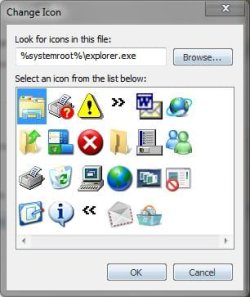
You are right, that imageres.dll doesnot contain all the icons, there are more locations where icons are stored, like explorer.exe and shell 32.dll.
Capture.JPG Expl.JPG
From the screenshot, you may see that the icons contained in explorer.exe are not generally used, so nobody does not want to change them generally. Then comes the question of icons in shell32.dll. Most of the icons (other tahn a few xp style icons) are included in imageres.dll. Hence I dont recommend to change those files. But, it is always better to have a system image backup before taking ownership of system files or customizing them.
 

My Computer

Computer type
PC/Desktop
Computer Manufacturer/Model Number
Self Assembled
OS
Microsoft Windows 10 Pro Insider Preview 64-bit
CPU
Intel(R) Core(TM) i3-4130 CPU @ 3.40GHz
Motherboard
Gigabyte Technology Co., Ltd. B85M-D3H
Memory
Corsair Vengence 4GB x2 (8.00GB Dual-Channel DDR3 @ 798MHz)
Graphics Card(s)
2047MB GeForce GTS 450 (ZOTAC International)
Sound Card
Onboard (Realtek High Definition Audio)
Monitor(s) Displays
LG Flatron E2040T
Screen Resolution
1600x900
Hard Drives
Western Digital 1 TB
Seagate 500 GB
PSU
Corsair VS550
Case
Cooler Master K380
Cooling
Cooler Master Seidon 120V Plus
Keyboard
Logitech MK260r
Mouse
Logitech MK260r
Internet Speed
PMPL Broadband
Antivirus
Windows Defender + MBAM
Browser
Firefox
Other Info
Dell Studio 15" Laptop
Hi Arc, I am having troubles with STEP 13. It will not let me add all Icon versions (those different sizes).
 

My Computer

OS
Windows 7
Back
Top