Solved icons floated around on desktop

Freddid

New member
Local time
9:53 PM
Messages
24
Location
Catskill Mtns. of NYS
I have a "shortcut icon" problem also: I arrange them in a certain way and find that they've floated around on the desktop, usually happens after the computer has been shut completely "off"/down. I can live with it, but it's annoying and once, long, long, ago it never used to happen! I run Norton 360 quick scan a couple times a day and complete scan at least once a day. Any suggestions? Thanks.
 

My Computer My Computer

At a glance

New York
Computer type
PC/Desktop
Computer Manufacturer/Model Number
Dell Inspiron 530
OS
New York
Keyboard
Cordless Microsoft
Mouse
Dell Premium corded
Internet Speed
DSL (slow-Verizon end of the line.)
Antivirus
Norton
Browser
Chrome
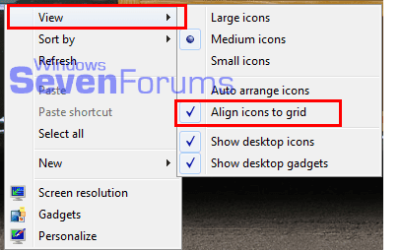
Right click the desktop in an empty spot, hover the cursor on View, click Align to Grid.

align.png
 

My Computer My Computer

At a glance

Windows 7 Ultimate X64 SP1Intel i5-2550K, Differing ~4.4-4.8GHz No buil...16GB G.Skill Sniper 1866MHz @ 2133MHz 2x8GBASUS GTX650TIB-DC2OC-2GD5, (650TI Boost)
Computer type
PC/Desktop
Computer Manufacturer/Model Number
Home Built Desktop By DataTech
OS
Windows 7 Ultimate X64 SP1
CPU
Intel i5-2550K, Differing ~4.4-4.8GHz No built in GPU
Motherboard
ASUS P8Z68-V PRO/GEN3
Memory
16GB G.Skill Sniper 1866MHz @ 2133MHz 2x8GB
Graphics Card(s)
ASUS GTX650TIB-DC2OC-2GD5, (650TI Boost)
Sound Card
Onboard Realtek 5-1
Monitor(s) Displays
Samsung P2570HD
Screen Resolution
1920x1080
Hard Drives
Samsung 840 Pro 256GB SSD for OS, 500GB Seagate Constellation (Enterprise drive) for Data
PSU
Corsair HX650W
Case
Inwin Dragon Rider
Cooling
Hyper 212 EVO w/two Noctua fans, push-pull, @1300 RPM
Keyboard
E-Z Eyes, bright yellow keys with large characters
Mouse
steelseries SENSEI Laser Pro Gaming
Internet Speed
48-51Mbs Mbs down, 11 Mbs up Xfinity Cable
Antivirus
Norton Internet Security 2013
Browser
IE 10, Opera, Pale Moon if needed
Other Info
4 case fans, LG BluRay-RE, ASUS DVD-RW, Mr. Fusion power supply, 1.21 gigawatts.
I run Norton 360 quick scan a couple times a day and complete scan at least once a day. Any suggestions? Thanks.

Not related to your question, but REALLY?!!! How many times per day do you wash your hands?
 

My Computer My Computer

At a glance

Windows 7 Ultimate x86 and x64
Computer type
PC/Desktop
Computer Manufacturer/Model Number
Dell, HP, Toshiba, Compaq
OS
Windows 7 Ultimate x86 and x64

My Computer My Computer

At a glance

Windows 7 Ultimate X64 SP1Intel i5-2550K, Differing ~4.4-4.8GHz No buil...16GB G.Skill Sniper 1866MHz @ 2133MHz 2x8GBASUS GTX650TIB-DC2OC-2GD5, (650TI Boost)
Computer type
PC/Desktop
Computer Manufacturer/Model Number
Home Built Desktop By DataTech
OS
Windows 7 Ultimate X64 SP1
CPU
Intel i5-2550K, Differing ~4.4-4.8GHz No built in GPU
Motherboard
ASUS P8Z68-V PRO/GEN3
Memory
16GB G.Skill Sniper 1866MHz @ 2133MHz 2x8GB
Graphics Card(s)
ASUS GTX650TIB-DC2OC-2GD5, (650TI Boost)
Sound Card
Onboard Realtek 5-1
Monitor(s) Displays
Samsung P2570HD
Screen Resolution
1920x1080
Hard Drives
Samsung 840 Pro 256GB SSD for OS, 500GB Seagate Constellation (Enterprise drive) for Data
PSU
Corsair HX650W
Case
Inwin Dragon Rider
Cooling
Hyper 212 EVO w/two Noctua fans, push-pull, @1300 RPM
Keyboard
E-Z Eyes, bright yellow keys with large characters
Mouse
steelseries SENSEI Laser Pro Gaming
Internet Speed
48-51Mbs Mbs down, 11 Mbs up Xfinity Cable
Antivirus
Norton Internet Security 2013
Browser
IE 10, Opera, Pale Moon if needed
Other Info
4 case fans, LG BluRay-RE, ASUS DVD-RW, Mr. Fusion power supply, 1.21 gigawatts.
I have a "shortcut icon" problem also: I arrange them in a certain way and find that they've floated around on the desktop, usually happens after the computer has been shut completely "off"/down. I can live with it, but it's annoying and once, long, long, ago it never used to happen! I run Norton 360 quick scan a couple times a day and complete scan at least once a day. Any suggestions? Thanks.

I use DesktopOK to remember my desktop icon layout. It automatically restores the layout when I boot and can be invoked at any time to put them back where they belong.
 

My Computer My Computer

At a glance

Windows 10 Pro X64Intel Quad Core i7-4770 @ 3.4Ghz16.0GB PC3-12800 DDR3 SDRAM 1600 MHzIntel Integrated HD Graphics
Computer type
PC/Desktop
Computer Manufacturer/Model Number
Lenovo IdeaCenter 450
OS
Windows 10 Pro X64
CPU
Intel Quad Core i7-4770 @ 3.4Ghz
Memory
16.0GB PC3-12800 DDR3 SDRAM 1600 MHz
Graphics Card(s)
Intel Integrated HD Graphics
Sound Card
Realtek HD Audio
Monitor(s) Displays
HP 22" LCD
Screen Resolution
1680 x 1050
Hard Drives
250GB Samsung EVO SATA-3 SSD
2TB Seagate ST2000DM001 SATA-2
1.5TB Seagate ST3150041AS SATA
Keyboard
Dell USB
Mouse
Lenovo USB
Internet Speed
Cable via Road Runner 3MB Upload, 30MB Download
Antivirus
Windows Defender, MBAM Pro, MBAE
Browser
Seamonkey
Other Info
UEFI/GPT
PLDS DVD-RW DH16AERSH
Thank you for the useful info. As to the snarky comment: :p
 

My Computer My Computer

At a glance

New York
Computer type
PC/Desktop
Computer Manufacturer/Model Number
Dell Inspiron 530
OS
New York
Keyboard
Cordless Microsoft
Mouse
Dell Premium corded
Internet Speed
DSL (slow-Verizon end of the line.)
Antivirus
Norton
Browser
Chrome
Thanks everyone...up and running with tons of "new" stuff. Thanks to that computer company that's not "Apple"!!! You've all been a big help and it's very much appreciated. :D
 

My Computer My Computer

At a glance

New York
Computer type
PC/Desktop
Computer Manufacturer/Model Number
Dell Inspiron 530
OS
New York
Keyboard
Cordless Microsoft
Mouse
Dell Premium corded
Internet Speed
DSL (slow-Verizon end of the line.)
Antivirus
Norton
Browser
Chrome
Back
Top