
IveyLeaguer
New member
Hi Fellows,
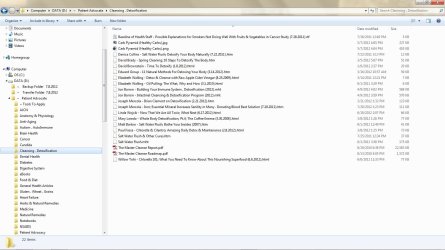
I've had this problem in several installs of W7 x64, including this current fresh one. It usually happens about a month after a fresh install.
Here are some facts about the problem:
1. The only icons affected are .mht, .htm., & .html.
2. File extensions are fine - no issues.
3. .mht = Internet Explorer ... both htm & html are associated with Firefox.
4. In Firefox, when using "Save Page As", in the Explorer window that opens, the icons are always there! This has been true in each install of W7, though after a year or two they will sometimes not appear in this case as well. Then, they'll suddenly reappear.
5. Rebuilding the icon cache didn't fix it.
6. Changing the file association temporarily didn't work. When changing htm & html to IE, the icon appears. But changing mht to Firefox doesn't cause an icon to appear, not does the correct IE icon appear when I change the association back to IE. Changing htm & html back to Firefox doesn't work, either.
7. No custom icons, file extensions, etc. are involved.
8. Other icons in the same Explorer window .. DO appear, without fail.
Would appreciate any help for this annoying problem. Below is a screenshot.
Thanks is advance.
~~~
I've had this problem in several installs of W7 x64, including this current fresh one. It usually happens about a month after a fresh install.
Here are some facts about the problem:
1. The only icons affected are .mht, .htm., & .html.
2. File extensions are fine - no issues.
3. .mht = Internet Explorer ... both htm & html are associated with Firefox.
4. In Firefox, when using "Save Page As", in the Explorer window that opens, the icons are always there! This has been true in each install of W7, though after a year or two they will sometimes not appear in this case as well. Then, they'll suddenly reappear.
5. Rebuilding the icon cache didn't fix it.
6. Changing the file association temporarily didn't work. When changing htm & html to IE, the icon appears. But changing mht to Firefox doesn't cause an icon to appear, not does the correct IE icon appear when I change the association back to IE. Changing htm & html back to Firefox doesn't work, either.
7. No custom icons, file extensions, etc. are involved.
8. Other icons in the same Explorer window .. DO appear, without fail.
Would appreciate any help for this annoying problem. Below is a screenshot.
Thanks is advance.
~~~
Attachments
My Computer
At a glance
Windows 7 Home Premium x64 v6.1.76002.26 GHz Intel Core2 Duo Processor P7550, 3MB...4096MB DDR3 System MemoryATI Mobility Radeon HD 4650 (M96); 1 GB dedic...
- Computer Manufacturer/Model Number
- HP dv7-2277cl Notebook PC
- OS
- Windows 7 Home Premium x64 v6.1.7600
- CPU
- 2.26 GHz Intel Core2 Duo Processor P7550, 3MB L2 Cache
- Memory
- 4096MB DDR3 System Memory
- Graphics Card(s)
- ATI Mobility Radeon HD 4650 (M96); 1 GB dedicated memory
- Sound Card
- Altec Lansing with SRS Premium Sound and Sub-Woofer
- Monitor(s) Displays
- 17.3” HD+ LED BrightView Widescreen Display
- Screen Resolution
- 1600 x 900
- Hard Drives
- 640 GB Western Digital 7200 rpm WD3200BEKT-60F3T1 Dual HDD (320 GB x 2)
- Keyboard
- Microsoft eHome MCIR 109 Keyboard
