Icons invisible while dragging (with windows classic theme)

retspag

New member
Local time
7:35 AM
Messages
28
I have the windows classic theme turned on; and I’ve noticed a peculiarity of it.

Items become invisible while being dragged, and then reappear when “dropped”.

Is there a way to make it so items are visible when drug, when using windows classic theme?

Thanks. :)
 

My Computer My Computer

OS
Windows 7 Home Premium 64bit
Memory
4 gb
Monitor(s) Displays
LG flatron E2050T
Screen Resolution
1600*900
Internet Speed
1mb
Or...could just use Aero...
Aero, GPU powered with visible dragged-icons!
 

My Computer My Computer

Computer type
PC/Desktop
Computer Manufacturer/Model Number
Alienware Aurora ALX R4
OS
Windows 10 Pro (x64)
CPU
Intel Core i7-3930K (3.2GHz - 4.5GHz)
Motherboard
Alienware Aurora-R4 x79
Memory
4x Samsung 4GB PC3-12800 DDR3 (16GB 1600MHz)
Graphics Card(s)
Nvidia Geforce GTX 690
Sound Card
SteelSeries Siberia Elite
Monitor(s) Displays
Dell UltraSharp U3011
Screen Resolution
2560x1600
Hard Drives
Samsung 850 Pro 256 GB, Seagate 1TB Desktop Hybrid HDD, 2x Western Digital 4TB Green HDD
PSU
875W Some Dell PSU <.<
Case
Alienware Aurora ALX
Cooling
Custom Liquid Cooling (EK CPU & GPU blocks) dual EK 480RAD
Keyboard
Logitech G710+ Mechanical
Mouse
Logitech G700s
Internet Speed
Verizon Fios (50 mbps average)
Other Info
Server: Intel NUC D54250WYK: i5-4250U, 16GB, 256 GB mSATA, Windows Server 2012 R2
Or windows 7 basic, but I’d rather not unless I have to, I don’t like the look of either.
 

My Computer My Computer

OS
Windows 7 Home Premium 64bit
Memory
4 gb
Monitor(s) Displays
LG flatron E2050T
Screen Resolution
1600*900
Internet Speed
1mb
Ugh...Basic is not even something worth touching. Aero is what should be used, unlike Classic and Basic it runs on the GPU, not the CPU.
 

My Computer My Computer

Computer type
PC/Desktop
Computer Manufacturer/Model Number
Alienware Aurora ALX R4
OS
Windows 10 Pro (x64)
CPU
Intel Core i7-3930K (3.2GHz - 4.5GHz)
Motherboard
Alienware Aurora-R4 x79
Memory
4x Samsung 4GB PC3-12800 DDR3 (16GB 1600MHz)
Graphics Card(s)
Nvidia Geforce GTX 690
Sound Card
SteelSeries Siberia Elite
Monitor(s) Displays
Dell UltraSharp U3011
Screen Resolution
2560x1600
Hard Drives
Samsung 850 Pro 256 GB, Seagate 1TB Desktop Hybrid HDD, 2x Western Digital 4TB Green HDD
PSU
875W Some Dell PSU <.<
Case
Alienware Aurora ALX
Cooling
Custom Liquid Cooling (EK CPU & GPU blocks) dual EK 480RAD
Keyboard
Logitech G710+ Mechanical
Mouse
Logitech G700s
Internet Speed
Verizon Fios (50 mbps average)
Other Info
Server: Intel NUC D54250WYK: i5-4250U, 16GB, 256 GB mSATA, Windows Server 2012 R2
So performance is better with Aero, even though it’s more “fancy”?


I run a program routinely that doesn’t support aero so it just defaults to Basic.

So unless I want it to change all the time, I need to use 7 basic or classic.
 

My Computer My Computer

OS
Windows 7 Home Premium 64bit
Memory
4 gb
Monitor(s) Displays
LG flatron E2050T
Screen Resolution
1600*900
Internet Speed
1mb
Performance depending on your GPU.

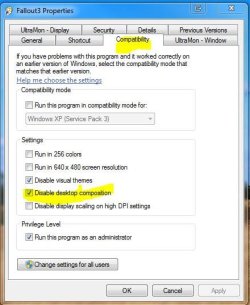
Could you just use Aero, and use disable desktop composition (disable Aero) with your mentioned program?

Capture.JPG
 

My Computer My Computer

Computer type
PC/Desktop
Computer Manufacturer/Model Number
Airbot 2.0
OS
Windows 7 Ultimate x64 SP1
CPU
Core i7 920 (D0) @ 4Ghz, *26c idle *65c full load on air
Motherboard
Asus P6X58D Premium - Sata 6Gb/s - USB 3.0
Memory
12GB DDR3 Corsair Dominator -CMD12GX3M6A1600C8 at 1600MHz
Graphics Card(s)
Zotac Geforce GTX 770
Sound Card
ASUS Xonar D2X
Monitor(s) Displays
1 LG 24" Flatron W2453V-PF 1 Samsung 24" P2450H both 2ms RT
Screen Resolution
1920x1080@60hz
Hard Drives
1 Samsung 250GB 840 Evo SSD
1 OCZ Vertex2 180GB SSD
1 TB Samsung Spinpoint F1 7200RPM 32MB cache
2 500GB WD Caviar Blacks 7200RPM 32MB cache (WD5001AALS)

Pioneer DVD Burner DVR-S18M
PSU
Corsair HX1000W
Case
Cooler Master HAF 932
Cooling
Case Fans *3 230mm, *1 140mm/CPU - *Tuniq Tower 120 Extreme
Keyboard
Logitech Wireless MK700
Mouse
Logitech Wireless MK700
Internet Speed
DL 15 Mbps UL 0.98 Mbps
Antivirus
None
Browser
Firefox Nightly
Other Info
Processor-7.7 *RAM- 7.9 *Graphics-7.9 *Gaming Graphics- 7.9 *SSD- 7.8 W.E.I final score= 7.7
*Phone- LG Nexus 5
I just tried that and it doesn’t work, it still switches back to 7 basic.
 

My Computer My Computer

OS
Windows 7 Home Premium 64bit
Memory
4 gb
Monitor(s) Displays
LG flatron E2050T
Screen Resolution
1600*900
Internet Speed
1mb
Back
Top