icons loading slowly

LM2008

New member
Member
VIP
Local time
4:32 PM
Messages
168
I don't know if this is normal, but everytime i connect a USB portable hard drive or flash drive and access the drive, the icons start to show slowly and then it will load quickly afterwards. But after the drive is removed and connected again (tomorrow for example) the icons shows slowly again as if the icon cache is not being used.
 

My Computer

Computer type
Laptop
Computer Manufacturer/Model Number
Acer Aspire 5810T8929
OS
Windows 10 Home 64b
CPU
Intel Core Solo 1.4Ghz 800Mhz FSB
Memory
Samsung 4GB DDR3
Graphics Card(s)
Intel GMA 4500MHD
Screen Resolution
1366x768
Hard Drives
Seagate Momentus XT (Hybrid HD) 750GB
Internet Speed
40 Mbs
Antivirus
Kaspersky Free Antivirus
Browser
Chrome 60.0.3112.113 (Official Build) (64-bit)
Hi LM2008, see if this helps.

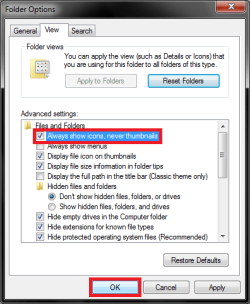
Open Windows Explorer. Click Organize, then click Folder and search Options. Click the View Tab and select Always show icons, never thumbnails and select OK.

1.png2.png

If this doesn't help try running an SFC Scan or Rebuilding the Icon Cache.

Lastly, if none of the above helps I would run a Malwarebytes and MSE Scan
 

My Computer

Computer type
PC/Desktop
Computer Manufacturer/Model Number
Novatech iRush Pro
OS
Windows 7 Ultimate SP1 - 64 Bit
CPU
Intel Core i5 2500k
Motherboard
Foxconn H67M-S/H67M-V/H67
Memory
2x4GB DDR3 1333Hz
Graphics Card(s)
Ati Radeon 6770
Sound Card
None
Monitor(s) Displays
Samsung S22B150
Screen Resolution
1920x1080
Hard Drives
2x500GB
PSU
500W
Cooling
Fan
Keyboard
HP KU0316
Mouse
Wireless Logitech M185
Internet Speed
20MB/s
Antivirus
Avast Free
Browser
Google Chrome
Other Info
Logitech M185 Mouse
KU-M316 Keyboard
Back
Top