
You are using an out of date browser. It may not display this or other websites correctly.
You should upgrade or use an alternative browser.
You should upgrade or use an alternative browser.
Icons look weird..
- Thread starter Nathan02
- Start date

Have a look at these tutorials, may help
http://www.sevenforums.com/tutorials/1538-sfc-scannow-command-system-file-checker.html
http://www.sevenforums.com/tutorials/49819-icon-cache-rebuild.html
http://www.sevenforums.com/tutorials/1538-sfc-scannow-command-system-file-checker.html
http://www.sevenforums.com/tutorials/49819-icon-cache-rebuild.html
My Computer
- Computer type
- PC/Desktop
- Computer Manufacturer/Model Number
- Pauly Special
- OS
- Win7 Ultimate X64
- CPU
- Intel i5 3570K
- Motherboard
- Gigabyte Z77X-DS3H
- Memory
- 8GB DDR3 1600
- Graphics Card(s)
- Onboard
- Sound Card
- Onboard
- Screen Resolution
- 1280x1024
- Hard Drives
- Samsung 840 Evo SSD (OS)
1TB Spinner (Data)
- PSU
- 800W Arctic
- Case
- Cooler Master
- Cooling
- 3x120mm Fans
- Keyboard
- MS Wireless
- Mouse
- MS Wireless
- Internet Speed
- 20M
Have a look at these tutorials, may help
http://www.sevenforums.com/tutorials/1538-sfc-scannow-command-system-file-checker.html
http://www.sevenforums.com/tutorials/49819-icon-cache-rebuild.html
I tried both and it didn't work.
My Computer
- OS
- Windows 7 Home Premium 64-bit

Malware?
Have you checked for malware (viruses, trojans, etc.)?
Did you install any new programs (or updates) prior to this problem appearing?
Have you checked for malware (viruses, trojans, etc.)?
Did you install any new programs (or updates) prior to this problem appearing?
My Computer
- Computer type
- PC/Desktop
- Computer Manufacturer/Model Number
- n/a
- OS
- W7 Ultimate SP1, LM19.2 MATE, W10 Home 1703, W10 Pro 1703 VM, #All 64 bit
- CPU
- AMD Phenom II x6 1100T, 3.3 GHz
- Motherboard
- ASUS M4A88T-M/USB3 (AM3)
- Memory
- 12GB DDR3 1333 G-Skill (4GB x 2), G-Skill (2GB x 2)
- Graphics Card(s)
- NVIDIA GeForce GTX 660
- Sound Card
- Realtek?
- Monitor(s) Displays
- Samsung S23B350
- Screen Resolution
- 1920x1080
- Hard Drives
- WD Green 2TB (SATA), WD Green 3TB (SATA), WD Blue 4TB (SATA), WD Blue 6TB (SATA)
- PSU
- Cooler Master
- Case
- Antec GX300 Tower
- Cooling
- 3x Antec TRICOOL 120mm Fans
- Mouse
- Wired Optical
- Internet Speed
- DSL
- Antivirus
- Avast
- Browser
- Pale Moon (64 bit)
- Other Info
- 2018-12-27 Upgraded HDDs
2015-12-10 Upgraded case, graphics card, storage
2015-08-15 Upgraded motherboard & RAM
2015-07-15 Upgraded LM17.1 to LM17.2
Have you checked for malware (viruses, trojans, etc.)?
Did you install any new programs (or updates) prior to this problem appearing?
Yes, I checked for virus. Avast detected nothing, but Malwarebytes detected a trojan. I removed the trojan, but the icons are still the same.
I downloaded IconPackager and installed different icons on my computer. However, when I applied my old icons back, the icons were like this..
My Computer
- OS
- Windows 7 Home Premium 64-bit
Have you installed any 3rd party Theme packs?
My Computer
- Computer type
- PC/Desktop
- Computer Manufacturer/Model Number
- n/a
- OS
- W7 Ultimate SP1, LM19.2 MATE, W10 Home 1703, W10 Pro 1703 VM, #All 64 bit
- CPU
- AMD Phenom II x6 1100T, 3.3 GHz
- Motherboard
- ASUS M4A88T-M/USB3 (AM3)
- Memory
- 12GB DDR3 1333 G-Skill (4GB x 2), G-Skill (2GB x 2)
- Graphics Card(s)
- NVIDIA GeForce GTX 660
- Sound Card
- Realtek?
- Monitor(s) Displays
- Samsung S23B350
- Screen Resolution
- 1920x1080
- Hard Drives
- WD Green 2TB (SATA), WD Green 3TB (SATA), WD Blue 4TB (SATA), WD Blue 6TB (SATA)
- PSU
- Cooler Master
- Case
- Antec GX300 Tower
- Cooling
- 3x Antec TRICOOL 120mm Fans
- Mouse
- Wired Optical
- Internet Speed
- DSL
- Antivirus
- Avast
- Browser
- Pale Moon (64 bit)
- Other Info
- 2018-12-27 Upgraded HDDs
2015-12-10 Upgraded case, graphics card, storage
2015-08-15 Upgraded motherboard & RAM
2015-07-15 Upgraded LM17.1 to LM17.2


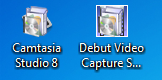
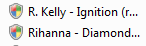
My icons look like this..the second image is music files (music files are not supposed to look like that). I tried doing a system restore but it didn't work. :\
Win 7 tends to show the icon associated with the default program used to open the file, like Notepad, VLC, etc. Maybe cause Camtasia can be used with music files, that ext is associated with Camtasia's icon. Try setting the extension of your music file (like .wma) to open with another media player and see what your icon looks like.
My Computer
- Computer type
- PC/Desktop
- Computer Manufacturer/Model Number
- Dell Inspiron 560
- OS
- Windows 7 Ultimate x64
- CPU
- dual core @3.20ghz
- Memory
- 4GB
- Sound Card
- Realtek hd & intel hdmi
- Monitor(s) Displays
- Dell 21.5"
- Screen Resolution
- 1920x1080 (running 1600x900)
- Hard Drives
- internal 500GB
ext buffalo hd-pntu3 1TB
- Keyboard
- Dell wireless
- Mouse
- Dell wireless
- Internet Speed
- 50/25
- Antivirus
- MSE & SAS
- Browser
- Chrome
- Other Info
- Canon Pixma MX410 Printer
Altec Speakers l-center boom-r
Have you installed any 3rd party Theme packs?
No I didn't. All I did was change the icons.
My Computer
- OS
- Windows 7 Home Premium 64-bit
Have you installed anything new before this happened because that can cause stuff to change
No I didn't install anything. All I did was change my icons back to normal, and this was my result.
My Computer
- OS
- Windows 7 Home Premium 64-bit
My icons look like this..the second image is music files (music files are not supposed to look like that). I tried doing a system restore but it didn't work. :\
Win 7 tends to show the icon associated with the default program used to open the file, like Notepad, VLC, etc. Maybe cause Camtasia can be used with music files, that ext is associated with Camtasia's icon. Try setting the extension of your music file (like .wma) to open with another media player and see what your icon looks like.
What do you mean by that? How can I do that?
My Computer
- OS
- Windows 7 Home Premium 64-bit
Default Programs
Do the files open with the correct program?
For example, do the music files open in your media player?
Open your Start Menu and click on "Default Programs".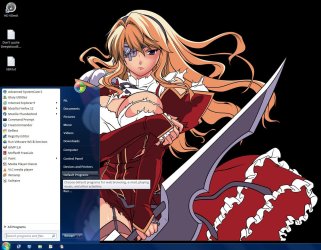
Another options is to right click on the file icon and choose "Properties".
On the "General" tab, click on the "Change" button.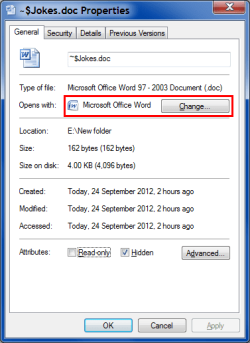
Do the files open with the correct program?
For example, do the music files open in your media player?
What do you mean by that? How can I do that?Win 7 tends to show the icon associated with the default program used to open the file, like Notepad, VLC, etc. Maybe cause Camtasia can be used with music files, that ext is associated with Camtasia's icon. Try setting the extension of your music file (like .wma) to open with another media player and see what your icon looks like.
Open your Start Menu and click on "Default Programs".
On the "General" tab, click on the "Change" button.
Last edited:
My Computer
- Computer type
- PC/Desktop
- Computer Manufacturer/Model Number
- n/a
- OS
- W7 Ultimate SP1, LM19.2 MATE, W10 Home 1703, W10 Pro 1703 VM, #All 64 bit
- CPU
- AMD Phenom II x6 1100T, 3.3 GHz
- Motherboard
- ASUS M4A88T-M/USB3 (AM3)
- Memory
- 12GB DDR3 1333 G-Skill (4GB x 2), G-Skill (2GB x 2)
- Graphics Card(s)
- NVIDIA GeForce GTX 660
- Sound Card
- Realtek?
- Monitor(s) Displays
- Samsung S23B350
- Screen Resolution
- 1920x1080
- Hard Drives
- WD Green 2TB (SATA), WD Green 3TB (SATA), WD Blue 4TB (SATA), WD Blue 6TB (SATA)
- PSU
- Cooler Master
- Case
- Antec GX300 Tower
- Cooling
- 3x Antec TRICOOL 120mm Fans
- Mouse
- Wired Optical
- Internet Speed
- DSL
- Antivirus
- Avast
- Browser
- Pale Moon (64 bit)
- Other Info
- 2018-12-27 Upgraded HDDs
2015-12-10 Upgraded case, graphics card, storage
2015-08-15 Upgraded motherboard & RAM
2015-07-15 Upgraded LM17.1 to LM17.2

- Local time
- 6:20 AM
- Messages
- 1,346
My icons look like this..the second image is music files (music files are not supposed to look like that). I tried doing a system restore but it didn't work. :\
Win 7 tends to show the icon associated with the default program used to open the file, like Notepad, VLC, etc. Maybe cause Camtasia can be used with music files, that ext is associated with Camtasia's icon. Try setting the extension of your music file (like .wma) to open with another media player and see what your icon looks like.
What do you mean by that? How can I do that?
Right click on the icon and choose "Open with" and select "Default Program" from the list. For music files select "Windows Media Player" as an example.
My Computer
- Computer type
- PC/Desktop
- Computer Manufacturer/Model Number
- Custom Built
- OS
- Windows 7 Professional x64
- CPU
- Intel i5 quad processor
- Motherboard
- DP67BG
- Memory
- 16 GB
- Graphics Card(s)
- Radeon HD 5770
- Sound Card
- Realtek High Definition Audio
- Monitor(s) Displays
- Samsung SyncMaster
- Screen Resolution
- 1920X1080
- Hard Drives
- WD 2TB (SATA Internal)
WD 1TB (USB External)
- PSU
- Corsair GS800
- Case
- Tower (Generic)
- Cooling
- 3 Internal Fans
- Keyboard
- MS Wireless
- Mouse
- MS Optical Wired
- Internet Speed
- 54 mbps
- Antivirus
- Emsisoft
- Browser
- IE-Version 9, Palemoon-Version 24.2.0