Solved Icons missing but space shown where they should be in taskbar

Waverider69

New member
Local time
5:11 PM
Messages
3
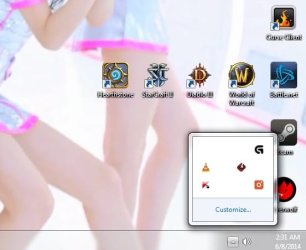
I had to do a total system install and used the usb that Dell sent me for my system and all seemed ok but then I noticed that the icons were gone. Except even thought the icons don't show the programs still run and but can't be accessed via the desktop by right clicking. and this can be seen in the picture attachment. Any help would be greatfully accepted and much thanks. notice also the lack of network icon is missing but space for it is there also. if a fix for this is also possible that would be good too.
 

Attachments
  • missing icons2.jpg
    missing icons2.jpg
    24.6 KB · Views: 22
Last edited:

My Computer My Computer

At a glance

windows 7 home premium 64bitIntel core i7-3930k CPU @ 3.20GHz16.0 GBAMD
Computer type
PC/Desktop
Computer Manufacturer/Model Number
Alienware Aroura R04
OS
windows 7 home premium 64bit
CPU
Intel core i7-3930k CPU @ 3.20GHz
Memory
16.0 GB
Graphics Card(s)
AMD
Antivirus
Kaspersky
If I understand you correctly. You are trying to get the Icons in the little box down by the clock.
If that is correct just drag and drop them down by the clock.
 

My Computer My Computer

At a glance

Windows 10 Pro. 64/ version 1709 Windows 7 Pr...Intel i7-6800K @ 4.3Corsair Platinum 16 gig @2400EVGA GTX 1070 OC
Computer type
PC/Desktop
Computer Manufacturer/Model Number
Home made Desktop
OS
Windows 10 Pro. 64/ version 1709 Windows 7 Pro/64
CPU
Intel i7-6800K @ 4.3
Motherboard
ASUS X-99 Deluxe II
Memory
Corsair Platinum 16 gig @2400
Graphics Card(s)
EVGA GTX 1070 OC
Monitor(s) Displays
Asus 27" LED LCD/VE278Q
Screen Resolution
1920-1080 or 1280-720 HDMI
Hard Drives
INTEL SSD 730-240 Gb Sata 3.0/
PSU
EVGA Platium 1200W
Case
Phanteks Luxe Tempered Glass 8 fans/ one radiator
Cooling
XSPC/ Water Cooled CPU
Keyboard
Das 4 Professional
Mouse
Logitech M705/MX Anywhere 2-S
Internet Speed
100 mbits
Antivirus
Microsoft Security Essentials/ Malwarebytes Premium 3.0/ SAS
Browser
I.E. 11 default/Firefox/ ISP Time Warner Cable/Spectrum
Other Info
LG BluRay Burner/
Sound system-KLipsch-THX/
Icy Dock ssd Hot Swap bays.
icons

No, if you notice in the box there are icons and then there are blank spaces also. In those blank spaces there should be other icons but they aren't showing up and also next to the sound icon that is showing next to the time there should be a network/online icon but that isn't showing either. This is the problem that I want to fix and have the icons back where they should be and to be able to use them.
 

My Computer My Computer

At a glance

windows 7 home premium 64bitIntel core i7-3930k CPU @ 3.20GHz16.0 GBAMD
Computer type
PC/Desktop
Computer Manufacturer/Model Number
Alienware Aroura R04
OS
windows 7 home premium 64bit
CPU
Intel core i7-3930k CPU @ 3.20GHz
Memory
16.0 GB
Graphics Card(s)
AMD
Antivirus
Kaspersky

My Computer My Computer

At a glance

Win7 Ultimate X64Intel i5 3570K8GB DDR3 1600Onboard
Computer type
PC/Desktop
Computer Manufacturer/Model Number
Pauly Special
OS
Win7 Ultimate X64
CPU
Intel i5 3570K
Motherboard
Gigabyte Z77X-DS3H
Memory
8GB DDR3 1600
Graphics Card(s)
Onboard
Sound Card
Onboard
Screen Resolution
1280x1024
Hard Drives
Samsung 840 Evo SSD (OS)
1TB Spinner (Data)
PSU
800W Arctic
Case
Cooler Master
Cooling
3x120mm Fans
Keyboard
MS Wireless
Mouse
MS Wireless
Internet Speed
20M
Hi Waverider and welcome to the Forum
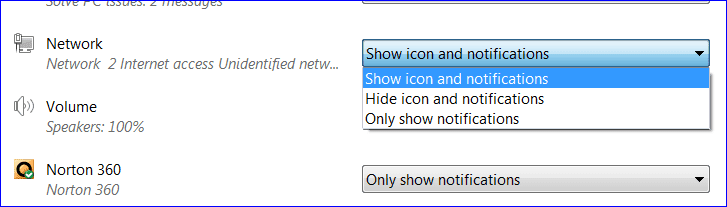
Inyour screenshot above you can see "Customize" in the small icons box. Click this and then on a chosen program click the black arrow head and there you will see the three options vailable. Click the one of your choice see screenshot below:

Snipping Tool.PNG
 

My Computer My Computer

At a glance

Microsoft Windows 7 Home Premium 64-bit 7601 ...Intel(R) Core(TM) i7-3770 CPU @ 3.40GHz8.00 GBIntel(R) HD Graphics 4000
Computer type
PC/Desktop
OS
Microsoft Windows 7 Home Premium 64-bit 7601 Multiprocessor Free Service Pack 1
CPU
Intel(R) Core(TM) i7-3770 CPU @ 3.40GHz
Motherboard
ASUSTeK COMPUTER INC. P8H77-M
Memory
8.00 GB
Graphics Card(s)
Intel(R) HD Graphics 4000
Sound Card
On Board
Monitor(s) Displays
Dell 24"
Screen Resolution
1920 x 1080
Hard Drives
(1) INTEL SSDSC2CT180A3 ATA Device (2) ST500DM002-1BD142 ATA Device (3) WDC WD3200AAKS-75L9A0 ATA Device (4) Generic- Compact Flash USB Device (5) Generic- MS/MS-Pro USB Device (6) Generic- SD/MMC USB Device (7) Generic- SM/xD-Picture USB
PSU
500w Corsair
Case
Cooler Master
Cooling
3 Fans
Keyboard
Logitech MK300
Mouse
Logitech WOM
Internet Speed
75Mb
Antivirus
Norton 360
Browser
Firefox, Opera, IE
Icons

thanks all for the help the icon rebuild fixed the problem.
 

My Computer My Computer

At a glance

windows 7 home premium 64bitIntel core i7-3930k CPU @ 3.20GHz16.0 GBAMD
Computer type
PC/Desktop
Computer Manufacturer/Model Number
Alienware Aroura R04
OS
windows 7 home premium 64bit
CPU
Intel core i7-3930k CPU @ 3.20GHz
Memory
16.0 GB
Graphics Card(s)
AMD
Antivirus
Kaspersky
Glad to hear you got it sorted :)
 

My Computer My Computer

At a glance

Win7 Ultimate X64Intel i5 3570K8GB DDR3 1600Onboard
Computer type
PC/Desktop
Computer Manufacturer/Model Number
Pauly Special
OS
Win7 Ultimate X64
CPU
Intel i5 3570K
Motherboard
Gigabyte Z77X-DS3H
Memory
8GB DDR3 1600
Graphics Card(s)
Onboard
Sound Card
Onboard
Screen Resolution
1280x1024
Hard Drives
Samsung 840 Evo SSD (OS)
1TB Spinner (Data)
PSU
800W Arctic
Case
Cooler Master
Cooling
3x120mm Fans
Keyboard
MS Wireless
Mouse
MS Wireless
Internet Speed
20M
pc long on this earth?

My wife's Win7 computer had icons that disappeared often... maybe 1-2 a week. Had to delete the cache quite often to get them back. It's a weird problem, with an equally esoteric solution. Eventually the pc needed to be replaced.

What I'm saying is that I would recommend that you back up your data very often. It could have been a coincidence... don't really know. But in general, it can't hurt to back-up your data more frequently than normal.
 

My Computer My Computer

At a glance

win7 64bit Ult. using: XP Mode, in English or...8GB - included when purchased.
Computer type
Laptop
OS
win7 64bit Ult. using: XP Mode, in English or Español, SUA, Bitlocker
Memory
8GB - included when purchased.
Monitor(s) Displays
two: Laptop: 1366x768 and HP 1024x768.
Hard Drives
1: 750GB
Keyboard
Second: PS2 connection Compaq kboard, used w/adapter cable.
Mouse
USB mouse.
Antivirus
MS Security Essentials
Other Info
XP Mode Apps used: VC6 C++ and MSDN help as virtual PC apps - one for ea. monitor.
Tri-boot machine. Has Ubuntu 12.04 and Win 8.0 on as well - both used seldomly.
Back
Top