Icons missing

nbafan

New member
Local time
3:59 PM
Messages
13
Hello,

Sorry if I'm posting in the wrong section but I just registered.

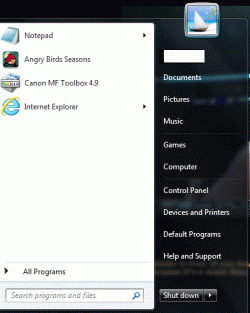
For the past few days, I've noticed the icons from the startup menu starting to go missing. Programs like Paint, Skype, Microsoft Office suite aren't there. I tried using the search bar but they're not there either. However, I can still use them if I have another file open.

I don't know why this is happening but I did download Codec-C plugin a few days back and updated Avast. Maybe one of them triggered it. If someone knows what I'm talking about, please help!

Thanks :)
 

Attachments

  • lal.gif
    lal.gif
    42.1 KB · Views: 7

My Computer

OS
Windows 7 64 bit
Hello nbafan and welcome to Seven Forums.

If you have a system restore point that goes back prior to when you installed the codecs and/or updated avast, you could try restoring your computer to that date/time.

http://www.sevenforums.com/tutorials/700-system-restore.html

Then update avast first (always best to have the most updated antimalware on your computer) and see if the icon problem returns. If all is OK, then try installing the codecs again. If everything works - problem solved. If not you'll know which might have caused the issue.

If the icons are still messed up you could also try rebuilding the icon cache. This tutorial will explain how.

http://www.sevenforums.com/tutorials/49819-icon-cache-rebuild.html

Please post back if any of this helped or not.
 

My Computer

Computer type
Laptop
Computer Manufacturer/Model Number
Sony Vaio VPCEB47GM Laptop
OS
Win 7 Pro 64-bit
CPU
Intel i5 2.4 Ghz
Memory
8GB DDR3
Graphics Card(s)
Intel HD 3000
Sound Card
IDT High Definition
Monitor(s) Displays
15.6 WGXA Anti-Glare LED
Screen Resolution
1280x800
Hard Drives
640Gb 7200rpm
Antivirus
MSE
Browser
Opera (primary) with IE9 backup
In addition to marsmimar, try Right Clicking on empty area of the Start Menu when the Start Button has been pressed and chose Properties. Then select Store and display recently opened programs in the start menu. and Store and display recently opened items in the Start Menu and Taskbar.

Then load the programs and pin if you wish.
 

My Computer

Computer type
PC/Desktop
Computer Manufacturer/Model Number
Novatech iRush Pro
OS
Windows 7 Ultimate SP1 - 64 Bit
CPU
Intel Core i5 2500k
Motherboard
Foxconn H67M-S/H67M-V/H67
Memory
2x4GB DDR3 1333Hz
Graphics Card(s)
Ati Radeon 6770
Sound Card
None
Monitor(s) Displays
Samsung S22B150
Screen Resolution
1920x1080
Hard Drives
2x500GB
PSU
500W
Cooling
Fan
Keyboard
HP KU0316
Mouse
Wireless Logitech M185
Internet Speed
20MB/s
Antivirus
Avast Free
Browser
Google Chrome
Other Info
Logitech M185 Mouse
KU-M316 Keyboard
Thanks for your reply guys.

I did think of restoring my computer to a different point. The only restore points I got were of yesterday and Feb 25 when I created a back up. If nothing works, I will select that point.

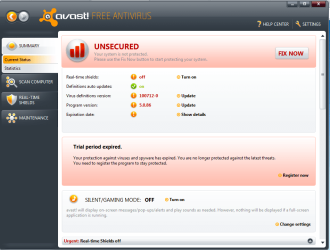
When I open Avast, this is the window that appears (look at attachment)
I clicked register but nothing pops up so I downloaded AVG and ran a scan. It didn't detect anything severe but I did remove everything it detected.

Infinite, I did what you suggested and they're already selected.

I'm usually good with computers but this problem's pretty weird.
 

Attachments

  • avast.png
    avast.png
    48.9 KB · Views: 10

My Computer

OS
Windows 7 64 bit
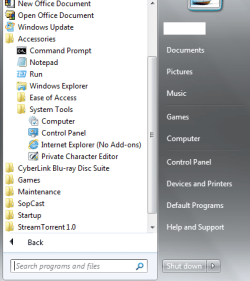
This is what my Accessories/System Tools folder looks like:


I'm also going to try to rebuild the cache and let you know!
 

Attachments

  • systemtools.png
    systemtools.png
    19.3 KB · Views: 3

My Computer

OS
Windows 7 64 bit
I'm trying to remove Avast from my computer since I have AVG installed. I tried to End Task from the Task Manager and it's telling me: The operation could not be completed. Access is denied.

I've never seen this message pop up before.
 

My Computer

OS
Windows 7 64 bit
I recommend removing AVG as it is not very good and using either MSE or Avast (reinstall Avast).

You'd probably need to Right Click Avast from the Notification Area Icon Tray and Exit as Comodo does the same thing when ended from Task Manager.
 

My Computer

Computer type
PC/Desktop
Computer Manufacturer/Model Number
Novatech iRush Pro
OS
Windows 7 Ultimate SP1 - 64 Bit
CPU
Intel Core i5 2500k
Motherboard
Foxconn H67M-S/H67M-V/H67
Memory
2x4GB DDR3 1333Hz
Graphics Card(s)
Ati Radeon 6770
Sound Card
None
Monitor(s) Displays
Samsung S22B150
Screen Resolution
1920x1080
Hard Drives
2x500GB
PSU
500W
Cooling
Fan
Keyboard
HP KU0316
Mouse
Wireless Logitech M185
Internet Speed
20MB/s
Antivirus
Avast Free
Browser
Google Chrome
Other Info
Logitech M185 Mouse
KU-M316 Keyboard
I recommend removing AVG as it is not very good and using either MSE or Avast (reinstall Avast).

You'd probably need to Right Click Avast from the Notification Area Icon Tray and Exit as Comodo does the same thing when ended from Task Manager.

When I go into Add/Remove programs, I don't even see Avast there. I feel like that's what is causing the problems.

When I right click Avast from the Notification Area, I don't see a Exit as Comodo option.
 

My Computer

OS
Windows 7 64 bit
Some settings of the recent versions of Ccleaner wipe up the start menu. It's not harmful, if those can be accessed form the all programs list. Open the program using the all program list , for one or two times, it will be back in start menu.

Then, you may pin those there.

EDIT : Sorry I misunderstood !
Do you use any Disk / Registry cleaning utility ?
 

My Computer

Computer type
PC/Desktop
Computer Manufacturer/Model Number
Self Assembled
OS
Microsoft Windows 10 Pro Insider Preview 64-bit
CPU
Intel(R) Core(TM) i3-4130 CPU @ 3.40GHz
Motherboard
Gigabyte Technology Co., Ltd. B85M-D3H
Memory
Corsair Vengence 4GB x2 (8.00GB Dual-Channel DDR3 @ 798MHz)
Graphics Card(s)
2047MB GeForce GTS 450 (ZOTAC International)
Sound Card
Onboard (Realtek High Definition Audio)
Monitor(s) Displays
LG Flatron E2040T
Screen Resolution
1600x900
Hard Drives
Western Digital 1 TB
Seagate 500 GB
PSU
Corsair VS550
Case
Cooler Master K380
Cooling
Cooler Master Seidon 120V Plus
Keyboard
Logitech MK260r
Mouse
Logitech MK260r
Internet Speed
PMPL Broadband
Antivirus
Windows Defender + MBAM
Browser
Firefox
Other Info
Dell Studio 15" Laptop
Some settings of the recent versions of Ccleaner wipe up the start menu. It's not harmful, if those can be accessed form the all programs list. Open the program using the all program list , for one or two times, it will be back in start menu.

Then, you may pin those there.

EDIT : Sorry I misunderstood !
Do you use any Disk / Registry cleaning utility ?

Actually I did what you said and it worked for programs like Skype, and VLC. I can't seem to find Microsoft Office files though.
And no, I don't use any of that.
 

My Computer

OS
Windows 7 64 bit
Does anyone have any prior knowledge of Codec-C? I downloaded it a few days back. Maybe that's what is causing me problems. I tried doing some research on it and some said it's a virus while others said it's not. I tried removing it but it's not working.
 

My Computer

OS
Windows 7 64 bit

My Computer

Computer type
PC/Desktop
Computer Manufacturer/Model Number
Novatech iRush Pro
OS
Windows 7 Ultimate SP1 - 64 Bit
CPU
Intel Core i5 2500k
Motherboard
Foxconn H67M-S/H67M-V/H67
Memory
2x4GB DDR3 1333Hz
Graphics Card(s)
Ati Radeon 6770
Sound Card
None
Monitor(s) Displays
Samsung S22B150
Screen Resolution
1920x1080
Hard Drives
2x500GB
PSU
500W
Cooling
Fan
Keyboard
HP KU0316
Mouse
Wireless Logitech M185
Internet Speed
20MB/s
Antivirus
Avast Free
Browser
Google Chrome
Other Info
Logitech M185 Mouse
KU-M316 Keyboard

My Computer

Computer type
PC/Desktop
Computer Manufacturer/Model Number
Bruce ... somewhere in his 40's
OS
Windows 7 Ultimate 32bit SP1
CPU
Intel(R) Core(TM)2 Quad CPU @ 2.40GHz, 2400 MHz
Motherboard
INTEL/D975XBX2
Memory
4 GB
Graphics Card(s)
ATI Radeon HD 2600 Pro
Monitor(s) Displays
Samsung SyncMaster 914v
Screen Resolution
1280 x 1024
Hard Drives
2/500GB each ... ST3500630AS ATA Device.
One is not connected
PSU
Rocketfish 700 W
Case
G.Skill Gigabyte Chassis
Keyboard
Standard PS/2 Keyboard
Mouse
Microsoft PS/2 Mouse
Internet Speed
DSL
Antivirus
Avira Internet Security
Browser
IE 11
Other Info
ATI HDMI Audio

My Computer

Computer type
PC/Desktop
Computer Manufacturer/Model Number
Bruce ... somewhere in his 40's
OS
Windows 7 Ultimate 32bit SP1
CPU
Intel(R) Core(TM)2 Quad CPU @ 2.40GHz, 2400 MHz
Motherboard
INTEL/D975XBX2
Memory
4 GB
Graphics Card(s)
ATI Radeon HD 2600 Pro
Monitor(s) Displays
Samsung SyncMaster 914v
Screen Resolution
1280 x 1024
Hard Drives
2/500GB each ... ST3500630AS ATA Device.
One is not connected
PSU
Rocketfish 700 W
Case
G.Skill Gigabyte Chassis
Keyboard
Standard PS/2 Keyboard
Mouse
Microsoft PS/2 Mouse
Internet Speed
DSL
Antivirus
Avira Internet Security
Browser
IE 11
Other Info
ATI HDMI Audio
I e-mailed the people that created the C-Codec and they sent me this link to remove C-Codec - [link removed] (I apologize if I'm not allowed to post links) but it worked.
I ran the uninstall utility and Avast is gone.
I tried using Revo but I couldn't find Avast.
 
Last edited by a moderator:

My Computer

OS
Windows 7 64 bit
WOT is flagging premiumsave.info as red for me.
 

My Computer

Computer type
PC/Desktop
Computer Manufacturer/Model Number
Novatech iRush Pro
OS
Windows 7 Ultimate SP1 - 64 Bit
CPU
Intel Core i5 2500k
Motherboard
Foxconn H67M-S/H67M-V/H67
Memory
2x4GB DDR3 1333Hz
Graphics Card(s)
Ati Radeon 6770
Sound Card
None
Monitor(s) Displays
Samsung S22B150
Screen Resolution
1920x1080
Hard Drives
2x500GB
PSU
500W
Cooling
Fan
Keyboard
HP KU0316
Mouse
Wireless Logitech M185
Internet Speed
20MB/s
Antivirus
Avast Free
Browser
Google Chrome
Other Info
Logitech M185 Mouse
KU-M316 Keyboard
WOT is flagging premiumsave.info as red for me.

Oh I'm sorry about that! It actually did remove Codec-C from my computer so I thought it was safe. This was the e-mail I received from them:

Hello,

I apologize that you are having trouble with your application. You should be able to remove the application simply by going into your computer Control Panel and entering your Add/Remove programs menu.
From this menu you can remove Premiumplay Codec-C by clicking uninstall.

We are aware of a problem over the past week of users who installed a faulty version of our product, if the above steps did not work then please use the below link. The below link only works if you installed the faulty version.

[link here]
 

My Computer

OS
Windows 7 64 bit

My Computer

Computer type
PC/Desktop
Computer Manufacturer/Model Number
Novatech iRush Pro
OS
Windows 7 Ultimate SP1 - 64 Bit
CPU
Intel Core i5 2500k
Motherboard
Foxconn H67M-S/H67M-V/H67
Memory
2x4GB DDR3 1333Hz
Graphics Card(s)
Ati Radeon 6770
Sound Card
None
Monitor(s) Displays
Samsung S22B150
Screen Resolution
1920x1080
Hard Drives
2x500GB
PSU
500W
Cooling
Fan
Keyboard
HP KU0316
Mouse
Wireless Logitech M185
Internet Speed
20MB/s
Antivirus
Avast Free
Browser
Google Chrome
Other Info
Logitech M185 Mouse
KU-M316 Keyboard
Can you reinstall ms office ? It may bring those programs back in start menu.
 

My Computer

Computer type
PC/Desktop
Computer Manufacturer/Model Number
Self Assembled
OS
Microsoft Windows 10 Pro Insider Preview 64-bit
CPU
Intel(R) Core(TM) i3-4130 CPU @ 3.40GHz
Motherboard
Gigabyte Technology Co., Ltd. B85M-D3H
Memory
Corsair Vengence 4GB x2 (8.00GB Dual-Channel DDR3 @ 798MHz)
Graphics Card(s)
2047MB GeForce GTS 450 (ZOTAC International)
Sound Card
Onboard (Realtek High Definition Audio)
Monitor(s) Displays
LG Flatron E2040T
Screen Resolution
1600x900
Hard Drives
Western Digital 1 TB
Seagate 500 GB
PSU
Corsair VS550
Case
Cooler Master K380
Cooling
Cooler Master Seidon 120V Plus
Keyboard
Logitech MK260r
Mouse
Logitech MK260r
Internet Speed
PMPL Broadband
Antivirus
Windows Defender + MBAM
Browser
Firefox
Other Info
Dell Studio 15" Laptop
Back
Top