Icons not functioning "align to grid"

karank6195

Banned
Local time
3:13 AM
Messages
28
Location
Nagpur
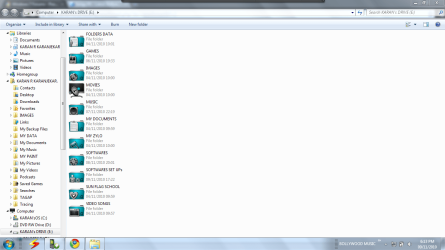
Hello!my folder icons in windows 7 are not functioning"align to grid"
 

Attachments

  • Capture1233.PNG
    Capture1233.PNG
    70.7 KB · Views: 49

My Computer

Computer Manufacturer/Model Number
DELL
OS
Windows 7 Ultimate x64
CPU
DELL
Motherboard
Intel
Memory
320 gb
Graphics Card(s)
Not available
Sound Card
Don't know
Monitor(s) Displays
Laptop
Mouse
USB i-ball
Karan K
Align to grid refers to the desktop icons.
 

My Computer

Computer type
PC/Desktop
Computer Manufacturer/Model Number
Dell XPS 420
OS
Windows 10, Home Clean Install
CPU
Intel Core2 processsor Q8200(2.33Ghz 1333FSB) Quad Core Tech
Motherboard
Dell
Memory
6 gb
Graphics Card(s)
ATI Radeon 256MB HD3650
Sound Card
Intergrated 7.1 Channel Audio
Monitor(s) Displays
Dell SP2009W 20"
Hard Drives
640 GB Serial ATA Hard drive
Cooling
Fan
Keyboard
Dell USB Keyboard
Mouse
Dell Premium Optical USB
Internet Speed
DSL 2.85
Hello!my folder icons in windows 7 are not functioning"align to grid"

You're obviously in Windows Explorer, so what is it that you're trying to do? And hopefully we'll be able to help you do it.
 

My Computer

Computer Manufacturer/Model Number
HP Pavillion dv5t (generation 1)
OS
Vista 64 bit and 32 bit (SP2)
CPU
Intel(R) Core(TM)2 Duo Processor T9400 (2.53 GHz
Memory
4GB DDR2 System Memory (2 Dimm)
Graphics Card(s)
512 MB NVIDIA GeForce 9600M GT
Monitor(s) Displays
15.4" diagonal WSXGA+ High-Definition HP BrightView Widescre
Screen Resolution
1680 x 1050
Hard Drives
320GB 5400RPM SATA Hard Drive with HP ProtectSmart Hard Drive Protection
Keyboard
Built-in HP
Mouse
Built in - Synaptics TouchPad V6.5 on PS/2 Port
Internet Speed
Max
Other Info
~ Intel Next-Gen Wireless-N Mini-card w/Bluetooth ~ Blu-Ray ROM DVD+/-R/RW ~ Integ. HDTV Hybrid Tuner ~ 12 Cell Battery ~ MS Office (Home Premium) 2007 ~
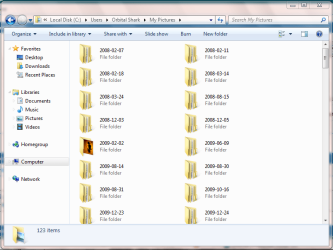
I think the OP is wondering why the icons aren't displaying from left to right, top to bottom.

Capture.PNG

My setting are set to 'Sort by' Name and Ascending
 

My Computer

Computer Manufacturer/Model Number
Compaq Desktop
OS
Windows 7 Ultimate x64
CPU
AMD Sempron Dual Core
Memory
3GB
Graphics Card(s)
NVIDIA GeForce 6150SE nForce 430
Screen Resolution
1024x768
Hard Drives
150GB Sata
Yeah I want to display the icons left to right i windows explorer.
 

My Computer

Computer Manufacturer/Model Number
DELL
OS
Windows 7 Ultimate x64
CPU
DELL
Motherboard
Intel
Memory
320 gb
Graphics Card(s)
Not available
Sound Card
Don't know
Monitor(s) Displays
Laptop
Mouse
USB i-ball
Why don't you first go into the Windows Explorer toolbar, and open Views, because it gives you many choices of icon layouts. See if one (for example, Tiles) is what you want.
 

My Computer

Computer Manufacturer/Model Number
HP Pavillion dv5t (generation 1)
OS
Vista 64 bit and 32 bit (SP2)
CPU
Intel(R) Core(TM)2 Duo Processor T9400 (2.53 GHz
Memory
4GB DDR2 System Memory (2 Dimm)
Graphics Card(s)
512 MB NVIDIA GeForce 9600M GT
Monitor(s) Displays
15.4" diagonal WSXGA+ High-Definition HP BrightView Widescre
Screen Resolution
1680 x 1050
Hard Drives
320GB 5400RPM SATA Hard Drive with HP ProtectSmart Hard Drive Protection
Keyboard
Built-in HP
Mouse
Built in - Synaptics TouchPad V6.5 on PS/2 Port
Internet Speed
Max
Other Info
~ Intel Next-Gen Wireless-N Mini-card w/Bluetooth ~ Blu-Ray ROM DVD+/-R/RW ~ Integ. HDTV Hybrid Tuner ~ 12 Cell Battery ~ MS Office (Home Premium) 2007 ~
I want to display the icons as 'extended tiles'.but i don't want them to display 'top to bottom'.
 

My Computer

Computer Manufacturer/Model Number
DELL
OS
Windows 7 Ultimate x64
CPU
DELL
Motherboard
Intel
Memory
320 gb
Graphics Card(s)
Not available
Sound Card
Don't know
Monitor(s) Displays
Laptop
Mouse
USB i-ball
Mmmmmm, don't think that currently you can have that option. Maybe some kind person will write a script for you. . .
 

My Computer

Computer Manufacturer/Model Number
HP Pavillion dv5t (generation 1)
OS
Vista 64 bit and 32 bit (SP2)
CPU
Intel(R) Core(TM)2 Duo Processor T9400 (2.53 GHz
Memory
4GB DDR2 System Memory (2 Dimm)
Graphics Card(s)
512 MB NVIDIA GeForce 9600M GT
Monitor(s) Displays
15.4" diagonal WSXGA+ High-Definition HP BrightView Widescre
Screen Resolution
1680 x 1050
Hard Drives
320GB 5400RPM SATA Hard Drive with HP ProtectSmart Hard Drive Protection
Keyboard
Built-in HP
Mouse
Built in - Synaptics TouchPad V6.5 on PS/2 Port
Internet Speed
Max
Other Info
~ Intel Next-Gen Wireless-N Mini-card w/Bluetooth ~ Blu-Ray ROM DVD+/-R/RW ~ Integ. HDTV Hybrid Tuner ~ 12 Cell Battery ~ MS Office (Home Premium) 2007 ~
Hello!my folder icons in windows 7 are not functioning"align to grid"

You're asking for a Windows XP function.
There is no such thing in Windows 7 for non-desktop folders.

However having said that, using Medium Icons in Windows 7 will give the same desired effect.
 

My Computer

OS
Windows 7 Pro
ok!thanks
 

My Computer

Computer Manufacturer/Model Number
DELL
OS
Windows 7 Ultimate x64
CPU
DELL
Motherboard
Intel
Memory
320 gb
Graphics Card(s)
Not available
Sound Card
Don't know
Monitor(s) Displays
Laptop
Mouse
USB i-ball
Back
Top