Icons on Taskbar

KeL

New member
Local time
5:38 AM
Messages
3
I've been tinkering around with the icons on my taskbar lately now I've changed them all to just the way I like them. Problem is, when I launch any of them, the icon reverts back to the default icons.
For example, I've changed the icon for winamp and when I launch winamp, while it is running, it shows the winamp default icon.
Any ideas what I've done wrong?
 

My Computer

OS
Windows 7 32bit
Go to: C:\Users\Administrator\AppData\Roaming\Microsoft\Internet Explorer\Quick Launch\User Pinned\TaskBar -drag the shortcut you want to change to desktop, unpin it from the taskbar, replace shortcut with the icon you want, and then click pin to taskbar.
30my8v6.jpg
 

My Computer

Computer type
PC/Desktop
OS
The 8.1 OS made by Billy Microsoft
I cant seem to find my AppData folder. Is there another way to do this?
 

My Computer

OS
Windows 7 32bit
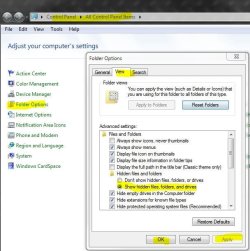
Appdata is a hidden folder, go here and apply, then you'll see it.

j.JPG
 

My Computer

Computer type
PC/Desktop
Computer Manufacturer/Model Number
Airbot 2.0
OS
Windows 7 Ultimate x64 SP1
CPU
Core i7 920 (D0) @ 4Ghz, *26c idle *65c full load on air
Motherboard
Asus P6X58D Premium - Sata 6Gb/s - USB 3.0
Memory
12GB DDR3 Corsair Dominator -CMD12GX3M6A1600C8 at 1600MHz
Graphics Card(s)
Zotac Geforce GTX 770
Sound Card
ASUS Xonar D2X
Monitor(s) Displays
1 LG 24" Flatron W2453V-PF 1 Samsung 24" P2450H both 2ms RT
Screen Resolution
1920x1080@60hz
Hard Drives
1 Samsung 250GB 840 Evo SSD
1 OCZ Vertex2 180GB SSD
1 TB Samsung Spinpoint F1 7200RPM 32MB cache
2 500GB WD Caviar Blacks 7200RPM 32MB cache (WD5001AALS)

Pioneer DVD Burner DVR-S18M
PSU
Corsair HX1000W
Case
Cooler Master HAF 932
Cooling
Case Fans *3 230mm, *1 140mm/CPU - *Tuniq Tower 120 Extreme
Keyboard
Logitech Wireless MK700
Mouse
Logitech Wireless MK700
Internet Speed
DL 15 Mbps UL 0.98 Mbps
Antivirus
None
Browser
Firefox Nightly
Other Info
Processor-7.7 *RAM- 7.9 *Graphics-7.9 *Gaming Graphics- 7.9 *SSD- 7.8 W.E.I final score= 7.7
*Phone- LG Nexus 5
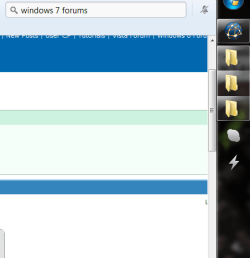
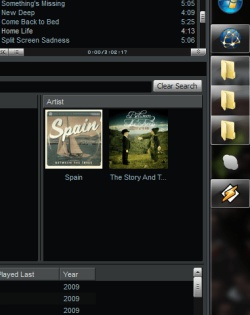
As u can see from the before and after shots, it doesn't work. Was hoping that the icons will remain the custom icons I choose.
 

Attachments

  • Before.PNG
    Before.PNG
    11.4 KB · Views: 3
  • After.PNG
    After.PNG
    25.7 KB · Views: 6

My Computer

OS
Windows 7 32bit
Which method did you use to change the icons? All i do is go to the program on "All Programs" within the start menu, right click and go to "Properties" then to the shortcut tab (Opens there on default for me, not sure for everyone else) and click on "Change Icon", then browse for the ico image that i want to use and once i have selected that, i go back to the program i just changed on "All Programs" within the start menu and then right click and choose "Pin to Taskbar"


My Computer

Computer Manufacturer/Model Number
Customised
OS
Windows 7 64Bit Ultimate Edition SP1
CPU
AMD Phenom II X5 955 @ 3200 Mhz
Motherboard
Asus M5A99X EVO
Memory
G.Skill 12GB DDR3 1333MHz
Graphics Card(s)
Palit GeForce GTX 550 Ti OC Sonic 1GB
Sound Card
Onboard
Monitor(s) Displays
LG 32" HDTV
Screen Resolution
1920x1080 @ 60Hz
Hard Drives
Internal 250GB SATA 3.0 Western Digital WDC WD25 00AAKX-001CA0

Internal 500GB SATA 2.0 Seagate ST350041 3AS

Internal 500GB SATA 2.0 Western Digital WDC WD50 00AAKS-00WWP

External 1TB USB 2.0 Western Digital

External 2TB USB 2.0 Buffalo
PSU
Colors-IT 750w BLACK 12CM Silent
Case
Xigamatek CPC-T45UB-U01 Asgard Chassis
Cooling
4 120mm Fans In Total
Keyboard
ADVENT Illuminated Keyboard
Mouse
Genius
Internet Speed
30MB
Other Info
CPU Cooler - Cooler Master Hyper 212 Plus Cooler
Back
Top