icons

aintnorock

New member
Member
Local time
1:37 PM
Messages
72
I can see where there are tons of icon files on the net for free, but I downloaded a specific icon I wanted, and when I went to properties/change icon for a specific link, it didn't recognize the .ico file. It was looking for a .lnk file. How do I put icons in a .lnlk file, or is there something else I need to do.
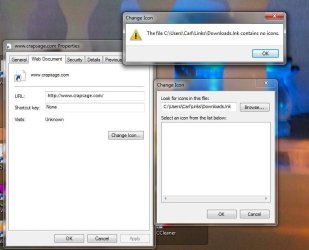
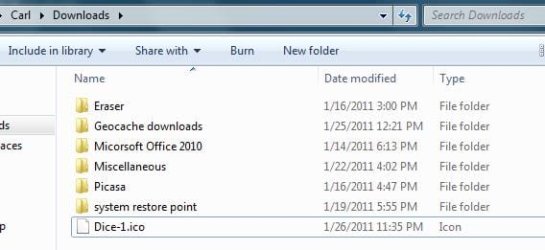
ScreenShot003.jpg
ScreenShot004.jpg

As you can see, there is an /ico file in the selected browse directory.

Any suggestions?
 

My Computer

Computer type
Laptop
Computer Manufacturer/Model Number
compaq
OS
windows 7 home premium 64 bit
Motherboard
AMD V140
Memory
2gb
Internet Speed
30mb
Other Info
malwarebytes
You can try this, but be sure to back up your files and set a System Restore point BEFORE you do it, just in case it doesn't work or causes a problem to your system.

When editing the icon in the .ico file, save the output as a .lnk file to the Desktop, and then replace the original with the modified one. Then, if the original .ico file was in System32, replace that one with the modified .lnk file. When done, rebuild your Icon Cache.
 

My Computer

Computer Manufacturer/Model Number
HP Pavillion dv5t (generation 1)
OS
Vista 64 bit and 32 bit (SP2)
CPU
Intel(R) Core(TM)2 Duo Processor T9400 (2.53 GHz
Memory
4GB DDR2 System Memory (2 Dimm)
Graphics Card(s)
512 MB NVIDIA GeForce 9600M GT
Monitor(s) Displays
15.4" diagonal WSXGA+ High-Definition HP BrightView Widescre
Screen Resolution
1680 x 1050
Hard Drives
320GB 5400RPM SATA Hard Drive with HP ProtectSmart Hard Drive Protection
Keyboard
Built-in HP
Mouse
Built in - Synaptics TouchPad V6.5 on PS/2 Port
Internet Speed
Max
Other Info
~ Intel Next-Gen Wireless-N Mini-card w/Bluetooth ~ Blu-Ray ROM DVD+/-R/RW ~ Integ. HDTV Hybrid Tuner ~ 12 Cell Battery ~ MS Office (Home Premium) 2007 ~
Look in Downloads

You're being directed to users and a URL link.
 

Attachments

  • download folder.jpg
    download folder.jpg
    983 bytes · Views: 63

My Computer

Computer type
PC/Desktop
Computer Manufacturer/Model Number
Bruce ... somewhere in his 40's
OS
Windows 7 Ultimate 32bit SP1
CPU
Intel(R) Core(TM)2 Quad CPU @ 2.40GHz, 2400 MHz
Motherboard
INTEL/D975XBX2
Memory
4 GB
Graphics Card(s)
ATI Radeon HD 2600 Pro
Monitor(s) Displays
Samsung SyncMaster 914v
Screen Resolution
1280 x 1024
Hard Drives
2/500GB each ... ST3500630AS ATA Device.
One is not connected
PSU
Rocketfish 700 W
Case
G.Skill Gigabyte Chassis
Keyboard
Standard PS/2 Keyboard
Mouse
Microsoft PS/2 Mouse
Internet Speed
DSL
Antivirus
Avira Internet Security
Browser
IE 11
Other Info
ATI HDMI Audio

My Computer

Computer type
Laptop
Computer Manufacturer/Model Number
compaq
OS
windows 7 home premium 64 bit
Motherboard
AMD V140
Memory
2gb
Internet Speed
30mb
Other Info
malwarebytes
See how in your screenshot it shows ...\downloads.Ink

You don't want the last part, just the downloads part. Try browsing to the download folder an then clicking on the .ico file
 

My Computer

Computer Manufacturer/Model Number
Vostro
OS
Windows 7 Ultimate (SP1)
CPU
AMD Sempron 3600+
Graphics Card(s)
ATI Radeon Xpress 1150
Screen Resolution
1200 x 800
Hard Drives
WD Scorpio Blue 500 GB
See how in your screenshot it shows ...\downloads.Ink

You don't want the last part, just the downloads part. Try browsing to the download folder an then clicking on the .ico file


Got it. Thanks. I was just looking in the wrong place. You pointed that out to me.
 

My Computer

Computer type
Laptop
Computer Manufacturer/Model Number
compaq
OS
windows 7 home premium 64 bit
Motherboard
AMD V140
Memory
2gb
Internet Speed
30mb
Other Info
malwarebytes

My Computer

Computer Manufacturer/Model Number
Vostro
OS
Windows 7 Ultimate (SP1)
CPU
AMD Sempron 3600+
Graphics Card(s)
ATI Radeon Xpress 1150
Screen Resolution
1200 x 800
Hard Drives
WD Scorpio Blue 500 GB
Back
Top