
Hi all,
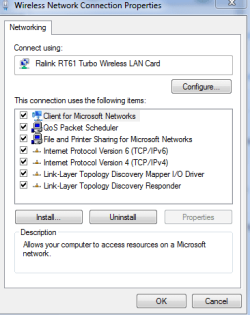
I'm trying to route my connection from my computer to my 360. My computer is connected through wireless, and I want to connect the 360 to it through wired. I've done this before on xp and vista, but with windows 7 i no longer get the sharing tab for ICS. I'm at a loss, any help?
I'm trying to route my connection from my computer to my 360. My computer is connected through wireless, and I want to connect the 360 to it through wired. I've done this before on xp and vista, but with windows 7 i no longer get the sharing tab for ICS. I'm at a loss, any help?
Attachments
My Computer
- OS
- 7 pro
- CPU
- i7 920
- Motherboard
- ex58-ud4p
- Memory
- 6gb ddr3
- Graphics Card(s)
- hd 3870
- Sound Card
- onboard
- Monitor(s) Displays
- sony 19",dell 19"
- Hard Drives
- 400gb 7200rpm
- PSU
- earthwatts 500
- Case
- antec 900
- Cooling
- fans galore
