ICS Won't Start/Can't Share Internet

Jomox

New member
Local time
7:14 AM
Messages
32
Hi,

I've got some problems with sharing internet between two 7 systems. I'll let you know how things worked before the new installs.

I use crossed ethernet cable with an ethernet network card. Before I had XP running as the host with a bridged connection and then a Vista system using the internet from the XP system. All that was needed then is to make sure the internet connection is shared on the XP host system and the internet would be shared without any problems.

I now have both systems running 7 and have tried to bridge the connections the same way I did before to share the internet but it won't work as ICS won't start and I can't find any box to tick to share the internet on the host in any of the network adapter properties or configirations. I can share folders but no internet.

I've tried troubleshooting, shutting down both PC's and unplugging the modem for 10 minutes and rebooting to no avail.

I've also tried to start ICS in task manager and in services but it won't run, it says when trying to start it in services:
The ICS on local computer started and stopped. Some services stop automaticly if they are not in use by another service or program.

I have all network discovery and sharing all turned on both computers.
 

Attachments
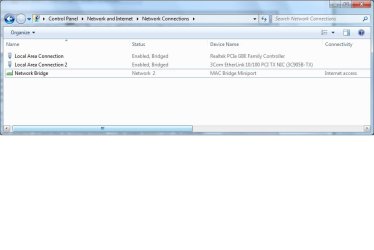
  • adapters.jpg
    adapters.jpg
    32 KB · Views: 482

My Computer My Computer

At a glance

Windows 7 Ultimate x64[email protected]4GB 6400 OCZ Gold @ 5-5-5-15Evga 9600GT SC
OS
Windows 7 Ultimate x64
CPU
[email protected]
Motherboard
Gigabyte P35-S3G
Memory
4GB 6400 OCZ Gold @ 5-5-5-15
Graphics Card(s)
Evga 9600GT SC
Sound Card
Emu 1820m
Hard Drives
Samsung F1
WD's
PSU
OZC ModStream 520w
Cooling
Andy Samurai Cooler
So you havn't found this setting yet on the host computer?
I can't imagine why this setting would be missing.
 

Attachments

  • Internet connection sharing.PNG
    Internet connection sharing.PNG
    30 KB · Views: 679

My Computer My Computer

At a glance

Windows 7 Ult, Windows 8.1 Pro,Q9650-4.275GHz, E8600 4.5GHz, E6750-3.8GHzG.Skill PC2 9600 1200Mhz 5 5 5 15 2TGTX480
Computer type
PC/Desktop
Computer Manufacturer/Model Number
Home built
OS
Windows 7 Ult, Windows 8.1 Pro,
CPU
Q9650-4.275GHz, E8600 4.5GHz, E6750-3.8GHz
Motherboard
Evga 780i FTW
Memory
G.Skill PC2 9600 1200Mhz 5 5 5 15 2T
Graphics Card(s)
GTX480
Sound Card
Asus Xonar D2
Monitor(s) Displays
HannsG
Screen Resolution
1680X1050
Hard Drives
GSkill Phoenix Pro 120GB SSD
PSU
ThermalTake Toughpower 1000Watt modular
Case
ThermalTake XaserV
Cooling
Xigmatek S1283
Keyboard
Logitech G15
Mouse
Logitech G9
Internet Speed
T1
Nope, that setting is not anywhere.
 

My Computer My Computer

At a glance

Windows 7 Ultimate x64[email protected]4GB 6400 OCZ Gold @ 5-5-5-15Evga 9600GT SC
OS
Windows 7 Ultimate x64
CPU
[email protected]
Motherboard
Gigabyte P35-S3G
Memory
4GB 6400 OCZ Gold @ 5-5-5-15
Graphics Card(s)
Evga 9600GT SC
Sound Card
Emu 1820m
Hard Drives
Samsung F1
WD's
PSU
OZC ModStream 520w
Cooling
Andy Samurai Cooler
That window should be there on the host machine. If you don't see it then the host machine probably doesn't have a connection.
 

My Computer My Computer

At a glance

Windows 7 Ult, Windows 8.1 Pro,Q9650-4.275GHz, E8600 4.5GHz, E6750-3.8GHzG.Skill PC2 9600 1200Mhz 5 5 5 15 2TGTX480
Computer type
PC/Desktop
Computer Manufacturer/Model Number
Home built
OS
Windows 7 Ult, Windows 8.1 Pro,
CPU
Q9650-4.275GHz, E8600 4.5GHz, E6750-3.8GHz
Motherboard
Evga 780i FTW
Memory
G.Skill PC2 9600 1200Mhz 5 5 5 15 2T
Graphics Card(s)
GTX480
Sound Card
Asus Xonar D2
Monitor(s) Displays
HannsG
Screen Resolution
1680X1050
Hard Drives
GSkill Phoenix Pro 120GB SSD
PSU
ThermalTake Toughpower 1000Watt modular
Case
ThermalTake XaserV
Cooling
Xigmatek S1283
Keyboard
Logitech G15
Mouse
Logitech G9
Internet Speed
T1
It has a connection, am connected to the internet right now on the host machine and the other computer is connected to this as am sharing files, it just won't share the net. No option to share it and ICS won't start.
 

My Computer My Computer

At a glance

Windows 7 Ultimate x64[email protected]4GB 6400 OCZ Gold @ 5-5-5-15Evga 9600GT SC
OS
Windows 7 Ultimate x64
CPU
[email protected]
Motherboard
Gigabyte P35-S3G
Memory
4GB 6400 OCZ Gold @ 5-5-5-15
Graphics Card(s)
Evga 9600GT SC
Sound Card
Emu 1820m
Hard Drives
Samsung F1
WD's
PSU
OZC ModStream 520w
Cooling
Andy Samurai Cooler
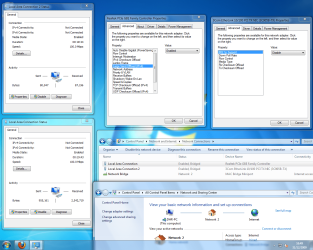
Attached a picture. It worked fine this way on XP and it would work fine if I could enable ICS or there was a sharing option in the network. Any Idea's? It does say ivpv6 and 4 not connected, dunno why.
 

Attachments

  • config.png
    config.png
    152.2 KB · Views: 1,114

My Computer My Computer

At a glance

Windows 7 Ultimate x64[email protected]4GB 6400 OCZ Gold @ 5-5-5-15Evga 9600GT SC
OS
Windows 7 Ultimate x64
CPU
[email protected]
Motherboard
Gigabyte P35-S3G
Memory
4GB 6400 OCZ Gold @ 5-5-5-15
Graphics Card(s)
Evga 9600GT SC
Sound Card
Emu 1820m
Hard Drives
Samsung F1
WD's
PSU
OZC ModStream 520w
Cooling
Andy Samurai Cooler
Have you tried to shut down the bridge to see if that is working against ICS? I havn't used ICS in a long time but I didn't need to use a bridge or a crossover cable when I did. I just used a pci NIC card. It worked good that way but you had to have the host machine on to use the secondary connection.

It will probably not work the same as it did in XP.
The network window on the host machine should show IPv4 as connected. That is probably why you don't see the option to enable ICS.
 

My Computer My Computer

At a glance

Windows 7 Ult, Windows 8.1 Pro,Q9650-4.275GHz, E8600 4.5GHz, E6750-3.8GHzG.Skill PC2 9600 1200Mhz 5 5 5 15 2TGTX480
Computer type
PC/Desktop
Computer Manufacturer/Model Number
Home built
OS
Windows 7 Ult, Windows 8.1 Pro,
CPU
Q9650-4.275GHz, E8600 4.5GHz, E6750-3.8GHz
Motherboard
Evga 780i FTW
Memory
G.Skill PC2 9600 1200Mhz 5 5 5 15 2T
Graphics Card(s)
GTX480
Sound Card
Asus Xonar D2
Monitor(s) Displays
HannsG
Screen Resolution
1680X1050
Hard Drives
GSkill Phoenix Pro 120GB SSD
PSU
ThermalTake Toughpower 1000Watt modular
Case
ThermalTake XaserV
Cooling
Xigmatek S1283
Keyboard
Logitech G15
Mouse
Logitech G9
Internet Speed
T1
I've tried to remove the bridge ye and it's just the same :(

How can we get IPv4 connected? shall I try IP settings on the secondary machine?

Thanks
 

My Computer My Computer

At a glance

Windows 7 Ultimate x64[email protected]4GB 6400 OCZ Gold @ 5-5-5-15Evga 9600GT SC
OS
Windows 7 Ultimate x64
CPU
[email protected]
Motherboard
Gigabyte P35-S3G
Memory
4GB 6400 OCZ Gold @ 5-5-5-15
Graphics Card(s)
Evga 9600GT SC
Sound Card
Emu 1820m
Hard Drives
Samsung F1
WD's
PSU
OZC ModStream 520w
Cooling
Andy Samurai Cooler
Here is a page that shows how to release your ipconfig and obtain a new one. Just basic command prompt internet connection commands that you can use to renew your connection.

It could also be a driver problem on one of those machines. Make sure all the NIC drivers are up do date.

ipconfig - Windows Command Line Utility
 

My Computer My Computer

At a glance

Windows 7 Ult, Windows 8.1 Pro,Q9650-4.275GHz, E8600 4.5GHz, E6750-3.8GHzG.Skill PC2 9600 1200Mhz 5 5 5 15 2TGTX480
Computer type
PC/Desktop
Computer Manufacturer/Model Number
Home built
OS
Windows 7 Ult, Windows 8.1 Pro,
CPU
Q9650-4.275GHz, E8600 4.5GHz, E6750-3.8GHz
Motherboard
Evga 780i FTW
Memory
G.Skill PC2 9600 1200Mhz 5 5 5 15 2T
Graphics Card(s)
GTX480
Sound Card
Asus Xonar D2
Monitor(s) Displays
HannsG
Screen Resolution
1680X1050
Hard Drives
GSkill Phoenix Pro 120GB SSD
PSU
ThermalTake Toughpower 1000Watt modular
Case
ThermalTake XaserV
Cooling
Xigmatek S1283
Keyboard
Logitech G15
Mouse
Logitech G9
Internet Speed
T1
I tried entering the ipv4 details manually but to no avail.

I will try the ipconfig now.

The Ethernet network card is old though, but I've got the latest driver's but they are quite old and it's a discontinued product so if we can't fix it with your help I have a new network card on the way which i hope will solve it otherwise.
 

My Computer My Computer

At a glance

Windows 7 Ultimate x64[email protected]4GB 6400 OCZ Gold @ 5-5-5-15Evga 9600GT SC
OS
Windows 7 Ultimate x64
CPU
[email protected]
Motherboard
Gigabyte P35-S3G
Memory
4GB 6400 OCZ Gold @ 5-5-5-15
Graphics Card(s)
Evga 9600GT SC
Sound Card
Emu 1820m
Hard Drives
Samsung F1
WD's
PSU
OZC ModStream 520w
Cooling
Andy Samurai Cooler
Looking at your first picture.... have you clicked on 'properties' and enabled IPv-4?
 

My Computer My Computer

At a glance

Windows 7 Ultimate 32bit SP1Intel(R) Core(TM)2 Quad CPU @ 2.40GHz, 2400 MHz4 GBATI Radeon HD 2600 Pro
Computer type
PC/Desktop
Computer Manufacturer/Model Number
Bruce ... somewhere in his 40's
OS
Windows 7 Ultimate 32bit SP1
CPU
Intel(R) Core(TM)2 Quad CPU @ 2.40GHz, 2400 MHz
Motherboard
INTEL/D975XBX2
Memory
4 GB
Graphics Card(s)
ATI Radeon HD 2600 Pro
Monitor(s) Displays
Samsung SyncMaster 914v
Screen Resolution
1280 x 1024
Hard Drives
2/500GB each ... ST3500630AS ATA Device.
One is not connected
PSU
Rocketfish 700 W
Case
G.Skill Gigabyte Chassis
Keyboard
Standard PS/2 Keyboard
Mouse
Microsoft PS/2 Mouse
Internet Speed
DSL
Antivirus
Avira Internet Security
Browser
IE 11
Other Info
ATI HDMI Audio
I tried entering the ipv4 details manually but to no avail.

I will try the ipconfig now.

The Ethernet network card is old though, but I've got the latest driver's but they are quite old and it's a discontinued product so if we can't fix it with your help I have a new network card on the way which i hope will solve it otherwise.

It sounds like the network card isn't working quite right because it should obtain the lease automatically. They are cheap these days so maybe a new one will work who knows.
 

My Computer My Computer

At a glance

Windows 7 Ult, Windows 8.1 Pro,Q9650-4.275GHz, E8600 4.5GHz, E6750-3.8GHzG.Skill PC2 9600 1200Mhz 5 5 5 15 2TGTX480
Computer type
PC/Desktop
Computer Manufacturer/Model Number
Home built
OS
Windows 7 Ult, Windows 8.1 Pro,
CPU
Q9650-4.275GHz, E8600 4.5GHz, E6750-3.8GHz
Motherboard
Evga 780i FTW
Memory
G.Skill PC2 9600 1200Mhz 5 5 5 15 2T
Graphics Card(s)
GTX480
Sound Card
Asus Xonar D2
Monitor(s) Displays
HannsG
Screen Resolution
1680X1050
Hard Drives
GSkill Phoenix Pro 120GB SSD
PSU
ThermalTake Toughpower 1000Watt modular
Case
ThermalTake XaserV
Cooling
Xigmatek S1283
Keyboard
Logitech G15
Mouse
Logitech G9
Internet Speed
T1
Nah still not working. You think it's this network card then?

It's 32bit 7 btw on the host machine, windows update found driver's for the card and they are the latest and most up to date ones but driver is from 2003! @ Jacee ye it's enabled.

Is there not any way we can force ICS to start?
 

My Computer My Computer

At a glance

Windows 7 Ultimate x64[email protected]4GB 6400 OCZ Gold @ 5-5-5-15Evga 9600GT SC
OS
Windows 7 Ultimate x64
CPU
[email protected]
Motherboard
Gigabyte P35-S3G
Memory
4GB 6400 OCZ Gold @ 5-5-5-15
Graphics Card(s)
Evga 9600GT SC
Sound Card
Emu 1820m
Hard Drives
Samsung F1
WD's
PSU
OZC ModStream 520w
Cooling
Andy Samurai Cooler
The ICS enable option isn't showing up because it's not obtaining the IP lease at all, so unless it connects using the standard IPv4 connection it's not going to give you the ICS enable window. If those IP commands don't work then either your NIC card or your drivers aren't compatible with Windows 7.

Have you tried the Gigabyte site for some Windows 7 drivers? There are some very recent driver updates for your board.
http://www.gigabyte.com.tw/Support/Motherboard/Driver_Model.aspx?ProductID=2729
 

My Computer My Computer

At a glance

Windows 7 Ult, Windows 8.1 Pro,Q9650-4.275GHz, E8600 4.5GHz, E6750-3.8GHzG.Skill PC2 9600 1200Mhz 5 5 5 15 2TGTX480
Computer type
PC/Desktop
Computer Manufacturer/Model Number
Home built
OS
Windows 7 Ult, Windows 8.1 Pro,
CPU
Q9650-4.275GHz, E8600 4.5GHz, E6750-3.8GHz
Motherboard
Evga 780i FTW
Memory
G.Skill PC2 9600 1200Mhz 5 5 5 15 2T
Graphics Card(s)
GTX480
Sound Card
Asus Xonar D2
Monitor(s) Displays
HannsG
Screen Resolution
1680X1050
Hard Drives
GSkill Phoenix Pro 120GB SSD
PSU
ThermalTake Toughpower 1000Watt modular
Case
ThermalTake XaserV
Cooling
Xigmatek S1283
Keyboard
Logitech G15
Mouse
Logitech G9
Internet Speed
T1
Ye I got driver's from their site for the onboard.

The driver's I was talking about are for the 3Com PCI Ethernet NetWork card, it's 10 years old now and the last driver's where from 2003.

In windows update it has found some newer driver's then those on the gigabyte site for the onboard network. I will try installing them see if that helps.
 

My Computer My Computer

At a glance

Windows 7 Ultimate x64[email protected]4GB 6400 OCZ Gold @ 5-5-5-15Evga 9600GT SC
OS
Windows 7 Ultimate x64
CPU
[email protected]
Motherboard
Gigabyte P35-S3G
Memory
4GB 6400 OCZ Gold @ 5-5-5-15
Graphics Card(s)
Evga 9600GT SC
Sound Card
Emu 1820m
Hard Drives
Samsung F1
WD's
PSU
OZC ModStream 520w
Cooling
Andy Samurai Cooler
That old NIC card might be the problem from what I'm seeing. 03 drivers typically don't work with Win 7.

Looks like the Gigabyte drivers are about the only option left besides changing out the old NIC card.
 

My Computer My Computer

At a glance

Windows 7 Ult, Windows 8.1 Pro,Q9650-4.275GHz, E8600 4.5GHz, E6750-3.8GHzG.Skill PC2 9600 1200Mhz 5 5 5 15 2TGTX480
Computer type
PC/Desktop
Computer Manufacturer/Model Number
Home built
OS
Windows 7 Ult, Windows 8.1 Pro,
CPU
Q9650-4.275GHz, E8600 4.5GHz, E6750-3.8GHz
Motherboard
Evga 780i FTW
Memory
G.Skill PC2 9600 1200Mhz 5 5 5 15 2T
Graphics Card(s)
GTX480
Sound Card
Asus Xonar D2
Monitor(s) Displays
HannsG
Screen Resolution
1680X1050
Hard Drives
GSkill Phoenix Pro 120GB SSD
PSU
ThermalTake Toughpower 1000Watt modular
Case
ThermalTake XaserV
Cooling
Xigmatek S1283
Keyboard
Logitech G15
Mouse
Logitech G9
Internet Speed
T1
Ye the update did not change anything.

I have a newer network card on the way, should be here in the next couple of days. Will let you know when I get it, hopefully it will work ok.

Thanks for all your help.
 

My Computer My Computer

At a glance

Windows 7 Ultimate x64[email protected]4GB 6400 OCZ Gold @ 5-5-5-15Evga 9600GT SC
OS
Windows 7 Ultimate x64
CPU
[email protected]
Motherboard
Gigabyte P35-S3G
Memory
4GB 6400 OCZ Gold @ 5-5-5-15
Graphics Card(s)
Evga 9600GT SC
Sound Card
Emu 1820m
Hard Drives
Samsung F1
WD's
PSU
OZC ModStream 520w
Cooling
Andy Samurai Cooler
Sure no problem, try and report back in if the new card fixes it or not. I'm curious to know what the problem might be.
 

My Computer My Computer

At a glance

Windows 7 Ult, Windows 8.1 Pro,Q9650-4.275GHz, E8600 4.5GHz, E6750-3.8GHzG.Skill PC2 9600 1200Mhz 5 5 5 15 2TGTX480
Computer type
PC/Desktop
Computer Manufacturer/Model Number
Home built
OS
Windows 7 Ult, Windows 8.1 Pro,
CPU
Q9650-4.275GHz, E8600 4.5GHz, E6750-3.8GHz
Motherboard
Evga 780i FTW
Memory
G.Skill PC2 9600 1200Mhz 5 5 5 15 2T
Graphics Card(s)
GTX480
Sound Card
Asus Xonar D2
Monitor(s) Displays
HannsG
Screen Resolution
1680X1050
Hard Drives
GSkill Phoenix Pro 120GB SSD
PSU
ThermalTake Toughpower 1000Watt modular
Case
ThermalTake XaserV
Cooling
Xigmatek S1283
Keyboard
Logitech G15
Mouse
Logitech G9
Internet Speed
T1
Back
Top