IDE Controller Driver Problems

rich101682

New member
Local time
4:07 PM
Messages
8
Please forgive me if this is an obvious fix and I'm just not getting it. I searched all over the net to figure out this problem and I still can't find it.

I have a Gateway P-7811fx laptop. I did a fresh install of Windows 7 (64 bit) and now I can't seem to get my SD Card reader to work. I know that the laptop knows there's a SD card in there because when I plug it in, it pops up as "O2Micro SD Disk Device" under Disk Drives in Device Manager. But for some reason, it won't show the SD card in My Computer.

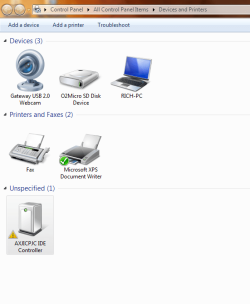
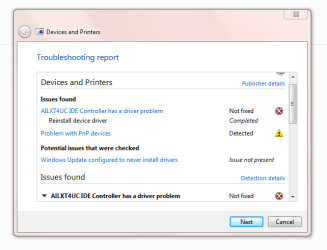
The only problem I can see is that under Storage Controllers in the Device Manager, there's a yellow exclamation point next to "AILXT4UC IDE Controller" that I cannot seem to fix.

All of my drivers seem to be updated and I cannot get any answers from Troubleshooting the problem. Anyone know what I'm experiencing and how to fix it?
 

My Computer

OS
Windows 7
Have you tried to click on that device and let windows try and update the driver?
 

My Computer

Computer Manufacturer/Model Number
Self Built
OS
Windows 7 ultimate 64 bit / XP Home sp3
CPU
intel Core 2 Duo E8400 3.0ghz
Motherboard
Asus P5ND bios 1401
Memory
8 gigs 1066 OCZ Fata1ty
Graphics Card(s)
EVGA GTX 580 Call of Duty Black Ops Edition
Sound Card
Creative Soundblaster Audigy 2zs
Monitor(s) Displays
Asus 24in LCD's 2MS X2
Screen Resolution
1920x1080p @60Hz
Hard Drives
WD Caviar 500 Black/ WD Caviar 200 Blue
PSU
OCZ 700W GameXtreme
Case
NZXT Apollo
Cooling
Corsair H50 CPU/120mm x3 /60mm x2 /Corsair Dominator Ram
Keyboard
Logitech Bluetooth Wireless MX5000
Mouse
Logitech Bluetooth Wireless MX1000
Internet Speed
Download 19.83 Upload 0.97
Other Info
Logitech Z2300 Speakers/ Bose Noise Cancelling Headphones/Avermedia PCI-e Hybrid TV Bravo/Epson NX415 all in one/ 4 Port Powered USB Hub/ LG 10x Bluray Burner /TSST Corp DVDRW External
Yeah I tried that and Windows said it couldn't update the driver.
 

My Computer

OS
Windows 7
Do these screenshots help?
 

Attachments

  • Capture1.PNG
    Capture1.PNG
    27.9 KB · Views: 382
  • Capture 2.PNG
    Capture 2.PNG
    15 KB · Views: 416

My Computer

OS
Windows 7
Gateway Support Drivers & Downloads

There is a media card reader driver there - try installing - its maybe the correct driver. They are vista drivers if they wont install because of a OS mismatch error do the following -

To install a driver OR program in compatibility mode - right click the setup.exe file - click properties - click compatibility - check run in compatibility with vista/xp etc - check run as administrator - leave the rest blank. Start setup.exe and install.
 

My Computer

OS
XP, Vista, W7 64bit Home Premium
CPU
Intel Core Duo 6850 3.0 ghz @ 3.7 ghz
Motherboard
Asus P5E
Memory
4GB Corsair DDR 2 PC-6400
Graphics Card(s)
Ati 4870 1ghz
Sound Card
Supreme FX 11
Monitor(s) Displays
View Sonic VX1962wm
Screen Resolution
1680 X1050
Hard Drives
3 Seagate Sata Drives 160gb 250gb 500gb
PSU
Thermaltake 600 watt
Case
NZXT Alpha
Cooling
3X120cm Fans
Keyboard
Microsoft Digital Media Pro Keyboard
Mouse
Microsoft Wheel Mouse Optical
Internet Speed
1.5Mb to 8Mb/384k
I read that on another post. Tried that and it didn't work either.
 

My Computer

OS
Windows 7

My Computer

OS
XP, Vista, W7 64bit Home Premium
CPU
Intel Core Duo 6850 3.0 ghz @ 3.7 ghz
Motherboard
Asus P5E
Memory
4GB Corsair DDR 2 PC-6400
Graphics Card(s)
Ati 4870 1ghz
Sound Card
Supreme FX 11
Monitor(s) Displays
View Sonic VX1962wm
Screen Resolution
1680 X1050
Hard Drives
3 Seagate Sata Drives 160gb 250gb 500gb
PSU
Thermaltake 600 watt
Case
NZXT Alpha
Cooling
3X120cm Fans
Keyboard
Microsoft Digital Media Pro Keyboard
Mouse
Microsoft Wheel Mouse Optical
Internet Speed
1.5Mb to 8Mb/384k
How do I know whether any of my hardware is Texas Instruments?
 

My Computer

OS
Windows 7
YOUR laptop would probably have other texas instrument controllers in device manager - another suggestion would be to try, and search your recovery disc - right click on device in device manager click update driver then let it search your dvd drive - it would be on it, but whether it will find it I dont know - you could email gateway support - you have enough info, and see if they have somewhere you can download it - try to avoid for w7 though as they may try to brush you off using that as an excuse.
 

My Computer

OS
XP, Vista, W7 64bit Home Premium
CPU
Intel Core Duo 6850 3.0 ghz @ 3.7 ghz
Motherboard
Asus P5E
Memory
4GB Corsair DDR 2 PC-6400
Graphics Card(s)
Ati 4870 1ghz
Sound Card
Supreme FX 11
Monitor(s) Displays
View Sonic VX1962wm
Screen Resolution
1680 X1050
Hard Drives
3 Seagate Sata Drives 160gb 250gb 500gb
PSU
Thermaltake 600 watt
Case
NZXT Alpha
Cooling
3X120cm Fans
Keyboard
Microsoft Digital Media Pro Keyboard
Mouse
Microsoft Wheel Mouse Optical
Internet Speed
1.5Mb to 8Mb/384k
I noticed there was the intel matrix storage manager driver on the gateway site - if you have raid or AHCI enabled in the bios it needs to be installed and could be the cause of the problem. Check under sata configuration in the bios to see what the settings is - if its there - if it says sata as IDE you dont need to worry about installing the matrix driver if its says AHCI or Raid you do. I wouldnt think you have raid but AHCI is a strong possibility. Its an enhanced storage controller, but wouldnt hold my hopes on this one - sort of worth mentioning, as you might need to install it in any case, as its listed, and applicable to your laptop.
 
Last edited:

My Computer

OS
XP, Vista, W7 64bit Home Premium
CPU
Intel Core Duo 6850 3.0 ghz @ 3.7 ghz
Motherboard
Asus P5E
Memory
4GB Corsair DDR 2 PC-6400
Graphics Card(s)
Ati 4870 1ghz
Sound Card
Supreme FX 11
Monitor(s) Displays
View Sonic VX1962wm
Screen Resolution
1680 X1050
Hard Drives
3 Seagate Sata Drives 160gb 250gb 500gb
PSU
Thermaltake 600 watt
Case
NZXT Alpha
Cooling
3X120cm Fans
Keyboard
Microsoft Digital Media Pro Keyboard
Mouse
Microsoft Wheel Mouse Optical
Internet Speed
1.5Mb to 8Mb/384k
I checked and it is AHCI. I updated the intel matrix storage manager driver. No dice. No change.
 

My Computer

OS
Windows 7
Back
Top