IDE hard drive not recognized

TyMyShew

New member
Local time
3:38 PM
Messages
12
I was posting in another thread and realized I shouldn't hijack his/her thread. I also tried looking around the forums for a resolution to my problem and either 1) can't find it or 2) probably didn't look hard enough.

Before I get into the problem, here's my HD configuration:

1 x 500GB SATA HD (2 partitions) -- Master Drive -- Windows 7 Pro 64-bit installed in one of the partitions (150GB partition)
1 x 250GB IDE HD (no partitions) -- Slave Drive -- just for file dump.

Here's my problem:

I installed Windows 7 Pro 64-bit on one of the partitions of the SATA HD. It works great and recognizes both partitions of this drive. However, I cannot "see" my IDE HD. I went through to disk management and I can see the drive there with no drive letter. I tried to assign it a drive letter via right clicking, but all options were grayed out (meaning, not clickable). I read other posts but they either have the same solution (assigning drive letter) or the problem is slightly different from mine. I've had this HD configuration before and had Windows XP Pro 64-bit on it too.

Anyways, I'm not sure what to do and I don't want to delete the files on that HD. Anyone have a solution to this problem? Thanks!
 

My Computer

OS
Windows 7 Pro 64-bit
CPU
Intel Core 2 Duo E7300
Motherboard
Gigabyte GA-EP45-DS3L
Memory
Corsair TWINX 4096MB (2 x 2GB)
Graphics Card(s)
Asus (ATI) Radeon 4670 HD
Hard Drives
Seagate 500GB SATA
WD 250GB IDE
Case
Antec Sonata II
I should also add that the two partitions have drive letters of C: and D: (Windows installed on C: ). Also, I'm not dual-booting (as I see that question being asked in other threads).
 

My Computer

OS
Windows 7 Pro 64-bit
CPU
Intel Core 2 Duo E7300
Motherboard
Gigabyte GA-EP45-DS3L
Memory
Corsair TWINX 4096MB (2 x 2GB)
Graphics Card(s)
Asus (ATI) Radeon 4670 HD
Hard Drives
Seagate 500GB SATA
WD 250GB IDE
Case
Antec Sonata II
Wait... you say that your IDE drive has no partitions? If so, that would explain everything. You cannot give a drive a letter; you can give a volume a letter. If you really have no partitions on it, the first step is to create a volume on it.

Assuming you were correct in saying that the drive has no partitions, it means that somehow any previous partitions were deleted. You can try using Diskdigger to recover any data.
 

My Computer

Computer Manufacturer/Model Number
Custom
OS
Windows 7 Professional x64
CPU
Intel i7 2600K OC'd @ 4620 MHz
Motherboard
Asus P8Z68-V Pro
Memory
16GB GSkill Sniper 2133 Mhz (4x4GB)
Graphics Card(s)
EVGA GeForce GTX 480 SuperClocked+
Sound Card
Realtek High Definition Audio
Monitor(s) Displays
2x Acer S273HLbmii 27"
Screen Resolution
2 x 1920x1080
Hard Drives
64GB Crucial M4 SSD

Storage: Hitachi 1TB 5400RPM, Samsung 1.5TB 5400RPM
PSU
Corsair HW Series 750w (modular)
Case
Cooler Master HAF 932 Advanced Blue Edition
Cooling
CM Hyper 212+ CPU cooler, 3x 230mm + 1x 140mm case fans
Keyboard
Logitech MK320 (wireless)
Mouse
Logitech MK320 (wireless)
Internet Speed
30 Mb/s : 2 Mb/s
Wait... you say that your IDE drive has no partitions? If so, that would explain everything. You cannot give a drive a letter; you can give a volume a letter. If you really have no partitions on it, the first step is to create a volume on it.

To be honest, I'm not sure if it has a partition or not. It worked in Windows XP Pro as a slave drive. I didn't change anything to the IDE HD when I was installing Windows 7. Should I have?
 

My Computer

OS
Windows 7 Pro 64-bit
CPU
Intel Core 2 Duo E7300
Motherboard
Gigabyte GA-EP45-DS3L
Memory
Corsair TWINX 4096MB (2 x 2GB)
Graphics Card(s)
Asus (ATI) Radeon 4670 HD
Hard Drives
Seagate 500GB SATA
WD 250GB IDE
Case
Antec Sonata II
To be honest, I'm not sure if it has a partition or not. It worked in Windows XP Pro as a slave drive. I didn't change anything to the IDE HD when I was installing Windows 7. Should I have?
Okay, let's try this

open diskpart (press Win+R and type diskpart)
once it has opened, type "list disk" without quotes
find the IDE disk
type "select disk [n]" n is whatever number your drive is, do not type the brackets
type "list partition" no quotes

See what the results are.

And no, you did not need to change the disk any when you installed Windows.
 
Last edited:

My Computer

Computer Manufacturer/Model Number
Custom
OS
Windows 7 Professional x64
CPU
Intel i7 2600K OC'd @ 4620 MHz
Motherboard
Asus P8Z68-V Pro
Memory
16GB GSkill Sniper 2133 Mhz (4x4GB)
Graphics Card(s)
EVGA GeForce GTX 480 SuperClocked+
Sound Card
Realtek High Definition Audio
Monitor(s) Displays
2x Acer S273HLbmii 27"
Screen Resolution
2 x 1920x1080
Hard Drives
64GB Crucial M4 SSD

Storage: Hitachi 1TB 5400RPM, Samsung 1.5TB 5400RPM
PSU
Corsair HW Series 750w (modular)
Case
Cooler Master HAF 932 Advanced Blue Edition
Cooling
CM Hyper 212+ CPU cooler, 3x 230mm + 1x 140mm case fans
Keyboard
Logitech MK320 (wireless)
Mouse
Logitech MK320 (wireless)
Internet Speed
30 Mb/s : 2 Mb/s
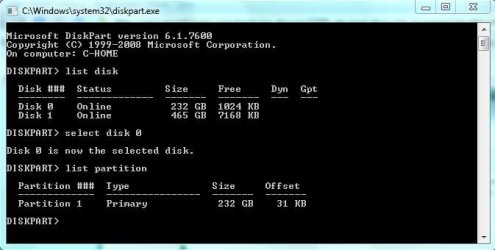
Jonathan King: I did the diskpart thing and the drive does show up. After typing the "list partition" this is what I see:
http://www.sevenforums.com/attachment.php?attachmentid=33498&stc=1&d=1256711983
diskpart.JPG

I'm not sure what to do after that. I actually see the IDE drive in disk drive (right-click Computer > properties > Device Manager > Disk Drives.)

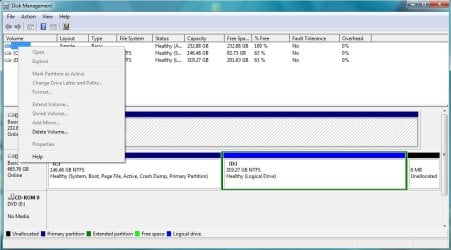
I've also attached two pictures of disk management window (where I described, earlier, about seeing the drive but unable to assign a drive letter, or do anything, to the drive).

diskmgmt.JPG

diskmgmt2.jpg


(Disk 0 is the IDE one).

I'm at a lost of what to do now :P
 

My Computer

OS
Windows 7 Pro 64-bit
CPU
Intel Core 2 Duo E7300
Motherboard
Gigabyte GA-EP45-DS3L
Memory
Corsair TWINX 4096MB (2 x 2GB)
Graphics Card(s)
Asus (ATI) Radeon 4670 HD
Hard Drives
Seagate 500GB SATA
WD 250GB IDE
Case
Antec Sonata II
try right clicking on the volume, not the drive. Just an idea.
 

My Computer

Computer Manufacturer/Model Number
Custom
OS
Windows 7 Professional x64
CPU
Intel i7 2600K OC'd @ 4620 MHz
Motherboard
Asus P8Z68-V Pro
Memory
16GB GSkill Sniper 2133 Mhz (4x4GB)
Graphics Card(s)
EVGA GeForce GTX 480 SuperClocked+
Sound Card
Realtek High Definition Audio
Monitor(s) Displays
2x Acer S273HLbmii 27"
Screen Resolution
2 x 1920x1080
Hard Drives
64GB Crucial M4 SSD

Storage: Hitachi 1TB 5400RPM, Samsung 1.5TB 5400RPM
PSU
Corsair HW Series 750w (modular)
Case
Cooler Master HAF 932 Advanced Blue Edition
Cooling
CM Hyper 212+ CPU cooler, 3x 230mm + 1x 140mm case fans
Keyboard
Logitech MK320 (wireless)
Mouse
Logitech MK320 (wireless)
Internet Speed
30 Mb/s : 2 Mb/s
Firstly try this, and do the below if this doesnt work or check in any case -
right clicked the drive, go to properties, go to security then change the owner to you.

2nd hard drive issue, how do u take ownership???

Go into your bios and see what you have enabled under sata configuration - choices are IDE , Raid or AHCI. If you have AHCI enabled or Raid even (but less likely though - if this is enabled AHCI is also enabled, and you have the option to use a Raid configuration if you ever decide to you want to set it up) W7 will load the driver for it during installation, but for it to function correctly you need to download the Intel Matrix Storage Manager from the intel site.

You will find it at the intel site - http://downloadcenter.intel.com/default.aspx
Select chipsets - chipset software - intel(R) matrix storage manager - Select Operating System - select W7RC1 (64bit OR 32 bit) - select drivers - select intel(R) matrix storage manager 8.9.0.1023 - download and install.
(make sure you don't download the floppy configuration utility by mistake) - it will show up if you select utilities.
 
Last edited:

My Computer

OS
XP, Vista, W7 64bit Home Premium
CPU
Intel Core Duo 6850 3.0 ghz @ 3.7 ghz
Motherboard
Asus P5E
Memory
4GB Corsair DDR 2 PC-6400
Graphics Card(s)
Ati 4870 1ghz
Sound Card
Supreme FX 11
Monitor(s) Displays
View Sonic VX1962wm
Screen Resolution
1680 X1050
Hard Drives
3 Seagate Sata Drives 160gb 250gb 500gb
PSU
Thermaltake 600 watt
Case
NZXT Alpha
Cooling
3X120cm Fans
Keyboard
Microsoft Digital Media Pro Keyboard
Mouse
Microsoft Wheel Mouse Optical
Internet Speed
1.5Mb to 8Mb/384k
Firstly try this, and do the below if this doesnt work or check in any case -
right clicked the drive, go to properties, go to security then change the owner to you.

2nd hard drive issue, how do u take ownership???

Sorry, where am I right-clicking (I know you said drive...but in Disk Management? Disk Drive section? Because I can't "see" the drive in Computer.)

I went to the site and looks like the intel matrix storage manager supports SATA...but doesn't mention anything about IDE. Does it support IDE? (I haven't checked my bios yet because I'm away from the computer at the moment but thought I might ask about the driver you're asking me to download).
 

My Computer

OS
Windows 7 Pro 64-bit
CPU
Intel Core 2 Duo E7300
Motherboard
Gigabyte GA-EP45-DS3L
Memory
Corsair TWINX 4096MB (2 x 2GB)
Graphics Card(s)
Asus (ATI) Radeon 4670 HD
Hard Drives
Seagate 500GB SATA
WD 250GB IDE
Case
Antec Sonata II
If its enabled in the bios yes you should install it - as the driver will aready be installed by W7 during installation - the matrix software updates that driver if there is a later version, and adds the extra functionality.

The same here I couldnt find anything there about IDE support, but you would think it would support the other drive - on the other hand the only other choice is to set the bios to IDE, ie if it isnt that already, however, you will have to reinstall W7 - you might find a fix on the internet but by the time you have found it you might of reinstalled the OS 3 times - because W7 wont boot up if you change it from AHCI to IDE. This would be a last resort and I cannot guarantee it would work.
 
Last edited:

My Computer

OS
XP, Vista, W7 64bit Home Premium
CPU
Intel Core Duo 6850 3.0 ghz @ 3.7 ghz
Motherboard
Asus P5E
Memory
4GB Corsair DDR 2 PC-6400
Graphics Card(s)
Ati 4870 1ghz
Sound Card
Supreme FX 11
Monitor(s) Displays
View Sonic VX1962wm
Screen Resolution
1680 X1050
Hard Drives
3 Seagate Sata Drives 160gb 250gb 500gb
PSU
Thermaltake 600 watt
Case
NZXT Alpha
Cooling
3X120cm Fans
Keyboard
Microsoft Digital Media Pro Keyboard
Mouse
Microsoft Wheel Mouse Optical
Internet Speed
1.5Mb to 8Mb/384k
Jonathan King: I tried that and it gave me the same options.

whest: In BIOS, I can only find (to my knowledge) SATA AHCI. I found the IDE HD though, but didn't know how to make it "active".

NEWS: I made it work!!!

However, it wasn't through the various means that you both have provided (though I am very grateful for your help!)

I still don't really know how it worked or why it worked but this is what I did:
In the third picture in my previous post, you see that I right-clicked the "blank drive" and no options were available. However, when I right clicked the "Disk 0" (which it was assigned to) and selected "Convert to Dynamic" it suddenly went "online" or it worked. Now, I don't know what dynamic is or what basic is (which is what my SATA drive is currently at).

The problem is fixed but I'd still like to know what these "Dynamic" or "Basic" drives mean. Do you two know?

Again, thanks for all your help!
 

My Computer

OS
Windows 7 Pro 64-bit
CPU
Intel Core 2 Duo E7300
Motherboard
Gigabyte GA-EP45-DS3L
Memory
Corsair TWINX 4096MB (2 x 2GB)
Graphics Card(s)
Asus (ATI) Radeon 4670 HD
Hard Drives
Seagate 500GB SATA
WD 250GB IDE
Case
Antec Sonata II
:D Yes open help in disk management it will give you the details, and how to change back to basic, as that is what it should be set as - you will understand when you find it in help.
Disk management - help -contents - change a basic disk to a dynamic disk - read thoroughly.
I would be careful if you have data on that drive, and also be hesitant to accept that its fixed, and look for another solution - on the other hand hopefully when you change it back to basic you can assign a drive letter to it.
Read this link also http://technet.microsoft.com/en-us/library/cc757696(WS.10).aspx
 

My Computer

OS
XP, Vista, W7 64bit Home Premium
CPU
Intel Core Duo 6850 3.0 ghz @ 3.7 ghz
Motherboard
Asus P5E
Memory
4GB Corsair DDR 2 PC-6400
Graphics Card(s)
Ati 4870 1ghz
Sound Card
Supreme FX 11
Monitor(s) Displays
View Sonic VX1962wm
Screen Resolution
1680 X1050
Hard Drives
3 Seagate Sata Drives 160gb 250gb 500gb
PSU
Thermaltake 600 watt
Case
NZXT Alpha
Cooling
3X120cm Fans
Keyboard
Microsoft Digital Media Pro Keyboard
Mouse
Microsoft Wheel Mouse Optical
Internet Speed
1.5Mb to 8Mb/384k
Whest: So, I read up on Dynamic and Basic and...I'm still a bit confused at the difference (I mean, I read the differences, but the terminologies are above my head). I don't know their specific uses or "pros"/"cons" of using either. If I'm using a disk as Dynamic for pure file storage, is that bad? Will it randomly "corrupt" or "break"? I kind of don't want to go through the hassle of backing up, deleting and then re-assigning volumes or what not. If it's a must, I guess I'll do it!

Also, there is now a drive letter (ever since I converted it to Dynamic). It is now F:.
 

My Computer

OS
Windows 7 Pro 64-bit
CPU
Intel Core 2 Duo E7300
Motherboard
Gigabyte GA-EP45-DS3L
Memory
Corsair TWINX 4096MB (2 x 2GB)
Graphics Card(s)
Asus (ATI) Radeon 4670 HD
Hard Drives
Seagate 500GB SATA
WD 250GB IDE
Case
Antec Sonata II
Please convert it to basic,and see whether it works - the drive letter remains, and you can still access it , that way you have no problems - i know your worries - but im still learning from my experiences, and thats how Ive survived by trying things - for one you should check your bios to see what it says under sata configuration, and i'll try to find out whether the matrix driver supports IDE - you might of stumbled on a great solution but be careful.
 

My Computer

OS
XP, Vista, W7 64bit Home Premium
CPU
Intel Core Duo 6850 3.0 ghz @ 3.7 ghz
Motherboard
Asus P5E
Memory
4GB Corsair DDR 2 PC-6400
Graphics Card(s)
Ati 4870 1ghz
Sound Card
Supreme FX 11
Monitor(s) Displays
View Sonic VX1962wm
Screen Resolution
1680 X1050
Hard Drives
3 Seagate Sata Drives 160gb 250gb 500gb
PSU
Thermaltake 600 watt
Case
NZXT Alpha
Cooling
3X120cm Fans
Keyboard
Microsoft Digital Media Pro Keyboard
Mouse
Microsoft Wheel Mouse Optical
Internet Speed
1.5Mb to 8Mb/384k
EDIT* didn't read last page and realized the problem was fixed when I posted this.
 

My Computer

Computer Manufacturer/Model Number
Custom Built
OS
Windows 7 Ultimate x64
CPU
AMD Phenom II X4 965 Black Edition ~3.4Ghz
Motherboard
ASUS M4A79XTD-EVO
Memory
8GB (4x2GB) Mushkin DDR3-1600 7-7-7-20 @ 1.85V
Graphics Card(s)
HIS Radeon 4890 Turbo+ OC Edition 1GB GDDR5 965/1050
Sound Card
Creative X-Fi Titanium Fatal1ty Pro PCI-E
Monitor(s) Displays
ASUS VK246 24"
Screen Resolution
1920x1080 ~75hz
Hard Drives
WD Raptor 150GB 10K - OS /Programs Drive
2xWD Black 1TB RAID 0 - Storage / Games Drive
PSU
Corsair CMPSU-750TX 750W / 12V+ @60AMP
Case
Coolermaster SGC-2000 Storm Scout
Cooling
Zalman CNPS9900 + Paper-thin layer Zalman compound
Keyboard
Saitek Cyborg
Mouse
Logitech G5
Internet Speed
Cable 20M/5M
Other Info
WEI:
CPU: 7.4
RAM: 7.7
VID1: 7.7
VID2: 7.7
HDD: 7.0
EDIT* didn't read last page and realized the problem was fixed when I posted this.

It sort of is fixed...but not really. It's currently in Dynamic drive and not Basic drive. Still not sure if it's good or bad but I guess better to be safe with Basic!
 

My Computer

OS
Windows 7 Pro 64-bit
CPU
Intel Core 2 Duo E7300
Motherboard
Gigabyte GA-EP45-DS3L
Memory
Corsair TWINX 4096MB (2 x 2GB)
Graphics Card(s)
Asus (ATI) Radeon 4670 HD
Hard Drives
Seagate 500GB SATA
WD 250GB IDE
Case
Antec Sonata II
Put it back to basic - as that will cause you less problems, and if you check your other drive it will be basic also, you can easily return to dynamic.
Check in the disk column furthest to the left it will be basic (where it says online etc.)
 

My Computer

OS
XP, Vista, W7 64bit Home Premium
CPU
Intel Core Duo 6850 3.0 ghz @ 3.7 ghz
Motherboard
Asus P5E
Memory
4GB Corsair DDR 2 PC-6400
Graphics Card(s)
Ati 4870 1ghz
Sound Card
Supreme FX 11
Monitor(s) Displays
View Sonic VX1962wm
Screen Resolution
1680 X1050
Hard Drives
3 Seagate Sata Drives 160gb 250gb 500gb
PSU
Thermaltake 600 watt
Case
NZXT Alpha
Cooling
3X120cm Fans
Keyboard
Microsoft Digital Media Pro Keyboard
Mouse
Microsoft Wheel Mouse Optical
Internet Speed
1.5Mb to 8Mb/384k
Does The Intel Matrix Storage Manager support both Sata and Pata drives -
I found the link on intel site, as I thought the intel storage manager supports both pata and sata drives - below is a link to the page - you will find it under General Information plus all other valuable info on the matrix manager.

Desktop Boards - Troubleshooting Serial ATA / RAID issues
 

My Computer

OS
XP, Vista, W7 64bit Home Premium
CPU
Intel Core Duo 6850 3.0 ghz @ 3.7 ghz
Motherboard
Asus P5E
Memory
4GB Corsair DDR 2 PC-6400
Graphics Card(s)
Ati 4870 1ghz
Sound Card
Supreme FX 11
Monitor(s) Displays
View Sonic VX1962wm
Screen Resolution
1680 X1050
Hard Drives
3 Seagate Sata Drives 160gb 250gb 500gb
PSU
Thermaltake 600 watt
Case
NZXT Alpha
Cooling
3X120cm Fans
Keyboard
Microsoft Digital Media Pro Keyboard
Mouse
Microsoft Wheel Mouse Optical
Internet Speed
1.5Mb to 8Mb/384k
Before I get into the problem, here's my HD configuration:

1 x 500GB SATA HD (2 partitions) -- Master Drive -- Windows 7 Pro 64-bit installed in one of the partitions (150GB partition)
1 x 250GB IDE HD (no partitions) -- Slave Drive -- just for file dump.

Here's my problem:

I installed Windows 7 Pro 64-bit on one of the partitions of the SATA HD. It works great and recognizes both partitions of this drive. However, I cannot "see" my IDE HD. I went through to disk management and I can see the drive there with no drive letter. I tried to assign it a drive letter via right clicking, but all options were grayed out (meaning, not clickable). I read other posts but they either have the same solution (assigning drive letter) or the problem is slightly different from mine. I've had this HD configuration before and had Windows XP Pro 64-bit on it too.

Anyways, I'm not sure what to do and I don't want to delete the files on that HD. Anyone have a solution to this problem? Thanks!

I'm sad to say by the looks of your screenshot from Disk Manager it looks like your 250GB HDD - Disk 0 is not formatted... it doesnt say NTFS or FAT32 on the image representing the HDD! But it could be an issue with Win7 and mixing PATA with SATA.

Do you have a 2nd PC you could throw the 250GB HDD in to test? That's an easy way to know if its formatted and working! Or get one of these or similar... Newegg.com - SABRENT USB-DSC5 Serial ATA (SATA) or IDE 2.5" and 3.5" to USB 2.0 Cable Converter Adapter - Adapters & Gender Changers

I swear by mine but Im a fix and repair guy and use it often!
 

My Computer

Computer Manufacturer/Model Number
Homebrew PC - "Alpha_Dawg"
OS
Windows 7 Ultimate 64 bit Steve Ballmer Signature Edition
CPU
Intel Core 2 Quad - Q9550 - 2.83GHz stock - OC'd to 3.6GHz
Motherboard
Gigabyte EP45-UD3P
Memory
4GB DDR2 800MHz (PC6400) OCZ Reaper
Graphics Card(s)
Nvidia GE Force 8800 GTS
Sound Card
Asus Xonar DX
Monitor(s) Displays
Samsung SyncMaster 2333HD
Screen Resolution
1920 x 1080
Hard Drives
WD Caviar Black 750GB - 7200RPM - 32MB cache
WD Caviar Green 1.5TB - 5400RPM - 64MB cache
WD Caviar Green 2.0TB - 5400RPM - 64MB cache
PSU
PC Power & Cooling Silencer 750
Case
Gigabyte 3D Aurora
Cooling
Case is Air - 5ea. 120mm fans (mix of Arctic and Xigmatec)
Keyboard
MS Natural Wireless KB
Mouse
MS Wireless Mouse
Internet Speed
50 mbps down/5 mbps up
Other Info
AVerMedia - AVerTVHD G2 Dual Tuner Card
Its ok I only left that comment & link, as we were interested in whether the intel matrix storage manager supported pata drives. He solved his issues just by clicking the column with online/offline in disk management eventually, but he shouldnt of needed to do this. He is happy, so we will just have to leave it as that for the time being. :D
 

My Computer

OS
XP, Vista, W7 64bit Home Premium
CPU
Intel Core Duo 6850 3.0 ghz @ 3.7 ghz
Motherboard
Asus P5E
Memory
4GB Corsair DDR 2 PC-6400
Graphics Card(s)
Ati 4870 1ghz
Sound Card
Supreme FX 11
Monitor(s) Displays
View Sonic VX1962wm
Screen Resolution
1680 X1050
Hard Drives
3 Seagate Sata Drives 160gb 250gb 500gb
PSU
Thermaltake 600 watt
Case
NZXT Alpha
Cooling
3X120cm Fans
Keyboard
Microsoft Digital Media Pro Keyboard
Mouse
Microsoft Wheel Mouse Optical
Internet Speed
1.5Mb to 8Mb/384k
Back
Top