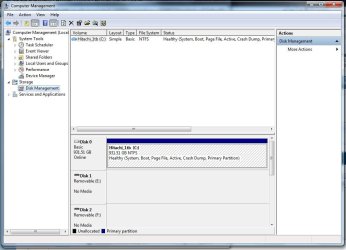
IDE HD removed, Win7 won't boot.

Sip

New member
Local time
7:30 AM
Messages
7
So, I've installed Win7 32bit on my original HD, which is a Westgate 500GB (sata). I wanted to transfer some old files from my old HD which is IDE connected. After connecting the old HD, I can't boot back in Win7 with the IDE HD removed. I get an error, asking for my boot disk. It seems to only boot correctly with both HD installed. Any way I can fix this so it will only boot with my sata hd?
 

My Computer

OS
Windows 7 32bit
CPU
AMD Phenom II X4 940 Black Edition 3.0GHz
Motherboard
GIGABYTE GA-MA790GP
Memory
G-skillz 4GB
Graphics Card(s)
EVGA GeForce 9600 GT
Monitor(s) Displays
Apple Cinema
Screen Resolution
1680 x 1050
Hard Drives
Western Digital 500GB
PSU
Rosewill 600W
Case
Antec Solo Silver Steel ATX Mid Tower
Keyboard
HP Wireless Elite Keyboard
Mouse
Magic Mouse
hello and welcome
go to your BIOS and check the first boot. set the first boot contain win7 system HDD.
then F10 to save and quit. that's should be work.
 

My Computer

Computer Manufacturer/Model Number
built up
OS
windows 7
CPU
Phenom II AMD Dragon 3.5Ghz
Memory
DDR3 4GB
Graphics Card(s)
ATI Radeon 512Mb
Monitor(s) Displays
HP L1506
Screen Resolution
1152 x 864
Hard Drives
WDC 1 TB SATA-II Green Power
Keyboard
HP wireless keyboard
Mouse
HP Optic
Internet Speed
1GB
hello and welcome
go to your BIOS and check the first boot. set the first boot contain win7 system HDD.
then F10 to save and quit. that's should be work.


Yes, I've tried that. It doesn't give me the option to choose a certain drive, only "HD-DISK". When the IDE HD is removed, it will not boot and request for a boot disk. I have no idea why it will not boot the sata drive, but it is detected. Thanks for the reply.
 

My Computer

OS
Windows 7 32bit
CPU
AMD Phenom II X4 940 Black Edition 3.0GHz
Motherboard
GIGABYTE GA-MA790GP
Memory
G-skillz 4GB
Graphics Card(s)
EVGA GeForce 9600 GT
Monitor(s) Displays
Apple Cinema
Screen Resolution
1680 x 1050
Hard Drives
Western Digital 500GB
PSU
Rosewill 600W
Case
Antec Solo Silver Steel ATX Mid Tower
Keyboard
HP Wireless Elite Keyboard
Mouse
Magic Mouse
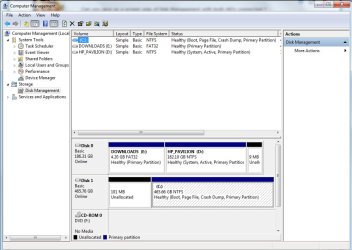
Can you give us a screen snip of Disk Management with both HD's connected ?

Start :ar: Computer Management :ar: Disk Management
 

Attachments

  • Disk_Management.JPG
    Disk_Management.JPG
    76.1 KB · Views: 29

My Computer

Computer type
PC/Desktop
Computer Manufacturer/Model Number
Built them myself, Science Experiments !
OS
Win7 Enterprise, Win7 x86 (Ult 7600), Win7 x64 Ult 7600, TechNet RTM on AMD x64 (2.8Ghz)
CPU
AMD fx8350 4ghz, AMD-32 2400mhz, AMD-64 3200mhz, AMDx64 2.8G
Motherboard
SIS 755, ECS-K8M890M-M (Ult 7600), GigaByte & others
Memory
2gb, 4gb on the Ult 7600, 4gb on Technet RTM, 32gb on FX8350
Graphics Card(s)
Draw my own Graphics, several nVidia cards
Sound Card
on motherboard
Monitor(s) Displays
19" flat scr, 28" I-Inc widescr,22" Emprex Widescr, 23" Acer
Screen Resolution
1280 x 1024, 1440 x 900, 1920 x 1080
Hard Drives
6 pata Ide HD's & 2 Sata HD's
added 80gb external on Ult 7600 computer,
numerous extra 1tb, 2TB, 3Tb SATA HD's
A collection of ext HD Docks w/ HDs
PSU
430w, 550w, 600w, 700, 800, etc
Case
All Generic Full Towers
Cooling
Open Air & a few fans, some w/ colored LEDs
Keyboard
Compaq & Dell recycled from GoodWill
Mouse
Made in China Optical Wired Mouse
Internet Speed
Fast Cable InterNet
Antivirus
AVG Free on 24 different Desktops, NO Problems!
Browser
IE 8 is preferred, but use FireFox sometimes
Other Info
Linksys Routers, switches, & Hubs
Too Many USB Flash Drives to count, Biggest is 64GB !
Eight computers in my home network.
Sixteen computers at my business network.
Linked via TeamViewer !
Lots of old used spare computer parts everywhere!
Here it is,
 

Attachments

  • ccccc.jpg
    ccccc.jpg
    81.8 KB · Views: 84

My Computer

OS
Windows 7 32bit
CPU
AMD Phenom II X4 940 Black Edition 3.0GHz
Motherboard
GIGABYTE GA-MA790GP
Memory
G-skillz 4GB
Graphics Card(s)
EVGA GeForce 9600 GT
Monitor(s) Displays
Apple Cinema
Screen Resolution
1680 x 1050
Hard Drives
Western Digital 500GB
PSU
Rosewill 600W
Case
Antec Solo Silver Steel ATX Mid Tower
Keyboard
HP Wireless Elite Keyboard
Mouse
Magic Mouse
From the screenshot, I can guess that when you installed the new 500GB hard disk and then installed Windows 7, the original IDE hard disk was still installed, right?

The reason why you can't boot when it is removed, is because the Windows Installer, even though you selected a different hard disk to install to, placed the required boot code onto what was perceived as the system boot disk:

D: is marked as "System, Active". This meanss it's the boot drive.

All I can do to try to help is to ask you to again remove the IDE hard disk, then boot from the Windows 7 DVD and use the Repair options. This might find and resolve the problem for you.
 

My Computer

Computer type
PC/Desktop
Computer Manufacturer/Model Number
Virtual Machine
OS
Windows 7 Professional 32-bit SP1
CPU
AMD A4/A6
Motherboard
Intel Corporation 440BX Desktop Reference Platform
Memory
3.00GB EDO
Graphics Card(s)
VMware SVGA 3D
Sound Card
High Definition Audio Device
Monitor(s) Displays
Generic Non-PnP Monitor on VMware SVGA 3D
Screen Resolution
1440x900
Hard Drives
1 x 60GB VMware Virtual SATA Hard Drive ATA Device
Antivirus
Kaspersky Total Security
No, I built this PC 2yrs ago with the sata disk. Just recently, I decided to pull some old files from the IDE disk. Though, I have booted once with the IDE disk which had Vista installed.
 

My Computer

OS
Windows 7 32bit
CPU
AMD Phenom II X4 940 Black Edition 3.0GHz
Motherboard
GIGABYTE GA-MA790GP
Memory
G-skillz 4GB
Graphics Card(s)
EVGA GeForce 9600 GT
Monitor(s) Displays
Apple Cinema
Screen Resolution
1680 x 1050
Hard Drives
Western Digital 500GB
PSU
Rosewill 600W
Case
Antec Solo Silver Steel ATX Mid Tower
Keyboard
HP Wireless Elite Keyboard
Mouse
Magic Mouse
It looks like the 100mb System Reserved partition which boots Win7 was somehow deleted and is now unallocated space.

Regardless of reason, you must now recover System Active MBR to the Win7 HD for it to boot independently without the Vista HD.

To do this unplug the Vista HD, boot from the Win7 DVD Repair console or Repair CD, mark Win7 partition Active: http://www.sevenforums.com/tutorials/71432-partition-mark-active.html

Next boot back into DVD Repair console or Repair CD, click through to Recovery Tools to run Startup Repair up to 3 separate times with reboots until Win7 starts on its own.

You can also recover the 100 mb unallocated space into Win7 while marking Win7 active using free Partition Wizard bootable CD before you run the repair.
 
Back
Top