Identify Cursor location

Big Skip33

New member
Local time
3:12 PM
Messages
17
Location
Oregon
Hi,
This is my first attempt at the Windows 7 Forums. I used to be able to locate my cursor by pressing the CTRL key on the key board. It would show me where it is on the desktop. Is this possible in Win 7? Thank you for your help. :D
 

My Computer

Computer Manufacturer/Model Number
HP p6719c
OS
Windows 7 Home Premium Edition 64 bit
CPU
AMD Phenom-2.9GHz
Memory
4.096GB
Graphics Card(s)
ATI Radeon HD-1.9GB
Sound Card
RealTek High Defination Audio
Monitor(s) Displays
HP 24" LCD
Screen Resolution
1920 X 1200
Hard Drives
918GB
Case
Desktop Tower
Cooling
Forced air
Keyboard
USB
Mouse
USB Logitech Trackball
Internet Speed
25.53Mbps
  • Locate your cursor on screen (circle animation)

    In addition to being able to use larger cursors in Windows 7, you can also enable an accessibility option that lets you find easily where your mouse pointer is on the screen.
    • Open the start menu, and type "cursor easier to see"
    • Click on the "Make it easier to see the mouse pointer" link:
    When Windows 7 opens the Mouse Properties dialog, make sure that the "Pointer Options" tab is selected, and look at the last checkbox shown on that tab:
  • Check the "Show location of pointer when I press the CTRL key" checkbox, and click the Apply button to test the feature.
  • Now press and release the Control key on your keyboard ("Ctrl") - Windows 7 will display an animation of a circle centering in onto the current position of your mouse pointer (cursor).
  • If you like this option, click OK to close the Mouse Properties dialog.
  • Otherwise, uncheck the "Show location of pointer when I press the CTRL key" checkbox and click OK to disable that setting and return to Windows.
Got this from the interwebs @:
http://freewindowsvistatutorials.co...asierToSeeInWindows7.php#locateCursorOnScreen
 

My Computer

OS
XP Professional, 7 Professional
Hi,
This is my first attempt at the Windows 7 Forums. I used to be able to locate my cursor by pressing the CTRL key on the key board. It would show me where it is on the desktop. Is this possible in Win 7? Thank you for your help. :D


Start > Control Panel > at View by , change to either Large or Small Icons > select Mouse > Pointer Options tab > under Visibility, checkmark at " Show location of pointer when I press CTRL key " > click OK when done.
 

My Computer

Computer Manufacturer/Model Number
Acer Aspire 7741Z
OS
Windows 7 Home Premium 64-bit, SP1
CPU
Intel Pentium P6200, Cores 2, 2.13 GHz
Memory
4 GB
Graphics Card(s)
Intel HD
Sound Card
unknown
Monitor(s) Displays
17.3 inches
Screen Resolution
1600 x 900
Hard Drives
640 GB, 5400 PRM
On laptops if mouse-pad is disabled (you are using an external mouse) ...
-OR-
Your PC is customized to "Classic View"
... neither of the previous suggestions work ... because some controls are disabled

MY SOLUTION:
- successful on my Toshiba Laptop -- Win-7 32-bit Home Premium (external mouse and keyboard)
Start > Control Panel > Mouse
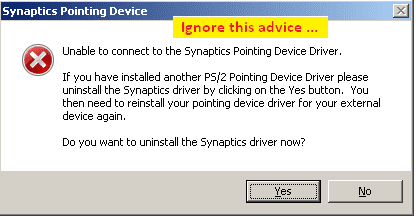
- if touch pad is disabled an alert will appear which can be ignored
- DO NOT uninstall "Synaptics" driver as suggested by the alert

bad_advice.png

Click the [NO] button
- Mouse Properties (dialog) opens ... just what we wanted, before the interruption.
Mouse Properties (dialog) > Pointer Options (tab) > Visability (panel)
[x] Show location of pointer when I press the CTRL key
[Apply] > [OK] ... buttons
- feature is available immediately, no need to reboot
.
 

My Computer

Computer type
PC/Desktop
Computer Manufacturer/Model Number
Toshiba, Lenovo (laptops) + 4 rigs
OS
XP Pro (x86) | 7 HP (x86) & (x64) | 7 Pro (x64)
Back
Top