Solved Identify this Auto-Play entry please.

ViperMWC

New member
Member
Local time
5:57 PM
Messages
54
Hello all,
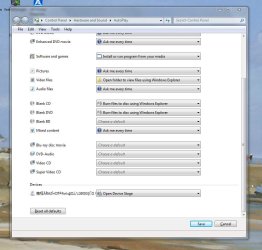
Wrestling with a DVD burner issue here, while trying to sort that I checked my Auto-Play settings, discovered something I need some help with. On the attached picture, anyone know what that item at the bottom is ?

Mick C,
 

Attachments

  • Capture.JPG
    Capture.JPG
    103.4 KB · Views: 20

My Computer

Computer type
PC/Desktop
Computer Manufacturer/Model Number
Arbico i7 PC
OS
Windows 7 Home Premium 64 bit - SP1
CPU
Intel Core i7 920 (2.66GHz 8MB L2 Cache)
Motherboard
Asus P6X58D-E
Memory
6Gb (3 x Kingston 2Gb PC12800 DDR3 1600MHZ)
Graphics Card(s)
ATI Radeon HD 5850 1Gb
Sound Card
AMD HIgh Def HDMI
Monitor(s) Displays
LG 24EB23 Digital
Screen Resolution
1920x1080 (32bit) (60Hz)
Hard Drives
Samsung HD103SJ
Samsung HD5021J
Samsung HD204UI
Samsung M3 External USB 3
PSU
Nexus RX-8500 850w
Case
NZXT Hush Black ATA
Cooling
3 x Xilence Red Wing 120mm Case Fans
Keyboard
Microsoft Wireless Keyboard 6000 v3.0
Mouse
Microsoft Wireless Laser Mouse 6000 v 2.0
Internet Speed
60.0 Mbps Average
Antivirus
Spybot Search & Destroy
Browser
Avant Browser
Do you have a camera, MP3 player or any similar device plugged into your computer?
If so, that might be the cause...
 

My Computer

Computer type
PC/Desktop
Computer Manufacturer/Model Number
Custom Build
OS
Windows 7 Ultimate 64-bit
CPU
Intel Core i7
Motherboard
ASUS
Memory
32GB RAM
Monitor(s) Displays
2
Hard Drives
1TB HDD
160GB SSD
2TB HDD
Cooling
3 Fans, water cooling
Keyboard
Microsoft
Mouse
Microsoft
Internet Speed
Around 70mbps
Antivirus
AVG Internet Security 2014
Browser
IE11, Google Chrome (default browser is Chrome)
Do you have a camera, MP3 player or any similar device plugged into your computer?
If so, that might be the cause...

Yes techhead, got it. My Nikon Coolpic S2 gets connected now and then.
Would have been obvious if that is what it said there, instead of a line of gibberish characters !!

Any ideas how to either get rid of it, or at least have the characters readable ?
 

My Computer

Computer type
PC/Desktop
Computer Manufacturer/Model Number
Arbico i7 PC
OS
Windows 7 Home Premium 64 bit - SP1
CPU
Intel Core i7 920 (2.66GHz 8MB L2 Cache)
Motherboard
Asus P6X58D-E
Memory
6Gb (3 x Kingston 2Gb PC12800 DDR3 1600MHZ)
Graphics Card(s)
ATI Radeon HD 5850 1Gb
Sound Card
AMD HIgh Def HDMI
Monitor(s) Displays
LG 24EB23 Digital
Screen Resolution
1920x1080 (32bit) (60Hz)
Hard Drives
Samsung HD103SJ
Samsung HD5021J
Samsung HD204UI
Samsung M3 External USB 3
PSU
Nexus RX-8500 850w
Case
NZXT Hush Black ATA
Cooling
3 x Xilence Red Wing 120mm Case Fans
Keyboard
Microsoft Wireless Keyboard 6000 v3.0
Mouse
Microsoft Wireless Laser Mouse 6000 v 2.0
Internet Speed
60.0 Mbps Average
Antivirus
Spybot Search & Destroy
Browser
Avant Browser
I'm not sure if the characters are readable, does it appear when the camera is disconnected?
 

My Computer

Computer type
PC/Desktop
Computer Manufacturer/Model Number
Custom Build
OS
Windows 7 Ultimate 64-bit
CPU
Intel Core i7
Motherboard
ASUS
Memory
32GB RAM
Monitor(s) Displays
2
Hard Drives
1TB HDD
160GB SSD
2TB HDD
Cooling
3 Fans, water cooling
Keyboard
Microsoft
Mouse
Microsoft
Internet Speed
Around 70mbps
Antivirus
AVG Internet Security 2014
Browser
IE11, Google Chrome (default browser is Chrome)
I'm not sure if the characters are readable, does it appear when the camera is disconnected?

Hi again techhead, yes the entry is there permanently...
I only attatch camera now and then to transfer pictures.
I'ts no serious thing, just annoying and I don't like stuff that's annoying lol
The strange thing is the symbol at the front looks like a mobile phone, while the one on the "Open Device Stage" looks like a printer !!
If you have any other thoughts let me know.
I might have to remove some software or plow through the registry to have a look for any Nikon bits.
Thanks for thinking on this for me.
Mick C.
 

My Computer

Computer type
PC/Desktop
Computer Manufacturer/Model Number
Arbico i7 PC
OS
Windows 7 Home Premium 64 bit - SP1
CPU
Intel Core i7 920 (2.66GHz 8MB L2 Cache)
Motherboard
Asus P6X58D-E
Memory
6Gb (3 x Kingston 2Gb PC12800 DDR3 1600MHZ)
Graphics Card(s)
ATI Radeon HD 5850 1Gb
Sound Card
AMD HIgh Def HDMI
Monitor(s) Displays
LG 24EB23 Digital
Screen Resolution
1920x1080 (32bit) (60Hz)
Hard Drives
Samsung HD103SJ
Samsung HD5021J
Samsung HD204UI
Samsung M3 External USB 3
PSU
Nexus RX-8500 850w
Case
NZXT Hush Black ATA
Cooling
3 x Xilence Red Wing 120mm Case Fans
Keyboard
Microsoft Wireless Keyboard 6000 v3.0
Mouse
Microsoft Wireless Laser Mouse 6000 v 2.0
Internet Speed
60.0 Mbps Average
Antivirus
Spybot Search & Destroy
Browser
Avant Browser
Hi,

Try this. Pull out - safely remove - all your devices (except KB/Mouse) and do a drive clean up http://www.sevenforums.com/hardware...-recognised-not-drive-letter.html#post2477076 (Run as Administrator.)

This will remove all non-present devices including WPDs ( Windows Portable Devices)

Reboot and check whether that entry is gone.

When you plug-in your USB devices the necessary drivers will be installed afresh.. After you connect your camera check what entry comes in Auto Play. That way you can relate it.

Removing non-present devices periodically is a good practice especially when you keep plugging in and plugging out umpteen USB devices.
 

My Computer

OS
Windows 7 Home Premium 32 bit
Hi,

Try this. Pull out - safely remove - all your devices (except KB/Mouse) and do a drive clean up http://www.sevenforums.com/hardware...-recognised-not-drive-letter.html#post2477076 (Run as Administrator.)

This will remove all non-present devices including WPDs ( Windows Portable Devices)

Reboot and check whether that entry is gone.

When you plug-in your USB devices the necessary drivers will be installed afresh.. After you connect your camera check what entry comes in Auto Play. That way you can relate it.

Removing non-present devices periodically is a good practice especially when you keep plugging in and plugging out umpteen USB devices.

Hello jumanji,
Thanks for looking in on this.
Ran the drive clean up, removed quite a lot of rubbish for sure.
The entry was still lurking after a re-boot. Head scratching time.
The drive clean up got me thinking, so I read up a little on USB bits n bobs.
The problem was not having something to search for as the label was gibberish.
A phrase popped off the page as I was reading an article, "Autoplay Handlers" !!
Ahhh ha, something to look into.
There it was..... [See attatched image]
As you can see from the label, its a mix of Japanese and rubbish !!
A quick delete of that lot sorted out the niggling problem :)

Thanks to you and techhead for your insights and help, was an education to be sure !!
I'm almost 100% sorted now, Autoplay/Autorun is behaving itself. the unnamed entry gone.
Just a few test runs and all should be good :)
All the best,
Mick C.
 

Attachments

  • Capture 01.JPG
    Capture 01.JPG
    112.9 KB · Views: 8

My Computer

Computer type
PC/Desktop
Computer Manufacturer/Model Number
Arbico i7 PC
OS
Windows 7 Home Premium 64 bit - SP1
CPU
Intel Core i7 920 (2.66GHz 8MB L2 Cache)
Motherboard
Asus P6X58D-E
Memory
6Gb (3 x Kingston 2Gb PC12800 DDR3 1600MHZ)
Graphics Card(s)
ATI Radeon HD 5850 1Gb
Sound Card
AMD HIgh Def HDMI
Monitor(s) Displays
LG 24EB23 Digital
Screen Resolution
1920x1080 (32bit) (60Hz)
Hard Drives
Samsung HD103SJ
Samsung HD5021J
Samsung HD204UI
Samsung M3 External USB 3
PSU
Nexus RX-8500 850w
Case
NZXT Hush Black ATA
Cooling
3 x Xilence Red Wing 120mm Case Fans
Keyboard
Microsoft Wireless Keyboard 6000 v3.0
Mouse
Microsoft Wireless Laser Mouse 6000 v 2.0
Internet Speed
60.0 Mbps Average
Antivirus
Spybot Search & Destroy
Browser
Avant Browser
Last edited:

My Computer

OS
Windows 7 Home Premium 32 bit
Was an interesting adventure jumanji, not as much fun as chilling out and listening to some good CD's lol.
But it all works fine now, so was well worth the effort !!
Hitting the big green button on this one :)
Off now to puzzle out why WMP 12 is previewing ok on some tracks but not others... ho hum !!
All the best,
Mick C.
 

My Computer

Computer type
PC/Desktop
Computer Manufacturer/Model Number
Arbico i7 PC
OS
Windows 7 Home Premium 64 bit - SP1
CPU
Intel Core i7 920 (2.66GHz 8MB L2 Cache)
Motherboard
Asus P6X58D-E
Memory
6Gb (3 x Kingston 2Gb PC12800 DDR3 1600MHZ)
Graphics Card(s)
ATI Radeon HD 5850 1Gb
Sound Card
AMD HIgh Def HDMI
Monitor(s) Displays
LG 24EB23 Digital
Screen Resolution
1920x1080 (32bit) (60Hz)
Hard Drives
Samsung HD103SJ
Samsung HD5021J
Samsung HD204UI
Samsung M3 External USB 3
PSU
Nexus RX-8500 850w
Case
NZXT Hush Black ATA
Cooling
3 x Xilence Red Wing 120mm Case Fans
Keyboard
Microsoft Wireless Keyboard 6000 v3.0
Mouse
Microsoft Wireless Laser Mouse 6000 v 2.0
Internet Speed
60.0 Mbps Average
Antivirus
Spybot Search & Destroy
Browser
Avant Browser
Back
Top