Identifying Call Home Programs

dw85745

New member
Member
VIP
Local time
3:59 PM
Messages
199
I see my modem "Send" lights being activated when I am not sending or using an Internet related program.
(e.g. Firefox or IE).

I have used-- AutoRun, Regedit, and Services to identify -- what I hope -- is most if Not all of the Call Home programs.

However, I would like to take this further and continually monitor my system to see what,if anything, is calling out over a period of time (e.g. month).

Anyone know of a program that is simple to use (WireShark has a major learning curve IMO) where I can let it run in the background, identify any program (not just a PID or port) making a call ,
and then log that information for later perusal?

Thanks
David
 

My Computer

Computer type
PC/Desktop
Computer Manufacturer/Model Number
build -
OS
Win 7 Pro x32
CPU
Intel I5-4690K
Motherboard
ASUS H-97Plus
Memory
8 GB
Graphics Card(s)
On Board
Sound Card
On Board
Other Info
ASUS MOBO Issues never resolved even by ASUS:
1) MOBO will NOT boot from other than the Default HDD drive.
2) MOBO will NOT boot Most DOS based CDs
A firewall log would be my best advice. I tried that once with enabling full logging for Windows Firewall but it didn't log what program made the connection. Then I discovered Windows Firewall Control which provides a new and better interface for the Windows Firewall including notifications and logs. Its main purpose is to switch the default Windows Firewall allow all outbound connections to block, and then help you with notifications/logs to decide what programs allow for creating outbound connections. Notifications are available after a small "donation". Many people think WFC is a firewall but it's not. It uses Windows Firewall but adds a better interface for it.

If you want an instant view over your current connections I think a very easy program to use is TCPView from Microsoft. It can show the remote address instead of an IP, and if you hide unconnected endpoints(toggled with Ctrl+U) only true connections will be shown.

Windows itself, your anti-virus and other programs and services checking for updates and valid subscriptions/licenses etc will create new connections in the background, even when you're not using any Internet applications like a browser.
 

My Computer

Computer type
Laptop
Computer Manufacturer/Model Number
HP Elitebook 8540p
OS
Windows 7 Pro 32
CPU
Intel(R) Core(TM) i5 CPU M 540 @ 2.53GHz
Motherboard
Hewlett-Packard 1521
Memory
4,00 GB (Usable 2,98)
Graphics Card(s)
NVIDIA NVS 5100M
Sound Card
NVIDIA High Definition Audio
Screen Resolution
1600x900
Hard Drives
INTEL SSDSA2CW120G3
Antivirus
F-Secure Internet Security
Browser
IE, Firefox, Opera
Other Info
Sandboxie,
SRP (Software Restriction Policy),
EMET (Enhanced Mitigation Experience Toolkit),
WFC (Windows Firewall Control by BiniSoft),
Malwarebytes Premium
Hi there

Simple -- just BLOCK windows Firewall so that ALL outbound connections are disabled -- then you can enable each piece of software you want to allow to have NET access individually. A popup will often appear -- allow this program through firewall.

then YOU can decide.

Cheers
jimbo
 

My Computer

Computer type
PC/Desktop
Computer Manufacturer/Model Number
Custom built, several laptops HP/ASUS
OS
Linux CENTOS 7 / various Windows OS'es and servers
CPU
Intel i7 Intel i5
Memory
8GB, 16GB
Graphics Card(s)
On Motherboard
Sound Card
Realtek HD audio
Monitor(s) Displays
Apple Cinema display, Samsung LCD
Screen Resolution
1920 X 1080
Hard Drives
4 X 1TB SATA
Mouse
Toshiba wireless laser
Internet Speed
> 20MB up
Simple -- just BLOCK windows Firewall so that ALL outbound connections are disabled -- then you can enable each piece of software you want to allow to have NET access individually. A popup will often appear -- allow this program through firewall.
Windows Firewall doesn't give notifications for outbound connections. Why else would several popular 3rd-party apps offer that functionality...
The setting "Display a notification when Windows Firewall blocks a program" is from XP when Windows Firewall only handled inbound connections.

And to block all outbound and create all rules manually without the help of a program like WFC, can be difficult so I wouldn't recommend that. If you block ALL rules you block the OS too.
 

My Computer

Computer type
Laptop
Computer Manufacturer/Model Number
HP Elitebook 8540p
OS
Windows 7 Pro 32
CPU
Intel(R) Core(TM) i5 CPU M 540 @ 2.53GHz
Motherboard
Hewlett-Packard 1521
Memory
4,00 GB (Usable 2,98)
Graphics Card(s)
NVIDIA NVS 5100M
Sound Card
NVIDIA High Definition Audio
Screen Resolution
1600x900
Hard Drives
INTEL SSDSA2CW120G3
Antivirus
F-Secure Internet Security
Browser
IE, Firefox, Opera
Other Info
Sandboxie,
SRP (Software Restriction Policy),
EMET (Enhanced Mitigation Experience Toolkit),
WFC (Windows Firewall Control by BiniSoft),
Malwarebytes Premium
Thanks for the input all.

doctore re:
Essential Net Tools
Look like someone has just written a wrapper around several of the common internet tools like netstat.
Unless I'm missing something do not believe it will solve my problem

Tookeri:
Windows Firewall Control
Based on the web site looks promising. Sent off an email to them so will see what kind of response I get to my quesitons.

Jimbo45:
Block all outbound traffic
Had initially thought of this but was not sure how to do it in Windows Firewall. Especially set up filters to allow those I've flagged (found calling home) and those I have yet to find. Will do some more checking.

Tookeri: Your post echo my concerns / questions in Jimbo45's post.
 

My Computer

Computer type
PC/Desktop
Computer Manufacturer/Model Number
build -
OS
Win 7 Pro x32
CPU
Intel I5-4690K
Motherboard
ASUS H-97Plus
Memory
8 GB
Graphics Card(s)
On Board
Sound Card
On Board
Other Info
ASUS MOBO Issues never resolved even by ASUS:
1) MOBO will NOT boot from other than the Default HDD drive.
2) MOBO will NOT boot Most DOS based CDs
Not sure if this would help, but the WinPatrol guys have just released a program that I think will do what you want. It is called WinPrivacy:

https://www.winpatrol.com/winprivacy/

Here is an original review while it was in beta development (some of the suggestions are now in the final release):

WinPrivacy review: new program of WinPatrol maker - gHacks Tech News

If this program turns out to be anything like the quality of WinPatrol, I image it will be in most people's arsenal before long. While it is not free, it is cheap and very easy to use. I've been using it since early beta, and like it's capabilities (blocking specific outbound Internet connections, blocking Fingerprinting connects --both Canvas and Non-Canvas types, Flash Cookies, etc.)

Jim
 

My Computer

Computer type
PC/Desktop
OS
Windows 7 Professional
Well, you referenced Wireshark and it being too complicated, so I gave you some simpler tools that would do similar job.

If you just want to find out which programs are establishing connections at any time, the firewall should work. I don't use Windows Firewall, but Kaspersky let's me choose all/any programs to ask when trying to establish a connection - you can set it like that and either log them yourself or sift through the archived messages.
 

My Computer

Computer type
PC/Desktop
OS
Windows 7 Pro
What's connecting?

The problem with using NetStat or any monitoring tools is that it's useless unless it alerts on new connections or else keeps a log.

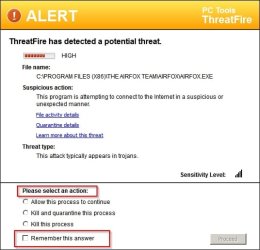
Personally I use Threatfire (no longer available unless you know the direct download link) and it informs anytime a program connects with options to allow or kill and remember your choice.

ALERT.jpg

Problem: If you choose kill - it kills the program. You just want to prevent it from connecting but still allow it to run.

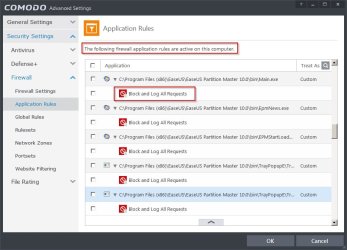
Solution: Let Threatfire alert on new connections and block anything unwanted using your firewall like this example where Easus Partition Master connections are blocked.

COMODO Advanced Settings.jpg

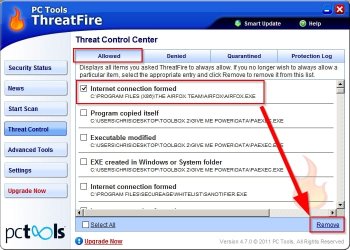
Note: Threatfire keeps a log of actions and rules can be added or removed.

Airfox is allowed to connect:

Remove.jpg

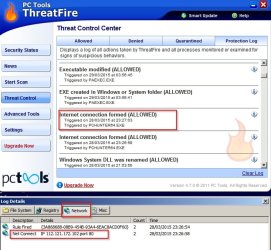
If you click the information button to the right of any entry you get the details. Connections, file modifications, registry entries created.

Log Details.jpg

Note: Comodo CIS has pretty much the same ability to alert on new connections via HIPS but I prefer to disable this and rely on Threatfire instead.

For monitoring active connections I also use a whole bunch of other tools.

If you want to try Threatfire let us know and I'll PM you the download link.
 
Last edited:

My Computer

Computer type
Laptop
Computer Manufacturer/Model Number
ASUS
OS
Microsoft Windows 7 Home Premium 64-bit 7601 Multiprocessor Free Service Pack 1
CPU
AMD C-60 APU with Radeon(tm) HD Graphics
Motherboard
ASUSTeK COMPUTER INC. X501U
Memory
4.00 GB
Graphics Card(s)
AMD Radeon HD 6290 Graphics
Sound Card
(1) AMD High Definition Audio Device (2) Realtek High Defi
Screen Resolution
1366 x 768 x 32 bits (4294967296 colors) @ 60 Hz
Hard Drives
Hitachi HTS545050A7E380 SATA Disk Device
Antivirus
Comodo CIS & FW, SecureAplus App Whitelisting, Threatfire
Browser
Cyberfox 64bit, Opera 64bit, Airfox
Other Info
Spy-The-Spy, HitmanPro.Alert, Norton Connect Safe, MJRegWatcher, BitDefender TrafficLight, Voodoo Shield, Zemana AntiMalware
Thanks guys will check out WinPatrol and Threatfire.

doctore:
If you just want to find out which programs are establishing connections at any time, the firewall should work.
Been delving into Windows Firewall from "WF.msc".
Going to take some research as to what it all means, how easy to configure, and will do what I want.
As usual with M$, they don't seem to follow the KISS method and make things easy.

Always thought a lot of Kaspersky, never used them, but always have great ratings.
 

My Computer

Computer type
PC/Desktop
Computer Manufacturer/Model Number
build -
OS
Win 7 Pro x32
CPU
Intel I5-4690K
Motherboard
ASUS H-97Plus
Memory
8 GB
Graphics Card(s)
On Board
Sound Card
On Board
Other Info
ASUS MOBO Issues never resolved even by ASUS:
1) MOBO will NOT boot from other than the Default HDD drive.
2) MOBO will NOT boot Most DOS based CDs

My Computer

Computer type
Laptop
Computer Manufacturer/Model Number
ASUS
OS
Microsoft Windows 7 Home Premium 64-bit 7601 Multiprocessor Free Service Pack 1
CPU
AMD C-60 APU with Radeon(tm) HD Graphics
Motherboard
ASUSTeK COMPUTER INC. X501U
Memory
4.00 GB
Graphics Card(s)
AMD Radeon HD 6290 Graphics
Sound Card
(1) AMD High Definition Audio Device (2) Realtek High Defi
Screen Resolution
1366 x 768 x 32 bits (4294967296 colors) @ 60 Hz
Hard Drives
Hitachi HTS545050A7E380 SATA Disk Device
Antivirus
Comodo CIS & FW, SecureAplus App Whitelisting, Threatfire
Browser
Cyberfox 64bit, Opera 64bit, Airfox
Other Info
Spy-The-Spy, HitmanPro.Alert, Norton Connect Safe, MJRegWatcher, BitDefender TrafficLight, Voodoo Shield, Zemana AntiMalware
Callender: Thanks, looks promising.
 

My Computer

Computer type
PC/Desktop
Computer Manufacturer/Model Number
build -
OS
Win 7 Pro x32
CPU
Intel I5-4690K
Motherboard
ASUS H-97Plus
Memory
8 GB
Graphics Card(s)
On Board
Sound Card
On Board
Other Info
ASUS MOBO Issues never resolved even by ASUS:
1) MOBO will NOT boot from other than the Default HDD drive.
2) MOBO will NOT boot Most DOS based CDs
Some "keep-alive" traffic is normal. You have ZERO system specs but if you have any Ethernet or wireless printers "connected", those too create a lot traffic even when not in use.
 

My Computer

Computer type
PC/Desktop
Computer Manufacturer/Model Number
Built 2/11/2011
OS
Windows 7 Pro-x64
CPU
i7-2600 3.4GHz - 3.8GHz Turbo
Motherboard
Intel DH67BL-B3
Memory
8Gb - 2x4GB, Muskin 991770 PC3-1333
Graphics Card(s)
Integrated Intel HD 2000
Sound Card
Integrated Intel 10.1 HD, RealTek ALC892
Monitor(s) Displays
Asus LCD VH222H, Haier HL24XSL2a
Screen Resolution
1920x1080, 1920x1080
Hard Drives
Crucial SSD C300-128Gb,
Western Digital WD5002AALX - 500Gb,
Western Digital WD7501AALS - 750Gb
PSU
Seasonic 650W 80+ Gold Modular
Case
Rosewill Defender
Cooling
Stock CPU, Four 120mm case fans, PCH fan added
Keyboard
Logitech EX100 Y-RBH94 Wireless
Mouse
Logitech EX100 M-RCE95 Wireless
Internet Speed
3.0/1.5 Mbs
Antivirus
Microsoft Security Essentials
Browser
Microsoft Internet Explorer 11
Other Info
Antec Veris Premier-Multimedia IR Station,
Cyber Accoustics-3602 Speakers,
AFT XM-5U Card Reader,
Hauppauge TV-HVR-2250,
Sony LX300 USB Turntable
carwiz:
Good to know. Did find two entries for HPSAS I didn't know about in outbound. While not a wireless printer, was calling HP.
 

My Computer

Computer type
PC/Desktop
Computer Manufacturer/Model Number
build -
OS
Win 7 Pro x32
CPU
Intel I5-4690K
Motherboard
ASUS H-97Plus
Memory
8 GB
Graphics Card(s)
On Board
Sound Card
On Board
Other Info
ASUS MOBO Issues never resolved even by ASUS:
1) MOBO will NOT boot from other than the Default HDD drive.
2) MOBO will NOT boot Most DOS based CDs
If you did a standard install, the HP software is voluminous and includes a maintenance program for checking updates. And no doubt probably reports your ink level so they can "remind you". :)
 

My Computer

Computer type
PC/Desktop
Computer Manufacturer/Model Number
Built 2/11/2011
OS
Windows 7 Pro-x64
CPU
i7-2600 3.4GHz - 3.8GHz Turbo
Motherboard
Intel DH67BL-B3
Memory
8Gb - 2x4GB, Muskin 991770 PC3-1333
Graphics Card(s)
Integrated Intel HD 2000
Sound Card
Integrated Intel 10.1 HD, RealTek ALC892
Monitor(s) Displays
Asus LCD VH222H, Haier HL24XSL2a
Screen Resolution
1920x1080, 1920x1080
Hard Drives
Crucial SSD C300-128Gb,
Western Digital WD5002AALX - 500Gb,
Western Digital WD7501AALS - 750Gb
PSU
Seasonic 650W 80+ Gold Modular
Case
Rosewill Defender
Cooling
Stock CPU, Four 120mm case fans, PCH fan added
Keyboard
Logitech EX100 Y-RBH94 Wireless
Mouse
Logitech EX100 M-RCE95 Wireless
Internet Speed
3.0/1.5 Mbs
Antivirus
Microsoft Security Essentials
Browser
Microsoft Internet Explorer 11
Other Info
Antec Veris Premier-Multimedia IR Station,
Cyber Accoustics-3602 Speakers,
AFT XM-5U Card Reader,
Hauppauge TV-HVR-2250,
Sony LX300 USB Turntable
Back
Top