Solved Identifying

GRB70

New member
Member
VIP
Local time
11:34 PM
Messages
160
Location
ohio
I read through this guide http://www.sevenforums.com/tutorials/96442-device-manager-finding-unknown-devices.html and saw that it was focused on other devices. I wasn't sure if that pertained to the error I was getting under USB Controllers (I attached the device error). It is slowing my boot to about 4 minutes.

Please let me know if this guide is for both device types so I can identify it.


TY all in advance :o:o
http://www.sevenforums.com/tutorials/96442-device-manager-finding-unknown-devices.html
 

Attachments
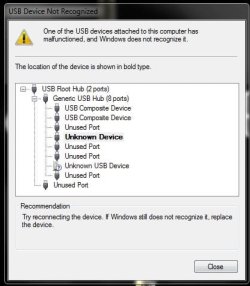
  • USB device.JPG
    USB device.JPG
    33.2 KB · Views: 29

My Computer

Computer type
PC/Desktop
OS
Windows 7 Home Premium 64-bit
CPU
i7-2600k
Motherboard
ASUS P8P67 Deluxe
Memory
Corsair Vengence 8GB
Graphics Card(s)
EVGA GTX 570 HD
Hard Drives
120 SSD
1 TB HDD
500 GB HDD
PSU
Corsair Gaming GS800
Case
HAF X
Cooling
Corsair H70
Hi ... Is your USB 3 Ports working ? .... Is all your Drivers and Windows OS up to date ? ....

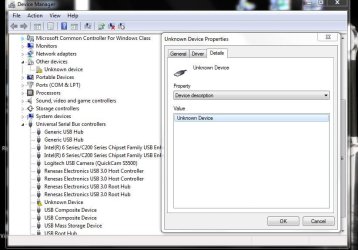
Select the unknown Device right click select Property's ...


Please post any information you see listed under the Details Tab ..
 

My Computer

Computer Manufacturer/Model Number
W530-3630QM1
OS
windows 7 home 64bit
CPU
INTEL-CORE I7
Memory
16GB
Hard Drives
750GB
Browser
Chrome
As far as I know my USB 3 are working. Windows is up to date and as far as I know so are other drives, but is there a way to know for sure? Please see attachment.

TY for the help :)
 

Attachments

  • Capture.JPG
    Capture.JPG
    71.7 KB · Views: 3

My Computer

Computer type
PC/Desktop
OS
Windows 7 Home Premium 64-bit
CPU
i7-2600k
Motherboard
ASUS P8P67 Deluxe
Memory
Corsair Vengence 8GB
Graphics Card(s)
EVGA GTX 570 HD
Hard Drives
120 SSD
1 TB HDD
500 GB HDD
PSU
Corsair Gaming GS800
Case
HAF X
Cooling
Corsair H70
I think your issue is related to one of the Asus Utilities not being Installed ... I do not suggest for one moment that you Install them ..

As I have seen some of them can cause cause problems ...


I take it all your Devices is working well including the Bluetooth ? ...
 

My Computer

Computer Manufacturer/Model Number
W530-3630QM1
OS
windows 7 home 64bit
CPU
INTEL-CORE I7
Memory
16GB
Hard Drives
750GB
Browser
Chrome
Everything is working, with the exception of the very slow boot. Every time I do get to my desktop, I receive those messages. Normally I wouldn't be so worried about it, but the boot is way worse than my first 8088.

TYVM :)
 

My Computer

Computer type
PC/Desktop
OS
Windows 7 Home Premium 64-bit
CPU
i7-2600k
Motherboard
ASUS P8P67 Deluxe
Memory
Corsair Vengence 8GB
Graphics Card(s)
EVGA GTX 570 HD
Hard Drives
120 SSD
1 TB HDD
500 GB HDD
PSU
Corsair Gaming GS800
Case
HAF X
Cooling
Corsair H70
Can anyone add more possibly. TY :)
 

My Computer

Computer type
PC/Desktop
OS
Windows 7 Home Premium 64-bit
CPU
i7-2600k
Motherboard
ASUS P8P67 Deluxe
Memory
Corsair Vengence 8GB
Graphics Card(s)
EVGA GTX 570 HD
Hard Drives
120 SSD
1 TB HDD
500 GB HDD
PSU
Corsair Gaming GS800
Case
HAF X
Cooling
Corsair H70
If you Uninstall the Device does it come back after a Reboot ? ....
 

My Computer

Computer Manufacturer/Model Number
W530-3630QM1
OS
windows 7 home 64bit
CPU
INTEL-CORE I7
Memory
16GB
Hard Drives
750GB
Browser
Chrome
List any Problem devices
  • Make sure devices are connected and powered on
  • Click the Start Orb, type msinfo32 in the search box. Hit Enter
  • Click the + sign next to Components to expand it
  • Click Problem Devices. Anything appear?
  • If yes, click on it, Ctrl-A to select all, Ctrl-C to copy it, Ctrl-V to paste into next post
  • On the other hand, if no devices are listed, tell me so
 

My Computer

Computer type
PC/Desktop
Computer Manufacturer/Model Number
Dell Optiplex 360 and Optiplex 755
OS
Desk 1: Win 7 Pro x32; Desk 2: Windows 10 x64
Hard Drives
500GB Crucial SSD in both Desktops
Other Info
Buffalo 6TB NAS, Raid 1
@maxie, yes I uninstalled, re-booted (which was still long) and now their back.

@ComputerGeek, doing yours.

Thx guys :)
 

My Computer

Computer type
PC/Desktop
OS
Windows 7 Home Premium 64-bit
CPU
i7-2600k
Motherboard
ASUS P8P67 Deluxe
Memory
Corsair Vengence 8GB
Graphics Card(s)
EVGA GTX 570 HD
Hard Drives
120 SSD
1 TB HDD
500 GB HDD
PSU
Corsair Gaming GS800
Case
HAF X
Cooling
Corsair H70
Weird, when I typed msinfo32 and hit enter the system info box opened as well as an action beep about my USB and for some reason it was finding the USB that was unknown. I rebooted and all was fine. I have no clue.


Thx all I really appreciate your time :)
 

My Computer

Computer type
PC/Desktop
OS
Windows 7 Home Premium 64-bit
CPU
i7-2600k
Motherboard
ASUS P8P67 Deluxe
Memory
Corsair Vengence 8GB
Graphics Card(s)
EVGA GTX 570 HD
Hard Drives
120 SSD
1 TB HDD
500 GB HDD
PSU
Corsair Gaming GS800
Case
HAF X
Cooling
Corsair H70
Weird but sorted that is the main thing ...
 

My Computer

Computer Manufacturer/Model Number
W530-3630QM1
OS
windows 7 home 64bit
CPU
INTEL-CORE I7
Memory
16GB
Hard Drives
750GB
Browser
Chrome
Wow.

I don't understand it. And sure can't explain it. But am sure glad to see it got fixed! :D
 

My Computer

Computer type
PC/Desktop
Computer Manufacturer/Model Number
Dell Optiplex 360 and Optiplex 755
OS
Desk 1: Win 7 Pro x32; Desk 2: Windows 10 x64
Hard Drives
500GB Crucial SSD in both Desktops
Other Info
Buffalo 6TB NAS, Raid 1
Thx again guys :)
 

My Computer

Computer type
PC/Desktop
OS
Windows 7 Home Premium 64-bit
CPU
i7-2600k
Motherboard
ASUS P8P67 Deluxe
Memory
Corsair Vengence 8GB
Graphics Card(s)
EVGA GTX 570 HD
Hard Drives
120 SSD
1 TB HDD
500 GB HDD
PSU
Corsair Gaming GS800
Case
HAF X
Cooling
Corsair H70
Back
Top