IDT integrated soundcard. Need to change jack assignment?

nonyabus

New member
Local time
9:36 PM
Messages
10
My front speaker pin (the green one) is ruined. When I plug my headphones into any other pin, the sound will not work.
I know it's possible to change pin assignments with realtek, I used to do it through their software. IDT however allows no such thing through their control panel.

Is there any other way to change it?

I'm using an integrated sound processor Intel Dp35dp and Windows 7 x32bit
 

My Computer My Computer

At a glance

Windows 7 ultimate x32
OS
Windows 7 ultimate x32
Motherboard
Intel dp35dp
Sound Card
IDT 92xx
I was messing around the registry editor and I found this:

ByQw6.jpg


Changing the value of Input/Output from 01 to 04 does nothing. I'm not sure of what I'm doing but I hope this will give someone an idea...
 

My Computer My Computer

At a glance

Windows 7 ultimate x32
OS
Windows 7 ultimate x32
Motherboard
Intel dp35dp
Sound Card
IDT 92xx
Welcome to SevenForums!

First off, I'd strongly suggest to change that registry value back to 01 if you haven't already...to me it appears to be completely off-base.

I don't think you can change jack assignments for your onboard audio. I'm afraid your only recourse is to try and physically repair the jack (might not be possible) or install a cheap PCI soundcard to use instead.


EDIT: I just realized you have the option of using the back panel jacks or connecting a front panel to the motherboard. Do you have a front panel connected?
 

My Computer My Computer

At a glance

Windows 7 Professional SP1 32-bitIntel Core 2 Duo E6600 2.4GHz4GB DDR2-667 (4x1GB in dual-channel config)nVidia GeForce 9800 GT
Computer type
PC/Desktop
Computer Manufacturer/Model Number
Custom-built
OS
Windows 7 Professional SP1 32-bit
CPU
Intel Core 2 Duo E6600 2.4GHz
Motherboard
Asus PL5D2
Memory
4GB DDR2-667 (4x1GB in dual-channel config)
Graphics Card(s)
nVidia GeForce 9800 GT
Sound Card
Creative X-Fi XtremeMusic
Monitor(s) Displays
Acer P236H
Screen Resolution
1920x1200 (DVI)
Hard Drives
OCZ SSD Vertex Plus 60GB SATA (Firmware 3.55), 64MB cache
Hitachi HD321KJ SATA, 320GB, 7200rpm, 16MB cache
PSU
Antec TruePower 2.0
Case
Cooler Master Centurion
Cooling
Too many fans
Keyboard
Standard
Mouse
Microsoft wireless optical mouse
Internet Speed
AT&T U-verse (18mbit/sec)
Antivirus
Microsoft Security Essentials
Browser
Firefox
Other Info
Other devices:
Compaq CQ-60 laptop
Google Nexus 7 (2012) tablet
Nvidia SHIELD tablet (US/LTE)
Hardkernel ODROID-XU single-board computer (Samsung Exynos 5420)
I don't have a front panel. I've been using the rear panel jacks the whole time and now the green one is busted.

Are you sure I have no other recourse? What about using a S/PDIF connector? Would that work?

BTW I did change the value back to 01 after I saw that it did nothing.
 
Last edited:

My Computer My Computer

At a glance

Windows 7 ultimate x32
OS
Windows 7 ultimate x32
Motherboard
Intel dp35dp
Sound Card
IDT 92xx
wzDuO.jpg


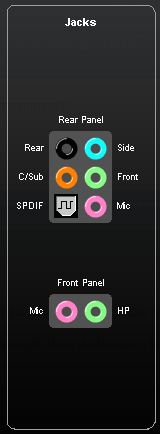
This shows up in the audio control panel. I have no front panel so I can't use those, but I do have all the other ones.


No sound will come out if I just plug the headphones in (only used to work with front) - if I get them to work as front speakers then the problem will be fixed. But how?
 

My Computer My Computer

At a glance

Windows 7 ultimate x32
OS
Windows 7 ultimate x32
Motherboard
Intel dp35dp
Sound Card
IDT 92xx
Ok, I've got some progress!

I went here and changed it to "Quadraphonic" and clicked test. When the RR & RL play I can hear them through my headphones.

Now I need to make it so sound is only coming out of those two. Any ideas?
 

My Computer My Computer

At a glance

Windows 7 ultimate x32
OS
Windows 7 ultimate x32
Motherboard
Intel dp35dp
Sound Card
IDT 92xx
Back
Top