IE 11 Back button problems

MUGEN02

New member
Local time
1:44 PM
Messages
17
It's been over a year now since I first noticed this problem with IE 11. I posted this problem on Microsoft community and Microsoft Connect but never was given a solution. I've been sticking with IE 10 for over a year now because of this.


Things I've tried:
1. With a clean install of WIN 7 Home premium 64-bit and with all updates installed for Windows and IE 11 in September 2014 I get this problem still. With all updates installed on IE 11 back in Feb 2015 I still get this problem.

2. Inprivate mode and no add ons mode doesn't fix this problem.

3. I tried IE Reset & Restore fix but it did nothing.

4. Rolling back to IE 10 fixed this problem.

How to replicate my problem:
1. Open a new IE 11 window. Highlight some text and use any accelerator, example: bing search. After clicking a bing search link in the new tab which the accelerator from the first tab created I still have the option to go back to the bing search results page in this tab.

2. Close the new tab that the accelerator opened.(you may have to do this a few times or open multiple tabs and close them). Don't close the window.

3. Use the accelerator again on the first tab and click a bing search link in the new tab. I no longer have the option to go back to the bing search results page where I clicked the search link.
 
Last edited:

My Computer

Computer type
PC/Desktop
OS
Windows 7 Home Premium 64 Bit
Bump

Microsoft isn't replying to this problem on Microsoft community and Microsoft Connect. Anyone have any ideas?
 

My Computer

Computer type
PC/Desktop
OS
Windows 7 Home Premium 64 Bit
Did you try: Internet Explorer >>>Tools>>>Internet Options>>>Advanced>>>Reset & Restore Advanced Settings,
{Uncheck: Internet Explorer>>>Tools>>>About Internet Explorer>>>Install New Versions Automatically}

I Have never had a single problem with IE[11] ever.

What I have posted might help, or it might not.

Someone will know how to resolve that trouble you are having, eventually.
 

My Computer

OS
[Genuine Custom DOS 5.0] & [Genuine Custom Windows 7 Home Premium 64Bit SP1]
Hi and welcome to SevenForums,
Take a screen shot of the listings on the backwards button list,
You can see what site is in the way by right clicking on the backwards button

use your keyboard shortcuts to take the screen shot mine are Shift+prtscrn
Open M$ Paint and use the Paste button on the top right
Save the file and upload it here
Cheers.
 

My Computer

Computer type
PC/Desktop
Computer Manufacturer/Model Number
Custom assembled by me :}
OS
Win-7-Pro64bit 7-H-Prem-64bit
CPU
i7-5930K 2nd i9-9940x both water blocked VRM's too
Motherboard
ASUS SABERTOOTH X99 2nd ASUS x299 Apex
Memory
Trident-z 3200C14 2nd Trident-z 3600C16
Graphics Card(s)
EVGA 1080ti ftw3 2nd Titan Xp both water blocked
Sound Card
Built-in Realtek
Monitor(s) Displays
1-AOC G2460PG 24"G-Sync 144Hz/ 2nd 1-ASUS VG248QE 24" 144Hz
Screen Resolution
1920 x 1080 144Hz
Hard Drives
2-Samsung M.2 Evo & Evo Plus
2-Samsung 850 EVO 500GB SSD's/ 3-2.5 W.D. Black 1tb-&3-1tb/3-3.5 WD Black 1tb hdd's
PSU
EVGA SuperNOVA 1000-P2 2nd 1200-P2
Case
2-Corsair Obsidian Series 450D Black ATX Mid Tower
Cooling
Custom water loops
Keyboard
Logitech G710+/ 2nd Logitech G910
Mouse
2-RedDragon M901 Perdition 16400 dpi Gaming mouse = wired
Internet Speed
Comcast Ping 19ms 89.31mbps download speed 6.12mbps upload
Antivirus
Malwarebytes Pro/ Superantispyware Pro
Browser
FireFox & Pale moon
Other Info
2nd ASUS X299 Apex/Intel i9-9940x with Custom water loop/7H-Prem-x64/Corsair 450D case/Ram Trident-z 3600C16 4x8gb / Samsung970Evo plus 500gb SSD/Dual ssd EZ swap evo/PSU EVGA SuperNova 1200w-P2 80+Platinum/GPU Titan Xp /8-ML-140 on push-pull on 2-280GTX rads
Did you try: Internet Explorer >>>Tools>>>Internet Options>>>Advanced>>>Reset & Restore Advanced Settings,
{Uncheck: Internet Explorer>>>Tools>>>About Internet Explorer>>>Install New Versions Automatically}

I Have never had a single problem with IE[11] ever.

What I have posted might help, or it might not.

Someone will know how to resolve that trouble you are having, eventually.

I tried Reset & Restore fix but it did nothing. I had the Install New Versions Automatically checked but I have windows updates set to "check for updates but let me choose whether or not to download and install them"

Hi and welcome to SevenForums,
Take a screen shot of the listings on the backwards button list,
You can see what site is in the way by right clicking on the backwards button

use your keyboard shortcuts to take the screen shot mine are Shift+prtscrn
Open M$ Paint and use the Paste button on the top right
Save the file and upload it here
Cheers.
I've lurked these forums for tutorials since the Vista x64 days.

I currently have IE 10 installed and don't want to waste time installing and uninstalling IE 11 for the 3rd time. I'll try IE 11 again but it would be a waste of my time without the help of forums members.

The back button does not change color or have the option to left click with the problem I'm having. I'm pretty sure that right click or hold left click also showed no results.
 

My Computer

Computer type
PC/Desktop
OS
Windows 7 Home Premium 64 Bit
Sounds like the link or what ever you clicked on opened in a new window
Although a new tab will produce the same inactive backwards button it's also quite obvious what a new tab is opened :)

If you post the site and links you clicked on I might try to reproduce the issue just walk me through where and what your clicking on
Cheers.
 

My Computer

Computer type
PC/Desktop
Computer Manufacturer/Model Number
Custom assembled by me :}
OS
Win-7-Pro64bit 7-H-Prem-64bit
CPU
i7-5930K 2nd i9-9940x both water blocked VRM's too
Motherboard
ASUS SABERTOOTH X99 2nd ASUS x299 Apex
Memory
Trident-z 3200C14 2nd Trident-z 3600C16
Graphics Card(s)
EVGA 1080ti ftw3 2nd Titan Xp both water blocked
Sound Card
Built-in Realtek
Monitor(s) Displays
1-AOC G2460PG 24"G-Sync 144Hz/ 2nd 1-ASUS VG248QE 24" 144Hz
Screen Resolution
1920 x 1080 144Hz
Hard Drives
2-Samsung M.2 Evo & Evo Plus
2-Samsung 850 EVO 500GB SSD's/ 3-2.5 W.D. Black 1tb-&3-1tb/3-3.5 WD Black 1tb hdd's
PSU
EVGA SuperNOVA 1000-P2 2nd 1200-P2
Case
2-Corsair Obsidian Series 450D Black ATX Mid Tower
Cooling
Custom water loops
Keyboard
Logitech G710+/ 2nd Logitech G910
Mouse
2-RedDragon M901 Perdition 16400 dpi Gaming mouse = wired
Internet Speed
Comcast Ping 19ms 89.31mbps download speed 6.12mbps upload
Antivirus
Malwarebytes Pro/ Superantispyware Pro
Browser
FireFox & Pale moon
Other Info
2nd ASUS X299 Apex/Intel i9-9940x with Custom water loop/7H-Prem-x64/Corsair 450D case/Ram Trident-z 3600C16 4x8gb / Samsung970Evo plus 500gb SSD/Dual ssd EZ swap evo/PSU EVGA SuperNova 1200w-P2 80+Platinum/GPU Titan Xp /8-ML-140 on push-pull on 2-280GTX rads
Sounds like the link or what ever you clicked on opened in a new window
Although a new tab will produce the same inactive backwards button it's also quite obvious what a new tab is opened :)

If you post the site and links you clicked on I might try to reproduce the issue just walk me through where and what your clicking on
Cheers.
I will explain the steps on how I encountered the problem with more detail. This problem happened with the following accelerators: bing search, google maps, translate with bing and yahoo search.

How to replicate my problem:
1. Open a new IE 11 window. Highlight some text and use any accelerator, example: bing search. After clicking a bing search link in the new tab which the accelerator from the first tab created I still have the option to go back to the bing search results page in this tab.

2. Close the new tab that the accelerator opened.(you may have to do this a few times or open multiple tabs and close them). Don't close the window.

3. Use the accelerator again on the first tab and click a bing search link in the new tab. I no longer have the option to go back to the bing search results page where I clicked the search link.

Without any IE add ons installed in the OS I still had this problem. I use Adblock Plus IE, Speckie and Adobe flash only for add ons.
 
Last edited:

My Computer

Computer type
PC/Desktop
OS
Windows 7 Home Premium 64 Bit
You'll never get an active backwards button opening anything in a new tab
Ie does not keep history of that in the original window
You would have to open everything in the same window not another tab or another window for that matter.
 

My Computer

Computer type
PC/Desktop
Computer Manufacturer/Model Number
Custom assembled by me :}
OS
Win-7-Pro64bit 7-H-Prem-64bit
CPU
i7-5930K 2nd i9-9940x both water blocked VRM's too
Motherboard
ASUS SABERTOOTH X99 2nd ASUS x299 Apex
Memory
Trident-z 3200C14 2nd Trident-z 3600C16
Graphics Card(s)
EVGA 1080ti ftw3 2nd Titan Xp both water blocked
Sound Card
Built-in Realtek
Monitor(s) Displays
1-AOC G2460PG 24"G-Sync 144Hz/ 2nd 1-ASUS VG248QE 24" 144Hz
Screen Resolution
1920 x 1080 144Hz
Hard Drives
2-Samsung M.2 Evo & Evo Plus
2-Samsung 850 EVO 500GB SSD's/ 3-2.5 W.D. Black 1tb-&3-1tb/3-3.5 WD Black 1tb hdd's
PSU
EVGA SuperNOVA 1000-P2 2nd 1200-P2
Case
2-Corsair Obsidian Series 450D Black ATX Mid Tower
Cooling
Custom water loops
Keyboard
Logitech G710+/ 2nd Logitech G910
Mouse
2-RedDragon M901 Perdition 16400 dpi Gaming mouse = wired
Internet Speed
Comcast Ping 19ms 89.31mbps download speed 6.12mbps upload
Antivirus
Malwarebytes Pro/ Superantispyware Pro
Browser
FireFox & Pale moon
Other Info
2nd ASUS X299 Apex/Intel i9-9940x with Custom water loop/7H-Prem-x64/Corsair 450D case/Ram Trident-z 3600C16 4x8gb / Samsung970Evo plus 500gb SSD/Dual ssd EZ swap evo/PSU EVGA SuperNova 1200w-P2 80+Platinum/GPU Titan Xp /8-ML-140 on push-pull on 2-280GTX rads
I just traced your steps and it is the same for me as well. So I am not sure if this is a feature (?) of IE11 or a bug rather than a problem on your side.

@ThrashZone: The accelerator opens a new tab automatically. And of course one can't go back, no problem there. But if you follow a link in the new tab, you get to a web page in that same tab but there is no back option (it is grayed out). I tried a couple of times. If you go 1 more link ahead, you do get the back option. But no way to get back to the search results which was the 1st page visited in this tab. Hope this is clear :)

I don't use accelerators normally so haven't noticed this before.
 

My Computer

Computer type
PC/Desktop
Computer Manufacturer/Model Number
Custom Build
OS
Windows 7 Ultimate x64 SP1
CPU
AMD Phenom 2 1090T
Motherboard
Gigabyte GA-890FXA-UD5
Memory
2x8GB Kingston HyperX Fury Black 1600Mhz Unganged
Graphics Card(s)
MSI GTX 970 Gaming 4G
Sound Card
Realtek On-Board HD 7.1 Audio / Logitech G35
Monitor(s) Displays
3xAcer GD245HQ
Screen Resolution
1920x1080
Hard Drives
Samsung 850 Pro 512GB SSD - OS /
WD Caviar Black SATA 3 - 1 TBx2 - Dynamic RAID 0 /
WD Caviar Green SATA 2 - 640GBx2 - Dynamic RAID 0 /
WD Caviar Green SATA 2 - 640GB - Internal Backup /
Seagate Barracude SATA 3 - 3TB - External Backup/ Sync
PSU
HighPower 1000W
Case
Cooler Master HAF 932
Cooling
Noctua NH-D14
Keyboard
Logitech G19
Mouse
Logitech G500
Internet Speed
100/4 Mbit Cable (100GB quota)
Antivirus
ZoneAlarm Extreme Security / MBAM Pro / MBAE Free / SAS Free
Browser
IE 11 - Firefox - Chrome
Other Info
Logitech F710/ G27/ G940/ Z5500 // TrackIR 5 // Nvidia 3D Surround Vision
Yea it was pretty clear in the beginning :)
No history tab to tab or new window to window they are independent of each other.
Not a bug it's by design

You can change your tabs options to not let ie decide and open everything in the same window.
 

My Computer

Computer type
PC/Desktop
Computer Manufacturer/Model Number
Custom assembled by me :}
OS
Win-7-Pro64bit 7-H-Prem-64bit
CPU
i7-5930K 2nd i9-9940x both water blocked VRM's too
Motherboard
ASUS SABERTOOTH X99 2nd ASUS x299 Apex
Memory
Trident-z 3200C14 2nd Trident-z 3600C16
Graphics Card(s)
EVGA 1080ti ftw3 2nd Titan Xp both water blocked
Sound Card
Built-in Realtek
Monitor(s) Displays
1-AOC G2460PG 24"G-Sync 144Hz/ 2nd 1-ASUS VG248QE 24" 144Hz
Screen Resolution
1920 x 1080 144Hz
Hard Drives
2-Samsung M.2 Evo & Evo Plus
2-Samsung 850 EVO 500GB SSD's/ 3-2.5 W.D. Black 1tb-&3-1tb/3-3.5 WD Black 1tb hdd's
PSU
EVGA SuperNOVA 1000-P2 2nd 1200-P2
Case
2-Corsair Obsidian Series 450D Black ATX Mid Tower
Cooling
Custom water loops
Keyboard
Logitech G710+/ 2nd Logitech G910
Mouse
2-RedDragon M901 Perdition 16400 dpi Gaming mouse = wired
Internet Speed
Comcast Ping 19ms 89.31mbps download speed 6.12mbps upload
Antivirus
Malwarebytes Pro/ Superantispyware Pro
Browser
FireFox & Pale moon
Other Info
2nd ASUS X299 Apex/Intel i9-9940x with Custom water loop/7H-Prem-x64/Corsair 450D case/Ram Trident-z 3600C16 4x8gb / Samsung970Evo plus 500gb SSD/Dual ssd EZ swap evo/PSU EVGA SuperNova 1200w-P2 80+Platinum/GPU Titan Xp /8-ML-140 on push-pull on 2-280GTX rads
You'll never get an active backwards button opening anything in a new tab
Ie does not keep history of that in the original window
You would have to open everything in the same window not another tab or another window for that matter.
I found a mistake in my explanation that might have confused you? I'm missing the history for the new tab created once I click on a link in the new tab.

1. Open a new IE 11 window. Highlight some text and use any accelerator, example: bing search. After clicking a bing search link in the new tab which the accelerator from the first tab created I still have the option to go back to the bing search results page in this tab.
 

My Computer

Computer type
PC/Desktop
OS
Windows 7 Home Premium 64 Bit
Mugen, I guess the only option at the moment, more a workaround, is to open links in the search results with CTRL pressed - hence opening them in a new tab so you don't lose the results.
 

My Computer

Computer type
PC/Desktop
Computer Manufacturer/Model Number
Custom Build
OS
Windows 7 Ultimate x64 SP1
CPU
AMD Phenom 2 1090T
Motherboard
Gigabyte GA-890FXA-UD5
Memory
2x8GB Kingston HyperX Fury Black 1600Mhz Unganged
Graphics Card(s)
MSI GTX 970 Gaming 4G
Sound Card
Realtek On-Board HD 7.1 Audio / Logitech G35
Monitor(s) Displays
3xAcer GD245HQ
Screen Resolution
1920x1080
Hard Drives
Samsung 850 Pro 512GB SSD - OS /
WD Caviar Black SATA 3 - 1 TBx2 - Dynamic RAID 0 /
WD Caviar Green SATA 2 - 640GBx2 - Dynamic RAID 0 /
WD Caviar Green SATA 2 - 640GB - Internal Backup /
Seagate Barracude SATA 3 - 3TB - External Backup/ Sync
PSU
HighPower 1000W
Case
Cooler Master HAF 932
Cooling
Noctua NH-D14
Keyboard
Logitech G19
Mouse
Logitech G500
Internet Speed
100/4 Mbit Cable (100GB quota)
Antivirus
ZoneAlarm Extreme Security / MBAM Pro / MBAE Free / SAS Free
Browser
IE 11 - Firefox - Chrome
Other Info
Logitech F710/ G27/ G940/ Z5500 // TrackIR 5 // Nvidia 3D Surround Vision
Yea it was pretty clear in the beginning :)
No history tab to tab or new window to window they are independent of each other.
Not a bug it's by design

You can change your tabs options to not let ie decide and open everything in the same window.
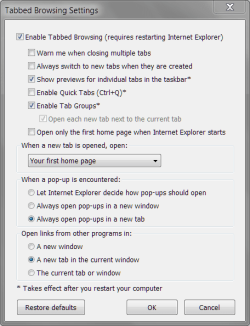
I have IE tabs settings to the following in IE 10, I would use the same in IE 11.
Capture.PNG
Mugen, I guess the only option at the moment, more a workaround, is to open links in the search results with CTRL pressed - hence opening them in a new tab so you don't lose the results.
Right click and open in new tab is an option (CTRL+left click) I use yahoo search:huh: and it has a built in option to open links in a new tab.
 

My Computer

Computer type
PC/Desktop
OS
Windows 7 Home Premium 64 Bit
Uncheck use tab browsing to see if that acts differently.

Also select on the very bottom Current tab or window.
 
Last edited:

My Computer

Computer type
PC/Desktop
Computer Manufacturer/Model Number
Custom assembled by me :}
OS
Win-7-Pro64bit 7-H-Prem-64bit
CPU
i7-5930K 2nd i9-9940x both water blocked VRM's too
Motherboard
ASUS SABERTOOTH X99 2nd ASUS x299 Apex
Memory
Trident-z 3200C14 2nd Trident-z 3600C16
Graphics Card(s)
EVGA 1080ti ftw3 2nd Titan Xp both water blocked
Sound Card
Built-in Realtek
Monitor(s) Displays
1-AOC G2460PG 24"G-Sync 144Hz/ 2nd 1-ASUS VG248QE 24" 144Hz
Screen Resolution
1920 x 1080 144Hz
Hard Drives
2-Samsung M.2 Evo & Evo Plus
2-Samsung 850 EVO 500GB SSD's/ 3-2.5 W.D. Black 1tb-&3-1tb/3-3.5 WD Black 1tb hdd's
PSU
EVGA SuperNOVA 1000-P2 2nd 1200-P2
Case
2-Corsair Obsidian Series 450D Black ATX Mid Tower
Cooling
Custom water loops
Keyboard
Logitech G710+/ 2nd Logitech G910
Mouse
2-RedDragon M901 Perdition 16400 dpi Gaming mouse = wired
Internet Speed
Comcast Ping 19ms 89.31mbps download speed 6.12mbps upload
Antivirus
Malwarebytes Pro/ Superantispyware Pro
Browser
FireFox & Pale moon
Other Info
2nd ASUS X299 Apex/Intel i9-9940x with Custom water loop/7H-Prem-x64/Corsair 450D case/Ram Trident-z 3600C16 4x8gb / Samsung970Evo plus 500gb SSD/Dual ssd EZ swap evo/PSU EVGA SuperNova 1200w-P2 80+Platinum/GPU Titan Xp /8-ML-140 on push-pull on 2-280GTX rads
Uncheck use tab browsing to see if that acts differently.

Also select on the very bottom Current tab or window.
I installed IE 11(updated too) again and It has the same problem.:shock: I tried changing "the very bottom Current tab or window" but it did nothing.
 

My Computer

Computer type
PC/Desktop
OS
Windows 7 Home Premium 64 Bit
I'm still using IE 11 with the open link in new tab fix. A lot of websites I visited were having problems with IE 10 anyway. I prefer the browser speed of IE 11 too.

Hopefully this isn't a problem when I switch to Win 10.:axe:
 

My Computer

Computer type
PC/Desktop
OS
Windows 7 Home Premium 64 Bit
Back
Top