
IE 11 Default Search Provider Resets After Sysprep

HEADSHOTPUNK

New member
Local time
12:02 PM
Messages
14
I'm trying to make a Windows 7 Ent. x64 image for deployment but for the life of me I can't get the default search provider to stick after the workstation syspreps. I've followed Microsoft's instructions and added a section in my answer file that adds Google as a search provider, but when I try to set it as the default, it ignores it and sets Bing as the default search provider. Here's what I have in my answer file:

<component name="Microsoft-Windows-IE-InternetExplorer" processorArchitecture="amd64" publicKeyToken="31bf3856ad364e35" language="neutral" versionScope="nonSxS" xmlns:wcm="http://schemas.microsoft.com/WMIConfig/2002/State" xmlns:xsi="http://www.w3.org/2001/XMLSchema-instance">
<Home_Page>www.wnc.edu</Home_Page>
<DisableAccelerators>true</DisableAccelerators>
<DisableFirstRunWizard>true</DisableFirstRunWizard>
<FavoritesDelete>true</FavoritesDelete>
<SearchScopes>
<Scope wcm:action="add">
<FaviconURL>http://www.google.com/favicon.ico</FaviconURL>
<ScopeDefault>true</ScopeDefault>
<ScopeDisplayName>Google</ScopeDisplayName>
<ScopeKey>Search1</ScopeKey>
<ScopeUrl>http://www.google.com/search?q={searchTerms}&sourceid=ie7&rls=com.microsoft:{language}:{referrer:source}&ie={inputEncoding?}&oe={outputEncoding?}</ScopeUrl>
<SuggestionsURL>http://clients5.google.com/complete/search?q={searchTerms}&client=ie8&mw={ie:maxWidth}&sh={ie:sectionHeight}&rh={ie:rowHeight}&inputencoding={inputEncoding}&outputencoding={outputEncoding}</SuggestionsURL>
</Scope>
</SearchScopes>
</component>

Any ideas? ScopeDefault = true is the what Microsoft says to use when you are setting the default search provider but it doesn't seem to work for me.

Thanks for any help you guys can give me.
 

My Computer My Computer

Computer type
PC/Desktop
Computer Manufacturer/Model Number
HP
OS
Windows 7 Enterprise x64
CPU
Intel
Do you have Bing installed in Programs and Features?

Is it removed in Browser Add-on's under Search with no other service allowed box checked?
 
Bing is installed. I don't really mind it being there, I just don't want it as the default. Though I've removed Bing in the past and it shows back up after syspreping. I've never checked the option "Prevent programs from suggesting changes to my default search provider". My co-worker says he's used that option before but after syspreping, Bing came back up and was set as the default again.

I don't see Bing listed under programs and features.
 

My Computer My Computer

Computer type
PC/Desktop
Computer Manufacturer/Model Number
HP
OS
Windows 7 Enterprise x64
CPU
Intel
Internet Explorer search provider setting is part of the default user profile settings. The default user profile can only be customized and settings saved when:
  • No user accounts exist (clean installation on reference computer interrupted to enter Audit Mode with built-in administrator account)
  • The value of CopyProfile is set to TRUE in answer file (Spezialize pass, Component > Microsoft-Windows-Shell-Setup, tutorial, Part 6 and Part 9 Step 2)
  • The image is generalized (for instance %windir%\system32\sysprep\sysprep.exe /generalize /oobe /shutdown /unattend:X:\MyAnswerFile)
Kari
 
Last edited:

My Computer My Computer

Computer type
Laptop
Computer Manufacturer/Model Number
HP ENVY 17-1150eg
OS
Windows 10 Pro x64 EN-GB
CPU
1.6 GHz Intel Core i7-720QM Processor
Memory
6 GB
Graphics Card(s)
ATI Mobility Radeon HD 5850 Graphics
Sound Card
Beats sound system with integrated subwoofer
Monitor(s) Displays
17" laptop display, 22" LED and 32" Full HD TV through HDMI
Screen Resolution
1600*900 (1), 1920*1080 (2&3)
Hard Drives
Internal: 2 x 500 GB SATA Hard Disk Drive 7200 rpm
External: 2TB for backups, 3TB USB3 network drive for media
Cooling
As Envy runs a bit warm, I have it on a Cooler Master pad
Keyboard
Logitech diNovo Media Desktop Laser (bluetooth)
Mouse
Logitech Performance Mouse MX
Internet Speed
50/10 Mbps VDSL
Antivirus
Windows Defender 4.3.9431.0
Browser
Maxthon 3.5.2., IE11
Internet Explorer search provider setting is part of the default user profile settings. The default user profile can only be customized and settings saved when:
  • No user accounts exist (clean installation on reference computer interrupted to enter Audit Mode with built-in administrator account)
  • The value of CopyProfile is set to TRUE in answer file (tutorial, Part 6 and Part 9 Step 2)
  • The image is generalized (for instance %windir%\system32\sysprep\sysprep.exe /generalize /oobe /shutdown /unattend:X:\MyAnswerFile)
Kari

I do all of these things but still can't get that setting to stick. I build the image in audit mode, CopyProfile is set to true and we run it in generalize. Here is my answer file minus a few serial numbers / passwords I removed:


<?xml version="1.0" encoding="utf-8"?>
<unattend xmlns="urn:schemas-microsoft-com:unattend">
<settings pass="generalize">
<component name="Microsoft-Windows-Security-SPP" processorArchitecture="amd64" publicKeyToken="31bf3856ad364e35" language="neutral" versionScope="nonSxS" xmlns:wcm="http://schemas.microsoft.com/WMIConfig/2002/State" xmlns:xsi="http://www.w3.org/2001/XMLSchema-instance">
<SkipRearm>1</SkipRearm>
</component>
</settings>
<settings pass="specialize">
<component name="Microsoft-Windows-Deployment" processorArchitecture="amd64" publicKeyToken="31bf3856ad364e35" language="neutral" versionScope="nonSxS" xmlns:wcm="http://schemas.microsoft.com/WMIConfig/2002/State" xmlns:xsi="http://www.w3.org/2001/XMLSchema-instance">
<RunSynchronous>
<RunSynchronousCommand wcm:action="add">
<Order>1</Order>
<Path>net user administrator /active:yes</Path>
</RunSynchronousCommand>
</RunSynchronous>
</component>
<component name="Microsoft-Windows-Security-SPP-UX" processorArchitecture="amd64" publicKeyToken="31bf3856ad364e35" language="neutral" versionScope="nonSxS" xmlns:wcm="http://schemas.microsoft.com/WMIConfig/2002/State" xmlns:xsi="http://www.w3.org/2001/XMLSchema-instance">
<SkipAutoActivation>true</SkipAutoActivation>
</component>
<component name="Microsoft-Windows-Shell-Setup" processorArchitecture="amd64" publicKeyToken="31bf3856ad364e35" language="neutral" versionScope="nonSxS" xmlns:wcm="http://schemas.microsoft.com/WMIConfig/2002/State" xmlns:xsi="http://www.w3.org/2001/XMLSchema-instance">
<ComputerName>*</ComputerName>
<CopyProfile>true</CopyProfile>
<DoNotCleanTaskBar>true</DoNotCleanTaskBar>
<TimeZone>Pacific Standard Time</TimeZone>
<ShowWindowsLive>false</ShowWindowsLive>
</component>
<component name="Microsoft-Windows-IE-InternetExplorer" processorArchitecture="amd64" publicKeyToken="31bf3856ad364e35" language="neutral" versionScope="nonSxS" xmlns:wcm="http://schemas.microsoft.com/WMIConfig/2002/State" xmlns:xsi="http://www.w3.org/2001/XMLSchema-instance">
<Home_Page>www.wnc.edu</Home_Page>
<DisableAccelerators>true</DisableAccelerators>
<DisableFirstRunWizard>true</DisableFirstRunWizard>
<FavoritesDelete>true</FavoritesDelete>
<SearchScopes>
<Scope wcm:action="add">
<FaviconURL>http://www.google.com/favicon.ico</FaviconURL>
<ScopeDefault>true</ScopeDefault>
<ScopeDisplayName>Google</ScopeDisplayName>
<ScopeKey>Search1</ScopeKey>
<ScopeUrl>http://www.google.com/search?q={searchTerms}&sourceid=ie7&rls=com.microsoft:{language}:{referrer:source}&ie={inputEncoding?}&oe={outputEncoding?}</ScopeUrl>
<SuggestionsURL>http://clients5.google.com/complete/search?q={searchTerms}&client=ie8&mw={ie:maxWidth}&sh={ie:sectionHeight}&rh={ie:rowHeight}&inputencoding={inputEncoding}&outputencoding={outputEncoding}</SuggestionsURL>
</Scope>
</SearchScopes>
</component>
</settings>
<settings pass="oobeSystem">
<component name="Microsoft-Windows-International-Core" processorArchitecture="amd64" publicKeyToken="31bf3856ad364e35" language="neutral" versionScope="nonSxS" xmlns:wcm="http://schemas.microsoft.com/WMIConfig/2002/State" xmlns:xsi="http://www.w3.org/2001/XMLSchema-instance">
<InputLocale>en-us</InputLocale>
<SystemLocale>en-us</SystemLocale>
<UILanguage>en-us</UILanguage>
<UILanguageFallback>en-us</UILanguageFallback>
</component>
<component name="Microsoft-Windows-Shell-Setup" processorArchitecture="amd64" publicKeyToken="31bf3856ad364e35" language="neutral" versionScope="nonSxS" xmlns:wcm="http://schemas.microsoft.com/WMIConfig/2002/State" xmlns:xsi="http://www.w3.org/2001/XMLSchema-instance">
<FirstLogonCommands>
<SynchronousCommand wcm:action="add">
<CommandLine>cscript //b c:\windows\system32\slmgr.vbs /ipk #####-#####-#####-#####-##### </CommandLine>
<Description>Activate Windows</Description>
<Order>1</Order>
<RequiresUserInput>false</RequiresUserInput>
</SynchronousCommand>
<SynchronousCommand wcm:action="add">
<CommandLine>cscript //b c:\windows\system32\slmgr.vbs /ato</CommandLine>
<Order>2</Order>
<RequiresUserInput>false</RequiresUserInput>
</SynchronousCommand>
</FirstLogonCommands>
<OOBE>
<HideEULAPage>true</HideEULAPage>
<NetworkLocation>Home</NetworkLocation>
<ProtectYourPC>1</ProtectYourPC>
</OOBE>
<UserAccounts>
<AdministratorPassword>
<Value>#####</Value>
<PlainText>false</PlainText>
</AdministratorPassword>
<LocalAccounts>
<LocalAccount wcm:action="add">
<Password>
<Value>#####</Value>
<PlainText>false</PlainText>
</Password>
<Description>Local Administrator</Description>
<DisplayName>Administrator</DisplayName>
<Group>Administrators</Group>
<Name>Administrator</Name>
</LocalAccount>
<LocalAccount wcm:action="add">
<Password>
<Value>#####</Value>
<PlainText>false</PlainText>
</Password>
<Description>Local Administrator</Description>
<DisplayName>Localmaint</DisplayName>
<Group>Administrators</Group>
<Name>Localmaint</Name>
</LocalAccount>
</LocalAccounts>
</UserAccounts>
</component>
</settings>
<cpi:offlineImage cpi:source="catalog:x:/sources/install_windows 7 enterprise.clg" xmlns:cpi="urn:schemas-microsoft-com:cpi" />
</unattend>


This is the only thing that I can't seem to get working right on my image. I don't know if it was a recent update or what, but my older images didn't have this problem. That setting copied without a problem and Bing wouldn't automatically install itself.

Thanks for all the help guys, I really appreciate it.
 

My Computer My Computer

Computer type
PC/Desktop
Computer Manufacturer/Model Number
HP
OS
Windows 7 Enterprise x64
CPU
Intel
I'll go through the answer file, might take a while. I'll be back whether I find something or not.
 

My Computer My Computer

Computer type
Laptop
Computer Manufacturer/Model Number
HP ENVY 17-1150eg
OS
Windows 10 Pro x64 EN-GB
CPU
1.6 GHz Intel Core i7-720QM Processor
Memory
6 GB
Graphics Card(s)
ATI Mobility Radeon HD 5850 Graphics
Sound Card
Beats sound system with integrated subwoofer
Monitor(s) Displays
17" laptop display, 22" LED and 32" Full HD TV through HDMI
Screen Resolution
1600*900 (1), 1920*1080 (2&3)
Hard Drives
Internal: 2 x 500 GB SATA Hard Disk Drive 7200 rpm
External: 2TB for backups, 3TB USB3 network drive for media
Cooling
As Envy runs a bit warm, I have it on a Cooler Master pad
Keyboard
Logitech diNovo Media Desktop Laser (bluetooth)
Mouse
Logitech Performance Mouse MX
Internet Speed
50/10 Mbps VDSL
Antivirus
Windows Defender 4.3.9431.0
Browser
Maxthon 3.5.2., IE11
As far as I can tell the answer file is totally OK, the search provider correctly set and in correct settings pass in answer file. The answer file also validates OK, I really can find no errors in it.

Strange. I am not able to test your answer file in an Enterprise setup before weekend, I will most definitely test it when possible.

I am sorry, I really have no clue why the search provider will not be changed.
 

My Computer My Computer

Computer type
Laptop
Computer Manufacturer/Model Number
HP ENVY 17-1150eg
OS
Windows 10 Pro x64 EN-GB
CPU
1.6 GHz Intel Core i7-720QM Processor
Memory
6 GB
Graphics Card(s)
ATI Mobility Radeon HD 5850 Graphics
Sound Card
Beats sound system with integrated subwoofer
Monitor(s) Displays
17" laptop display, 22" LED and 32" Full HD TV through HDMI
Screen Resolution
1600*900 (1), 1920*1080 (2&3)
Hard Drives
Internal: 2 x 500 GB SATA Hard Disk Drive 7200 rpm
External: 2TB for backups, 3TB USB3 network drive for media
Cooling
As Envy runs a bit warm, I have it on a Cooler Master pad
Keyboard
Logitech diNovo Media Desktop Laser (bluetooth)
Mouse
Logitech Performance Mouse MX
Internet Speed
50/10 Mbps VDSL
Antivirus
Windows Defender 4.3.9431.0
Browser
Maxthon 3.5.2., IE11
No worries. I'm just grateful for your help. I'm still doing some testing on my end. I just downloaded an older image of mine when it was working and I'm comparing updates and comparing some registry settings.

Thanks again for the help.
 

My Computer My Computer

Computer type
PC/Desktop
Computer Manufacturer/Model Number
HP
OS
Windows 7 Enterprise x64
CPU
Intel
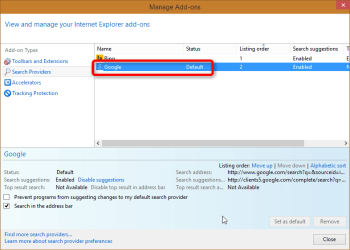
You did not forget to install and enable Google as Search Provider in IE11 in Audit Mode on reference computer prior to sysprep, and set it as default provider? It must of course be done.

2014-10-27_19h24_36.png

Sometimes I forget obvious things like this and wonder later why my answer file is not doing what I tell it to do. In this case, if the Search Provider is not first installed, enabled and set default, sysprep ignores your search provider change.
 

My Computer My Computer

Computer type
Laptop
Computer Manufacturer/Model Number
HP ENVY 17-1150eg
OS
Windows 10 Pro x64 EN-GB
CPU
1.6 GHz Intel Core i7-720QM Processor
Memory
6 GB
Graphics Card(s)
ATI Mobility Radeon HD 5850 Graphics
Sound Card
Beats sound system with integrated subwoofer
Monitor(s) Displays
17" laptop display, 22" LED and 32" Full HD TV through HDMI
Screen Resolution
1600*900 (1), 1920*1080 (2&3)
Hard Drives
Internal: 2 x 500 GB SATA Hard Disk Drive 7200 rpm
External: 2TB for backups, 3TB USB3 network drive for media
Cooling
As Envy runs a bit warm, I have it on a Cooler Master pad
Keyboard
Logitech diNovo Media Desktop Laser (bluetooth)
Mouse
Logitech Performance Mouse MX
Internet Speed
50/10 Mbps VDSL
Antivirus
Windows Defender 4.3.9431.0
Browser
Maxthon 3.5.2., IE11
I did this but it didn't work. However that was before I added the search scope section in my answer file. I will try a new image doing both, installing it manually and setting it as the default as well as having that information in my answer file. Just as an FYI, even when I didn't install it and just had the information in my answer file, after imaging Google was there as a search provider and everything looked great, except that it wasn't set as the default.
 

My Computer My Computer

Computer type
PC/Desktop
Computer Manufacturer/Model Number
HP
OS
Windows 7 Enterprise x64
CPU
Intel
I am very interested in this, please let us know how it goes.
 

My Computer My Computer

Computer type
Laptop
Computer Manufacturer/Model Number
HP ENVY 17-1150eg
OS
Windows 10 Pro x64 EN-GB
CPU
1.6 GHz Intel Core i7-720QM Processor
Memory
6 GB
Graphics Card(s)
ATI Mobility Radeon HD 5850 Graphics
Sound Card
Beats sound system with integrated subwoofer
Monitor(s) Displays
17" laptop display, 22" LED and 32" Full HD TV through HDMI
Screen Resolution
1600*900 (1), 1920*1080 (2&3)
Hard Drives
Internal: 2 x 500 GB SATA Hard Disk Drive 7200 rpm
External: 2TB for backups, 3TB USB3 network drive for media
Cooling
As Envy runs a bit warm, I have it on a Cooler Master pad
Keyboard
Logitech diNovo Media Desktop Laser (bluetooth)
Mouse
Logitech Performance Mouse MX
Internet Speed
50/10 Mbps VDSL
Antivirus
Windows Defender 4.3.9431.0
Browser
Maxthon 3.5.2., IE11
Will do! Loading Win 7 Ent right now.
 

My Computer My Computer

Computer type
PC/Desktop
Computer Manufacturer/Model Number
HP
OS
Windows 7 Enterprise x64
CPU
Intel
Okay, no luck. Here's what I just did.

* Installed Windows 7 Ent x64
* Ran all the updates
* Launched IE11
* Installed Google search provider and set it as default
* Removed Bing search provider
* Ran Sysprep with that answer file
* Once the computer came back up I created a new account and Bing was there and it was set as the default
* Banged head against desk

So my co-worker and I did some testing. We loaded up an image from April 2014 that had the search provider working correctly. We created a new account to test and made sure that it loaded with Google as the default and it was. After that we ran all the current updates, restarted the computer, created a another new account and low and behold....... Bing came up as the default search provider. So I'm not sure which update is doing it, but one of the Windows updates that came out in the last few months is changing the default user profile's search provider.
 

My Computer My Computer

Computer type
PC/Desktop
Computer Manufacturer/Model Number
HP
OS
Windows 7 Enterprise x64
CPU
Intel
So I did a little more testing. On the machine I just built a new image on, the default search provider didn't stick. It loaded all new accounts with Bing. So I uninstalled IE11 (which took it down to IE8) and restarted the computer, logged in as admin and created a new account, loaded up the new account and launched IE8 and magically, Google was set as my default search provider and Bing wasn't even listed as an option.

So it seems like the default user profile is being overridden by one of the IE11 updates.
 

My Computer My Computer

Computer type
PC/Desktop
Computer Manufacturer/Model Number
HP
OS
Windows 7 Enterprise x64
CPU
Intel
That's really valuable information, thanks for sharing.

To start narrowing down which update it could be, you said that an image from last April worked as it was told, Google as default? It's a lot of work but if you really want to research this, check the list of todays IE11 updates on that system (assuming there was no updates between April and today), then restore the machine to April state, turn off automatic updates and start updating one IE11 update at the time. Painful work, you need to create a user after every update and login to see what happens.

Anyway, like I said, thanks for sharing this.
 

My Computer My Computer

Computer type
Laptop
Computer Manufacturer/Model Number
HP ENVY 17-1150eg
OS
Windows 10 Pro x64 EN-GB
CPU
1.6 GHz Intel Core i7-720QM Processor
Memory
6 GB
Graphics Card(s)
ATI Mobility Radeon HD 5850 Graphics
Sound Card
Beats sound system with integrated subwoofer
Monitor(s) Displays
17" laptop display, 22" LED and 32" Full HD TV through HDMI
Screen Resolution
1600*900 (1), 1920*1080 (2&3)
Hard Drives
Internal: 2 x 500 GB SATA Hard Disk Drive 7200 rpm
External: 2TB for backups, 3TB USB3 network drive for media
Cooling
As Envy runs a bit warm, I have it on a Cooler Master pad
Keyboard
Logitech diNovo Media Desktop Laser (bluetooth)
Mouse
Logitech Performance Mouse MX
Internet Speed
50/10 Mbps VDSL
Antivirus
Windows Defender 4.3.9431.0
Browser
Maxthon 3.5.2., IE11
Alright, I think I've found the culprit.

KB2976627 - released August 12, 2014

Specifically this update that was included in there: Update that helps you manage your Internet Explorer 11 search provider

I'm about to leave for the day so I haven't had a chance to look into it yet, but this seems to be the problem child that is overriding my default profile. The issue is that this is included in the cumulative security updates so even if I hid this update, it would just be installed the next month. I double checked this by installing these updates one at a time:

KB2977629 - released September 9, 2014
KB2987107 - released October 14,2014

Each one of these updates, installed by themselves, overrode my default search provider.

Now time to find a solution... hopefully lol.


ps - I installed KB2962872 which was the security updated for July 2014 and it didn't cause an issue.
 

My Computer My Computer

Computer type
PC/Desktop
Computer Manufacturer/Model Number
HP
OS
Windows 7 Enterprise x64
CPU
Intel
Good to know you found it.

As much a Microsoft fan boy as I am (honestly!), I don't like what I read in that KB article. Microsoft should not override user settings with help of an update just to keep competitors away.

"Helps you maintain control over your Internet Explorer 11 search provider. After you install this update, you are prompted about any external requests to change the search provider." What the article does not mention is that the update also resets any previous settings. That and the some other things in that article sound like the update's mission is to change the default provider to Bing if user has made the mistake to change it to something else.
 

My Computer My Computer

Computer type
Laptop
Computer Manufacturer/Model Number
HP ENVY 17-1150eg
OS
Windows 10 Pro x64 EN-GB
CPU
1.6 GHz Intel Core i7-720QM Processor
Memory
6 GB
Graphics Card(s)
ATI Mobility Radeon HD 5850 Graphics
Sound Card
Beats sound system with integrated subwoofer
Monitor(s) Displays
17" laptop display, 22" LED and 32" Full HD TV through HDMI
Screen Resolution
1600*900 (1), 1920*1080 (2&3)
Hard Drives
Internal: 2 x 500 GB SATA Hard Disk Drive 7200 rpm
External: 2TB for backups, 3TB USB3 network drive for media
Cooling
As Envy runs a bit warm, I have it on a Cooler Master pad
Keyboard
Logitech diNovo Media Desktop Laser (bluetooth)
Mouse
Logitech Performance Mouse MX
Internet Speed
50/10 Mbps VDSL
Antivirus
Windows Defender 4.3.9431.0
Browser
Maxthon 3.5.2., IE11
At least they are not changing what current users have set as their default search providers, but come on, this is pretty shady.

Any ideas how to overcome this hurdle that Microsoft has thrown at us? Each month Microsoft is just going to include this update (KB2976627) in the cumulative update. Is there a way to disable just this one update from installing in the cumulative update?

I'm thinking I might have to resort to running a script to modify the registry settings when a user first signs on.

Thoughts?
 

My Computer My Computer

Computer type
PC/Desktop
Computer Manufacturer/Model Number
HP
OS
Windows 7 Enterprise x64
CPU
Intel
No, just hide the Update when it shows up again.

Also remove all but your preferred search in browse, set it to not allow replacement.
 
Back
Top