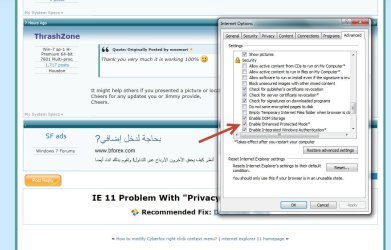
Solved IE 11 Problem With "Privacy Report."

CrazyJumpinJack

New member
Local time
7:52 PM
Messages
6
Location
Marietta, GA
Does anyone know how I can disable a VERY ANNOYING popup box that rears it's ugly self when I go to just about any of My Favorite sites?

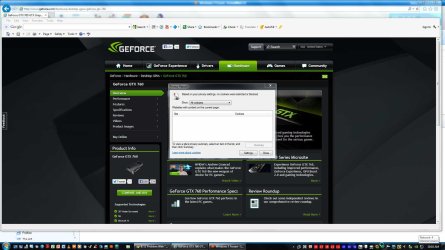
This box is named "Privacy Report" and it states "Based on your privacy settings, no cookies were restricted or blocked." On the bottom of this damn thing is a click box titled "Settings." That will take you to the standard Privacy Tab in the IE Internet Options found under Tools.

I have tried just about everything that I can think of to determine what might be causing this. Additionally, MalewareBytes is up and running with no infected objects on a Full System Scan.

ANY HELP WOULD BE GREATLY APPRECIATED!!!!

The System Specs for my entire goat-roped hookup should be on the lower left link of this post. :cry:
 

My Computer My Computer

Computer type
PC/Desktop
Computer Manufacturer/Model Number
Custom Built
OS
Windows 7 Professional SP1, x64
CPU
Xeon X3360 @2.83 GHz (currently overclocked to 4.1 GHz)
Motherboard
Gigabyte GA-EP45-UD3P (v1.6)
Memory
16 GB of DDR2 DIMM (240 pin) @ 800 MHz PC2-6400)
Graphics Card(s)
EVGA GTX 760 FTW 4GB GDDR5 w/ACX Cooler
Sound Card
Native on the Board using the Gigabyte Realtek Azalia Driver
Monitor(s) Displays
AOC 27" LED E2752VH
Screen Resolution
1920 X 1080
Hard Drives
SATA 1TB WD Caviar Black (C)
SATA 2TB WD Red
SATA 1TB WD Caviar Black
SATA 1.5TB Seagate
SATA 1TB WD Blue
SATA 1TB WD Blue
USB3 4TB Seagate BackUp+Desk
USB3 2TB WD My Book Essen
USB2 500GB Toshiba Canvio (FTP site)
PSU
Cooler Master GX - 750W 80 PLUS Bronze
Case
Cooler Master HAF XM Mid Tower
Cooling
Cooler Master Seidon 120M for the CPU
Keyboard
Azio Large Print Tri-Color Backlit Keyboard
Mouse
E-3lue Cobra EMS109BK High Precision Gaming Mouse
Internet Speed
Comcast Extreme 105 MB/s
Antivirus
Norton 360
Browser
IE and Chrome
Other Info
The system is being used as the server on a large home network.
The 43% overclocked FSB is 475 MHz (with an 8.5 multiplier yielding an effective clock of 1900 MHz). This processor is about the same as the Q9550.
The 1:1 RAM timing is at 800MHz (6-6-6-18).
Running Home Network with 5 Unmanaged 1 GB Switches, a Linksys E6900 (AC1900) Router and a Cisco SG-200-08 Managed Switch behind the Router.
Last edited:

My Computer My Computer

Computer type
PC/Desktop
Computer Manufacturer/Model Number
Custom assembled by me :}
OS
Win-7-Pro64bit 7-H-Prem-64bit
CPU
i7-5930K 2nd i9-9940x both water blocked VRM's too
Motherboard
ASUS SABERTOOTH X99 2nd ASUS x299 Apex
Memory
Trident-z 3200C14 2nd Trident-z 3600C16
Graphics Card(s)
EVGA 1080ti ftw3 2nd Titan Xp both water blocked
Sound Card
Built-in Realtek
Monitor(s) Displays
1-AOC G2460PG 24"G-Sync 144Hz/ 2nd 1-ASUS VG248QE 24" 144Hz
Screen Resolution
1920 x 1080 144Hz
Hard Drives
2-Samsung M.2 Evo & Evo Plus
2-Samsung 850 EVO 500GB SSD's/ 3-2.5 W.D. Black 1tb-&3-1tb/3-3.5 WD Black 1tb hdd's
PSU
EVGA SuperNOVA 1000-P2 2nd 1200-P2
Case
2-Corsair Obsidian Series 450D Black ATX Mid Tower
Cooling
Custom water loops
Keyboard
Logitech G710+/ 2nd Logitech G910
Mouse
2-RedDragon M901 Perdition 16400 dpi Gaming mouse = wired
Internet Speed
Comcast Ping 19ms 89.31mbps download speed 6.12mbps upload
Antivirus
Malwarebytes Pro/ Superantispyware Pro
Browser
FireFox & Pale moon
Other Info
2nd ASUS X299 Apex/Intel i9-9940x with Custom water loop/7H-Prem-x64/Corsair 450D case/Ram Trident-z 3600C16 4x8gb / Samsung970Evo plus 500gb SSD/Dual ssd EZ swap evo/PSU EVGA SuperNova 1200w-P2 80+Platinum/GPU Titan Xp /8-ML-140 on push-pull on 2-280GTX rads
THANKS very much for your time on this. I did everything that you suggested....still no change in behavior! I do like that Registry Reviver program though. It has the best Start-Up Manager that I've seen in any application to date!!.

Any other ideas out there?
 

My Computer My Computer

Computer type
PC/Desktop
Computer Manufacturer/Model Number
Custom Built
OS
Windows 7 Professional SP1, x64
CPU
Xeon X3360 @2.83 GHz (currently overclocked to 4.1 GHz)
Motherboard
Gigabyte GA-EP45-UD3P (v1.6)
Memory
16 GB of DDR2 DIMM (240 pin) @ 800 MHz PC2-6400)
Graphics Card(s)
EVGA GTX 760 FTW 4GB GDDR5 w/ACX Cooler
Sound Card
Native on the Board using the Gigabyte Realtek Azalia Driver
Monitor(s) Displays
AOC 27" LED E2752VH
Screen Resolution
1920 X 1080
Hard Drives
SATA 1TB WD Caviar Black (C)
SATA 2TB WD Red
SATA 1TB WD Caviar Black
SATA 1.5TB Seagate
SATA 1TB WD Blue
SATA 1TB WD Blue
USB3 4TB Seagate BackUp+Desk
USB3 2TB WD My Book Essen
USB2 500GB Toshiba Canvio (FTP site)
PSU
Cooler Master GX - 750W 80 PLUS Bronze
Case
Cooler Master HAF XM Mid Tower
Cooling
Cooler Master Seidon 120M for the CPU
Keyboard
Azio Large Print Tri-Color Backlit Keyboard
Mouse
E-3lue Cobra EMS109BK High Precision Gaming Mouse
Internet Speed
Comcast Extreme 105 MB/s
Antivirus
Norton 360
Browser
IE and Chrome
Other Info
The system is being used as the server on a large home network.
The 43% overclocked FSB is 475 MHz (with an 8.5 multiplier yielding an effective clock of 1900 MHz). This processor is about the same as the Q9550.
The 1:1 RAM timing is at 800MHz (6-6-6-18).
Running Home Network with 5 Unmanaged 1 GB Switches, a Linksys E6900 (AC1900) Router and a Cisco SG-200-08 Managed Switch behind the Router.
I do like that Registry Reviver program though. It has the best Start-Up Manager that I've seen in any application to date!!.

Any other ideas out there?
Not sure what your referring to ?

Okay Gear symbol on the top right and Safety,
See if anything is checked post any if there is.
 

My Computer My Computer

Computer type
PC/Desktop
Computer Manufacturer/Model Number
Custom assembled by me :}
OS
Win-7-Pro64bit 7-H-Prem-64bit
CPU
i7-5930K 2nd i9-9940x both water blocked VRM's too
Motherboard
ASUS SABERTOOTH X99 2nd ASUS x299 Apex
Memory
Trident-z 3200C14 2nd Trident-z 3600C16
Graphics Card(s)
EVGA 1080ti ftw3 2nd Titan Xp both water blocked
Sound Card
Built-in Realtek
Monitor(s) Displays
1-AOC G2460PG 24"G-Sync 144Hz/ 2nd 1-ASUS VG248QE 24" 144Hz
Screen Resolution
1920 x 1080 144Hz
Hard Drives
2-Samsung M.2 Evo & Evo Plus
2-Samsung 850 EVO 500GB SSD's/ 3-2.5 W.D. Black 1tb-&3-1tb/3-3.5 WD Black 1tb hdd's
PSU
EVGA SuperNOVA 1000-P2 2nd 1200-P2
Case
2-Corsair Obsidian Series 450D Black ATX Mid Tower
Cooling
Custom water loops
Keyboard
Logitech G710+/ 2nd Logitech G910
Mouse
2-RedDragon M901 Perdition 16400 dpi Gaming mouse = wired
Internet Speed
Comcast Ping 19ms 89.31mbps download speed 6.12mbps upload
Antivirus
Malwarebytes Pro/ Superantispyware Pro
Browser
FireFox & Pale moon
Other Info
2nd ASUS X299 Apex/Intel i9-9940x with Custom water loop/7H-Prem-x64/Corsair 450D case/Ram Trident-z 3600C16 4x8gb / Samsung970Evo plus 500gb SSD/Dual ssd EZ swap evo/PSU EVGA SuperNova 1200w-P2 80+Platinum/GPU Titan Xp /8-ML-140 on push-pull on 2-280GTX rads
OK: Everything seems to appear normal using the Gear symbol (Tools). Nothing is checked under Privacy and I don't see any other Extensions or Objects out of place. Part of the problem may be that I can't check the Gear tab when the Privacy Report screen is up. I have to close that first...and I am wondering if Safety does not "see" it because it is closed. I've included a snapshot of what this looks like. Is there any way to revert back to IE 10?
 

Attachments

  • Privacy Report.jpg
    Privacy Report.jpg
    165.5 KB · Views: 4

My Computer My Computer

Computer type
PC/Desktop
Computer Manufacturer/Model Number
Custom Built
OS
Windows 7 Professional SP1, x64
CPU
Xeon X3360 @2.83 GHz (currently overclocked to 4.1 GHz)
Motherboard
Gigabyte GA-EP45-UD3P (v1.6)
Memory
16 GB of DDR2 DIMM (240 pin) @ 800 MHz PC2-6400)
Graphics Card(s)
EVGA GTX 760 FTW 4GB GDDR5 w/ACX Cooler
Sound Card
Native on the Board using the Gigabyte Realtek Azalia Driver
Monitor(s) Displays
AOC 27" LED E2752VH
Screen Resolution
1920 X 1080
Hard Drives
SATA 1TB WD Caviar Black (C)
SATA 2TB WD Red
SATA 1TB WD Caviar Black
SATA 1.5TB Seagate
SATA 1TB WD Blue
SATA 1TB WD Blue
USB3 4TB Seagate BackUp+Desk
USB3 2TB WD My Book Essen
USB2 500GB Toshiba Canvio (FTP site)
PSU
Cooler Master GX - 750W 80 PLUS Bronze
Case
Cooler Master HAF XM Mid Tower
Cooling
Cooler Master Seidon 120M for the CPU
Keyboard
Azio Large Print Tri-Color Backlit Keyboard
Mouse
E-3lue Cobra EMS109BK High Precision Gaming Mouse
Internet Speed
Comcast Extreme 105 MB/s
Antivirus
Norton 360
Browser
IE and Chrome
Other Info
The system is being used as the server on a large home network.
The 43% overclocked FSB is 475 MHz (with an 8.5 multiplier yielding an effective clock of 1900 MHz). This processor is about the same as the Q9550.
The 1:1 RAM timing is at 800MHz (6-6-6-18).
Running Home Network with 5 Unmanaged 1 GB Switches, a Linksys E6900 (AC1900) Router and a Cisco SG-200-08 Managed Switch behind the Router.
I believe this popup is coming from Norton not Internet explorer,
Manage add-ons and Disable one at a time Norton's add-ons,
Use No Add-ons mode/ Click the Start button and type in the search box,
Internet explorer
Start-no%20add-ons-7.jpg

Click on the suggestion (No Add-ons) or it’s located at,
Start/ All programs/ Accessories folder/ System tools folder/ No add-ons.
http://windows.microsoft.com/en-us/internet-explorer/manage-add-ons#ie=ie-10-win-7
http://windows.microsoft.com/en-IN/windows7/How-to-manage-add-ons-in-Internet-Explorer-9
Managing add-ons has not changed in ie11,
http://windows.microsoft.com/en-us/internet-explorer/ie-crashes-stops-working#ie=ie-10-win-7

Activate Enhanced protection Mode to ensure Norton is not interfering,
http://blogs.msdn.com/b/ieinternals/archive/2012/03/23/understanding-ie10-enhanced-protected-mode-network-security-addons-cookies-metro-desktop.aspx

http://www.sevenforums.com/tutorials/280434-internet-explorer-10-enable-32-bit-64-bit-ie10-windows-7-a.html#post2312336
 

My Computer My Computer

Computer type
PC/Desktop
Computer Manufacturer/Model Number
Custom assembled by me :}
OS
Win-7-Pro64bit 7-H-Prem-64bit
CPU
i7-5930K 2nd i9-9940x both water blocked VRM's too
Motherboard
ASUS SABERTOOTH X99 2nd ASUS x299 Apex
Memory
Trident-z 3200C14 2nd Trident-z 3600C16
Graphics Card(s)
EVGA 1080ti ftw3 2nd Titan Xp both water blocked
Sound Card
Built-in Realtek
Monitor(s) Displays
1-AOC G2460PG 24"G-Sync 144Hz/ 2nd 1-ASUS VG248QE 24" 144Hz
Screen Resolution
1920 x 1080 144Hz
Hard Drives
2-Samsung M.2 Evo & Evo Plus
2-Samsung 850 EVO 500GB SSD's/ 3-2.5 W.D. Black 1tb-&3-1tb/3-3.5 WD Black 1tb hdd's
PSU
EVGA SuperNOVA 1000-P2 2nd 1200-P2
Case
2-Corsair Obsidian Series 450D Black ATX Mid Tower
Cooling
Custom water loops
Keyboard
Logitech G710+/ 2nd Logitech G910
Mouse
2-RedDragon M901 Perdition 16400 dpi Gaming mouse = wired
Internet Speed
Comcast Ping 19ms 89.31mbps download speed 6.12mbps upload
Antivirus
Malwarebytes Pro/ Superantispyware Pro
Browser
FireFox & Pale moon
Other Info
2nd ASUS X299 Apex/Intel i9-9940x with Custom water loop/7H-Prem-x64/Corsair 450D case/Ram Trident-z 3600C16 4x8gb / Samsung970Evo plus 500gb SSD/Dual ssd EZ swap evo/PSU EVGA SuperNova 1200w-P2 80+Platinum/GPU Titan Xp /8-ML-140 on push-pull on 2-280GTX rads
I had disabled those absolutely worthless Norton add-ons months ago, and when I checked, they were still disabled.

Brother Thrash: I have now done each and every suggestion that you have made and still the same popup. I am beginning to think that you have spent way too much time on this mess! I really appreciate the time you have taken so far and it has been a good learning experience for me. I'll continue to play around with the settings and see what I can do.

Jack G
 

My Computer My Computer

Computer type
PC/Desktop
Computer Manufacturer/Model Number
Custom Built
OS
Windows 7 Professional SP1, x64
CPU
Xeon X3360 @2.83 GHz (currently overclocked to 4.1 GHz)
Motherboard
Gigabyte GA-EP45-UD3P (v1.6)
Memory
16 GB of DDR2 DIMM (240 pin) @ 800 MHz PC2-6400)
Graphics Card(s)
EVGA GTX 760 FTW 4GB GDDR5 w/ACX Cooler
Sound Card
Native on the Board using the Gigabyte Realtek Azalia Driver
Monitor(s) Displays
AOC 27" LED E2752VH
Screen Resolution
1920 X 1080
Hard Drives
SATA 1TB WD Caviar Black (C)
SATA 2TB WD Red
SATA 1TB WD Caviar Black
SATA 1.5TB Seagate
SATA 1TB WD Blue
SATA 1TB WD Blue
USB3 4TB Seagate BackUp+Desk
USB3 2TB WD My Book Essen
USB2 500GB Toshiba Canvio (FTP site)
PSU
Cooler Master GX - 750W 80 PLUS Bronze
Case
Cooler Master HAF XM Mid Tower
Cooling
Cooler Master Seidon 120M for the CPU
Keyboard
Azio Large Print Tri-Color Backlit Keyboard
Mouse
E-3lue Cobra EMS109BK High Precision Gaming Mouse
Internet Speed
Comcast Extreme 105 MB/s
Antivirus
Norton 360
Browser
IE and Chrome
Other Info
The system is being used as the server on a large home network.
The 43% overclocked FSB is 475 MHz (with an 8.5 multiplier yielding an effective clock of 1900 MHz). This processor is about the same as the Q9550.
The 1:1 RAM timing is at 800MHz (6-6-6-18).
Running Home Network with 5 Unmanaged 1 GB Switches, a Linksys E6900 (AC1900) Router and a Cisco SG-200-08 Managed Switch behind the Router.
Go back to Manage add-ons and see what is listed in the Tracking protection section on the left column,
Please also review your Uninstall a program list for interesting entries which you don't recognize,
Never a problem I'm sure if some else has some suggestions they will eventually chime in and educate us both :D
Cheers.
 

My Computer My Computer

Computer type
PC/Desktop
Computer Manufacturer/Model Number
Custom assembled by me :}
OS
Win-7-Pro64bit 7-H-Prem-64bit
CPU
i7-5930K 2nd i9-9940x both water blocked VRM's too
Motherboard
ASUS SABERTOOTH X99 2nd ASUS x299 Apex
Memory
Trident-z 3200C14 2nd Trident-z 3600C16
Graphics Card(s)
EVGA 1080ti ftw3 2nd Titan Xp both water blocked
Sound Card
Built-in Realtek
Monitor(s) Displays
1-AOC G2460PG 24"G-Sync 144Hz/ 2nd 1-ASUS VG248QE 24" 144Hz
Screen Resolution
1920 x 1080 144Hz
Hard Drives
2-Samsung M.2 Evo & Evo Plus
2-Samsung 850 EVO 500GB SSD's/ 3-2.5 W.D. Black 1tb-&3-1tb/3-3.5 WD Black 1tb hdd's
PSU
EVGA SuperNOVA 1000-P2 2nd 1200-P2
Case
2-Corsair Obsidian Series 450D Black ATX Mid Tower
Cooling
Custom water loops
Keyboard
Logitech G710+/ 2nd Logitech G910
Mouse
2-RedDragon M901 Perdition 16400 dpi Gaming mouse = wired
Internet Speed
Comcast Ping 19ms 89.31mbps download speed 6.12mbps upload
Antivirus
Malwarebytes Pro/ Superantispyware Pro
Browser
FireFox & Pale moon
Other Info
2nd ASUS X299 Apex/Intel i9-9940x with Custom water loop/7H-Prem-x64/Corsair 450D case/Ram Trident-z 3600C16 4x8gb / Samsung970Evo plus 500gb SSD/Dual ssd EZ swap evo/PSU EVGA SuperNova 1200w-P2 80+Platinum/GPU Titan Xp /8-ML-140 on push-pull on 2-280GTX rads
Jesus, Mary, and Joseph...I think I got it!

So I went ahead again and disabled all the add-ons for a second time. But this time I re-booted. Guess what? No "Privacy Report" pop-up!

So, by process of elimination (enabling only one add-on at a time and then re-booting) and then a double confirmation, I've found the offender. It is: The Google Chrome Frame BHO, Version 31.0.1650.57. I now have that damn thing disabled and everything is back to normal.

Looks like I don't need it anyway, considering that's it's a developer's tool for Chromium which is going bye-bye- in 2014.
 

My Computer My Computer

Computer type
PC/Desktop
Computer Manufacturer/Model Number
Custom Built
OS
Windows 7 Professional SP1, x64
CPU
Xeon X3360 @2.83 GHz (currently overclocked to 4.1 GHz)
Motherboard
Gigabyte GA-EP45-UD3P (v1.6)
Memory
16 GB of DDR2 DIMM (240 pin) @ 800 MHz PC2-6400)
Graphics Card(s)
EVGA GTX 760 FTW 4GB GDDR5 w/ACX Cooler
Sound Card
Native on the Board using the Gigabyte Realtek Azalia Driver
Monitor(s) Displays
AOC 27" LED E2752VH
Screen Resolution
1920 X 1080
Hard Drives
SATA 1TB WD Caviar Black (C)
SATA 2TB WD Red
SATA 1TB WD Caviar Black
SATA 1.5TB Seagate
SATA 1TB WD Blue
SATA 1TB WD Blue
USB3 4TB Seagate BackUp+Desk
USB3 2TB WD My Book Essen
USB2 500GB Toshiba Canvio (FTP site)
PSU
Cooler Master GX - 750W 80 PLUS Bronze
Case
Cooler Master HAF XM Mid Tower
Cooling
Cooler Master Seidon 120M for the CPU
Keyboard
Azio Large Print Tri-Color Backlit Keyboard
Mouse
E-3lue Cobra EMS109BK High Precision Gaming Mouse
Internet Speed
Comcast Extreme 105 MB/s
Antivirus
Norton 360
Browser
IE and Chrome
Other Info
The system is being used as the server on a large home network.
The 43% overclocked FSB is 475 MHz (with an 8.5 multiplier yielding an effective clock of 1900 MHz). This processor is about the same as the Q9550.
The 1:1 RAM timing is at 800MHz (6-6-6-18).
Running Home Network with 5 Unmanaged 1 GB Switches, a Linksys E6900 (AC1900) Router and a Cisco SG-200-08 Managed Switch behind the Router.
Very good and thanks for not giving up which most people are to easily to do so,
Cheers :D
You should do this since you have Chrome installed to make sure any accelerators... do not effect other browsers when Chrome is closed,
Forget about the Privacy Safeguard pointers it's for another issue/ But you should review the section just in case you ever have any other issues that popup ;)
chrome-apps%20run-a.jpg
 

My Computer My Computer

Computer type
PC/Desktop
Computer Manufacturer/Model Number
Custom assembled by me :}
OS
Win-7-Pro64bit 7-H-Prem-64bit
CPU
i7-5930K 2nd i9-9940x both water blocked VRM's too
Motherboard
ASUS SABERTOOTH X99 2nd ASUS x299 Apex
Memory
Trident-z 3200C14 2nd Trident-z 3600C16
Graphics Card(s)
EVGA 1080ti ftw3 2nd Titan Xp both water blocked
Sound Card
Built-in Realtek
Monitor(s) Displays
1-AOC G2460PG 24"G-Sync 144Hz/ 2nd 1-ASUS VG248QE 24" 144Hz
Screen Resolution
1920 x 1080 144Hz
Hard Drives
2-Samsung M.2 Evo & Evo Plus
2-Samsung 850 EVO 500GB SSD's/ 3-2.5 W.D. Black 1tb-&3-1tb/3-3.5 WD Black 1tb hdd's
PSU
EVGA SuperNOVA 1000-P2 2nd 1200-P2
Case
2-Corsair Obsidian Series 450D Black ATX Mid Tower
Cooling
Custom water loops
Keyboard
Logitech G710+/ 2nd Logitech G910
Mouse
2-RedDragon M901 Perdition 16400 dpi Gaming mouse = wired
Internet Speed
Comcast Ping 19ms 89.31mbps download speed 6.12mbps upload
Antivirus
Malwarebytes Pro/ Superantispyware Pro
Browser
FireFox & Pale moon
Other Info
2nd ASUS X299 Apex/Intel i9-9940x with Custom water loop/7H-Prem-x64/Corsair 450D case/Ram Trident-z 3600C16 4x8gb / Samsung970Evo plus 500gb SSD/Dual ssd EZ swap evo/PSU EVGA SuperNova 1200w-P2 80+Platinum/GPU Titan Xp /8-ML-140 on push-pull on 2-280GTX rads
Privacy Report Window pop up

I had the same problem and it drove me nuts. The only thing I found to fix it was to uninstall Google Chrome Frame. I've read on other message board that some users depend on this, but since I removed it I haven't encountered problem one. Good luck, I hope this helps.

Jimmy S.
 

My Computer My Computer

Computer type
PC/Desktop
Computer Manufacturer/Model Number
emachine
OS
7 Home Premium 32 Bit
CPU
Intel Dual Core 2.66 Ghz
Motherboard
ACPI x86-based PC
Graphics Card(s)
GeForce 220
Hard Drives
400 GB
Antivirus
Norton 360
Browser
IE11
Thank you very much it is working 100% :)
 

My Computer My Computer

Computer type
Laptop
Computer Manufacturer/Model Number
SONY
OS
Windows 7 Home Premium 64bit
Thank you very much it is working 100% :)

It might help others if you presented a picture or location of the Google frame which was removed ?
Cheers for any updates you or Jimmy provide,
Cheers.
 

My Computer My Computer

Computer type
PC/Desktop
Computer Manufacturer/Model Number
Custom assembled by me :}
OS
Win-7-Pro64bit 7-H-Prem-64bit
CPU
i7-5930K 2nd i9-9940x both water blocked VRM's too
Motherboard
ASUS SABERTOOTH X99 2nd ASUS x299 Apex
Memory
Trident-z 3200C14 2nd Trident-z 3600C16
Graphics Card(s)
EVGA 1080ti ftw3 2nd Titan Xp both water blocked
Sound Card
Built-in Realtek
Monitor(s) Displays
1-AOC G2460PG 24"G-Sync 144Hz/ 2nd 1-ASUS VG248QE 24" 144Hz
Screen Resolution
1920 x 1080 144Hz
Hard Drives
2-Samsung M.2 Evo & Evo Plus
2-Samsung 850 EVO 500GB SSD's/ 3-2.5 W.D. Black 1tb-&3-1tb/3-3.5 WD Black 1tb hdd's
PSU
EVGA SuperNOVA 1000-P2 2nd 1200-P2
Case
2-Corsair Obsidian Series 450D Black ATX Mid Tower
Cooling
Custom water loops
Keyboard
Logitech G710+/ 2nd Logitech G910
Mouse
2-RedDragon M901 Perdition 16400 dpi Gaming mouse = wired
Internet Speed
Comcast Ping 19ms 89.31mbps download speed 6.12mbps upload
Antivirus
Malwarebytes Pro/ Superantispyware Pro
Browser
FireFox & Pale moon
Other Info
2nd ASUS X299 Apex/Intel i9-9940x with Custom water loop/7H-Prem-x64/Corsair 450D case/Ram Trident-z 3600C16 4x8gb / Samsung970Evo plus 500gb SSD/Dual ssd EZ swap evo/PSU EVGA SuperNova 1200w-P2 80+Platinum/GPU Titan Xp /8-ML-140 on push-pull on 2-280GTX rads

My Computer My Computer

Computer type
Laptop
Computer Manufacturer/Model Number
SONY
OS
Windows 7 Home Premium 64bit
Okay well possibly this is a Google add-on you can if you want to post a screen shot or shots of this page,
Gear symbol/ Manage add-ons,
Click on Show all so all of them will appear and we might be able to point it out so you can disable or remove it properly,
Shockwave-disable.JPG
 
Last edited:

My Computer My Computer

Computer type
PC/Desktop
Computer Manufacturer/Model Number
Custom assembled by me :}
OS
Win-7-Pro64bit 7-H-Prem-64bit
CPU
i7-5930K 2nd i9-9940x both water blocked VRM's too
Motherboard
ASUS SABERTOOTH X99 2nd ASUS x299 Apex
Memory
Trident-z 3200C14 2nd Trident-z 3600C16
Graphics Card(s)
EVGA 1080ti ftw3 2nd Titan Xp both water blocked
Sound Card
Built-in Realtek
Monitor(s) Displays
1-AOC G2460PG 24"G-Sync 144Hz/ 2nd 1-ASUS VG248QE 24" 144Hz
Screen Resolution
1920 x 1080 144Hz
Hard Drives
2-Samsung M.2 Evo & Evo Plus
2-Samsung 850 EVO 500GB SSD's/ 3-2.5 W.D. Black 1tb-&3-1tb/3-3.5 WD Black 1tb hdd's
PSU
EVGA SuperNOVA 1000-P2 2nd 1200-P2
Case
2-Corsair Obsidian Series 450D Black ATX Mid Tower
Cooling
Custom water loops
Keyboard
Logitech G710+/ 2nd Logitech G910
Mouse
2-RedDragon M901 Perdition 16400 dpi Gaming mouse = wired
Internet Speed
Comcast Ping 19ms 89.31mbps download speed 6.12mbps upload
Antivirus
Malwarebytes Pro/ Superantispyware Pro
Browser
FireFox & Pale moon
Other Info
2nd ASUS X299 Apex/Intel i9-9940x with Custom water loop/7H-Prem-x64/Corsair 450D case/Ram Trident-z 3600C16 4x8gb / Samsung970Evo plus 500gb SSD/Dual ssd EZ swap evo/PSU EVGA SuperNova 1200w-P2 80+Platinum/GPU Titan Xp /8-ML-140 on push-pull on 2-280GTX rads
I fixed mine through the control panel, programs and features, and simply uninstalled Google Chrome Frame. That did the trick for me, and had no further issues.
 

My Computer My Computer

Computer type
PC/Desktop
Computer Manufacturer/Model Number
emachine
OS
7 Home Premium 32 Bit
CPU
Intel Dual Core 2.66 Ghz
Motherboard
ACPI x86-based PC
Graphics Card(s)
GeForce 220
Hard Drives
400 GB
Antivirus
Norton 360
Browser
IE11
Sad to say, no, it's not. I got the same issued when I foolishly upgraded to ie11. I followed the above steps and it still happens (lucky me). I've been through all the cookie and privacy settings with no luck.

Must be you did something else to turn it off and did not realize it. So now I have a P I T A whenever I run IE 11.
 

My Computer My Computer

Computer type
PC/Desktop
Computer Manufacturer/Model Number
custom build
OS
win 7
Sad to say, no, it's not. I got the same issued when I foolishly upgraded to ie11. I followed the above steps and it still happens (lucky me). I've been through all the cookie and privacy settings with no luck.

Must be you did something else to turn it off and did not realize it. So now I have a P I T A whenever I run IE 11.
Welcome to the Seven Forums.

Can you post a screenshot of your IE add-ons?
http://www.sevenforums.com/tutorials/9733-screenshots-files-upload-post-seven-forums.html
 

My Computer My Computer

Computer type
Laptop
Computer Manufacturer/Model Number
Employer provided Dell Latitude
OS
W7 Pro SP1 64bit
CPU
i7
Memory
8GB
Graphics Card(s)
Intel HD Graphics
Hard Drives
crappy SSD
Antivirus
Employer mandated Symantec Endpoint Protection
Browser
Pale Moon 64bit, IE11 64bit & Chrome 64bit
What worked for me was to uninstall Google Chrome Frame under Windows Programs and Features! Restart and then all set!
 

My Computer My Computer

Computer type
PC/Desktop
OS
Windows 7 Home Premium 64-Bit
Back
Top