IE 11 reduces bandwidth speeds?

msalton1

New member
Member
VIP
Local time
7:34 PM
Messages
325
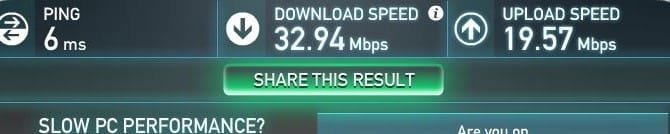
I have a 50mbps account which I regularly verify via speedtest.net. Recently, I became concerned because my speed had dropped to around 32mbps (generally, it will run around 45mbps give or take). I decided to check different speedtest sites around the internet. Surprisingly, 1 or 2 (out of 5 or so) showed above 40mbps, but the majority showed the same as speedtest.net...32 mbps <- ->. Then, I decided to check with Firefox 25.01. To my surprise, speedtest.net showed my expected 45mbps. I've run the test between the two browsers at speedtest.net multiple times and the result is consistently the same.


Resetting IE settings via Internet Options/Advanced|Reset changes nothing. Still 32mbps. FF is my default browser. Both tested from same system.


Googling various phrases (IE 11 slow bandwidth, IE 11 slow internet speeds, etc) returns nothing relevant.


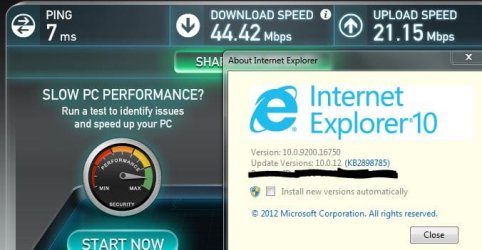
IE 10 always produced the expected =>45mbps. Below are screenshots of the IE 11 and FF 25.01 results. These results are consistent over 10 tests:

Firefox 25.01:

Firefox1.JPG

IE 11:
IE11_1.JPG
 
Last edited:

My Computer My Computer

At a glance

windows 7 Pro 64 Biti5 4670K16GB DDR3@933mhzRadeon R9 390 8192mb
Computer type
PC/Desktop
Computer Manufacturer/Model Number
custom
OS
windows 7 Pro 64 Bit
CPU
i5 4670K
Motherboard
Asus Max Hero 1150 socket
Memory
16GB DDR3@933mhz
Graphics Card(s)
Radeon R9 390 8192mb
Monitor(s) Displays
Dell U2415 x3
Screen Resolution
1920 (5760) x 1200 x3
Hard Drives
System: Kingston 128GB SSD

Installing to Samsung 860 EVO 500GB
WD Black 2 TB & 1 TB
PSU
Corsair CX750M
Cooling
Hyper 312
Internet Speed
50mbps
Is there anything that IE11 doesn't make a hash off??? Sounds like another one if it's many many bugs. Rollback to internet explorer 9, their last decent and compatible effort
 

My Computer My Computer

At a glance

Windows 7 Ultimate 64 bitSandybridge 2820 QM 2.3 ghz8 gbAMD Radeon 6970m
Computer type
Laptop
Computer Manufacturer/Model Number
Alienware M17RX3
OS
Windows 7 Ultimate 64 bit
CPU
Sandybridge 2820 QM 2.3 ghz
Memory
8 gb
Graphics Card(s)
AMD Radeon 6970m
Sound Card
Integrated
Monitor(s) Displays
Laptop 17"
Screen Resolution
1980x1080
Hard Drives
750 gb mechanical (7,200RPM) Seagate Momentous paired with OCZ Synapse 128 gb SSD cache drive
Internet Speed
55 mbits download, 12 mbits download
Antivirus
Microsoft Security Essentials
Browser
IE11, Mozilla
My real worry was that my bandwidth took a substantial hit. If it's only in IE (and it seems to be), I can live with that. My default browser is FF. But it is an oddity I thought worth mentioning.
 

My Computer My Computer

At a glance

windows 7 Pro 64 Biti5 4670K16GB DDR3@933mhzRadeon R9 390 8192mb
Computer type
PC/Desktop
Computer Manufacturer/Model Number
custom
OS
windows 7 Pro 64 Bit
CPU
i5 4670K
Motherboard
Asus Max Hero 1150 socket
Memory
16GB DDR3@933mhz
Graphics Card(s)
Radeon R9 390 8192mb
Monitor(s) Displays
Dell U2415 x3
Screen Resolution
1920 (5760) x 1200 x3
Hard Drives
System: Kingston 128GB SSD

Installing to Samsung 860 EVO 500GB
WD Black 2 TB & 1 TB
PSU
Corsair CX750M
Cooling
Hyper 312
Internet Speed
50mbps

My Computer My Computer

At a glance

Win-7-Pro64bit 7-H-Prem-64biti7-5930K 2nd i9-9940x both water blocked VRM'...Trident-z 3200C14 2nd Trident-z 3600C16EVGA 1080ti ftw3 2nd Titan Xp both water blocked
Computer type
PC/Desktop
Computer Manufacturer/Model Number
Custom assembled by me :}
OS
Win-7-Pro64bit 7-H-Prem-64bit
CPU
i7-5930K 2nd i9-9940x both water blocked VRM's too
Motherboard
ASUS SABERTOOTH X99 2nd ASUS x299 Apex
Memory
Trident-z 3200C14 2nd Trident-z 3600C16
Graphics Card(s)
EVGA 1080ti ftw3 2nd Titan Xp both water blocked
Sound Card
Built-in Realtek
Monitor(s) Displays
1-AOC G2460PG 24"G-Sync 144Hz/ 2nd 1-ASUS VG248QE 24" 144Hz
Screen Resolution
1920 x 1080 144Hz
Hard Drives
2-Samsung M.2 Evo & Evo Plus
2-Samsung 850 EVO 500GB SSD's/ 3-2.5 W.D. Black 1tb-&3-1tb/3-3.5 WD Black 1tb hdd's
PSU
EVGA SuperNOVA 1000-P2 2nd 1200-P2
Case
2-Corsair Obsidian Series 450D Black ATX Mid Tower
Cooling
Custom water loops
Keyboard
Logitech G710+/ 2nd Logitech G910
Mouse
2-RedDragon M901 Perdition 16400 dpi Gaming mouse = wired
Internet Speed
Comcast Ping 19ms 89.31mbps download speed 6.12mbps upload
Antivirus
Malwarebytes Pro/ Superantispyware Pro
Browser
FireFox & Pale moon
Other Info
2nd ASUS X299 Apex/Intel i9-9940x with Custom water loop/7H-Prem-x64/Corsair 450D case/Ram Trident-z 3600C16 4x8gb / Samsung970Evo plus 500gb SSD/Dual ssd EZ swap evo/PSU EVGA SuperNova 1200w-P2 80+Platinum/GPU Titan Xp /8-ML-140 on push-pull on 2-280GTX rads
I have a 50mbps account which I regularly verify via speedtest.net. Recently, I became concerned because my speed had dropped to around 32mbps (generally, it will run around 45mbps give or take). I decided to check different speedtest sites around the internet. Surprisingly, 1 or 2 (out of 5 or so) showed above 40mbps, but the majority showed the same as speedtest.net...32 mbps <- ->. Then, I decided to check with Firefox 25.01. To my surprise, speedtest.net showed my expected 45mbps. I've run the test between the two browsers at speedtest.net multiple times and the result is consistently the same.


Resetting IE settings via Internet Options/Advanced|Reset changes nothing. Still 32mbps. FF is my default browser. Both tested from same system.


Googling various phrases (IE 11 slow bandwidth, IE 11 slow internet speeds, etc) returns nothing relevant.


IE 10 always produced the expected =>45mbps. Below are screenshots of the IE 11 and FF 25.01 results. These results are consistent over 10 tests:

Firefox 25.01:

View attachment 296893

IE 11:
View attachment 296894

Hi,

Speedtest.net or similar site results are not accurate.
If the server to which you connect is congested at the time you test you can have a speed of 5Mbps, however your real goodput is the maximal.
Best way is to connect to your ISP's FTP site, download a large file and check the real Download speed.
IE 11 has nothing to do with this behavior.
Check inside your router settings the S/N ratio if the value is the usual you get, the Attenuation, the Attainable Rate and the Output power of the line. (note this values to a paper for future reference).
What type of connection do you have, Fiber, VDSL or Cable??
Hope this helps,
 

My Computer My Computer

At a glance

Windows 7 x64 Home Premium
Computer type
Laptop
Computer Manufacturer/Model Number
Sony Vaio
OS
Windows 7 x64 Home Premium
For those who might be googling this issue, back to IE 10 solves the problem:

Back to IE10.JPG

Thanks for all your comments.
 

My Computer My Computer

At a glance

windows 7 Pro 64 Biti5 4670K16GB DDR3@933mhzRadeon R9 390 8192mb
Computer type
PC/Desktop
Computer Manufacturer/Model Number
custom
OS
windows 7 Pro 64 Bit
CPU
i5 4670K
Motherboard
Asus Max Hero 1150 socket
Memory
16GB DDR3@933mhz
Graphics Card(s)
Radeon R9 390 8192mb
Monitor(s) Displays
Dell U2415 x3
Screen Resolution
1920 (5760) x 1200 x3
Hard Drives
System: Kingston 128GB SSD

Installing to Samsung 860 EVO 500GB
WD Black 2 TB & 1 TB
PSU
Corsair CX750M
Cooling
Hyper 312
Internet Speed
50mbps
Back
Top