JavaScript is disabled. For a better experience, please enable JavaScript in your browser before proceeding.
You are using an out of date browser. It may not display this or other websites correctly.
You should upgrade or use an
alternative browser .
Solved IE 11 Windows 7 Pro 64 bit - Temp Internet files not being saved
Hi
I upgraded my laptop HDD to SSD by cloning partitions. (I used Clonezilla)
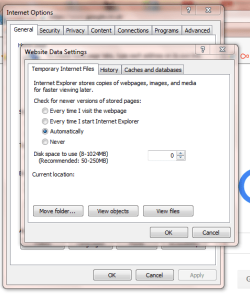
Since then I cannot save any downloads using IE11. History is not saved and neither are cookies. When I try to move the folder my "Website Data Settings" in Internet Options shows "Current Location" as blank. When I try to view files, the folder is the default one C:\Users\......\Microsoft\Windows. If I try to move it, I get an error screen saying to "select a value between 8 and 8 for how much disk space Temporary Internet Files may use"
I have found various suggestions for this, but nothing seems to work:
Creating a new user
Editing the Registry (Deleting "Cache" and "Lowcache" keys)
Using Safe Mode
Any help would be greatly appreciated, as I'm currently thinking of reverting to my original HDD and re-cloning!
TIA
Capture.PNG
26.2 KB
· Views: 16
Windows 7 Professional 64 bit
Laptop HP4520S Windows 7 Professional 64 bit
Well-known member
Guru
Gold Member
VIP
Dont think youll get a location as your disk storage space is showing 0.
W7 home premium 32bit/W7HP 64bit/w10 tp insid... E5300 dual core 3gb Nvidia Geforce 7100 Nforce 630i PC/Desktop medionl/Aspire 6930G/acer x55a W7 home premium 32bit/W7HP 64bit/w10 tp insider ring E5300 dual core medion MS7366 3gb Nvidia Geforce 7100 Nforce 630i avixc n (isp resticted to 72) mse/pands palemoon Belkin Fd7050 n USB using Railink RT2870 drivers, more upto date
3 Brain Cells
Guru
Gold Member
VIP
Your system specs.
Computer type PC/Desktop OS Windows 7 Business 64 bit
Never heard of a Business Windows 7.
How much free space is on the drive/partition?
Windows 10 Pro. 64/ version 1709 Windows 7 Pr... Intel i7-6800K @ 4.3 Corsair Platinum 16 gig @2400 EVGA GTX 1070 OC PC/Desktop Home made Desktop Windows 10 Pro. 64/ version 1709 Windows 7 Pro/64 Intel i7-6800K @ 4.3 ASUS X-99 Deluxe II Corsair Platinum 16 gig @2400 EVGA GTX 1070 OC Asus 27" LED LCD/VE278Q 1920-1080 or 1280-720 HDMI INTEL SSD 730-240 Gb Sata 3.0/ EVGA Platium 1200W Phanteks Luxe Tempered Glass 8 fans/ one radiator XSPC/ Water Cooled CPU Das 4 Professional Logitech M705/MX Anywhere 2-S 100 mbits Microsoft Security Essentials/ Malwarebytes Premium 3.0/ SAS I.E. 11 default/Firefox/ ISP Time Warner Cable/Spectrum LG BluRay Burner/
New member
Thread Starter
Thanks for the reply. Sorry I meant Windows 7 Professional.
Windows 7 Professional 64 bit
Laptop HP4520S Windows 7 Professional 64 bit
New member
Thread Starter
Just a quick update for anyone having similar problems.
Windows 7 Professional 64 bit
Laptop HP4520S Windows 7 Professional 64 bit