
IE 8 Browser Question

coldy

New member
Member
Local time
11:52 AM
Messages
78
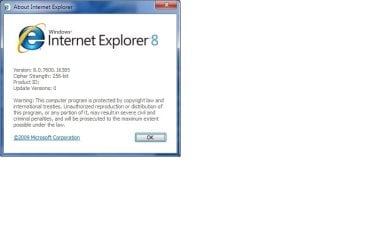
Okay i seem to be confuse here with ie8, I'm running windows 7 ultimate and it comes with
and ie8 comes with it what i dont understand is that some sites that i go to detect my browser
as ie7.. I then went to this site:
Peacekeeper - The Browser Benchmark to do a check and it said ie7

now heres a screen shot of it.. Okay i then went to microsoft:
Install Internet Explorer 8
and it said ie8 cannot be installed on this platform

can anyone explain what the problem is here.. serial was remove for a reason
 

Attachments
  • IE8.jpg
    IE8.jpg
    22.1 KB · Views: 7

My Computer

Computer type
PC/Desktop
Computer Manufacturer/Model Number
Self Built With Help
OS
Windows 7 Ultimate
CPU
Amd Athelon 64x2 Duel core Processor 6000+ 3.10ghz
Motherboard
Asus-MX Se Plus
Memory
4.0 GB
Graphics Card(s)
Radeon HD5450 2.8gb
Sound Card
7.1 Surround
Monitor(s) Displays
Lg Flatron 22inch lcd
Screen Resolution
1680x1050
Hard Drives
western digital 320 gig
PSU
550 w
Case
Standard Atx
Cooling
2 Fans
Keyboard
G15 Gaming keyboard
Mouse
Sky mouse
Internet Speed
ADSL2+ QUAD-1
Go here:

BrowserHawk

What does it say? Perhaps you are in compatibility mode? A Guy
 

My Computer

Computer type
PC/Desktop
OS
Windows 10 Home x64
CPU
INTEL Core i5-750 Quad-Core 3.37GHz
Motherboard
ASUS P7P55D
Memory
HyperX Fury Black Series 8GB (2 x 4GB) 1866Mhz
Graphics Card(s)
EVGA GeForce GTX 750 Superclocked 1GB 128-Bit GDDR5
Monitor(s) Displays
LG 32MA68HY 32" IPS
Screen Resolution
1920 x 1080
Hard Drives
Samsung 840 Evo 120GB, SEAGATE 500GB Barracuda® 7200.12, SATA 3 Gb/s, 7200 RPM, 16MB cache
PSU
ANTEC TruePower New TP-550, 80 PLUS, 550W
Case
ANTEC Three Hundred Illusion
Cooling
COOLER MASTER Hyper 212 Plus, 4 x 120mm 1 x 140mm Noctua's
Internet Speed
85 + Mbps
Antivirus
Avast
Browser
Vivaldi
After turning compatibility mode off from all sites and setting it back to standard
settings i end up getting this result:

User agent: Mozilla/4.0 (compatible; MSIE 8.0; Windows NT 6.1;
Trident/4.0; SLCC2; .NET CLR 2.0.50727; Media Center PC 6.0;
.NET4.0C; Tablet PC 2.0)

So i guess its not wise to have compatibility mode on all web sites then?

many thanks for your help on this. reputation tap for you
 

My Computer

Computer type
PC/Desktop
Computer Manufacturer/Model Number
Self Built With Help
OS
Windows 7 Ultimate
CPU
Amd Athelon 64x2 Duel core Processor 6000+ 3.10ghz
Motherboard
Asus-MX Se Plus
Memory
4.0 GB
Graphics Card(s)
Radeon HD5450 2.8gb
Sound Card
7.1 Surround
Monitor(s) Displays
Lg Flatron 22inch lcd
Screen Resolution
1680x1050
Hard Drives
western digital 320 gig
PSU
550 w
Case
Standard Atx
Cooling
2 Fans
Keyboard
G15 Gaming keyboard
Mouse
Sky mouse
Internet Speed
ADSL2+ QUAD-1
After turning compatibility mode off from all sites and setting it back to standard
settings i end up getting this result:

User agent: Mozilla/4.0 (compatible; MSIE 8.0; Windows NT 6.1;
Trident/4.0; SLCC2; .NET CLR 2.0.50727; Media Center PC 6.0;
.NET4.0C; Tablet PC 2.0)

So i guess its not wise to have compatibility mode on all web sites then?

many thanks for your help on this. reputation tap for you

Twarn't nothin :) You're welcome. A Guy
 

My Computer

Computer type
PC/Desktop
OS
Windows 10 Home x64
CPU
INTEL Core i5-750 Quad-Core 3.37GHz
Motherboard
ASUS P7P55D
Memory
HyperX Fury Black Series 8GB (2 x 4GB) 1866Mhz
Graphics Card(s)
EVGA GeForce GTX 750 Superclocked 1GB 128-Bit GDDR5
Monitor(s) Displays
LG 32MA68HY 32" IPS
Screen Resolution
1920 x 1080
Hard Drives
Samsung 840 Evo 120GB, SEAGATE 500GB Barracuda® 7200.12, SATA 3 Gb/s, 7200 RPM, 16MB cache
PSU
ANTEC TruePower New TP-550, 80 PLUS, 550W
Case
ANTEC Three Hundred Illusion
Cooling
COOLER MASTER Hyper 212 Plus, 4 x 120mm 1 x 140mm Noctua's
Internet Speed
85 + Mbps
Antivirus
Avast
Browser
Vivaldi
Back
Top