- Local time
- 7:52 AM
- Messages
- 568
This one stumps me and not sure about the source of the issue, may not be the correct forum to post this....
Accessing flash video at any of the websites results in the standard "The Adobe Flash Player is required to play this video..." message with link to download the add-on. Following the link, the program is downloaded and administrative access is given to install flash. Once completed, flash video plays just fine in the browser.
Restarting the PC and trying to access flash video will result in the standard "The Adobe Flash Player is required..." error message again. The IE Options\Programs\Manage Add-Ons shows that the flash add-on is installed:

Switching the user to an admin account, access the same flash video, and it plays just fine. The IE Options\Programs\Manage Add-Ons for the admin account shows:

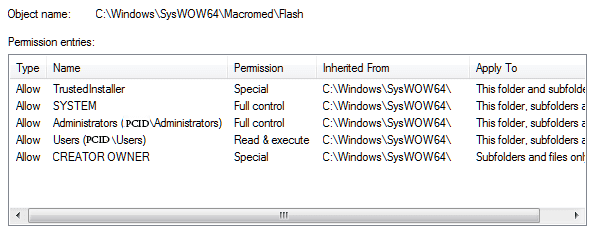
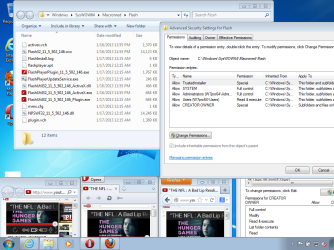
The issue seems to be related to Windows 7 system settings more than to the browser settings. This issue impacts Firefox, Opera, and Safari as well. Standard user account cannot play flash video in any of the browsers, while the admin account has no issues with any of the browser playing flash video.
Re-installing the add-ons for the browsers resolves the issue for the standard user account; however, the issue comes back once the PC is rebooted.
I am stumped and don't even know where to start; any suggestions would be appreciated.
TIA...
Accessing flash video at any of the websites results in the standard "The Adobe Flash Player is required to play this video..." message with link to download the add-on. Following the link, the program is downloaded and administrative access is given to install flash. Once completed, flash video plays just fine in the browser.
Restarting the PC and trying to access flash video will result in the standard "The Adobe Flash Player is required..." error message again. The IE Options\Programs\Manage Add-Ons shows that the flash add-on is installed:
Switching the user to an admin account, access the same flash video, and it plays just fine. The IE Options\Programs\Manage Add-Ons for the admin account shows:
The issue seems to be related to Windows 7 system settings more than to the browser settings. This issue impacts Firefox, Opera, and Safari as well. Standard user account cannot play flash video in any of the browsers, while the admin account has no issues with any of the browser playing flash video.
Re-installing the add-ons for the browsers resolves the issue for the standard user account; however, the issue comes back once the PC is rebooted.
I am stumped and don't even know where to start; any suggestions would be appreciated.
TIA...
My Computer
- Computer type
- PC/Desktop
- Computer Manufacturer/Model Number
- Custom built at Home
- OS
- Windows 7 64-bit, Windows 8.1 64-bit, OSX El Capitan, Windows 10 (VMware)
- CPU
- Intel i5-3350P 3.1 GHz
- Motherboard
- Gigabyte GA-Z77X-UP5 TH
- Memory
- 16 GBs GSkill Sniper
- Graphics Card(s)
- Radeon HD 7850
- Sound Card
- VIA HD Audio
- Monitor(s) Displays
- Dell U2410 24"
- Screen Resolution
- 1920x1200
- Hard Drives
- 1 x Intel 520 240 GBs
1 x Seagate 1TBs SATA 2.0,
1 x Seagate 1TBs eSATA 2.0
- PSU
- Thermaltake 850W
- Case
- Antec P183
- Cooling
- Noctua NH-D14 Heatsink 2 x 120mm fans, 4 x 120mm case fans
- Keyboard
- Dell Multimedia keyboard
- Mouse
- Logitech Trackball
- Internet Speed
- 28.5 Mb/s